Book 01 — Azure Networking Deep Dive
Hub-and-Spoke Topology
Hub-and-spoke is the reference topology for Azure Landing Zones and the starting point for most enterprise Azure networking designs. Centralising shared services — internet egress inspection, hybrid connectivity, DNS, Bastion — in a hub VNet while keeping workloads in isolated spokes provides consistent security enforcement, operational clarity, and cost sharing. Chapter 2 built the UDR toolkit; this chapter puts it to work at scale.
Hub-and-Spoke Architecture Fundamentals
Why Hub-and-Spoke
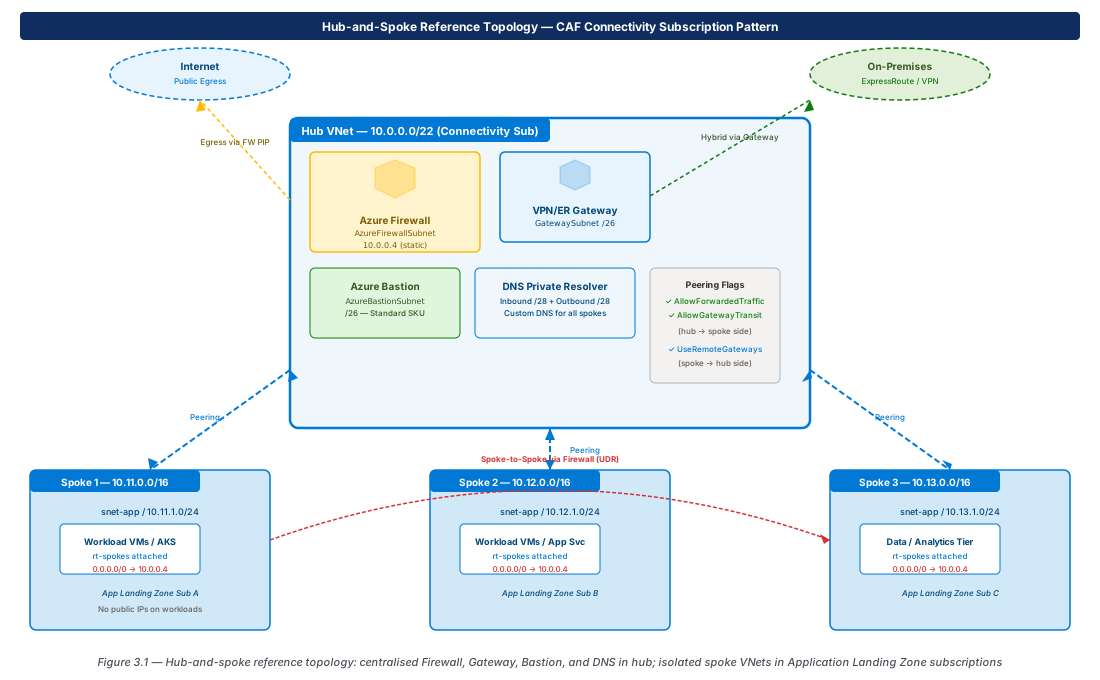
Hub-and-spoke separates connectivity concerns from workload concerns. The hub VNet is owned by the platform/connectivity team and contains shared infrastructure. Spoke VNets are owned by application teams and contain only workload resources. Adding a spoke requires creating a VNet, peering it, and attaching standard route tables — no hub changes required for most spokes. All spoke egress traverses the hub firewall, giving the security team visibility and control over lateral movement.
Hub VNet Components
| Component | Subnet | Purpose |
|---|---|---|
| Azure Firewall | AzureFirewallSubnet /26 | Internet egress inspection; spoke-to-spoke; on-prem-to-spoke |
| VPN/ER Gateway | GatewaySubnet /26 | Hybrid connectivity to on-premises |
| Azure Bastion | AzureBastionSubnet /26 | Secure browser-based SSH/RDP without public IPs |
| DNS Private Resolver | Two /28 subnets (inbound, outbound) | Custom DNS forwarding for all spokes (Chapter 11) |
| Management VMs | snet-management /27 | Jump hosts, tooling VMs |
Spoke Isolation and Peering Rules
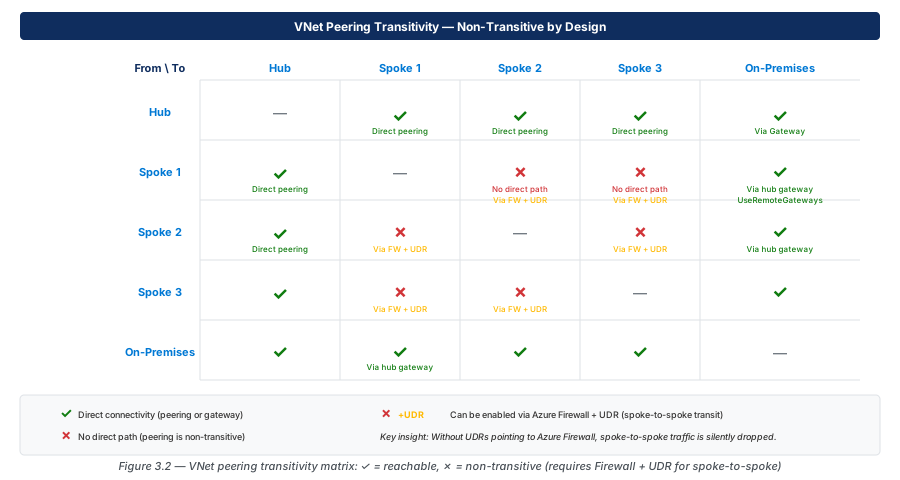
Each spoke VNet has its own non-overlapping address space, no internet-facing resources, no public IPs on workload NICs, and route tables applied to all application subnets. Spoke VNets connect to the hub via VNet peering — a non-transitive, regional, low-latency connection that routes through Azure's SDN fabric without a gateway. Peering is non-transitive: two spokes connected to the same hub cannot communicate through those peerings without explicit routing through the hub firewall.
VNet Peering In Depth
Peering Properties
Three boolean properties control peering behaviour and are frequently misconfigured:
- AllowForwardedTraffic — Allows traffic that did not originate in the local VNet to cross the peering (e.g., a packet from Spoke A forwarded by the firewall to Spoke B). Must be true on the hub side. Default: false.
- AllowGatewayTransit — Set on the hub side. Allows spokes to use the hub's VPN/ExpressRoute gateway for hybrid connectivity. Default: false.
- UseRemoteGateways — Set on the spoke side. Uses the hub's gateway (requires AllowGatewayTransit on hub side). Cannot be set if the spoke has its own gateway. Default: false.
Important
UseRemoteGateways cannot be enabled if the spoke already has a local gateway, or if the hub side does not have AllowGatewayTransit: true. The configuration must be correct on both peering sides simultaneously — an asymmetric configuration causes the peering to enter a failed state.
Transitive Routing Limitations
VNet peering is non-transitive. Spoke A and Spoke B cannot communicate through their shared hub peerings without UDRs routing via the hub firewall. The matrix below shows what is and is not reachable by default.
Peering Costs
VNet peering incurs data transfer charges in both directions. Same-region peering is cheaper than global (cross-region) peering. All internet egress through the hub also traverses peering — at high egress volumes, evaluate whether per-region Firewall deployments are more cost-effective than centralised egress. Chapter 12 covers peering cost analysis.
UDR Layout for Hub-and-Spoke
Spoke Subnet Route Tables
Every application subnet in every spoke needs:
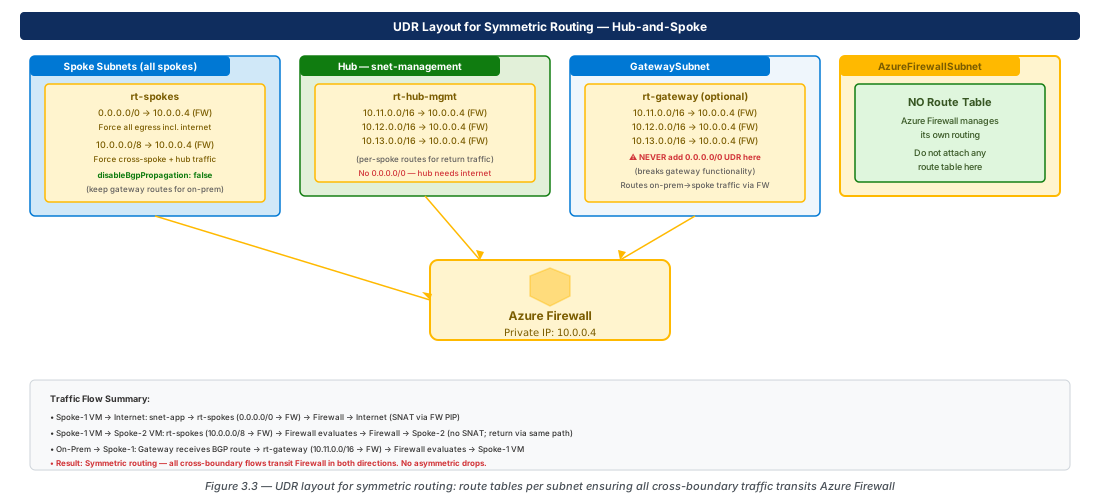
| Route | Next Hop | Purpose |
|---|---|---|
| 0.0.0.0/0 | VirtualAppliance → Firewall IP | Force internet egress through Firewall |
| 10.0.0.0/8 | VirtualAppliance → Firewall IP | Force cross-spoke RFC 1918 traffic through Firewall |
Hub Subnet Route Tables
The hub's snet-management subnet needs per-spoke routes pointing to the Firewall for return traffic. GatewaySubnet needs spoke-specific routes (not 0.0.0.0/0 — that is not allowed) so on-premises-to-spoke traffic transits the Firewall. AzureFirewallSubnet must have no route table attached.
Warning
Never attach a route table with a 0.0.0.0/0 → VirtualAppliance route to GatewaySubnet. This breaks gateway functionality. Use only specific on-premises prefix routes on GatewaySubnet.
Shared Services in the Hub
DNS Resolver Placement
Azure DNS Private Resolver (Chapter 11) in the hub provides central DNS for all spokes. An inbound endpoint in the hub accepts queries from spokes; an outbound endpoint forwards queries to on-premises DNS servers. All spoke VNets set the hub's inbound endpoint IP as their custom DNS server.
Bastion and Jump Hosts
Azure Bastion Standard SKU in the hub's AzureBastionSubnet provides browser-based SSH/RDP to VMs in any peered spoke. No public IPs required on spoke VMs.
Note
Azure Bastion Standard SKU supports cross-VNet (peering-based) VM connectivity. The Basic SKU supports only VMs in the same VNet. Always deploy Standard SKU in the hub for multi-spoke environments.
Key Vault and ACR via Private Endpoints
PaaS services used by multiple spokes should have private endpoints in the hub or a dedicated shared-services subnet. This centralises private DNS zone registration and avoids per-spoke endpoint duplication. Chapter 7 covers private endpoint placement strategy.
CAF Landing Zone Alignment
CAF Enterprise Scale Landing Zone defines a Connectivity subscription (owns hub VNet, Firewall, Gateway, Bastion, DNS) and Application Landing Zone subscriptions (each team/BU owns spoke VNets). Peering crosses subscription boundaries — it must be created on both sides, and both subscriptions must be in the same Azure AD tenant unless cross-tenant peering is explicitly configured. Azure Policy in the Connectivity subscription enforces hub attachment and denies public IPs on workload resources in spoke subscriptions.
Lab: Three-Spoke Hub-and-Spoke
Deploy Hub and Three Spokes with Correct Peering Flags
# CE-09: Hub VNet, three spokes, peering with correct flags
RG="rg-lab-ch03"; LOC="eastus2"
az group create --name "$RG" --location "$LOC"

az network vnet create --name vnet-hub-001 --resource-group "$RG" \
  --location "$LOC" --address-prefixes 10.0.0.0/22

for i in 1 2 3; do
  az network vnet create --name "vnet-spoke-00$i" --resource-group "$RG" \
    --location "$LOC" --address-prefixes "10.1$i.0.0/16" \
    --subnet-name snet-app --subnet-prefixes "10.1$i.1.0/24"
done

HUB_ID=$(az network vnet show --resource-group "$RG" --name vnet-hub-001 --query id -o tsv)
for i in 1 2 3; do
  SPOKE_ID=$(az network vnet show --resource-group "$RG" --name "vnet-spoke-00$i" --query id -o tsv)
  az network vnet peering create --name "hub-to-spoke-00$i" \
    --resource-group "$RG" --vnet-name vnet-hub-001 \
    --remote-vnet "$SPOKE_ID" \
    --allow-forwarded-traffic true --allow-gateway-transit true
  az network vnet peering create --name "spoke-00$i-to-hub" \
    --resource-group "$RG" --vnet-name "vnet-spoke-00$i" \
    --remote-vnet "$HUB_ID" --allow-forwarded-traffic true
doneApply UDRs and Verify Spoke-to-Spoke Routing
# CE-10: Create route table; associate to all spoke subnets
FW_IP="10.0.0.4"
az network route-table create --name rt-spokes --resource-group "$RG" --location "$LOC"
az network route-table route create --route-table-name rt-spokes --resource-group "$RG" \
  --name udr-default --address-prefix 0.0.0.0/0 \
  --next-hop-type VirtualAppliance --next-hop-ip-address "$FW_IP"
az network route-table route create --route-table-name rt-spokes --resource-group "$RG" \
  --name udr-rfc1918 --address-prefix 10.0.0.0/8 \
  --next-hop-type VirtualAppliance --next-hop-ip-address "$FW_IP"
for i in 1 2 3; do
  az network vnet subnet update --vnet-name "vnet-spoke-00$i" \
    --name snet-app --resource-group "$RG" --route-table rt-spokes
done

# CE-11: Verify effective routes on spoke-001 NIC
az network nic show-effective-route-table \
  --resource-group "$RG" --name nic-vm-spoke-001 --output table
# Confirm: 10.0.0.0/8 → VirtualAppliance 10.0.0.4
az group delete --name "$RG" --yes --no-wait
Summary
| Concept | Key Rule |
|---|---|
| Peering transitivity | Non-transitive — spokes need UDRs + Firewall for spoke-to-spoke |
| AllowForwardedTraffic | Must be true on hub→spoke peering for firewall-forwarded packets |
| AllowGatewayTransit | True on hub side; enables spokes to use hub gateway |
| UseRemoteGateways | True on spoke side; requires AllowGatewayTransit on hub |
| AzureFirewallSubnet | No route table — Firewall manages its own routing |
| GatewaySubnet UDRs | Per-spoke prefix routes only — never 0.0.0.0/0 |
| CAF alignment | Hub in Connectivity subscription; spokes in App Landing Zone subscriptions |
Chapter 4 covers Azure Virtual WAN, which replaces manual hub-and-spoke peering and UDR maintenance with a Microsoft-managed hub providing any-to-any connectivity automatically.
Chapter: 3 of 12 | Status: v0.1 Draft |