Book 01 — Azure Networking Deep Dive
Azure Front Door and CDN
Azure Front Door is Microsoft's global anycast HTTP(S) load balancer and CDN that operates from 200+ PoPs on the Microsoft global network. It provides TLS termination at the edge, sub-second origin failover, WAF inspection, and — at the Premium SKU — Private Link origins that keep backend services off the public internet.
Front Door Overview
SKU Comparison
| Capability | Standard | Premium |
|---|---|---|
| Global anycast routing | Yes | Yes |
| CDN caching | Yes | Yes |
| WAF | Basic (custom rules) | Managed (DRS 2.1 + Bot Protection) |
| Private Link origin | No | Yes |
| Security analytics | No | Yes |
| Pricing basis | Per GB + requests | Per GB + requests (higher) |
Tip
Use Standard for global CDN and routing. Use Premium when origins must remain private (no public endpoint), or when bot protection and security analytics are required for compliance.
Anycast and Global Routing
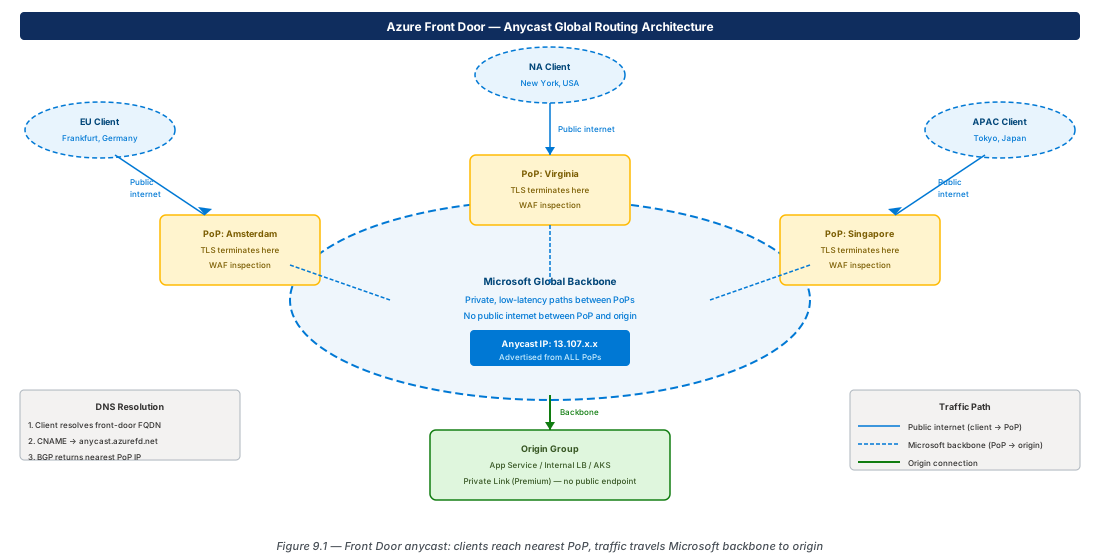
Front Door uses anycast: all Front Door IP addresses are simultaneously advertised from every PoP. When a client resolves the Front Door FQDN, BGP routes the DNS response to the geographically nearest PoP. The client's TLS handshake completes at that PoP — minimising RTT — and traffic travels over the Microsoft backbone to the origin.
Routing Methods
| Method | Behaviour | Use Case |
|---|---|---|
| Latency | Sends to lowest-latency origin (measured by health probe) | Default; best for active-active multi-region |
| Priority | Primary origin handles all traffic; secondary if primary fails | Active-passive DR |
| Weighted | Splits traffic by weight (e.g. 90/10 blue-green) | Canary releases, gradual migration |
| Session Affinity | Routes repeat clients to same origin | Stateful applications (shopping carts) |
Configuration: Endpoint, Origins, Route
# Create Front Door Premium profile
az afd profile create \
  --profile-name afd-web --resource-group rg-app \
  --sku Premium_AzureFrontDoor

az afd endpoint create \
  --endpoint-name ep-web \
  --profile-name afd-web --resource-group rg-app

az afd origin-group create \
  --origin-group-name og-web \
  --profile-name afd-web --resource-group rg-app \
  --probe-request-type HEAD \
  --probe-protocol Https --probe-path /health \
  --probe-interval-in-seconds 30 \
  --sample-size 4 --successful-samples-required 3

az afd origin create \
  --origin-name origin-appservice \
  --profile-name afd-web --resource-group rg-app \
  --origin-group-name og-web \
  --host-name myapp.azurewebsites.net \
  --origin-host-header myapp.azurewebsites.net \
  --priority 1 --weight 1000 --https-port 443

az afd route create \
  --route-name route-web \
  --endpoint-name ep-web \
  --profile-name afd-web --resource-group rg-app \
  --origin-group og-web \
  --https-redirect Enabled \
  --supported-protocols Http Https \
  --patterns-to-match "/*"
Private Link Origins (Premium)
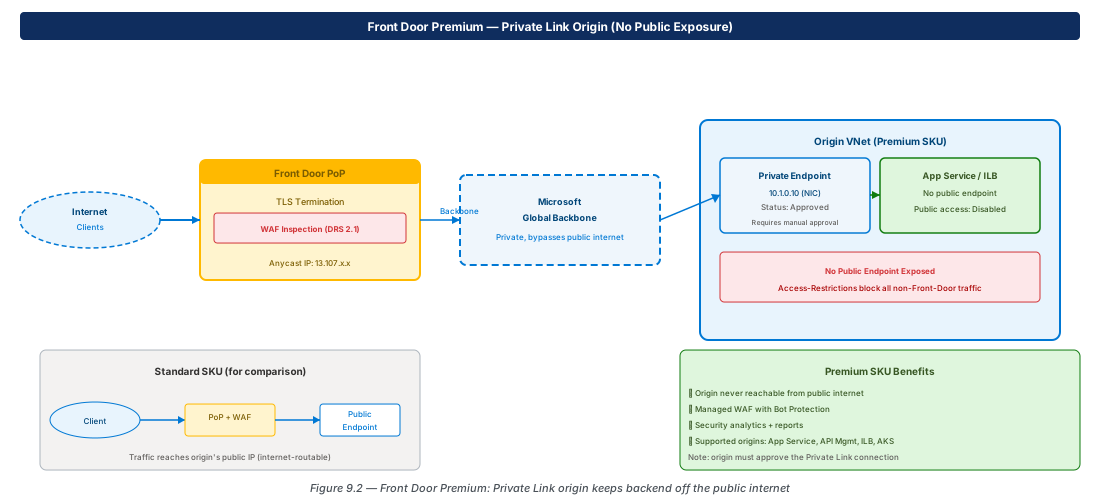
With Premium SKU, Front Door connects to origins via Private Link — the origin's public endpoint can be disabled entirely. Traffic from the PoP travels the Microsoft backbone and arrives via a Private Endpoint NIC in the origin VNet. The origin resource (App Service, Internal LB, AKS Ingress) must approve the connection.
# Origin with Private Link (Premium only)
az afd origin create \
  --origin-name origin-private \
  --profile-name afd-web --resource-group rg-app \
  --origin-group-name og-web \
  --host-name myapp.azurewebsites.net \
  --origin-host-header myapp.azurewebsites.net \
  --enable-private-link true \
  --private-link-resource "/subscriptions/<sub>/.../sites/myapp" \
  --private-link-sub-resource-type sites \
--private-link-request-message "Front Door origin"Note
After creating the origin, navigate to the origin resource's Private endpoint connections blade and approve the connection. Front Door health probes will remain unhealthy until the Private Endpoint is approved.
WAF at the Edge
# WAF Policy with Microsoft Default Rule Set
az network front-door waf-policy create \
  --name wafpol-fd --resource-group rg-app \
  --sku Premium_AzureFrontDoor --mode Prevention

az network front-door waf-policy managed-rules add \
  --policy-name wafpol-fd --resource-group rg-app \
  --type Microsoft_DefaultRuleSet --version 2.1

az afd security-policy create \
  --security-policy-name sec-pol-web \
  --profile-name afd-web --resource-group rg-app \
  --waf-policy ".../wafpol-fd" \
  --domains ep-web.z01.azurefd.net
Caching and CDN
Front Door caches at edge PoPs based on Cache-Control headers from the origin. Static assets (JS, CSS, images) should return Cache-Control: max-age=86400. Dynamic API routes should use a separate origin group with caching disabled, or return Cache-Control: no-store.
Lab: Front Door Standard Deployment
Front Door Standard with App Service Origin (CE-21)
# CE-21: Front Door Standard + App Service origin
RG="rg-lab-ch09"; LOC="eastus2"
az group create --name "$RG" --location "$LOC"

az appservice plan create --name plan-lab \
  --resource-group "$RG" --sku B1 --location "$LOC"

APP_NAME="lab-origin-$RANDOM"
az webapp create --name "$APP_NAME" \
  --resource-group "$RG" --plan plan-lab

az afd profile create \
  --profile-name afd-lab --resource-group "$RG" \
  --sku Standard_AzureFrontDoor

az afd endpoint create \
  --endpoint-name ep-lab \
  --profile-name afd-lab --resource-group "$RG"

# Clean up
az group delete --name "$RG" --yes --no-wait
Summary
| Concept | Key Fact |
|---|---|
| Anycast | DNS resolves to nearest PoP; TLS terminated at the edge |
| Standard vs Premium | Premium adds Private Link origin + managed WAF + bot protection |
| Private Link origin | Origin approves connection; no public endpoint needed |
| WAF at edge | Blocks attacks before they reach origin, reduces origin load |
| Routing: Latency | Default; sends to lowest-latency origin per health probe |
| Routing: Priority | Active-passive DR; secondary if primary health fails |
| Caching | Controlled by Cache-Control; disable for dynamic API routes |
Chapter 10 covers Network Security — NSG rule evaluation, Azure Firewall with Firewall Policy, and DDoS Protection tiers.
Chapter: 9 of 12 | Status: v0.1 Draft |