Book 01 — Azure Networking Deep Dive
Hybrid Connectivity: VPN Gateway
Azure VPN Gateway provides encrypted IPSec/IKE tunnels between Azure VNets and on-premises networks. It sits inside GatewaySubnet in your hub VNet and supports three connection types: Site-to-Site (branch/DC to Azure), Point-to-Site (remote users), and VNet-to-VNet (cross-region or cross-subscription VNet connectivity without internet transit).
VPN Gateway Overview
GatewaySubnet Requirements
The subnet that hosts VPN (and ExpressRoute) gateway instances must be named exactly GatewaySubnet — this name is how the Azure fabric identifies it as a gateway subnet and applies special routing rules.
Important — GatewaySubnet Rules
1. Name must be exactly GatewaySubnet (case-sensitive). 2. Minimum /28; recommend /26 to support multiple gateway instances without IP exhaustion. 3. No NSG — Azure controls traffic to/from the subnet. 4. No UDR with 0.0.0.0/0 — this breaks gateway functionality. Specific prefix routes (per-spoke UDRs pointing to Firewall) are allowed.
VPN Gateway SKUs
| SKU | Max Throughput | Max S2S Tunnels | Zone Redundant |
|---|---|---|---|
| Basic | 100 Mbps | 10 | No — legacy, avoid |
| VpnGw1 / VpnGw1AZ | 650 Mbps | 30 | AZ variant only |
| VpnGw2 / VpnGw2AZ | 1 Gbps | 30 | AZ variant only |
| VpnGw3 / VpnGw3AZ | 1.25 Gbps | 30 | AZ variant only |
| VpnGw4 / VpnGw4AZ | 5 Gbps | 100 | AZ variant only |
| VpnGw5 / VpnGw5AZ | 10 Gbps | 100 | AZ variant only |
Zone-redundant (AZ) SKUs require a Standard-tier zone-redundant public IP. The Basic SKU does not support BGP or active-active — do not use it for new deployments.
Site-to-Site VPN
Three-Resource Pattern
An S2S connection requires three Azure resources: a VPN Gateway in your GatewaySubnet (the Azure end), a Local Network Gateway representing the on-premises VPN device, and a Connection linking them with a shared key.
# Local Network Gateway — represents on-prem VPN device
az network local-gateway create \
  --name lgw-onprem --resource-group rg-connectivity \
  --location eastus2 \
  --gateway-ip-address 203.0.113.10 \
  --local-address-prefixes 192.168.0.0/16 \
  --asn 65020 --bgp-peering-address 192.168.0.1

# S2S Connection with BGP enabled
az network vpn-connection create \
  --name conn-onprem --resource-group rg-connectivity \
  --vnet-gateway1 vpngw-hub \
  --local-gateway2 lgw-onprem \
  --shared-key "$(az keyvault secret show --vault-name kv-corp --name vpn-psk --query value -o tsv)" \
  --enable-bgp
BGP over VPN
BGP over VPN exchanges routes dynamically. Azure VPN Gateway uses ASN 65010 by default (configurable). The BGP peer IP must fall within GatewaySubnet. Benefits: automatic route updates when on-premises networks change, no need to update Local Network Gateway prefixes manually.
# Create VPN Gateway with BGP and active-active (two PIPs)
az network vnet-gateway create \
  --name vpngw-hub --resource-group rg-connectivity \
  --vnet vnet-hub-001 \
  --gateway-type Vpn --vpn-type RouteBased \
  --sku VpnGw2AZ --active-active \
  --public-ip-addresses pip-vpngw-1 pip-vpngw-2 \
  --asn 65010 --bgp-peering-address 10.0.0.254
Point-to-Site VPN
Authentication Methods
| Method | Protocol | Best For |
|---|---|---|
| Certificate (client cert) | IKEv2 or SSTP | Corporate devices with managed cert deployment |
| Azure AD / OIDC | OpenVPN | Azure AD conditional access, MFA enforcement |
| RADIUS | IKEv2 or OpenVPN | Integration with existing on-prem NPS/RADIUS |
# Configure P2S on existing VPN Gateway — certificate + OpenVPN
az network vnet-gateway update \
  --name vpngw-hub --resource-group rg-connectivity \
  --vpn-auth-types Certificate \
  --vpn-client-protocol OpenVPN \
  --address-prefixes 172.16.100.0/24 \
  --root-cert-name corp-root \
  --root-cert-data "$(cat corp-root.cer | base64)"
Active-Active Configuration
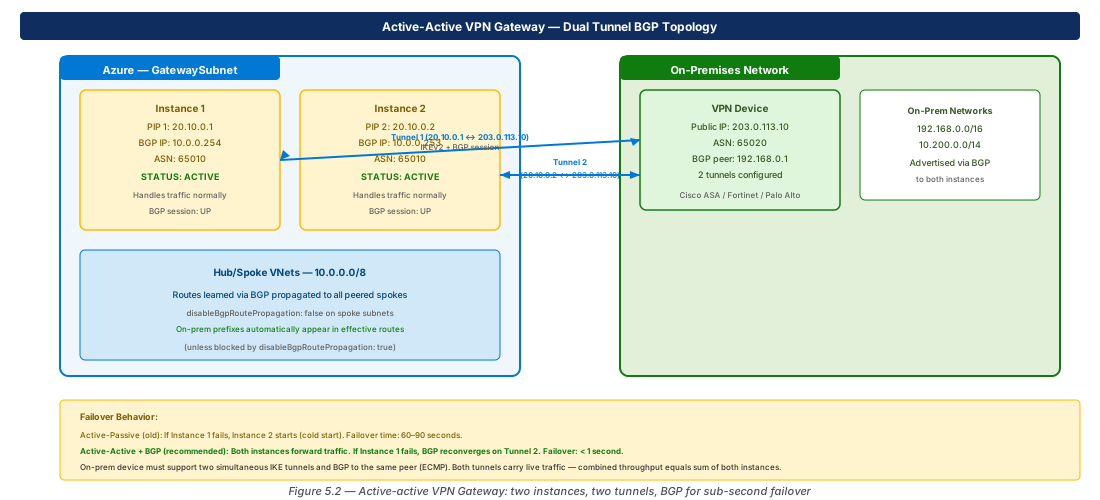
Active-active deploys two gateway instances simultaneously, each with its own public IP. Both instances handle live traffic. With BGP, failover is sub-second (BGP reconvergence) versus 60–90 seconds for active-passive cold start.
Note
The on-premises VPN device must support two simultaneous IKE sessions to the same Azure VNet. Most enterprise firewalls (Cisco, Fortinet, Palo Alto) do. Check your device's datasheet for "active-active VPN gateway" or "dual-tunnel IPSec" support before committing to this design.
Custom IPSec/IKE Policy
When your on-premises device requires specific cipher suites, configure a custom IPSec/IKE policy. The custom policy replaces the default policy entirely — only the specified algorithms are accepted.
# Set custom IPSec/IKE policy (replaces default)
az network vpn-connection ipsec-policy add \
  --connection-name conn-onprem \
  --resource-group rg-connectivity \
  --ike-encryption AES256 --ike-integrity SHA256 \
  --dh-group DHGroup14 \
  --ipsec-encryption AES256 --ipsec-integrity SHA256 \
  --pfs-group PFS14 \
  --sa-lifetime 27000 --sa-datasize 102400000
Lab: Active-Active VPN Gateway with BGP
Deploy Active-Active VPN Gateway (CE-14)
# CE-14: Hub VNet + GatewaySubnet + active-active VPN Gateway
RG="rg-lab-ch05"; LOC="eastus2"
az group create --name "$RG" --location "$LOC"

az network vnet create --name vnet-hub --resource-group "$RG" \
  --location "$LOC" --address-prefixes 10.0.0.0/22
az network vnet subnet create --name GatewaySubnet \
  --resource-group "$RG" --vnet-name vnet-hub \
  --address-prefix 10.0.0.0/26

for i in 1 2; do
  az network public-ip create --name "pip-vpngw-$i" \
    --resource-group "$RG" --location "$LOC" \
    --sku Standard --zone 1 2 3
done

az network vnet-gateway create \
  --name vpngw-hub --resource-group "$RG" \
  --vnet vnet-hub --gateway-type Vpn --vpn-type RouteBased \
  --sku VpnGw2AZ --active-active \
  --public-ip-addresses pip-vpngw-1 pip-vpngw-2 \
--asn 65010Configure Local Gateway and Verify BGP (CE-15)
# CE-15: Local Gateway + BGP Connection
az network local-gateway create \
  --name lgw-branch --resource-group "$RG" \
  --location "$LOC" \
  --gateway-ip-address 198.51.100.1 \
  --local-address-prefixes 192.168.10.0/24 \
  --asn 65020 --bgp-peering-address 192.168.10.1

az network vpn-connection create \
  --name conn-branch --resource-group "$RG" \
  --vnet-gateway1 vpngw-hub \
  --local-gateway2 lgw-branch \
  --shared-key "Lab@Pass123!" --enable-bgp

# View BGP peer status (requires tunnel to be up)
az network vnet-gateway list-bgp-peer-status \
  --resource-group "$RG" --name vpngw-hub --output table

az group delete --name "$RG" --yes --no-wait
Summary
| Concept | Key Fact |
|---|---|
| GatewaySubnet | Exact name; /26 recommended; no NSG; no 0.0.0.0/0 UDR |
| Basic SKU | Legacy — no BGP, no active-active; avoid for new deployments |
| Active-active | Two instances + two PIPs; BGP gives < 1s failover |
| Zone-redundant (AZ) | Standard PIP required; survives full AZ failure |
| BGP over VPN | Requires IKEv2; each instance needs separate BGP peer IP in GatewaySubnet |
| P2S auth options | Certificate, Azure AD (OpenVPN), RADIUS |
| Custom IPSec policy | Replaces default — only specified algorithms accepted |
Chapter 6 covers ExpressRoute — dedicated private connectivity bypassing the internet, Private and Microsoft peering options, FastPath, Global Reach, and SLA design patterns.
Chapter: 5 of 12 | Status: v0.1 Draft |