Book 01 — Azure Networking Deep Dive
Hybrid Connectivity: ExpressRoute
Azure ExpressRoute provides dedicated private connectivity between on-premises networks and Azure, bypassing the public internet. Unlike VPN, which encrypts packets over the internet, ExpressRoute rides Microsoft's global backbone — delivering predictable latency, consistent throughput, and a higher SLA. It is the connectivity standard for enterprise workloads with strict latency or compliance requirements.
ExpressRoute Overview
Circuit Anatomy
An ExpressRoute circuit is a logical object in Azure with an associated bandwidth and SKU. The physical layer is provided by a connectivity partner (telco or exchange provider) connecting your on-premises edge to two Microsoft Enterprise Edge (MSEE) routers at a peering location. Both primary and secondary MSEE connections must be active for the circuit's SLA to apply.
| Peering Type | Destination | Azure BGP AS | Notes |
|---|---|---|---|
| Private Peering | Azure VNets | 65515 | Primary use case; /30 or /31 BGP subnets |
| Microsoft Peering | Azure PaaS, Microsoft 365 | 8075 | Requires Route Filter |
| Public Peering | (Deprecated) | — | Migrated to Microsoft Peering |
Important
Both the primary and secondary MSEE connections must be provisioned and BGP sessions must be established for the circuit's 99.95% SLA to apply. A circuit with only one active path is not covered by SLA.
Circuit SKUs
| SKU Tier | Routing Scope | Use Case |
|---|---|---|
| Standard | Azure regions in same geopolitical region | Single-geography deployments |
| Premium | All Azure regions globally | Global deployments; Global Reach required |

Circuit Deployment
# Create ExpressRoute circuit (state: NotProvisioned → share Service Key with provider)
az network express-route create \
  --name er-circuit-corp \
  --resource-group rg-connectivity \
  --location eastus2 \
  --bandwidth 1000 \
  --peering-location "Washington DC" \
  --provider Equinix \
  --sku-family MeteredData \
  --sku-tier Premium

# After provider provisions circuit — configure Private Peering
az network express-route peering create \
  --resource-group rg-connectivity \
  --circuit-name er-circuit-corp \
  --peering-type AzurePrivatePeering \
  --peer-asn 65100 \
  --primary-peer-address-prefix 10.100.0.0/30 \
  --secondary-peer-address-prefix 10.100.0.4/30 \
  --vlan-id 100

# Connect circuit to VNet via ER Gateway
az network vpn-connection create \
  --name conn-er-hub \
  --resource-group rg-connectivity \
  --vnet-gateway1 ergw-hub \
  --express-route-circuit2 er-circuit-corp \
  --routing-weight 0
FastPath
FastPath bypasses the ER Gateway for data-plane traffic, routing packets directly from the MSEE to the destination VM's host. This eliminates the gateway as a bottleneck for high-bandwidth workloads. The control plane (BGP route distribution) still uses the ER Gateway — only data bypasses it.
| Aspect | Without FastPath | With FastPath |
|---|---|---|
| Data path | MSEE → ER Gateway → VM | MSEE → VM (direct) |
| Throughput limit | ER Gateway SKU cap | Near line-rate |
| Requirement | Any ER Gateway SKU | UltraPerformance or ErGw3AZ |
# Enable FastPath on ER connection (requires ErGw3AZ gateway)
az network vpn-connection update \
  --name conn-er-hub \
  --resource-group rg-connectivity \
  --express-route-gateway-bypass true
Global Reach
Global Reach connects two ExpressRoute circuits together inside Microsoft's backbone, enabling direct on-premises-to-on-premises communication without internet transit. Traffic flows: Site A → MSEE A → Global Reach backbone link → MSEE B → Site B. Azure VNets are reachable from both sites independently.
Note
Global Reach requires both circuits to be on the Premium SKU. Standard SKU circuits cannot participate in Global Reach. The link address prefix must be a /29 (not /30).
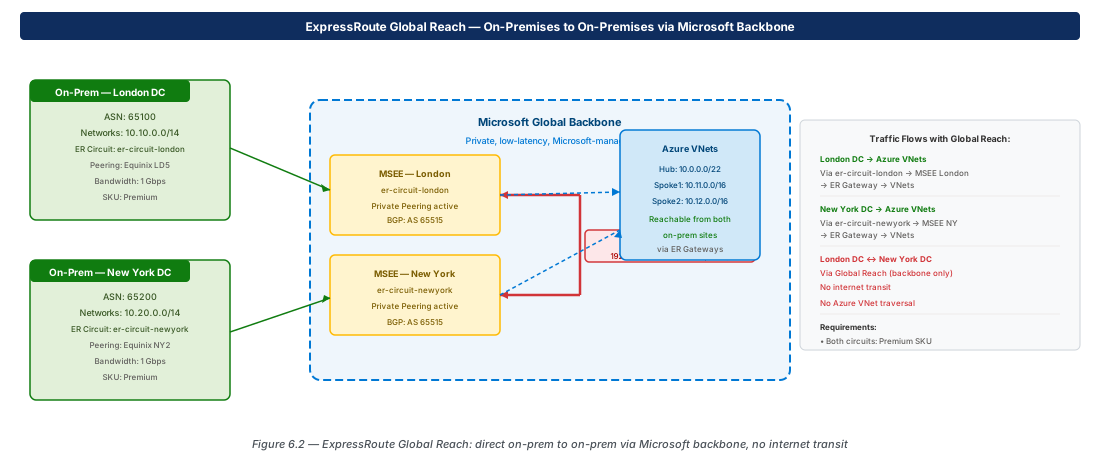
# Create Global Reach connection between two circuits
az network express-route peering connection create \
  --name gr-corp-to-branch \
  --resource-group rg-connectivity \
  --circuit-name er-circuit-corp \
  --peering-name AzurePrivatePeering \
  --peer-circuit /subscriptions/.../er-circuit-branch \
  --address-prefix 192.168.100.0/29
Microsoft Peering
Microsoft Peering routes traffic to Azure PaaS public endpoints and Microsoft 365 over ExpressRoute. A Route Filter restricts which BGP communities (services and regions) are accepted. Without a Route Filter attached, no routes are advertised from Microsoft Peering.
# Create Route Filter for Azure SQL + Storage in East US
az network route-filter create \
  --name rf-mspeering --resource-group rg-connectivity \
  --location eastus2
az network route-filter rule create \
  --filter-name rf-mspeering --resource-group rg-connectivity \
  --name allow-eastus-paas \
  --rule-type Community \
  --communities "12076:51004" "12076:50001" \
  --access Allow

az network express-route peering update \
  --resource-group rg-connectivity \
  --circuit-name er-circuit-corp \
  --peering-type MicrosoftPeering \
  --route-filter rf-mspeering
Lab: Guided Walkthrough
Lab Note: ExpressRoute circuits require a service provider to provision the physical path — this cannot be completed in a self-service lab environment. The walkthrough below uses az network express-route show against an existing circuit to practise inspection and configuration commands without incurring circuit provisioning.
Inspect Circuit State and Peering Status (CE-16)
# CE-16: Inspect circuit and BGP peer status
az network express-route list --output table
az network express-route show \
  --name er-circuit-corp \
  --resource-group rg-connectivity \
  --query "{State:circuitProvisioningState,Bandwidth:bandwidthInMbps,SKU:sku}"

# View BGP peer status via ER Gateway
az network vnet-gateway list-bgp-peer-status \
  --resource-group rg-connectivity \
--name ergw-hub --output tableVerify FastPath and Connection Routing Weight (CE-17)
# CE-17: Verify FastPath enabled and routing weight
az network vpn-connection show \
  --name conn-er-hub --resource-group rg-connectivity \
  --query "{FastPath:expressRouteGatewayBypass,Weight:routingWeight}"

# List learned on-prem routes from circuit
az network express-route list-route-tables \
  --resource-group rg-connectivity \
  --name er-circuit-corp \
  --peering-name AzurePrivatePeering \
  --path primary --output table
VPN + ER Coexistence
Both a VPN Gateway and an ER Gateway can coexist in the same GatewaySubnet. Configure the VPN connection as a backup: ER routes have lower weight (preferred) by default. When the ER circuit fails, BGP reconverges through the VPN tunnel. Requires UltraPerformance ER Gateway SKU for coexistence support.
Summary
| Concept | Key Fact |
|---|---|
| Circuit provisioning | Provider provisions after receiving Service Key; ~5 business days |
| Private Peering | VNet connectivity; Azure BGP AS 65515; two /30 subnets for primary/secondary |
| SLA | 99.95% requires both MSEEs active and zone-redundant ErGw |
| FastPath | Bypasses ER Gateway data plane; requires UltraPerformance or ErGw3AZ |
| Global Reach | Premium SKU; /29 link address; on-prem to on-prem via backbone |
| Microsoft Peering | PaaS/M365; Route Filter required; uses BGP communities |
| Standard vs Premium SKU | Premium enables global routing and Global Reach |
Chapter 7 covers Private Link and Private Endpoints — the preferred mechanism for consuming Azure PaaS services from VNets without exposing traffic to the public internet.
Chapter: 6 of 12 | Status: v0.1 Draft |