Book 01 — Azure Networking Deep Dive
DNS Architecture
Azure DNS covers two domains: public zones for internet-resolvable names, and Private DNS Zones for VNet-internal names and Private Endpoint resolution. For hybrid environments — where on-premises machines need to resolve Azure private names and Azure VMs need to resolve on-premises names — DNS Private Resolver provides managed, serverless conditional forwarding.
Azure DNS Public Zones
Azure DNS provides authoritative name service for public domains from a global anycast DNS infrastructure with 100% SLA. After creating a zone, Azure returns four nameserver addresses. Update the domain registrar's NS records to those addresses to complete delegation.
# Create public zone and add A record
az network dns zone create \
  --name contoso.com --resource-group rg-dns

az network dns record-set a add-record \
  --zone-name contoso.com --resource-group rg-dns \
  --record-set-name www --ipv4-address 20.1.2.3

# Get nameservers to set at registrar
az network dns zone show \
  --name contoso.com --resource-group rg-dns \
  --query nameServers
Private DNS Zones
VNet Links and Auto-Registration
A Private DNS Zone must be linked to each VNet that needs to resolve records in it. A link with registration-enabled=true makes VMs in that VNet automatically register and deregister their A records as they start and stop. Only one zone per VNet can have auto-registration enabled.
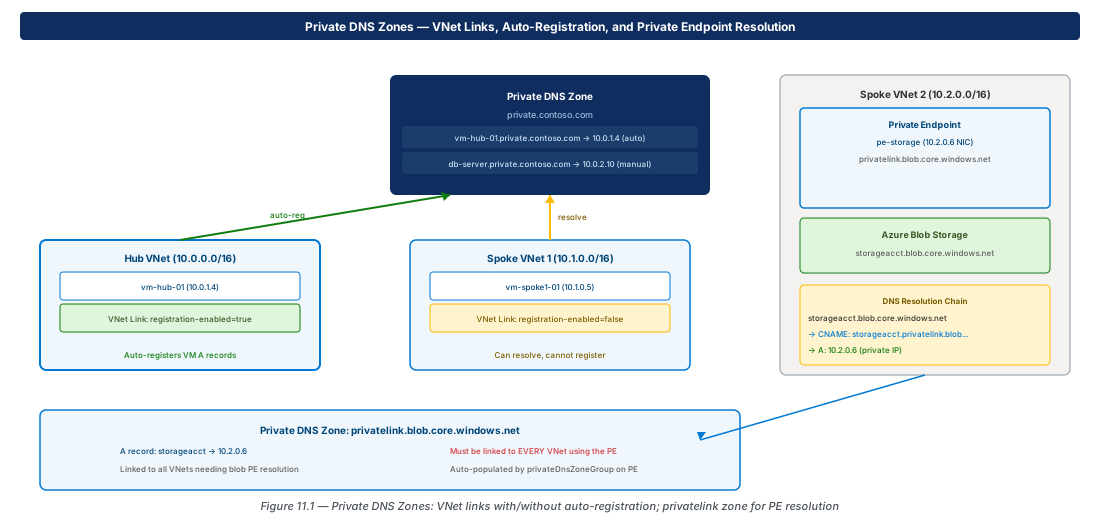
# Private DNS Zone + VNet link with auto-registration
az network private-dns zone create \
  --name private.contoso.com --resource-group rg-dns

az network private-dns link vnet create \
  --zone-name private.contoso.com --resource-group rg-dns \
  --name link-vnet-hub \
  --virtual-network vnet-hub \
  --registration-enabled true
Private DNS Zones for Azure Services
| Azure Service | Private DNS Zone |
|---|---|
| Blob Storage | privatelink.blob.core.windows.net |
| Azure SQL Database | privatelink.database.windows.net |
| Key Vault | privatelink.vaultcore.azure.net |
| App Service | privatelink.azurewebsites.net |
| Container Registry | privatelink.azurecr.io |
| AKS API Server | privatelink.<region>.azmk8s.io |
| Log Analytics | privatelink.ods.opinsights.azure.com |
Note
Each Private DNS Zone for Azure services must be linked to every VNet that contains workloads resolving that Private Endpoint. A missing link causes the VM to receive the storage account's public IP instead of the private IP, routing traffic over the internet.
DNS Private Resolver
DNS Private Resolver is a fully managed PaaS service that replaces the common pattern of deploying IaaS DNS forwarder VMs (Windows DNS Server or BIND). It requires no VM maintenance, scaling, or patching.
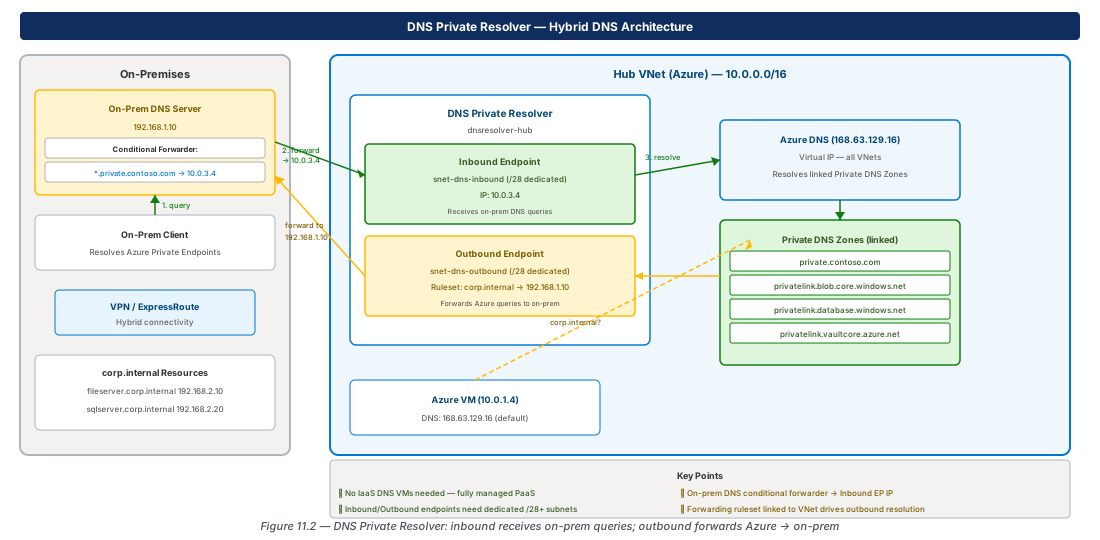
# DNS Private Resolver — inbound + outbound + forwarding ruleset
az network dns resolver create \
  --name dnsresolver-hub --resource-group rg-hub \
  --location eastus2 \
  --id ".../vnet-hub"

az network dns resolver inbound-endpoint create \
  --dns-resolver-name dnsresolver-hub --resource-group rg-hub \
  --name inbound-ep --location eastus2 \
  --ip-configurations "[{private-ip-allocation-method:Dynamic,id:.../snet-dns-inbound}]"

az network dns resolver outbound-endpoint create \
  --dns-resolver-name dnsresolver-hub --resource-group rg-hub \
  --name outbound-ep --location eastus2 \
  --id ".../snet-dns-outbound"

az network dns resolver forwarding-ruleset create \
  --name fwd-ruleset-hub --resource-group rg-hub \
  --location eastus2 \
  --outbound-endpoints "[{id:.../outbound-ep}]"

az network dns resolver forwarding-rule create \
  --ruleset-name fwd-ruleset-hub --resource-group rg-hub \
  --name rule-corp \
  --domain-name "corp.internal." \
--target-dns-servers "[{ip-address:192.168.1.10,port:53}]"Tip
Both the inbound and outbound endpoint subnets must be dedicated (minimum /28). No other resources — including VMs, Private Endpoints, or Application Gateway — may be deployed in these subnets.
Lab: Private DNS Zone with Auto-Registration
Private DNS Zone + VNet Link (CE-24)
RG="rg-lab-ch11"; LOC="eastus2"
az group create --name "$RG" --location "$LOC"

az network vnet create --name vnet-lab \
  --resource-group "$RG" --address-prefixes 10.10.0.0/16 \
  --subnet-name snet-lab --subnet-prefixes 10.10.0.0/24 \
  --location "$LOC"

az network private-dns zone create \
  --name lab.internal --resource-group "$RG"

az network private-dns link vnet create \
  --zone-name lab.internal --resource-group "$RG" \
  --name link-lab-vnet \
  --virtual-network vnet-lab \
  --registration-enabled true

az network private-dns record-set a add-record \
  --zone-name lab.internal --resource-group "$RG" \
  --record-set-name db-server --ipv4-address 10.10.0.20

az group delete --name "$RG" --yes --no-wait
Summary
| Concept | Key Fact |
|---|---|
| Public DNS Zone | Hosted in Azure; delegate by updating NS records at registrar |
| Private DNS Zone | VNet-linked; invisible to internet; auto-registration optional |
| Auto-registration | One zone per VNet; VMs register/deregister as they start/stop |
| PaaS Private DNS | Each service has a specific privatelink.* zone; link to every VNet |
| DNS Private Resolver | Replaces IaaS forwarder VMs; no VM maintenance or scaling |
| Inbound endpoint | Receives conditional forwarded queries from on-premises |
| Outbound endpoint | Forwards Azure queries to on-prem via forwarding ruleset |
| Dedicated subnets | Each endpoint needs a /28+ subnet; no other resources allowed |
Chapter 12 covers Monitoring and Troubleshooting — Network Watcher, NSG flow logs, Connection Monitor, Traffic Analytics, and network cost patterns.
Chapter: 11 of 12 | Status: v0.1 Draft |