Azure for .NET Developers: Production-Grade Cloud Architecture and Operations
Azure Architecture Foundations for .NET
Every .NET application destined for production Azure hosting is shaped by foundational decisions made before a single line of application code is written: how resources are organized and governed, which SDK patterns govern cloud service access, and how the Well-Architected Framework's five pillars translate into real infrastructure choices. This chapter establishes the mental model and tooling foundation that the remaining eleven chapters build upon.
The Azure Resource Model and How It Maps to .NET Applications
Subscriptions, Resource Groups, and the Hierarchy of Control
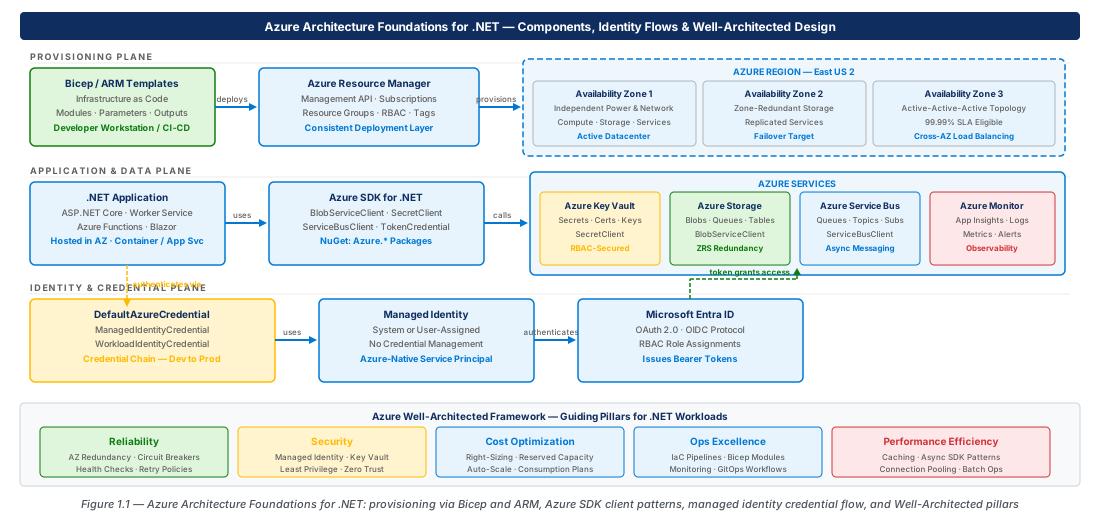
Azure organizes everything deployable into a management hierarchy: Management Groups → Subscriptions → Resource Groups → Resources. A Subscription is the billing and governance boundary; a Resource Group is the deployment and lifecycle boundary. Resources that deploy together and decommission together belong in the same resource group.
Each resource is addressable by a unique Azure Resource ID: /subscriptions/{subId}/resourceGroups/{rg}/providers/{provider}/{type}/{name}. .NET developers encounter these IDs constantly through the ResourceIdentifier type in Azure.ResourceManager.
Note
Resource IDs are case-insensitive for lookup but returned in canonical casing by the ARM API. Always use StringComparison.OrdinalIgnoreCase when comparing stored IDs against ARM responses.
Azure Resource Manager: The Control Plane for Everything
Azure Resource Manager (ARM) is the unified control plane fronting every management operation. Whether you use the Portal, CLI, PowerShell, Bicep, or the Azure Management SDK for .NET, every CRUD operation becomes an HTTPS call to https://management.azure.com. This consistency means the pattern for creating an App Service Plan is structurally identical to creating a Cosmos DB account.
The control-plane vs data-plane distinction is architecturally significant for .NET: control-plane operations use Azure.ResourceManager clients; data-plane operations (writing blobs, sending Service Bus messages) use service-specific clients. ARM operations are also subject to throttling — 12,000 reads and 1,200 writes per hour per subscription per region.
Naming Conventions and the Cloud Adoption Framework
Consistent resource naming is operational infrastructure, not aesthetic preference. The CAF naming pattern encodes context needed during an incident: {type}-{workload}-{env}-{region}-{instance}. Example: app-azure-architecture-dotnet-foundations-prod-eastus2-001. Key abbreviations: rg Resource Group, app App Service, kv Key Vault, st Storage Account, sb Service Bus.
Infrastructure as Code with Bicep
Why Bicep Over ARM JSON Templates
Bicep is Microsoft's domain-specific language for ARM that transpiles to ARM JSON and is fully supported as the primary IaC language for Azure. It offers type safety (VS Code surfaces schema errors at author time), modularity (reusable .bicep modules), and human-readable pull-request diffs. The relationship is analogous to C# vs MSIL: Bicep is the source language, ARM JSON is the compilation target.
Tip
Install the Bicep VS Code extension (ms-azuretools.vscode-bicep). It provides IntelliSense for all Azure resource types and a dependency-graph visualizer invaluable when debugging deployment ordering issues.
Bicep Language Fundamentals for .NET Developers
A Bicep file has four building blocks: parameters (inputs), variables (derived values), resources (side effects), and outputs (return values) — mapping intuitively to a C# method signature. The conditional SKU pattern (environment == 'prod' ? 'P2v3' : 'B1') allows one template to serve multiple environments.
// ch01-app-service.bicep — Minimal App Service foundations demo
@allowed(['dev', 'prod'])
param environment string
param location string = resourceGroup().location
var appServiceName = 'app-azure-architecture-dotnet-foundations-${environment}-${location}-001'
resource appService 'Microsoft.Web/sites@2022-09-01' = {
  name: appServiceName
  identity: { type: 'SystemAssigned' }
  properties: { httpsOnly: true; siteConfig: { netFrameworkVersion: 'v8.0' } }
}
// ... logAnalytics, diagnosticSettings, outputs — see full template in chapter repo
Deploying Bicep with the Azure CLI and CI/CD Pipelines
Use az deployment group create for resource group-scoped deployments. Always run --what-if first — it performs a dry-run comparison between template desired state and current resource group state, equivalent to reviewing a git diff before committing.
# Validate, preview, then deploy
az deployment group create \
  --name "deploy-foundations-dev-$(date +%Y%m%d)" \
  --resource-group rg-azure-architecture-dotnet-foundations-dev-001 \
  --template-file ch01-app-service.bicep \
  --parameters environment=dev instanceNumber=001 \
--what-if # remove flag to executeWarning
--mode Complete deletes any resources in the resource group not defined in the template. The default mode is Incremental. Never use Complete mode without reviewing the what-if output first.
Azure SDK for .NET: Client Library Patterns
The Azure SDK Architecture: Service Clients and Options
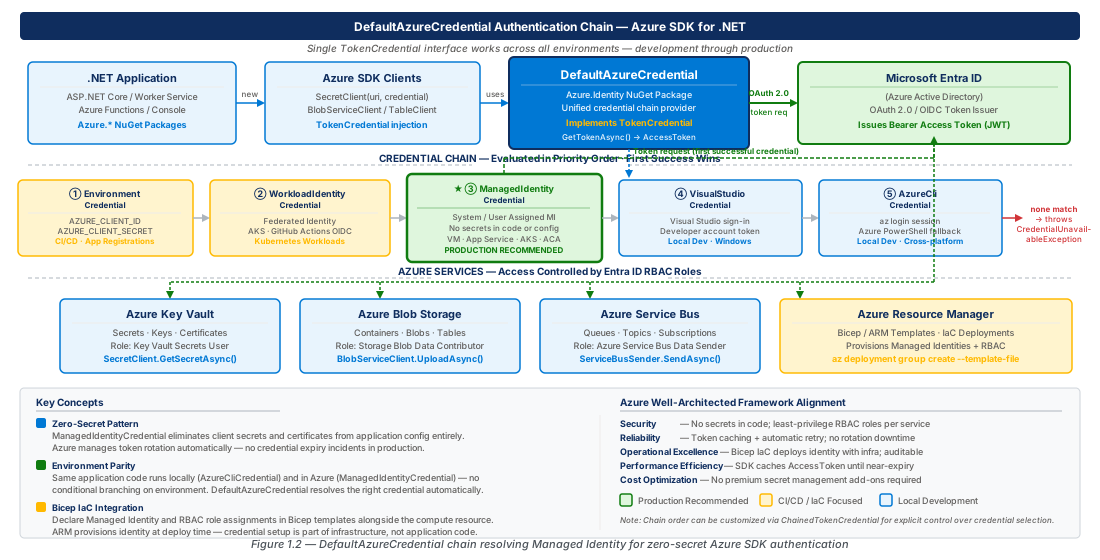
Every Azure SDK client is thread-safe, long-lived, and designed to be registered as a DI singleton. The instantiation pattern always involves three components: an endpoint URI, a credential, and an options object (*ClientOptions) for retry policies, transport, and logging. Constructing a new client per request is a common mistake that exhausts connection pool resources.
// Program.cs — Register Azure SDK clients as DI singletons
var credential = new DefaultAzureCredential();
builder.Services.AddSingleton(sp =>
    new SecretClient(new Uri(config["KeyVault:Uri"]!), credential));
builder.Services.AddSingleton(sp =>
    new BlobServiceClient(new Uri(config["Storage:BlobEndpoint"]!), credential));
builder.Services.AddSingleton(sp =>
new ServiceBusClient(config["ServiceBus:FullyQualifiedNamespace"]!, credential));Tip
Prefer endpoint-based client construction (URI + credential) over connection strings in all production code. Connection strings embed credentials that must be rotated; endpoints combined with Managed Identity eliminate secrets from configuration entirely.
Handling Responses, Errors, and Long-Running Operations
SDK responses are wrapped in Response<T>, pairing the value with raw HTTP metadata. Errors surface as RequestFailedException with Status (HTTP code), ErrorCode (service-specific string), and RequestId for support tickets. Long-running operations use Operation<T>.WaitForCompletionAsync(); paginated results use AsyncPageable<T> with await foreach.
The Azure.Core Pipeline and Diagnostics
Set Azure.Core and Azure.Identity log levels to Debug in appsettings.Development.json to observe the full HTTP cycle and credential chain evaluation — this eliminates most trial-and-error when Managed Identity works in staging but fails in production. Azure SDK clients automatically integrate with OpenTelemetry via ActivitySource, emitting distributed trace spans with no additional instrumentation.
{
  "Logging": {
    "LogLevel": {
      "Default": "Information",
      "Azure.Core": "Debug",
      "Azure.Identity": "Debug"
    }
  }
}
Managed Identities and DefaultAzureCredential
The Problem with Secrets in Configuration
Before Managed Identities, connecting .NET applications to Azure services required connection strings, client secrets, and SAS tokens — each with its own rotation schedule, stored in multiple locations, and a potential credential-compromise vector. Managed Identities give Azure-hosted resources an automatically managed identity in Entra ID; the private key never leaves Azure's managed HSM infrastructure and developers never see it.
Important
Managed Identities replace Azure service connection strings and keys for Azure-hosted workloads. They do not replace third-party API keys, customer-facing credentials, or non-Azure database passwords — those remain secrets that require Key Vault.
System-Assigned vs User-Assigned Managed Identities
| Characteristic | System-Assigned | User-Assigned |
|---|---|---|
| Lifecycle | Tied to resource; deleted with it | Independent; persists after resource deletion |
| Sharing | One-to-one per resource | Many resources share one identity |
| RBAC assignments | Lost when resource is recreated | Survive resource recreation |
| Blue-green / slots | Cannot pre-assign roles to new slot | New slot inherits roles immediately |
| Bicep declaration | identity: { type: 'SystemAssigned' } | Separate userAssignedIdentities resource |
For production .NET applications using deployment slots or rolling AKS updates, User-Assigned Managed Identities are strongly preferred — new compute instances inherit the pre-existing identity and its role assignments with no authentication window.
DefaultAzureCredential: One Credential Chain for All Environments
DefaultAzureCredential tries credential types in order: EnvironmentCredential → WorkloadIdentityCredential → ManagedIdentityCredential (production) → VisualStudioCredential → AzureCliCredential. This enables developers to use az login locally, service principals in CI/CD, and Managed Identity in production — all from new DefaultAzureCredential() with no environment branching.
// Single credential instance registered as DI singleton
var credential = new DefaultAzureCredential(new DefaultAzureCredentialOptions {
    ManagedIdentityClientId = config["ManagedIdentity:ClientId"],
    ExcludeAzurePowerShellCredential = true,
    ExcludeSharedTokenCacheCredential = true
});
builder.Services.AddSingleton<TokenCredential>(credential);Warning
Do not construct DefaultAzureCredential per-request or inside a using statement. It caches tokens internally and proactively refreshes them; disposing it discards the cache and causes throttling under load.
Regional and Availability Zone Architecture Design
Azure Regions, Geography, and Data Residency
Region selection for .NET workloads is driven by four criteria: data residency (regulatory requirements), latency (proximity to users), service availability (not all services are available in all regions), and cost (East US 2 and West US 2 are among the lowest-cost). Each region is paired with a geographically separated partner; Azure sequences platform updates so paired regions are never updated simultaneously.
Availability Zones: The Foundation of High Availability
Availability Zones (AZs) are physically separate locations within a region with independent power, cooling, and networking. Recommended regions have a minimum of three zones. For production .NET web applications: App Service Plan at P2v3+ with zone redundancy (minimum 3 instances), Azure SQL Database on Business Critical with zone-redundant configuration, and Service Bus Premium for AZ support.
| Category | Examples | .NET Guidance |
|---|---|---|
| Zone-Redundant | SQL Business Critical, Storage ZRS, Service Bus Premium | Choose these SKUs — no additional config required |
| Zonal | VMs, Premium SSDs, AKS node pools | Assign across zones 1, 2, 3 explicitly |
| Zone-Resilient | Azure DNS, Entra ID, Front Door | No AZ configuration needed |
Multi-Region Architecture Patterns for .NET Workloads
The three primary multi-region patterns are Active-Passive (primary serves traffic; secondary is warm standby — most common starting point, 5–15 min RTO with Traffic Manager), Active-Active (all regions serve traffic), and Active-Active with Global State (requires Cosmos DB multi-region writes or SQL Hyperscale geo-replication). The .NET compute tier is stateless and trivial to replicate; complexity concentrates in the data tier.
Azure Well-Architected Framework for .NET Workloads
.NET Expression of the Five Pillars
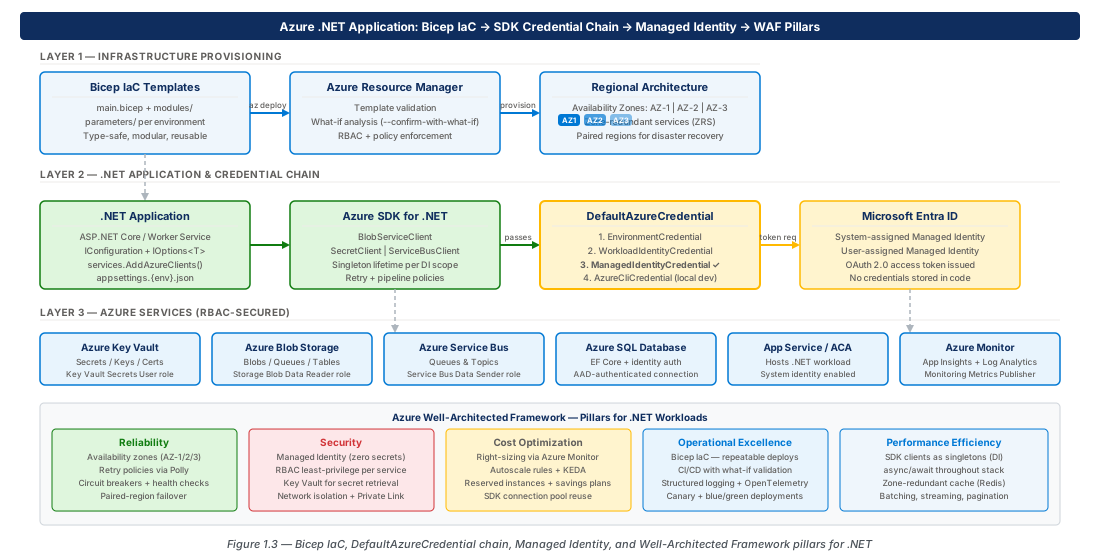
The WAF's five pillars map directly to .NET software quality attributes. Reliability: Polly retry policies, circuit breakers, AZ-redundant infrastructure, composite SLA calculations (three 99.9% services = 99.7% composite). Security: Managed Identities, RBAC, Private Endpoints, httpsOnly: true in Bicep, dotnet list package --vulnerable in CI. Cost Optimization: async/await to maximize throughput per instance, Blob Storage for binary assets, Application Insights sampling, budget alerts on every resource group.
Operational Excellence: structured logging with correlation IDs, app.MapHealthChecks("/health"), IaC for all infrastructure, deployment rings with automated rollback triggers. Performance Efficiency: right-sizing service tiers, Redis caching, load testing with Azure Load Testing integrated into CI/CD pipelines.
Tip
Enable Azure Cost Management budget alerts on every resource group during development. Set a soft alert at 80% and a hard alert at 100% of expected monthly spend to catch forgotten AKS clusters, Azure Firewalls, and Application Gateways before they generate unexpected bills.
Applying the WAF: Architecture Decision Records
The WAF is most valuable as a structured review process during decision-making, not a post-hoc audit. Architecture Decision Records (ADRs) capture context, options considered with WAF pillar tradeoffs, the decision made, and consequences — living in source control alongside application code so architectural reasoning is auditable as the team changes.
The WAF Review Process and Azure Well-Architected Review Tool
Schedule WAF reviews at three points: at project inception, after first production deployment, and annually thereafter. The Azure Well-Architected Review questionnaire generates a scored assessment across all five pillars with .NET-targeted questions. Combined with Azure Advisor recommendations and Security Center findings, it forms a complete operational-maturity picture.
# Review Azure Advisor WAF recommendations for a resource group
az advisor recommendation list \
  --resource-group rg-azure-architecture-dotnet-foundations-prod-001 \
  --query "[].{ category: category, impact: impact, problem: shortDescription.problem }" \
  --output table
Summary
| Concept | Key Point |
|---|---|
| ARM Resource Hierarchy | Management Groups → Subscriptions → Resource Groups → Resources; RGs are lifecycle and deployment boundaries |
| CAF Naming | {type}-{workload}-{env}-{region}-{instance} encodes on-call clarity, cost attribution, and policy scope |
| Bicep vs ARM JSON | Bicep transpiles to ARM JSON; use Bicep for all new IaC — type safety, modularity, and readable diffs |
| Azure SDK Pattern | Singleton clients + endpoint construction + shared TokenCredential — never per-request instantiation |
| Managed Identity Types | Prefer User-Assigned for production — decouples identity lifecycle from compute, survives blue-green deployments |
| DefaultAzureCredential | One credential chain: Azure CLI locally, env vars in CI/CD, Managed Identity in production — no code branching |
| AZ Design | Zone-redundant SKUs + minimum 3 App Service instances (P2v3+) for single-AZ-failure tolerance |
| WAF Five Pillars | Reliability, Security, Cost, Operational Excellence, Performance Efficiency — evaluate every architectural decision against all five |
Lab
CE-01: Bootstrap the Foundations Infrastructure with Bicep
Create the dev and prod resource groups, validate the Bicep template, and deploy the App Service with Log Analytics and Managed Identity enabled. Capture the appServicePrincipalId output for use in CE-02.
# Create resource groups and deploy foundations Bicep template
az group create --name rg-azure-architecture-dotnet-foundations-dev-001 \
  --location eastus2 --tags Environment=dev ManagedBy=Bicep
az deployment group create \
  --name "deploy-foundations-dev-$(date +%Y%m%d)" \
  --resource-group rg-azure-architecture-dotnet-foundations-dev-001 \
  --template-file ch01-app-service.bicep \
--parameters environment=dev instanceNumber=001 --what-ifCE-02: Configure Managed Identity and DefaultAzureCredential
Create a Key Vault with RBAC authorization enabled, assign the Key Vault Secrets User role to the App Service Managed Identity, and store a test secret. Configure the App Service with the Key Vault URI as an application setting.
# Create Key Vault and assign RBAC role to Managed Identity
az keyvault create --name kv-dotnet-foundations-dev-001 \
  --resource-group rg-azure-architecture-dotnet-foundations-dev-001 \
  --enable-rbac-authorization true --sku standard
PRINCIPAL_ID=$(az webapp identity show \
  --name app-azure-architecture-dotnet-foundations-dev-eastus2-001 \
  --resource-group rg-azure-architecture-dotnet-foundations-dev-001 \
  --query principalId -o tsv)
az role assignment create --assignee-object-id $PRINCIPAL_ID \
  --role "Key Vault Secrets User" --assignee-principal-type ServicePrincipal \
--scope $(az keyvault show --name kv-dotnet-foundations-dev-001 -g rg-azure-architecture-dotnet-foundations-dev-001 --query id -o tsv)CE-03: Verify Zone Redundancy and WAF Alignment
Deploy a zone-redundant production App Service Plan (P2V3, 3 workers) and a Zone-Redundant Storage account. Run Azure Advisor to surface WAF recommendations and apply cost-attribution tags to the resource group.
# Zone-redundant production App Service Plan (requires P2v3 minimum)
az appservice plan create \
  --name asp-azure-architecture-dotnet-foundations-prod-eastus2-001 \
  --resource-group rg-azure-architecture-dotnet-foundations-prod-001 \
  --location eastus2 --sku P2V3 --zone-redundant --number-of-workers 3
az advisor recommendation list \
  --resource-group rg-azure-architecture-dotnet-foundations-prod-001 --output table
Chapter: 1 of 12 | Status: v0.1 Draft |