Azure for .NET Developers: Production-Grade Cloud Architecture and Operations
Hosting ASP.NET Core on Azure App Service
Azure App Service is the cornerstone PaaS offering for running ASP.NET Core web applications and APIs in Azure without managing virtual machines or container orchestration infrastructure. It packages compute, networking, TLS termination, deployment pipelines, and platform-level identity into a single managed surface that can scale from a developer sandbox to a global enterprise workload.
App Service Plans, Pricing Tiers, and App Service Environment
The App Service Plan as a Unit of Compute
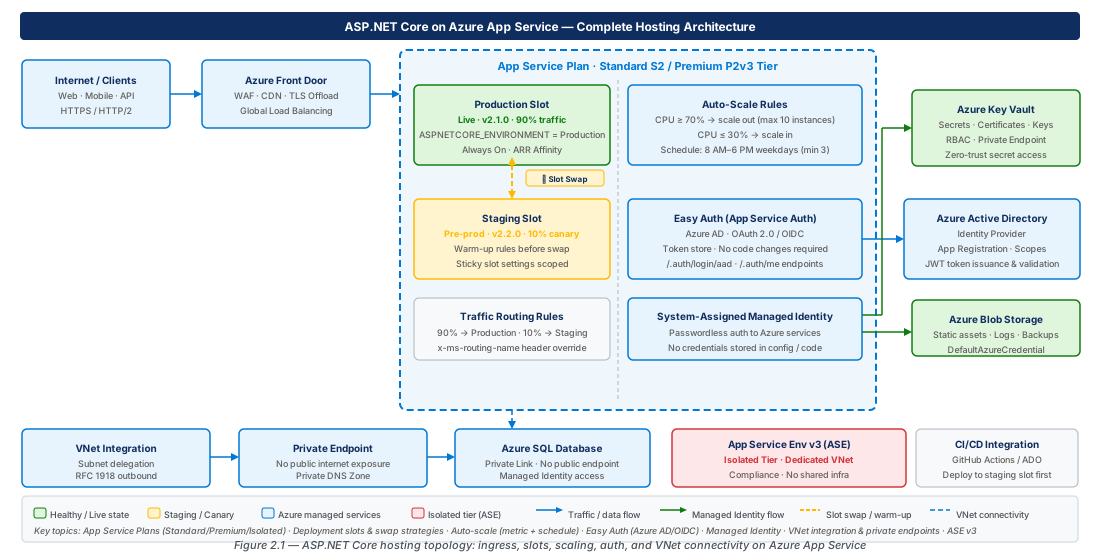
An App Service Plan defines the underlying VM family, instance count, and OS on which one or more App Service apps run. Every app bound to the plan shares those workers — ten lightweight APIs assigned to a single Standard S3 plan pay for one plan, not ten. The plan is both a scaling boundary (all apps scale out together) and a failure isolation boundary (a rogue app consuming CPU affects every app on that plan). Keep customer-facing APIs on dedicated plans to prevent internal tools from degrading user-facing services.
Plan tier also governs which features are available: deployment slots, VNet integration, and private endpoint support are all tier-dependent capabilities that must be evaluated during architecture design.
Pricing Tiers: A Decision Framework
| Tier | SKU Examples | SLA | Slots | VNet | Best Fit |
|---|---|---|---|---|---|
| Free | F1 | None | 0 | No | Local dev testing only |
| Shared | D1 | None | 0 | No | Lightweight demos |
| Basic | B1–B3 | 99.95% | 0 | No | Dev/test environments |
| Standard | S1–S3 | 99.95% | 5 | Regional VNet | General production APIs |
| Premium v3 | P0v3–P3v3 | 99.95% | 20 | Regional VNet + zones | High-throughput production |
| Isolated v2 | I1v2–I3v2 | 99.99% | 20 | Full ASE isolation | Regulated, air-gapped workloads |
Important
Free and Shared tiers run on shared multi-tenant workers, do not support custom domain SSL, and cannot join a VNet. Do not use them as stepping stones to production — the behavioral differences invalidate performance baselines.
The Premium v3 (Pv3) family supports zone-redundant deployments, spreading instances across Azure Availability Zones. Zone redundancy requires a minimum of three instances and must be configured at plan creation time — it cannot be enabled on an existing plan. The P0v3 SKU (1 vCore, 4 GiB RAM) is the cost-effective entry point for low-traffic production APIs needing VNet integration and slots without full P1v3 compute.
App Service Environment v3
ASEv3 is a fully isolated deployment of App Service infrastructure injected into a customer-managed VNet subnet. All inbound and outbound traffic flows through your VNet; an Internal Load Balancer (ILB) mode makes the environment completely inaccessible from the public internet — the architecture required for financial services, healthcare, and government workloads. ASEv3 supports up to 100 instances per plan and removes the multi-tenant 30-instance ceiling. Per-app scaling allows individual apps to scale independently within the plan.
Tip
ASEv3 uses a stamp fee model (approximately one I1v2 instance continuously) plus instance costs. It becomes cost-competitive versus multiple Premium plans at 10–15 production instances.
# CE-01: Provision a Premium v3 zone-redundant App Service Plan and .NET 8 Web App
az group create --name rg-app-service-aspnet-hosting-prod-001 --location eastus2 \
  --tags Environment=Production Workload=AspNetHosting CostCenter=Engineering

az appservice plan create --name plan-aspnetapi-prod-eastus2-001 \
  --resource-group rg-app-service-aspnet-hosting-prod-001 \
  --location eastus2 --sku P1V3 --is-linux --zone-redundant

az webapp create --name app-service-prod-eastus2-001 \
  --resource-group rg-app-service-aspnet-hosting-prod-001 \
  --plan plan-aspnetapi-prod-eastus2-001 --runtime "DOTNETCORE:8.0"
# Verify zone redundancy: az appservice plan show ... --query "zoneRedundant"
Deployment Slots, Swap Strategies, and Traffic Routing
Understanding Slot Architecture and Settings Behavior
Deployment slots are named environments within a single App Service app that run independently yet share the same plan's compute pool. Each slot has its own hostname, application settings, connection strings, and deployment history. The critical design decision is distinguishing slot-sticky settings (pinned to the slot, never swap) from swappable settings (travel with the deployment). Mark database connections, storage keys, feature flags, and external service endpoints as sticky so staging always connects to staging infrastructure after a swap.
Warning
Forgetting to mark a connection string as slot-sticky is among the most common causes of production data corruption during deployments. Build a pre-swap checklist and use Azure Policy to enforce that critical setting names are always slot-sticky across the subscription.
Startup warmup is integrated into slot swaps. The platform validates the /robots933456.txt health probe and any custom applicationInitialization URLs before routing traffic. Only after all new instances report healthy does the swap proceed, ensuring zero-downtime deployments even for apps with expensive startup sequences.
Swap Strategies for Production ASP.NET Core APIs
Three swap variants exist: standard swap (atomic, warms target before switching DNS), swap with preview (two-phase: applies production settings to staging so you validate the code+config combination before committing), and auto-swap (continuous delivery for non-critical workloads only). Swap with preview is the recommended strategy for any workload where new code plus production secrets might behave differently from staging secrets. Rollback is trivially a second swap — the previous production build remains in the staging slot, typically completing in under 30 seconds.
Important
During swap with preview, production slot settings are temporarily applied to the staging slot. If your staging code connects to external services using these settings, it will read and write production data during the preview window. Coordinate with database teams before using this on systems with strict data isolation requirements.
Traffic Routing and Canary Releases
App Service's traffic routing feature splits production traffic between slots by percentage using a sticky session cookie (x-ms-routing-name), preventing split-brain user experiences. Combine with Application Insights per-slot role names (APPLICATIONINSIGHTS_ROLE_NAME) to compare error rates and response-time percentiles between production and canary slots quantitatively before completing the promotion.
Tip
Ramp canary traffic in steps: 5% → 25% → 50% → full swap. Automate the ramp with GitHub Actions environment protection rules, and define a p99 rollback gate (e.g., if canary p99 exceeds production p99 by >20% for 5 consecutive minutes, route 0% to canary).
# CE-02: Create staging slot, configure sticky settings, canary routing, swap-with-preview
az webapp deployment slot create --name app-service-prod-eastus2-001 \
  --resource-group rg-app-service-aspnet-hosting-prod-001 --slot staging \
  --configuration-source app-service-prod-eastus2-001

az webapp config appsettings set --name app-service-prod-eastus2-001 \
  --resource-group rg-app-service-aspnet-hosting-prod-001 --slot staging \
  --settings ASPNETCORE_ENVIRONMENT=Staging --slot-settings ASPNETCORE_ENVIRONMENT

az webapp traffic-routing set --name app-service-prod-eastus2-001 \
  --resource-group rg-app-service-aspnet-hosting-prod-001 --distribution staging=10

az webapp deployment slot swap --name app-service-prod-eastus2-001 \
  --resource-group rg-app-service-aspnet-hosting-prod-001 \
  --slot staging --target-slot production --action preview
# After smoke tests: --action swap; then: az webapp traffic-routing clear ...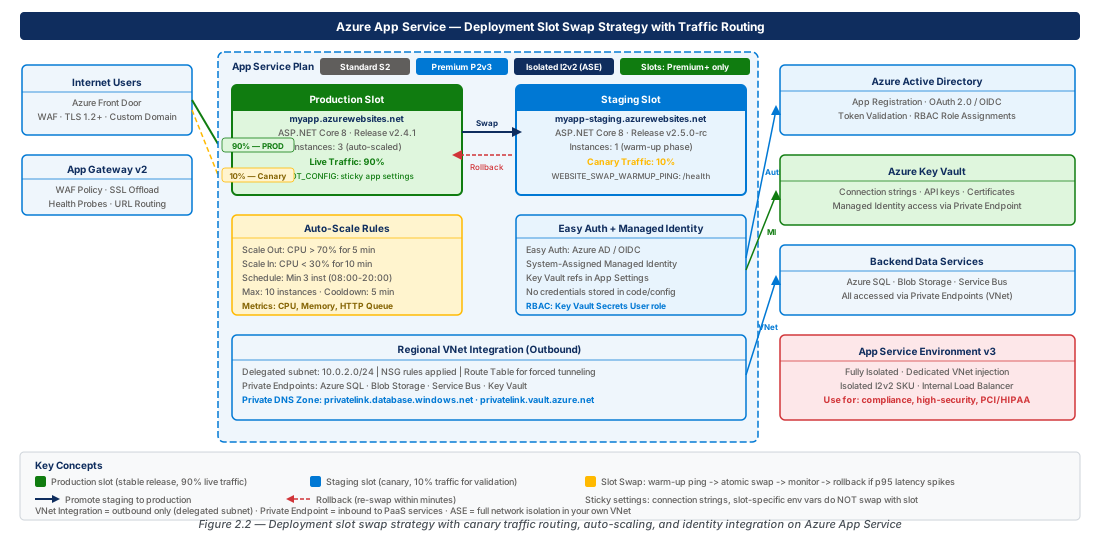
Auto-Scaling Rules and Schedule-Based Scaling
Horizontal vs. Vertical Scaling
Vertical scaling (scale up) changes the plan SKU and requires a brief restart — it is an architectural decision made during capacity planning, not an operational response to traffic spikes. Horizontal scaling (scale out) adds or removes worker instances dynamically without restarting existing instances and is the mechanism all autoscale strategies should target. Azure Monitor Autoscale is the policy engine; it is attached to the App Service Plan and supports metric-based and schedule-based rules within profiles.
Scale-out latency is 3–5 minutes for provisioning plus application startup time. For apps with a 30-second startup, expect 4–6 minutes from trigger to serving traffic. Set scale-out thresholds conservatively (60–70% CPU) to provide the platform sufficient lead time before existing instances saturate.
Note
Set scale-out cooldown to at least 5 minutes for ASP.NET Core apps and scale-in cooldown to 10–15 minutes. This prevents flapping around the threshold boundary before new instances absorb load.
Designing Effective Autoscale Policies
For CPU-bound APIs, CPU percentage is the natural trigger. For I/O-bound APIs, CPU stays low even under queue buildup — use HTTP Queue Length (>10 for 5 minutes) as a more reliable saturation signal. Memory utilization alone is a poor signal for .NET workloads; the CLR GC consumes available memory aggressively by design. Pair memory-triggered autoscale with an Application Insights alert on Gen2 GC frequency to distinguish normal CLR behavior from genuine memory pressure.
Use asymmetric cooldowns (scale out fast: 2-minute cooldown; scale in slowly: 15-minute cooldown) and a hysteresis band (scale out at 70% CPU, scale in at 30%) to prevent oscillation. Aggressive scale-in that removes instances too quickly leads to a cost-burning flap cycle.
Schedule-Based Scaling for Predictable Load
Schedule-based profiles pre-position the minimum instance count for known traffic windows, eliminating scale-out latency for predictable events. A weekday business hours profile (min=6, max=20) overrides the default profile (min=3, max=10) without requiring any metric trigger to reach baseline capacity. For planned high-traffic events, create a one-time fixed-date profile with an elevated minimum the day before the event and set an end time to automate cleanup.
# CE-03: Autoscale — metric rules (CPU + HTTP Queue) and business hours schedule profile
az monitor autoscale create --name autoscale-plan-aspnetapi-prod-eastus2-001 \
  --resource-group rg-app-service-aspnet-hosting-prod-001 \
  --resource plan-aspnetapi-prod-eastus2-001 \
  --resource-type Microsoft.Web/serverfarms \
  --min-count 3 --max-count 20 --count 3

az monitor autoscale rule create --autoscale-name autoscale-plan-aspnetapi-prod-eastus2-001 \
  --resource-group rg-app-service-aspnet-hosting-prod-001 \
  --condition "CpuPercentage > 65 avg 5m" --scale out 2 --cooldown 5

az monitor autoscale rule create --autoscale-name autoscale-plan-aspnetapi-prod-eastus2-001 \
  --resource-group rg-app-service-aspnet-hosting-prod-001 \
  --condition "HttpQueueLength > 10 avg 5m" --scale out 3 --cooldown 5
# Scale-in: CpuPercentage < 30 avg 10m → remove 1, cooldown 15; add schedule profile for business hours
App Service Easy Auth and Managed Identity Integration
Easy Auth: Platform-Level Authentication
Easy Auth is a platform middleware layer that intercepts incoming HTTP requests and validates authentication tokens before they reach your .NET process. It runs as an IIS or NGINX module outside the .NET process — no middleware pipeline changes required. When a valid JWT Bearer token is present, Easy Auth forwards the request with X-MS-CLIENT-PRINCIPAL headers populated from the caller's identity claims.
Easy Auth handles authentication only. Role-based access control, scope validation, and fine-grained permission checks must remain in the ASP.NET Core pipeline using [Authorize] attributes and policy handlers. Use Easy Auth as a first-line defense that eliminates unauthenticated requests before they consume application resources.
Note
Easy Auth configuration lives in Microsoft.Web/sites/config/authsettingsV2. When using Bicep or Terraform, manage this resource explicitly — omitting it causes Easy Auth configuration to drift or be deleted during ARM deployments.
Managed Identity: Eliminating Secrets
User-Assigned Managed Identity (UAMI) is the recommended pattern for App Service apps. A UAMI can be pre-provisioned with RBAC role assignments before the App Service resource exists, breaking the chicken-and-egg dependency that System-Assigned identity creates in automated pipelines. Multiple slots (production, staging, canary) can share a single UAMI, simplifying permission management.
In ASP.NET Core, DefaultAzureCredential resolves to Managed Identity on App Service and falls through to Azure CLI credentials locally — zero code changes between environments.
// Program.cs — Managed Identity with Key Vault, SQL, and Service Bus
var credential = new DefaultAzureCredential();

builder.Configuration.AddAzureKeyVault(
    new Uri("https://kv-aspnetapi-prod-eastus2-001.vault.azure.net/"), credential);

builder.Services.AddDbContext<AppDbContext>(o =>
    o.UseSqlServer(builder.Configuration.GetConnectionString("DefaultConnection"),
        sql => sql.EnableRetryOnFailure(3)));

builder.Services.AddSingleton(_ =>
new ServiceBusClient("sb-aspnetapi-prod-eastus2-001.servicebus.windows.net", credential));# CE-04: Create UAMI, assign Key Vault Secrets User role, configure Easy Auth
UAMI_ID=$(az identity create --name id-appservice-aspnetapi-prod-001 \
--resource-group rg-app-service-aspnet-hosting-prod-001 --location eastus2 \
--query id --output tsv)
az webapp identity assign --name app-service-prod-eastus2-001 \
--resource-group rg-app-service-aspnet-hosting-prod-001 --identities $UAMI_ID
UAMI_PRINCIPAL=$(az identity show --name id-appservice-aspnetapi-prod-001 \
--resource-group rg-app-service-aspnet-hosting-prod-001 --query principalId --output tsv)
az role assignment create --assignee-object-id $UAMI_PRINCIPAL \
--assignee-principal-type ServicePrincipal \
--role "Key Vault Secrets User" --scope $KV_ID
# Then: az webapp auth update --enabled true --action LoginWithAzureActiveDirectory ...VNet Integration and Private Endpoint Configuration
Regional VNet Integration: Outbound Connectivity
Regional VNet Integration connects an App Service app to a dedicated subnet in your Azure VNet, enabling outbound calls to Azure SQL private endpoints, Redis, Service Bus, on-premises resources via ExpressRoute, or any service in the VNet's address space. It is one-directional — it allows the app to initiate connections into the VNet but does not expose the app inside the VNet for inbound purposes. The integration subnet must be a dedicated /26 or larger, delegated to Microsoft.Web/serverFarms — undersizing this subnet silently limits the maximum scale-out count.
Important
By default, only RFC 1918 traffic routes through VNet Integration. Public internet traffic continues to exit through App Service's shared NAT. Set WEBSITE_VNET_ROUTE_ALL=1 to force all outbound traffic through the VNet — required when using Azure Firewall or an NVA for egress inspection.
Private Endpoints: Locking Down Inbound Access
A private endpoint creates a network interface with a private IP in your VNet subnet and associates it with your App Service app. Once a private endpoint is configured and public network access is disabled, the app's azurewebsites.net hostname resolves to the private IP via a Private DNS Zone (privatelink.azurewebsites.net). DNS Zone links do not propagate through VNet peering — add the link to each peered VNet independently. On-premises DNS forwarders must forward *.azurewebsites.net queries to Azure DNS (168.63.129.16) or an Azure DNS Private Resolver.
Warning
Private endpoints protect the main app hostname but do NOT automatically protect the SCM (Kudu) endpoint. GitHub Actions and Azure DevOps hosted agents are on the public internet and lose SCM access when public network access is disabled — use self-hosted agents inside the VNet or VNet-injected private agents.
Full Network Isolation Architecture
Combining VNet Integration (outbound) with Private Endpoints (inbound) produces a fully network-isolated App Service deployment. Inbound traffic flows through Application Gateway + WAF in the hub VNet to the private endpoint IP, never touching the public internet. Outbound traffic flows through the integration subnet via UDR to Azure Firewall, then to private endpoints for Azure PaaS services. This architecture aligns with Azure Landing Zone topology and satisfies regulated-industry network security requirements.
# CE-05: VNet Integration + Private Endpoint for full network isolation
az network vnet create --name vnet-spoke-aspnetapi-prod-eastus2-001 \
  --resource-group rg-app-service-aspnet-hosting-prod-001 \
  --location eastus2 --address-prefixes 10.10.0.0/22

az network vnet subnet create --name snet-appservice-integration-001 \
  --resource-group rg-app-service-aspnet-hosting-prod-001 \
  --vnet-name vnet-spoke-aspnetapi-prod-eastus2-001 \
  --address-prefixes 10.10.0.0/26 --delegations Microsoft.Web/serverFarms

az webapp vnet-integration add --name app-service-prod-eastus2-001 \
  --resource-group rg-app-service-aspnet-hosting-prod-001 \
  --vnet vnet-spoke-aspnetapi-prod-eastus2-001 \
  --subnet snet-appservice-integration-001

az webapp config appsettings set --name app-service-prod-eastus2-001 \
  --resource-group rg-app-service-aspnet-hosting-prod-001 \
  --settings WEBSITE_VNET_ROUTE_ALL=1
# Then: create private-dns zone, link to VNet, create private-endpoint, disable publicNetworkAccess
Lab
Deploy a Blue/Green Release with Slot Swap and Traffic Validation (CE-03)
Deploy a ZIP package to the staging slot, validate health, and route 10% canary traffic before performing swap-with-preview. After smoke tests pass, complete the swap and clear traffic routing — the prior build remains in staging for rollback.
# Step 1: Deploy build artefact to staging slot
az webapp deploy --name app-service-prod-eastus2-001 \
  --resource-group rg-app-service-aspnet-hosting-prod-001 \
  --slot staging --type zip --src-path ./publish/app.zip

# Step 2: Route 10% live traffic to staging; monitor Application Insights for 15 min
az webapp traffic-routing set --name app-service-prod-eastus2-001 \
  --resource-group rg-app-service-aspnet-hosting-prod-001 --distribution staging=10

# Step 3: Clear routing, swap-with-preview, smoke test, complete swap
az webapp traffic-routing clear --name app-service-prod-eastus2-001 \
  --resource-group rg-app-service-aspnet-hosting-prod-001
az webapp deployment slot swap --name app-service-prod-eastus2-001 \
  --resource-group rg-app-service-aspnet-hosting-prod-001 \
--slot staging --target-slot production --action swapImplement Auto-Scaling with Metric and Schedule Rules (CE-04)
Create an autoscale setting on the production plan with CPU and HTTP Queue Length scale-out rules, an asymmetric scale-in rule, and a weekday business hours schedule profile that pre-positions 6 minimum instances to eliminate scale-out latency during peak hours.
# Step 1: Create autoscale setting (min 3, max 20)
az monitor autoscale create --name autoscale-plan-aspnetapi-prod-eastus2-001 \
  --resource-group rg-app-service-aspnet-hosting-prod-001 \
  --resource plan-aspnetapi-prod-eastus2-001 \
  --resource-type Microsoft.Web/serverfarms \
  --min-count 3 --max-count 20 --count 3

# Step 2: Add scale-out rules (CPU > 65% and HttpQueueLength > 10)
az monitor autoscale rule create --autoscale-name autoscale-plan-aspnetapi-prod-eastus2-001 \
  --resource-group rg-app-service-aspnet-hosting-prod-001 \
  --condition "CpuPercentage > 65 avg 5m" --scale out 2 --cooldown 5

# Step 3: Add business hours schedule profile (weekdays 08:30–18:00 Eastern = 12:30–22:00 UTC)
az monitor autoscale profile create \
  --autoscale-name autoscale-plan-aspnetapi-prod-eastus2-001 \
  --resource-group rg-app-service-aspnet-hosting-prod-001 \
  --name WeekdayBusinessHours --min-count 6 --max-count 30 --count 6 \
  --recurrence week --recurrence-days Monday Tuesday Wednesday Thursday Friday \
  --start "12:30" --end "22:00" --timezone UTC
Summary
| Concept | Key Point |
|---|---|
| App Service Plan Tiers | Premium v3 is the recommended production tier; supports zone redundancy, VNet integration, and 20 slots. Isolated v2 (ASEv3) is required for fully air-gapped regulated workloads. |
| ASEv3 | ILB mode injects the entire environment into your VNet with no public internet exposure; supports up to 100 instances per plan and per-app independent scaling. |
| Deployment Slots | Mark environment-specific settings as slot-sticky to prevent them swapping with the deployment. Swap with Preview tests production settings on staging code before committing. |
| Traffic Routing | Session-cookie-sticky canary routing; combine with Application Insights per-role telemetry for quantitative promotion decisions. |
| Autoscale Design | Asymmetric cooldowns (fast out, slow in) and a hysteresis band prevent oscillation. Add HTTP Queue Length rules for I/O-bound APIs where CPU metrics are misleading. |
| Easy Auth | Platform middleware for authentication only — authorization logic must remain in the ASP.NET Core pipeline using policies and [Authorize] attributes. |
| Managed Identity | UAMI decouples identity lifecycle from app lifecycle and enables pre-provisioned RBAC in CI/CD pipelines. Use DefaultAzureCredential for transparent local/cloud credential resolution. |
| VNet Integration | Routes outbound traffic through a dedicated /26 integration subnet. Set WEBSITE_VNET_ROUTE_ALL=1 to force all outbound traffic through the VNet for firewall inspection. |
| Private Endpoints | Eliminates the public inbound surface. Requires a Private DNS Zone (privatelink.azurewebsites.net) linked to every VNet that must resolve the app hostname privately. |
Chapter: 2 of 12 | Status: v0.1 Draft |