Azure for .NET Developers: Production-Grade Cloud Architecture and Operations
Containerizing .NET Workloads with AKS and Container Apps
The shift from virtual machines to containers has fundamentally changed how .NET applications are packaged, deployed, and operated at scale. This chapter examines AKS and Azure Container Apps alongside ACR, Helm, and Dapr—the complete container supply chain from image build to auto-scaled, identity-secured deployment.
Container Strategy for .NET Teams
The .NET Container Story in 2026
Microsoft's investment in container-first .NET has compounded with each runtime release. Distroless base images (mcr.microsoft.com/dotnet/runtime-deps:8.0-jammy-chiseled) reduce a typical ASP.NET Core API image from 220 MB to under 80 MB, shrinking attack surface and cold-start latency. .NET 8 AOT compilation eliminates runtime overhead for compute-bound workloads.
The architectural consequence of smaller, faster images is that container granularity can now match business domain boundaries. Teams can follow DDD boundaries without apology—each bounded context in its own container, scaled and updated independently.
Choosing Between AKS and Azure Container Apps
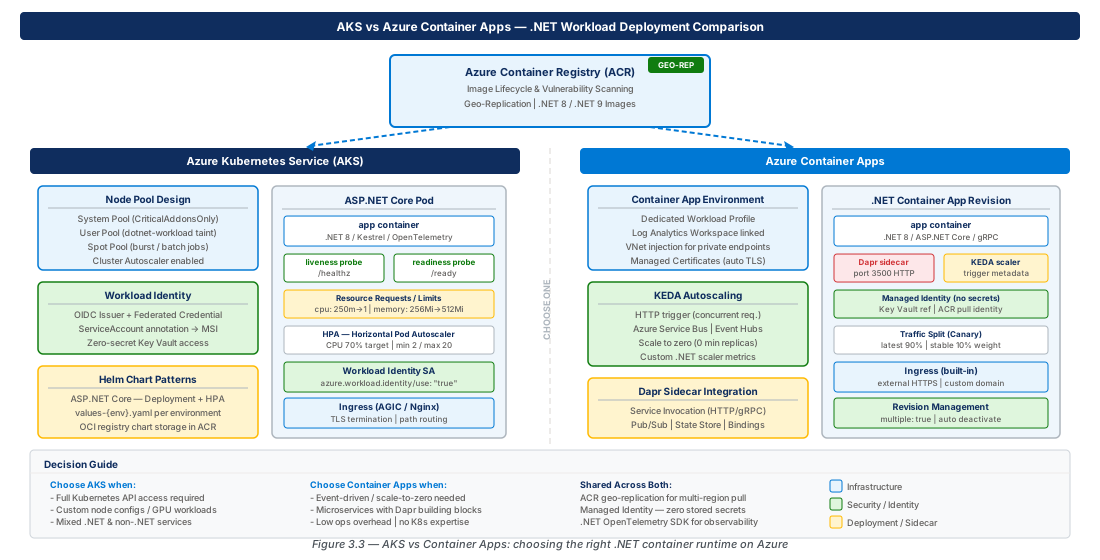
AKS gives you a fully managed Kubernetes control plane with direct access to every Kubernetes primitive: Deployment, StatefulSet, DaemonSet, NetworkPolicy, HPA, VPA, and custom CRDs. This control is essential for GPU workloads, stateful data services, and latency-sensitive workloads with complex scheduling constraints. The tradeoff is operational surface area: you own node pool patching and cluster upgrade orchestration.
Container Apps is a serverless abstraction built on Kubernetes and KEDA that hides the cluster entirely. It integrates KEDA natively, supports Dapr sidecars as first-class config, and bills on consumption reaching true zero. For greenfield microservices without a dedicated Kubernetes ops capability, Container Apps delivers 70–80% of AKS flexibility at 20% of the operational cost.
| Decision Dimension | AKS | Azure Container Apps |
|---|---|---|
| Kubernetes primitives | Full access (all resource types) | Abstracted — no direct kubectl access |
| Node pool customization | Full (GPU, spot, system/user pools) | Managed by platform |
| Scaling model | HPA, VPA, KEDA, cluster autoscaler | KEDA-native, HTTP scaling, consumption |
| Stateful workloads | Supported (StatefulSet + PV) | Limited (volume mounts, no StatefulSet) |
| Dapr integration | Manual sidecar injection or Helm | First-class config option |
| Cost model | Per-node (VM SKU billing) | Consumption (vCPU-seconds + memory-GiB-seconds) |
| Operations maturity required | High (Kubernetes expertise) | Low to medium |
| Ideal workload | Complex, stateful, GPU, multi-tenant | Event-driven APIs, background workers, Dapr apps |
Note
AKS and Container Apps are not mutually exclusive. A common enterprise pattern uses AKS for stateful/GPU workloads alongside Container Apps for HTTP-facing APIs. ACR and Workload Identity work identically across both, making the hybrid pattern operationally coherent.
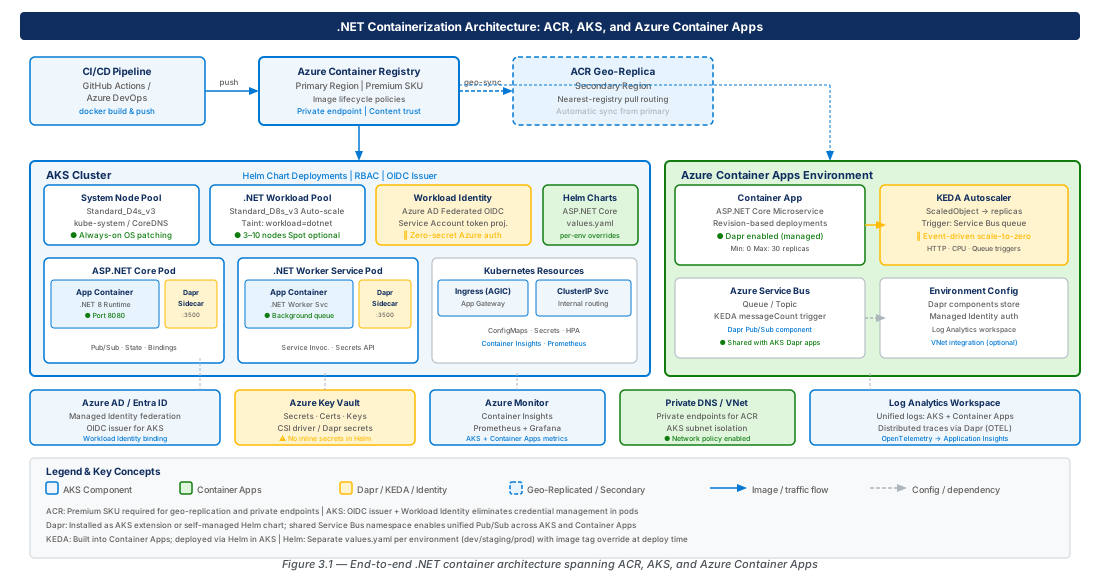
Azure Container Registry: Image Lifecycle and Geo-Replication
Registry Architecture and Naming Strategy
ACR is the foundation of the container supply chain. Premium is the only production SKU: it adds geo-replication, private endpoints, customer-managed keys, dedicated data endpoints, and a 99.95% SLA. Basic (10 GB) and Standard (100 GB) lack private endpoints and geo-replication—do not use them for production workloads.
# Create Premium ACR with zone redundancy and geo-replication
az acr create \
  --resource-group rg-containerizing-dotnet-workloads-prod-001 \
  --name containerizingdotnetprodeastus2 \
  --sku Premium --zone-redundancy Enabled \
  --public-network-enabled false --admin-enabled false

az acr replication create \
  --registry containerizingdotnetprodeastus2 \
--location westus3 --zone-redundancy EnabledImportant
Disable the ACR admin account (--admin-enabled false) in all production registries. The admin account uses username/password authentication that cannot be scoped, rotated automatically, or audited per-caller. All access should flow through managed identities with AcrPull or AcrPush roles.
Image Lifecycle Policies and Vulnerability Management
Container images accumulate rapidly in active CI/CD pipelines. ACR Tasks and lifecycle policies automate purge of untagged manifests, tags older than a configurable window, and retain a minimum number of recent images. The acr purge command executed as a cron-scheduled ACR Task is the primary tool.
# Purge task: retain 30 days, keep min 5 per repo, daily at 01:00 UTC
az acr task create \
  --registry containerizingdotnetprodeastus2 \
  --name purge-old-images \
  --cmd "acr purge --filter '.*:.*' --ago 30d --keep 5 --untagged" \
  --schedule "0 1 * * *" \
--context /dev/nullTip
Pair ACR vulnerability scanning (Microsoft Defender for Containers) with Azure Policy to block deployments of images with critical CVEs. The built-in policy Container images in Azure Container Registry should have vulnerability findings resolved can be assigned at subscription scope without modifying individual CI/CD pipelines.
Geo-Replication Design
Geo-replication in ACR is an active-active model: pull requests are served from the nearest replica via anycast routing, keeping image pulls local during pod scheduling. Enable --zone-redundancy Enabled per replica to survive a single-zone failure. Replication latency for images under 500 MB is typically under 60 seconds.
Warning
Geo-replication does not replicate ACR Tasks, webhooks, or lifecycle policies. Design CI/CD pipelines to push to the home registry and let replication propagate—do not push directly to individual replicas.
AKS Node Pool Design and Workload Identity for .NET
Cluster Architecture and Node Pool Topology
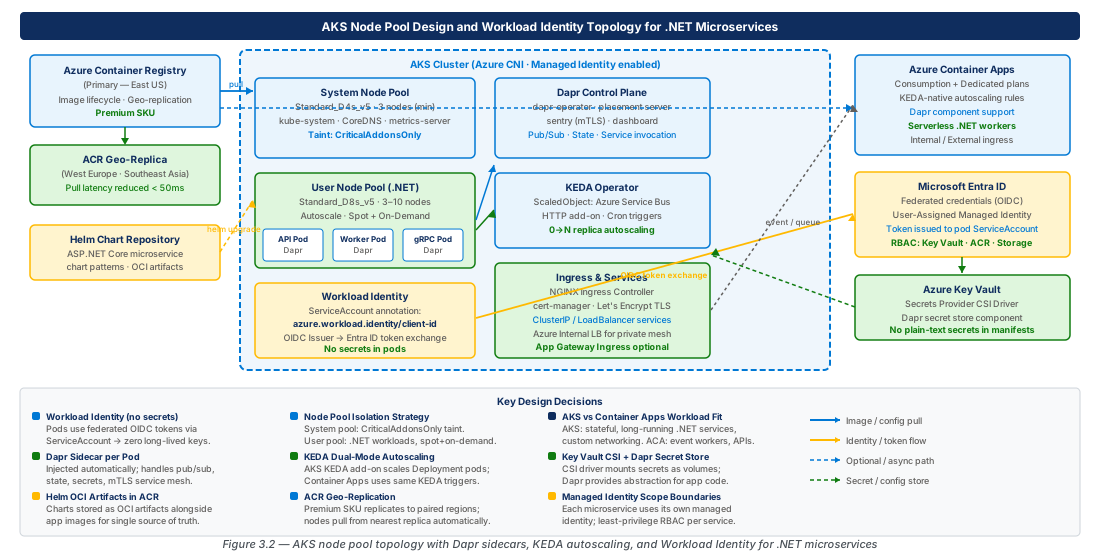
The foundational principle is separation of concerns through dedicated node pools. Every AKS cluster requires a system pool (tainted CriticalAddonsOnly=true:NoSchedule), a general-purpose user pool for ASP.NET Core APIs, and optionally a spot pool for interrupt-tolerant batch workloads. The --network-dataplane cilium flag enables eBPF-based dataplane with native NetworkPolicy, removing kube-proxy iptables overhead—measurable for microservices with high inter-service call volumes.
# Create AKS cluster with Cilium CNI and Workload Identity
az aks create \
  --name containerizing-dotnet-prod-eastus2-001 \
  --resource-group rg-containerizing-dotnet-workloads-prod-001 \
  --node-vm-size Standard_D4ds_v5 --node-count 3 \
  --network-plugin azure --network-dataplane cilium \
  --enable-oidc-issuer --enable-workload-identity \
  --enable-cluster-autoscaler --min-count 3 --max-count 5 \
  --attach-acr containerizingdotnetprodeastus2 \
  --zones 1 2 3 --tier Standard
Workload Identity for .NET Applications
The legacy approach of storing service principal secrets in Kubernetes Secrets has three critical flaws: manual rotation, base64 storage in etcd, and no per-pod audit trail. Azure Workload Identity solves all three by issuing short-lived OIDC tokens via a federated credential that maps a Kubernetes ServiceAccount to an Azure Managed Identity. The .NET application uses DefaultAzureCredential from Azure.Identity—no code changes beyond the package.
# Create managed identity and federated credential
OIDC_ISSUER=$(az aks show -g rg-containerizing-dotnet-workloads-prod-001 \
  -n containerizing-dotnet-prod-eastus2-001 \
  --query "oidcIssuerProfile.issuerUrl" -o tsv)

az identity create -g rg-containerizing-dotnet-workloads-prod-001 \
  --name mi-catalogapi-prod-001

az identity federated-credential create \
  --name fc-catalogapi-prod \
  --identity-name mi-catalogapi-prod-001 \
  --resource-group rg-containerizing-dotnet-workloads-prod-001 \
  --issuer "$OIDC_ISSUER" \
  --subject "system:serviceaccount:catalog:catalogapi" \
--audience "api://AzureADTokenExchange"Important
The OIDC discovery endpoint ({oidc-issuer}/.well-known/openid-configuration) must remain publicly accessible even in private-API-server clusters. AKS manages this automatically, but firewall policies on the node resource group can inadvertently block it and break token exchange.
Resource Quotas and Pod Disruption Budgets
Standard ASP.NET Core applications with EF Core and AutoMapper typically consume 150–300 MB RSS at startup. Set memory requests at 120% of idle RSS and limits at 200%; set CPU requests at the 95th-percentile under expected load. Pod Disruption Budgets with minAvailable: 2 on 3-replica deployments are mandatory—without them, a cluster upgrade that drains two nodes simultaneously can take a deployment to zero replicas.
Azure Container Apps with KEDA-Based Autoscaling
Container Apps Environment and Dapr Component Architecture
A Container Apps environment is the billing and networking boundary—it maps to a single VNet subnet and shares an internal load balancer and Log Analytics workspace. Two environments (production + staging, separate subnets) is the minimum viable configuration. Apps within the same environment communicate over private DNS without traversing the public internet.
# Create Container Apps Environment with workload profiles
az containerapp env create \
  --name cae-containerizing-dotnet-prod-eastus2-001 \
  --resource-group rg-containerizing-dotnet-workloads-prod-001 \
  --location eastus2 \
  --internal-only true \
  --enable-workload-profiles \
--tags environment=production workload=containerizing-dotnetTip
Use the Consumption + Dedicated workload profiles plan to keep warm containers for latency-sensitive .NET APIs (billing on reserved compute) while bursty background workers use the Consumption profile and bill at zero when idle. This hybrid model typically reduces cost by 40–60% versus fully dedicated hosting.
KEDA Scalers for .NET Microservices
KEDA's power for .NET microservices lies in event-source scalers: Azure Service Bus, Storage Queues, Event Hubs, RabbitMQ, and Kafka all have native scalers. When queue depth exceeds the configured threshold per replica, KEDA adds replicas; when it falls below, replicas are removed—potentially to zero. Tune the polling interval and cooldown based on downstream system capacity to avoid connection pool exhaustion.
# Deploy KEDA-scaled .NET worker (0-20 replicas via Service Bus queue depth)
az containerapp create \
  --name ca-orderprocessor-prod-001 \
  --environment cae-containerizing-dotnet-prod-eastus2-001 \
  --image containerizingdotnetprodeastus2.azurecr.io/order-processor:1.4.2 \
  --min-replicas 0 --max-replicas 20 \
  --scale-rule-type azure-servicebus \
--scale-rule-metadata "queueName=orders-prod" "messageCount=5"Warning
Scale-to-zero introduces a cold-start latency of 15–45 seconds for .NET 8 applications. For Service Bus queues with strict SLAs (e.g., 30-second end-to-end), set --min-replicas 1 to keep one warm replica and accept the baseline compute cost.
HTTP Scaling and Traffic Splitting for Canary Deployments
Container Apps supports HTTP-based scaling via a built-in ingress controller with automatic TLS provisioning, triggering on concurrent requests per replica (default: 10). Traffic splitting enables canary deployments natively—shift 10% to a new revision, monitor Application Insights, then complete cutover without Flagger or Argo Rollouts. Revision labels (--v142 suffix) provide stable named endpoints for deterministic integration test routing.
Helm Chart Patterns for ASP.NET Core Microservices
Helm Chart Structure and Values Hierarchy
The values hierarchy should express the minimum viable configuration at chart level and override only the delta between environments. Three layers: values.yaml (templating defaults), values-dev.yaml (fewer replicas, relaxed limits, disabled PDBs), and values-prod.yaml (replica counts, resource limits, PDB enabled, autoscaling on). The install command for any environment is then predictable: helm upgrade --install {release} {chart} -f values-{env}.yaml.
# values-prod.yaml — production layer of the three-tier hierarchy
replicaCount: 3
image:
  repository: containerizingdotnetprodeastus2.azurecr.io/catalog-api
  tag: "1.4.2"
serviceAccount:
  annotations:
    azure.workload.identity/client-id: "b3c4d5e6-..."
autoscaling:
  enabled: true
  minReplicas: 3
  maxReplicas: 20
podDisruptionBudget:
  enabled: true
  minAvailable: 2
Health Checks and ConfigMap Templates
The ASP.NET Core health check framework exposes /healthz/live (liveness—application only) and /healthz/ready (readiness—including downstream deps). Map liveness to the live endpoint and readiness to the ready endpoint to prevent cascading restarts during transient downstream outages. A Helm-managed ConfigMap mounted at /app/appsettings.Override.json injects non-secret config without cluttering the pod spec with environment variable entries.
Helm OCI Registry Integration with ACR
Helm 3.8+ supports OCI artifacts in container registries. Co-locating Helm charts in ACR with application images eliminates a separate chart repository. The AKS cluster's ACR attachment already grants the kubelet's managed identity permissions to pull OCI Helm charts—no additional auth configuration needed. ArgoCD and Flux both support OCI Helm sources for GitOps workflows.
# Package, push, and install Helm chart via ACR OCI registry
az acr login --name containerizingdotnetprodeastus2
helm package ./charts/catalog-api --version 1.4.2
helm push catalog-api-1.4.2.tgz \
  oci://containerizingdotnetprodeastus2.azurecr.io/helm
helm upgrade --install catalog-api \
  oci://containerizingdotnetprodeastus2.azurecr.io/helm/catalog-api \
  --version 1.4.2 --namespace catalog \
  -f values-prod.yaml --atomic --timeout 5m
Dapr Sidecar Integration with .NET Applications
Dapr Building Blocks for .NET Microservices
Dapr addresses cross-cutting microservices concerns—service invocation, pub/sub, state management, secret retrieval, and distributed tracing—via a localhost sidecar (daprd). The .NET application has no direct dependency on Azure Service Bus or Redis; only on Dapr's abstract API. The Dapr .NET SDK integrates with ASP.NET Core: topic subscriptions use the [Topic] attribute on minimal API endpoints, and DaprClient is injected via DI. On AKS, install via the GA AKS Dapr extension to receive automatic updates under Microsoft support.
# Enable Dapr AKS extension with HA mode
az k8s-extension create \
  --cluster-type managedClusters \
  --cluster-name containerizing-dotnet-prod-eastus2-001 \
  --resource-group rg-containerizing-dotnet-workloads-prod-001 \
  --name dapr --extension-type Microsoft.Dapr \
  --auto-upgrade-minor-version true \
  --configuration-settings "global.ha.enabled=true"
Service Invocation and Resiliency Policies
Dapr service invocation provides mTLS-encrypted, load-balanced HTTP/gRPC calls between services. Outbound requests go to http://localhost:3500/v1.0/invoke/{app-id}/method/{path}—the distributed systems complexity is entirely in the sidecar. Dapr resiliency policies (GA in 1.11) declare retry, timeout, and circuit breaker behavior in Resiliency CRDs, eliminating the need for per-service Polly pipelines for infrastructure-level calls.
Important
Dapr resiliency policies operate at the sidecar layer and apply to the Dapr API surface. For EF Core database retry and direct third-party HTTP calls that bypass Dapr, Polly remains the appropriate tool. Do not duplicate the same policy at both layers.
Dapr in Azure Container Apps
Container Apps provides first-class Dapr support—set dapr.enabled: true, dapr.appId, and dapr.appPort in the manifest; the platform injects daprd automatically. Dapr components are defined at the environment level and scoped per app via the scopes array. The combination of KEDA scaling (driven by raw queue depth) and Dapr pub/sub (reliable delivery + retries) creates a particularly elegant event-driven pattern with no code duplication between infrastructure scaling and message processing.
Lab
CE-05: Build and Push a Containerized ASP.NET Core API to ACR
Create a chiseled multi-stage ASP.NET Core 8 image, push it to ACR, and validate Defender vulnerability scan results. Requires az login, Docker Desktop, and .NET 8 SDK.
REGISTRY="containerizingdotnetprodeastus2"
dotnet new webapi -n CatalogApi --use-controllers --no-https
# Write multi-stage Dockerfile with 8.0-jammy-chiseled final stage
az acr login --name "$REGISTRY"
docker build -t "${REGISTRY}.azurecr.io/catalog-api:1.4.2" .
docker push "${REGISTRY}.azurecr.io/catalog-api:1.4.2"
az aks check-acr -g rg-containerizing-dotnet-workloads-prod-001 \
  -n containerizing-dotnet-prod-eastus2-001 \
--acr "${REGISTRY}.azurecr.io"CE-06: Deploy KEDA-Scaled .NET Worker to AKS with Workload Identity and Helm
Deploy a Service Bus queue consumer .NET worker to AKS using Helm with KEDA scaling (0–20 replicas) and Workload Identity. Creates the managed identity, federated credential, Service Bus queue, and Helm release in one flow.
RG="rg-containerizing-dotnet-workloads-prod-001"
# Create identity, assign Service Bus Data Receiver, create federated credential
az identity create -g "$RG" --name mi-orderprocessor-prod-001
# Enable KEDA add-on and deploy via Helm OCI chart from ACR
az aks enable-addons -g "$RG" -n containerizing-dotnet-prod-eastus2-001 \
  --addons keda
helm upgrade --install order-processor \
  oci://containerizingdotnetprodeastus2.azurecr.io/helm/order-processor \
  --version 1.0.0 --namespace orders --atomic \
  -f /tmp/lab-values.yaml --timeout 5m
Summary
| Concept | Key Point |
|---|---|
| AKS vs. Container Apps | AKS for complex, stateful, GPU workloads; Container Apps for event-driven APIs—use both in the same solution when workload types differ. |
| ACR SKU Selection | Premium is mandatory for production: geo-replication, private endpoints, and zone redundancy are unavailable in Basic and Standard. |
| Workload Identity | Replace service principal secrets with federated credentials tied to Kubernetes ServiceAccounts; DefaultAzureCredential resolves automatically. |
| KEDA Scaling | Scale-to-zero eliminates idle cost but adds cold-start latency; set minReplicas: 1 for latency-sensitive workloads. |
| Helm Values Hierarchy | Three-layer hierarchy (chart defaults → dev overrides → prod overrides) separates structural from environmental config; store charts as OCI in ACR. |
| Dapr Building Blocks | Use Dapr resiliency policies for sidecar-layer retry/circuit-breaker and Polly for application-layer resiliency—do not duplicate policies at both layers. |
| Image Lifecycle | Automate ACR purge tasks; combine Defender for Containers scanning with Azure Policy to block critical CVE images before they reach the cluster. |
Chapter: 3 of 12 | Status: v0.1 Draft |