Azure for .NET Developers: Production-Grade Cloud Architecture and Operations
Azure Functions and Serverless .NET
Serverless computing represents one of the most consequential shifts in cloud-native architecture: rather than provisioning infrastructure, you declare what code should run in response to events and let the platform handle everything beneath it. Azure Functions brings this model to .NET developers with first-class language support, a rich binding ecosystem, and advanced orchestration primitives suitable for mission-critical, stateful business workflows.
The Azure Functions Isolated Worker Model
Why the Isolated Worker Exists
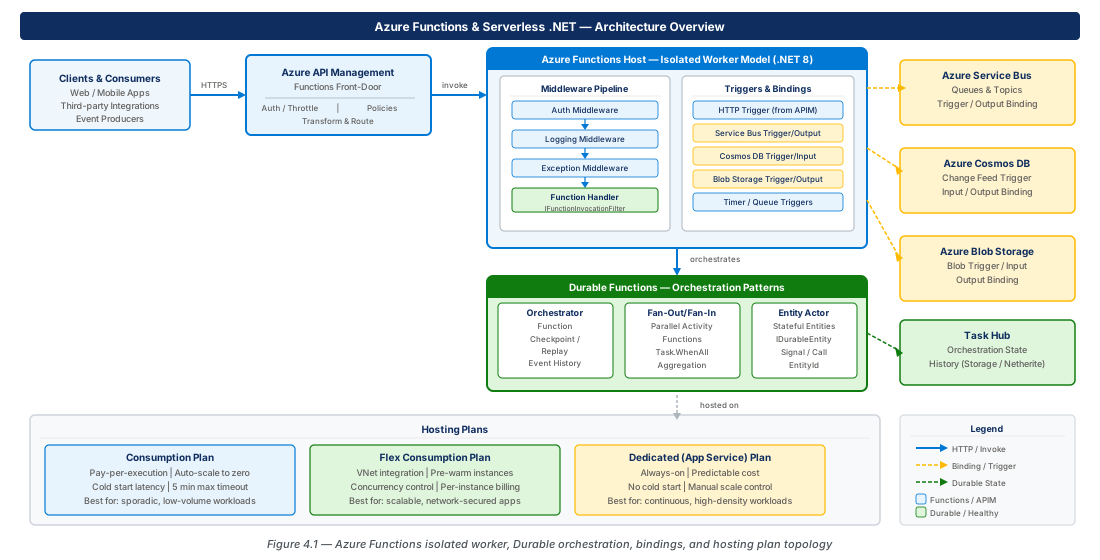
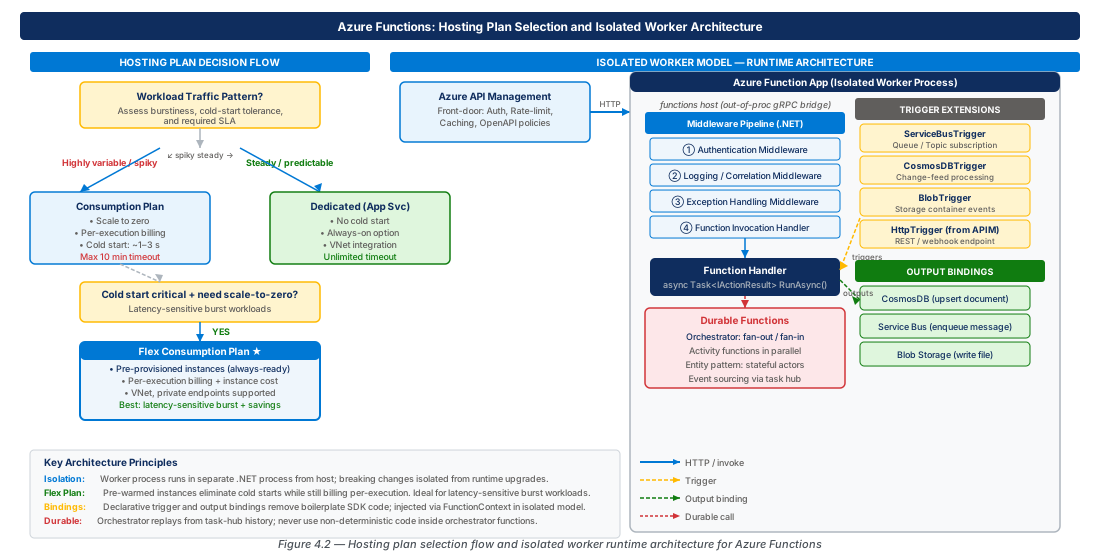
Before the isolated worker model, .NET functions ran in-process with the Functions host, creating a hard coupling between host runtime and your code. When the host pinned to .NET 6, your function code was also pinned, causing persistent dependency conflicts. The isolated worker model breaks this coupling: your code runs in a separate .NET process communicating with the host over gRPC, letting you target .NET 8 LTS, .NET 9, or future runtimes independently.
The isolation boundary also means an unhandled exception in your worker cannot crash the host, and telemetry is cleanly separated. This architecture maps directly onto the .NET generic host that ASP.NET Core developers already know, making the migration from web APIs to serverless significantly smoother.
The Generic Host and Startup Pipeline
An isolated-worker function app is structured identically to any other .NET generic host application. The entry point is Program.cs, which creates a HostBuilder, registers services, and calls RunAsync(). The middleware pipeline introduced by .ConfigureFunctionsWebApplication() is the correct architectural home for cross-cutting concerns — distributed tracing, structured logging enrichment, and uniform exception mapping.
var host = new HostBuilder()
    .ConfigureFunctionsWebApplication(worker =>
    {
        worker.UseMiddleware<CorrelationIdMiddleware>();
        worker.UseMiddleware<ExceptionHandlingMiddleware>();
        worker.UseMiddleware<TelemetryEnrichmentMiddleware>();
    })
    .ConfigureServices((ctx, services) =>
    {
        services.AddApplicationInsightsTelemetryWorkerService();
        services.AddSingleton<IOrderRepository, CosmosOrderRepository>();
        // ... additional registrations
    })
    .Build();
await host.RunAsync();
Dependency Injection and Configuration
Constructor injection is the primary DI mechanism for function classes. The IConfiguration system resolves values from environment variables, Azure App Configuration with feature flags, and Key Vault references — all via the standard .NET configuration provider chain. The IOptions<T> pattern with .ValidateOnStart() is particularly valuable: because functions scale out to many instances simultaneously, startup validation ensures a misconfigured environment variable fails fast on first boot rather than surfacing partial failures across a fleet.
Important
Avoid using the static keyword on function classes in the isolated worker model. Static function classes bypass constructor injection, leading to null reference exceptions that only manifest at runtime.
Durable Functions: Orchestration, Fan-Out, and Entity Patterns
Understanding the Durable Task Framework
Durable Functions adds stateful, long-running workflow capabilities using an event-sourcing model: every action taken by an orchestration is recorded as an immutable event to Azure Storage (or MSSQL/Netherite). When the orchestrator is replayed after an await, it reads its event history and fast-forwards to the last completed activity rather than re-executing I/O.
This replay constraint is the single most important architectural fact. Orchestrator functions must be deterministic — they cannot call DateTime.UtcNow, generate random numbers, or make HTTP calls directly. All non-deterministic work must be delegated to activity functions.
Warning
Never call DateTime.UtcNow inside an orchestrator. Use context.CurrentUtcDateTime instead — this reads the replay-safe timestamp from event history. Using DateTime.UtcNow for durable timers produces a different deadline on every replay, meaning the timer will never fire correctly after a restart.
Sequential and Fan-Out/Fan-In Orchestration
The fan-out pattern uses Task.WhenAll() over a collection of CallActivityAsync() calls. The Durable Task Framework dispatches each activity as an independent function invocation, potentially on separate compute instances, and records each completion event before the orchestrator unblocks.
// Fan-out: dispatch one activity per warehouse in parallel
var shipmentTasks = order.LineItems
    .GroupBy(li => li.WarehouseId)
    .Select(g => context.CallActivityAsync<ShipmentId>(
        nameof(CreateShipmentActivity),
        new ShipmentRequest { WarehouseId = g.Key, Items = g.ToList() }))
    .ToList();

// Fan-in: wait for all to complete
var shipmentIds = await Task.WhenAll(shipmentTasks);

// Replay-safe timer for human approval
var deadline = context.CurrentUtcDateTime.AddHours(24);Tip
For very large fan-outs (hundreds of items), use the sub-orchestrator pattern: divide work into batches and spawn a child orchestration per batch. This keeps individual orchestration history tables manageable and avoids Azure Storage throughput limits.
Durable Entities: Stateful Actors
Durable Entities implement the virtual actor pattern — an addressable, stateful unit identified by an entity ID. Entity state is durably persisted and mutations are serialized by the framework, making them safe for distributed counters, shopping cart aggregates, and rate-limiting without explicit locking.
public class ShoppingCartEntity : TaskEntity<CartState>
{
    public void AddItem(CartItem item)
    {
        var existing = State.Items.FirstOrDefault(i => i.Sku == item.Sku);
        if (existing != null) existing.Quantity += item.Quantity;
        else State.Items.Add(item);
    }
    public void Clear() => State.Items.Clear();
    [Function(nameof(ShoppingCartEntity))]
    public static Task Run([EntityTrigger] TaskEntityDispatcher d) => d.DispatchAsync<ShoppingCartEntity>();
}
Trigger and Binding Extensions
Service Bus Triggers and Output Bindings
The ServiceBusTrigger attribute invokes a function for each message on a queue or topic subscription. The binding manages the ServiceBusReceiver lifecycle, handles lock renewal for long-processing messages, and exposes the full settlement API — complete, abandon, dead-letter, and defer — through the injected ServiceBusMessageActions parameter.
{
  "extensions": {
    "serviceBus": {
      "prefetchCount": 100,
      "messageHandlerOptions": {
        "maxConcurrentCalls": 16,
        "autoCompleteMessages": false,
        "maxAutoLockRenewalDuration": "00:05:00"
      }
    }
  }
}Warning
If autoCompleteMessages: true (the default) is left on and your function throws after partially processing a message, the host still marks it complete — causing silent data loss. Always set autoCompleteMessages: false for production workloads where message loss is unacceptable.
Cosmos DB Triggers and Change Feed
The Cosmos DB trigger is powered by the change feed processor. The binding manages the lease container, checkpoint state, and parallel processing across function instances automatically. Each trigger requires a dedicated lease container — sharing a lease container between two functions monitoring the same source causes each to process only a fraction of changes.
[Function(nameof(ProcessCatalogChanges))]
public async Task ProcessCatalogChanges(
    [CosmosDBTrigger(
        databaseName: "catalog",
        containerName: "products",
        Connection = "CosmosDbConnection",
        LeaseContainerName = "leases",
        CreateLeaseContainerIfNotExists = true,
        MaxItemsPerInvocation = 100)]
    IReadOnlyList<Product> changedProducts,
    FunctionContext context)
{
    await _searchIndex.MergeOrUploadDocumentsAsync(changedProducts.Select(MapToDoc).ToList());
}Important
Each Cosmos DB trigger requires a dedicated lease container or a unique LeaseContainerPrefix. If two functions share the same lease container monitoring the same source, they compete for leases and each processes only a portion of the change feed — leading to dropped updates.
Blob Triggers and Bindings
The Blob trigger invokes a function when a blob is created or modified in an Azure Storage container and is commonly used for media processing, data ingestion pipelines, and document transformation workflows. The output binding writes to a blob without requiring explicit BlobContainerClient instantiation.
Tip
For high-volume ingestion (thousands of blobs per minute), the polling-based Blob trigger can introduce up to 10 minutes of latency on the Consumption plan. Use an Event Grid trigger from the storage account's BlobCreated event instead — notifications are delivered within seconds and are the recommended pattern for production data pipelines.
Hosting Plans: Consumption, Flex Consumption, and Dedicated
Understanding the Hosting Model Spectrum
Choosing the wrong hosting plan is expensive to reverse because it affects the function app's URL, compute SKU, network integration capabilities, and scaling behavior. Selection should be driven by latency requirements, traffic patterns, VNet integration needs, and total cost of ownership.
| Plan | Cold Start | VNet Integration | Max Instances | Billing Unit | Best For |
|---|---|---|---|---|---|
| Consumption | Yes (0 → 1) | Requires Premium | 200 | Per-execution (GB-s) | Low/variable traffic, cost-sensitivity |
| Flex Consumption | Reduced | Native, always-on | 1000 | Per-execution + min instances | Modern workloads needing VNet + reduced cold start |
| Premium (EP1–3) | Warm (pre-warmed) | Native, always-on | 100 | Per-vCPU-hour | VNet-integrated, latency-sensitive, long-running |
| Dedicated (ASP) | None | Native | Plan max | Per-ASP vCore-hour | Predictable workloads, compliance, co-hosted |
Consumption Plan
The Consumption plan bills only for executions — billed by invocation count and aggregate GB-seconds. The primary limitation is cold start latency: for .NET isolated worker apps with moderate dependency graphs, cold start times typically range from 800 ms to 2.5 seconds. This is unacceptable for synchronous HTTP APIs but operationally irrelevant for event-driven workloads (Service Bus, Cosmos DB change feed, timer).
Note
The Consumption plan does not support VNet integration natively. If your function needs to reach resources behind a private endpoint, use Flex Consumption or Premium. Attempting to use Consumption with VNet-private resources is a common architecture mistake that surfaces only at deployment time.
Flex Consumption Plan
Flex Consumption (GA since late 2024) retains scale-to-zero economics while adding native VNet integration, configurable instance memory (2 GB or 4 GB), and a configurable minimum number of always-warm instances. It also supports per-function concurrency limits, giving fine-grained control over inflight execution counts per function. Flex Consumption is the recommended default for most new greenfield applications.
Dedicated (App Service Plan) Hosting
Running Azure Functions on a Dedicated App Service Plan means no cold starts, predictable scaling, and treatment as a long-running process. This is correct for custom hardware tiers, compliance-mandated dedicated compute, or co-hosting alongside App Service web apps. Always On must be enabled — without it, the platform unloads an idle function app after 20 minutes, breaking timer-triggered functions.
# Enable Always On for a function app on a Dedicated plan
az functionapp config set \
  --resource-group rg-azure-functions-serverless-dotnet-prod-001 \
  --name azure-functions-prod-eastus2-001 \
  --always-on true
Azure API Management as a Functions Front-Door
Why Functions Alone Are Not Sufficient for Public APIs
Azure Functions exposed via HTTP triggers lack the features expected of a production-grade API platform: rate limiting, request/response transformation, developer portal, API versioning, analytics, and mTLS. Azure API Management (APIM) should sit in front of your function app when serving external consumers. APIM decouples the API contract from the implementation, letting backend functions be rewritten or replaced without breaking API consumers.
Important
When APIM is in front of your functions, disable direct function key access from the internet by placing the function app in a VNet and exposing it only via a private endpoint to APIM. Leaving public function keys accessible creates a security bypass that attackers exploit through brute-force key enumeration.
Importing Functions into APIM and Configuring Policies
APIM can auto-import Azure Functions directly from the portal or CLI, generating API operations for each HTTP-triggered function. Policies are XML documents applied to the request/response pipeline at the API, product, or individual operation level.
<!-- APIM inbound policy: JWT validation + rate limit + key forwarding -->
<inbound>
  <validate-jwt header-name="Authorization" failed-validation-httpcode="401">
    <openid-config url="https://login.microsoftonline.com/{tenant}/v2.0/.well-known/openid-configuration" />
    <required-claims><claim name="aud"><value>api://orders-api-prod</value></claim></required-claims>
  </validate-jwt>
  <rate-limit-by-key calls="500" renewal-period="60"
                     counter-key="@(context.Subscription.Id)" />
  <set-header name="x-functions-key" exists-action="override">
    <value>{{orders-function-host-key}}</value>
  </set-header>
</inbound>Tip
Store the function host key in an APIM Named Value that references Azure Key Vault. The key is never stored in plain text in APIM configuration and rotates automatically when updated in Key Vault. Reference it in policy as {{orders-function-host-key}}.
Versioning and Lifecycle Management
APIM supports API versioning through URL path segments (/v1/, /v2/), query string parameters, or HTTP headers. Path-based versioning is most explicit and easiest to observe in logs. When deploying a new function app version, import it under a new API ID and path in the same version set, use APIM's revision mechanism to test before promoting, and deprecate the old version with a sunset date on the developer portal.
Lab
CE-07: Deploy a Production-Ready Isolated Worker Function App with Service Bus Integration
Create all required Azure resources and deploy a .NET 8 isolated worker function app on the Flex Consumption plan with Service Bus trigger, Cosmos DB output binding, and Application Insights telemetry.
#!/usr/bin/env bash
LOCATION="eastus2"
RG="rg-azure-functions-serverless-dotnet-prod-001"
FUNC="azure-functions-prod-eastus2-001"
STORAGE="stfuncsprodeastus2001"
SB_NS="sbns-functions-prod-eastus2-001"
COSMOS="cosmos-functions-prod-eastus2-001"
APPI="appi-functions-prod-eastus2-001"
PLAN="asp-functions-flex-prod-eastus2-001"

az group create --name "$RG" --location "$LOCATION"
az storage account create --name "$STORAGE" --resource-group "$RG" \
  --sku Standard_LRS --https-only true --min-tls-version TLS1_2
# ... see draft for full Service Bus, Cosmos DB, App Insights, and functionapp create commands# Create Flex Consumption plan and function app
az functionapp plan create --resource-group "$RG" --name "$PLAN" \
--location "$LOCATION" --sku FC1 --is-linux
az functionapp create --resource-group "$RG" --name "$FUNC" \
--storage-account "$STORAGE" --plan "$PLAN" \
--runtime dotnet-isolated --runtime-version 8 \
--functions-version 4 --https-only true --assign-identity "[system]"
az functionapp deployment source config-zip \
--resource-group "$RG" --name "$FUNC" --src "./publish/azure-functions-prod.zip"CE-08: Configure Azure API Management in Front of the Function App with JWT Policy
Create an APIM instance, store the function host key in Key Vault, import the function app as an API, and apply JWT validation and rate-limit policies using a Key Vault-backed named value.
# Create APIM instance and assign system managed identity
APIM="apim-functions-prod-eastus2-001"
KV="kv-functions-prod-eastus2-001"
az apim create --name "$APIM" --resource-group "$RG" \
  --publisher-name "Contoso Platform" --publisher-email "platform@contoso.com" \
  --sku-name Developer --location "$LOCATION"
az apim update --name "$APIM" --resource-group "$RG" --enable-managed-identity true
# Store function host key in Key Vault and create APIM named value
# Then import function app and apply inbound JWT + rate-limit policy (see draft)
Summary
| Concept | Key Point |
|---|---|
| Isolated Worker Model | Function code runs in a separate .NET process, enabling independent runtime versioning, full generic host DI, and a middleware pipeline for cross-cutting concerns. |
| Durable Functions Replay Semantics | Orchestrator functions are replayed on resume — never use DateTime.UtcNow, random numbers, or direct I/O inside an orchestrator; delegate to activity functions. |
| Fan-Out / Fan-In | Use Task.WhenAll() over CallActivityAsync() calls; for very large fan-outs, batch with sub-orchestrators to keep history table size manageable. |
| Binding Extensions | CosmosDB, Service Bus, and Blob bindings eliminate boilerplate SDK code; require careful configuration (autoCompleteMessages: false, unique lease containers) to avoid data loss. |
| Hosting Plan Selection | Flex Consumption is the recommended default — VNet integration, configurable minimum instances, and per-execution billing with no architectural lock-in to a specific SKU. |
| APIM as Front-Door | Never expose function HTTP triggers directly to the internet; use APIM for JWT validation, rate limiting, and versioning, with the function host key stored in Key Vault. |
Chapter: 4 of 12 | Status: v0.1 Draft |