Azure for .NET Developers: Production-Grade Cloud Architecture and Operations
Relational Data Access with Azure SQL and EF Core
Relational data remains the backbone of most enterprise .NET applications. Azure SQL Database provides a fully managed, enterprise-grade platform that removes the operational burden of patching, backups, and high availability while delivering the full programmability of SQL Server. When paired with Entity Framework Core, teams can build data access layers that are maintainable, testable, and production-resilient without sacrificing granular control.
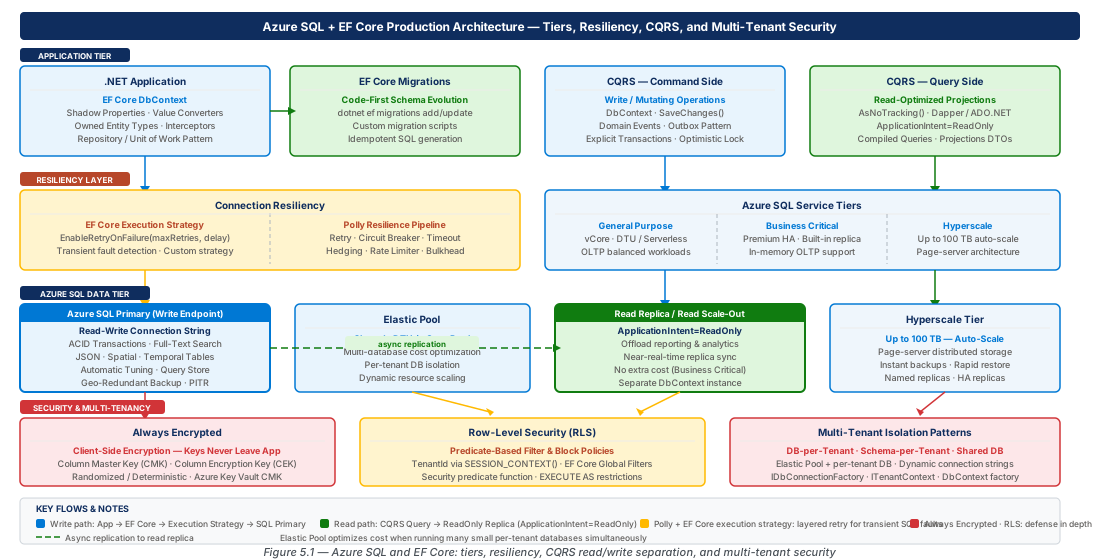
Azure SQL Database: Service Tiers, Elastic Pools, and Hyperscale
Choosing the right Azure SQL service tier is an architectural decision with long-term cost and operational consequences. Options span from modest DTU-based allocations suitable for development to the Hyperscale architecture capable of reaching 100 TB with near-instant backups.
DTU vs. vCore: The Purchasing Model Decision
The DTU model bundles compute, memory, and I/O into a single blended metric, but it obscures the underlying hardware and caps at 4 TB and 4000 DTUs, making it unsuitable for large-scale applications. The vCore model exposes actual hardware—General Purpose uses remote Azure Premium Storage (up to 5,000 IOPS per vCore); Business Critical uses local SSD (up to 200,000 IOPS) and is ideal for financial ledgers or e-commerce order processing.
Azure Hybrid Benefit for SQL Server allows organizations with existing SQL Server licenses with Software Assurance to reduce vCore compute cost by up to 55%. This benefit is only available in the vCore model, making it the preferred choice for any organization with an existing on-premises SQL Server footprint.
| Feature | DTU Standard/Premium | vCore General Purpose | vCore Business Critical | Hyperscale |
|---|---|---|---|---|
| Max Storage | 4 TB | 4 TB | 4 TB | 100 TB |
| Max vCores | N/A (4000 DTUs) | 80 vCores | 80 vCores | 80 vCores |
| IOPS | Up to 6,400 (P15) | 5,000 per vCore | 200,000 (local SSD) | Up to 204,800 |
| Read Scale-Out | No | No | Yes (1 free replica) | Yes (up to 4 named) |
| Azure Hybrid Benefit | No | Yes | Yes | Yes |
| Serverless Option | No | Yes | No | No |
| Best For | Dev/test, simple apps | Most OLTP production | Latency-sensitive, OLAP | Very large databases |
Important
Migrating between DTU and vCore requires a brief service interruption. Plan this transition during a maintenance window and use the --compute-model vCore flag in Azure CLI. Reversing from vCore back to DTU requires an explicit export/import cycle in some configurations.
Elastic Pools: Multi-Tenant Cost Optimization
Elastic pools allow multiple databases to share a common pool of vCore resources—the economically optimal choice for SaaS applications with many small tenants. Setting --db-dtu-min (or --min-capacity in vCore) to 0 allows idle databases to consume zero resources, maximizing density. Setting a per-database maximum prevents any single tenant from causing noisy-neighbor degradation.
Tip
Use the Serverless compute tier for development and staging elastic pools. Serverless automatically pauses databases after a configurable inactivity period (minimum 1 hour) and resumes on next connection, eliminating idle costs in non-production environments.
Hyperscale: Architecture and When to Use It
Azure SQL Hyperscale separates compute and storage through a distributed log service and tiered page server architecture. Backups record a log offset rather than a full snapshot, making backup and restore near-instantaneous regardless of database size—a 50 TB database restores in minutes. Named replicas (up to four per primary) are independently scalable compute nodes sharing the same page server storage, enabling a high-powered primary for OLTP writes alongside a low-cost named replica for analytics.
Hyperscale is the correct choice when storage exceeds 4 TB, when more than four read scale-out replicas are required, or when backup speed is a contractual requirement. For sub-5ms write latency SLAs on small datasets, Business Critical's local SSD remains the better choice.
EF Core Migrations, Shadow Properties, and Owned Entity Types
EF Core's migration system is the most common mechanism for evolving database schemas in .NET applications, but its default behaviors are frequently misapplied in production deployments. Understanding how EF Core tracks schema state and generates SQL enables architects to design a schema lifecycle that is safe, auditable, and reversible.
Designing a Production-Safe Migration Strategy
EF Core stores applied migration history in __EFMigrationsHistory. The SQL it generates is not always production-safe out of the box—adding a non-nullable column with a default to a large table can briefly lock the table. The safest pattern is an expand-contract approach: first deploy nullable columns, then the application code to populate them, then a follow-up migration to add the NOT NULL constraint.
Always generate idempotent scripts with dotnet ef migrations script --idempotent and have them reviewed before production execution. Use MigrationBuilder.Sql() within the migration class to inject custom SQL for index creation with ONLINE = ON hints or stored procedure updates that EF Core cannot model natively.
# Provision Azure SQL — vCore GP 4, zone-redundant
az sql db create \
  --resource-group "rg-azure-sql-efcore-persistence-prod-001" \
  --server "azure-sql-prod-eastus2-001" \
  --name "sqldb-bookstore-prod-eastus2-001" \
  --compute-model Provisioned --edition GeneralPurpose \
  --family Gen5 --capacity 4 \
  --zone-redundant true --max-size 32GB
Shadow Properties: Audit Trails Without Domain Model Pollution
Shadow properties exist in the database schema but have no CLR property on the entity class. They are defined in OnModelCreating using Property<T>() and are the correct mechanism for audit columns (CreatedAt, UpdatedAt, CreatedBy) without forcing domain model classes to carry infrastructure concerns.
// Shadow property configuration + SaveChangesAsync override
protected override void OnModelCreating(ModelBuilder modelBuilder)
{
    foreach (var entityType in modelBuilder.Model.GetEntityTypes())
    {
        modelBuilder.Entity(entityType.Name)
            .Property<DateTime>("CreatedAt").HasDefaultValueSql("GETUTCDATE()");
        modelBuilder.Entity(entityType.Name).Property<string>("CreatedBy").HasMaxLength(256);
    }
}
// ... populate in SaveChangesAsync via ChangeTracker.Entries()
Owned Entity Types: Value Objects in Relational Schema
EF Core models DDD value objects as owned entity types configured with OwnsOne or OwnsMany, persisting them as columns in the owner's table by default. Production schemas should configure explicit column names using HasColumnName() rather than relying on the default OwnerProperty_OwnedProperty pattern to prevent schema churn during CLR refactoring.
// Address value object mapped as owned type
modelBuilder.Entity<Order>()
    .OwnsOne(o => o.ShippingAddress, addr =>
    {
        addr.Property(a => a.Street).HasColumnName("ShippingStreet").HasMaxLength(200);
        addr.Property(a => a.City).HasColumnName("ShippingCity").HasMaxLength(100);
        addr.Property(a => a.PostalCode).HasColumnName("ShippingPostalCode").HasMaxLength(20);
});Note
Owned entity types configured with OwnsMany require a shadow primary key generated by EF Core. Always inspect the generated migration SQL when introducing OwnsMany for the first time, as the shadow Id property can conflict with certain migration scenarios.
Connection Resiliency with EF Core Execution Strategies and Polly
Transient database failures are a reality in any cloud environment. Azure SQL enforces resource governance limits that occasionally return error codes 40197, 40501, 40613, or 49918. Connection resiliency is not optional in a production Azure SQL deployment—it is a baseline reliability requirement.
EF Core Built-In Retry Execution Strategy
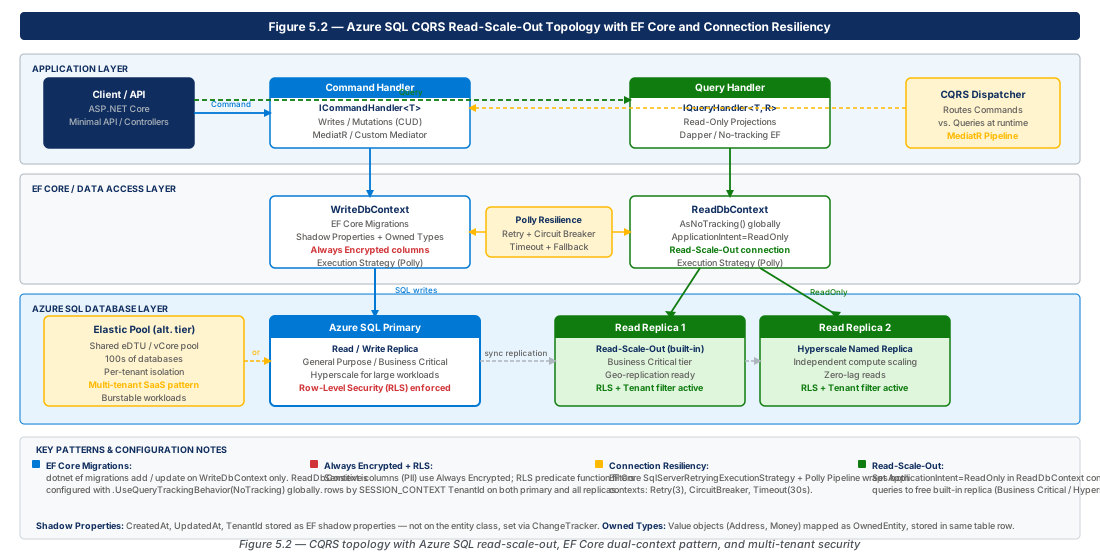
EF Core's SQL Server-specific execution strategy understands which Azure SQL error codes are transient and automatically retries failed operations with exponential backoff and jitter. For multi-statement transactions, wrap the entire operation in strategy.ExecuteAsync() so the full lambda is re-executed atomically on retry.
services.AddDbContext<AppDbContext>(options =>
    options.UseSqlServer(connectionString, sqlOptions =>
        sqlOptions.EnableRetryOnFailure(
            maxRetryCount: 5,
            maxRetryDelay: TimeSpan.FromSeconds(30),
            errorNumbersToAdd: null)));

// Wrap transactions in strategy scope
var strategy = context.Database.CreateExecutionStrategy();
await strategy.ExecuteAsync(async () => {
    await using var tx = await context.Database.BeginTransactionAsync();
    await context.SaveChangesAsync();
    await tx.CommitAsync();
});Warning
Do not use context.Database.BeginTransactionAsync() directly outside of an execution strategy scope when retry is enabled. EF Core will throw InvalidOperationException because it cannot safely retry a partial transaction.
Advanced Resiliency with Polly
The EF Core built-in strategy covers database-layer transients, but production applications also encounter Azure AD token expiry on managed identity connections. A Polly pipeline layered on top of EF Core's retry handles these gracefully.
var pipeline = new ResiliencePipelineBuilder()
    .AddRetry(new RetryStrategyOptions {
        MaxRetryAttempts = 3, Delay = TimeSpan.FromSeconds(2),
        BackoffType = DelayBackoffType.Exponential, UseJitter = true,
        ShouldHandle = new PredicateBuilder()
            .Handle<SqlException>(ex => ex.Number is 40197 or 40501 or 40613)
            .Handle<AuthenticationException>()
    })
    .AddCircuitBreaker(new CircuitBreakerStrategyOptions {
        SamplingDuration = TimeSpan.FromSeconds(30),
        FailureRatio = 0.5, MinimumThroughput = 10,
        BreakDuration = TimeSpan.FromSeconds(15)
}).Build();Tip
Register the Polly pipeline as a singleton in the DI container and inject it into repository classes. This ensures circuit breaker state is shared across all DbContext instances in the process, preventing a thundering-herd scenario where each isolated context independently trips its own breaker.
Always Encrypted and Row-Level Security for Multi-Tenant Applications
Multi-tenant SaaS applications face two distinct security requirements: data isolation (tenant A cannot access tenant B's rows) and data confidentiality (even DBAs cannot read sensitive column values). Row-Level Security (RLS) addresses isolation; Always Encrypted addresses confidentiality. A complete multi-tenant security posture requires both.
Row-Level Security: Predicate-Based Tenant Isolation
RLS enforces data isolation at the database engine level using security predicates—inline table-valued functions that filter rows based on session context. Unlike application-layer filtering, RLS predicates execute inside the engine regardless of how the query arrives, providing defense-in-depth against a misconfigured application layer.
CREATE FUNCTION Security.TenantAccessPredicate(@TenantId NVARCHAR(128))
RETURNS TABLE WITH SCHEMABINDING AS RETURN (
    SELECT 1 AS AccessResult
    WHERE @TenantId = CAST(SESSION_CONTEXT(N'TenantId') AS NVARCHAR(128))
       OR IS_MEMBER('db_owner') = 1);

CREATE SECURITY POLICY TenantIsolationPolicy
    ADD FILTER PREDICATE Security.TenantAccessPredicate(TenantId) ON dbo.Orders,
    ADD BLOCK PREDICATE Security.TenantAccessPredicate(TenantId) ON dbo.Orders AFTER INSERT
    WITH (STATE = ON);
Integration with EF Core requires a custom DbConnectionInterceptor that sets session context on every new connection using sp_set_session_context with @readonly=1. This interceptor receives the active tenant via ICurrentTenantService injected through DI.
Important
Always use @readonly=1 in sp_set_session_context. This marks the tenant context as immutable for the connection's lifetime, preventing a compromised application layer from overwriting the tenant ID to escalate access to another tenant's data.
Always Encrypted: Column-Level Encryption with Client-Side Key Management
Always Encrypted moves the encryption boundary to the application client. Column encryption keys (CEKs) are wrapped by a column master key (CMK) stored in Azure Key Vault. The .NET driver fetches and uses the CMK locally—the database server never sees plaintext values, so even a fully compromised SQL Server process or sysadmin DBA cannot read encrypted columns.
Always Encrypted supports two types: deterministic encryption (same plaintext produces same ciphertext, enabling equality predicates) and randomized encryption (stronger security but no query filtering). Use deterministic for filterable columns like email addresses; use randomized for store-only PII like Social Security Numbers.
# Create CMK in Azure Key Vault for Always Encrypted
az keyvault key create \
  --vault-name "kv-bookstore-prod-eastus2-001" \
  --name "cmk-bookstore-pii-prod-001" \
  --kty RSA --size 2048 \
--ops wrapKey unwrapKey sign verifyWarning
Randomized encryption makes the encrypted column incomparable. Attempting to use a randomized-encrypted column in a WHERE clause results in an Operand type clash error at runtime, not compile time. Validate encryption type choices against query patterns before deploying to production.
Read Replicas, Read Scale-Out, and CQRS with Azure SQL
The CQRS pattern applied at the data access layer separates read models from write models to optimize each independently. Azure SQL's read scale-out routes read-only connections to high-availability secondary replicas, allowing analytical queries to run without competing for resources with OLTP write workloads.
Azure SQL Read Scale-Out: How It Works
For Business Critical tier databases, Azure SQL maintains secondary replicas as part of the Always On availability group. Routing a connection to the read replica requires appending ApplicationIntent=ReadOnly to the connection string. The replica uses asynchronous log-shipping, introducing milliseconds to low-seconds of replication lag—acceptable for dashboards and reports, but write paths requiring read-after-write consistency should bypass the replica entirely.
CQRS Implementation with EF Core and Read Replicas
Implement CQRS at the EF Core level with two distinct DbContext registrations—one for the write (command) side pointing to the primary, and one for the read (query) side using a connection string with ApplicationIntent=ReadOnly and QueryTrackingBehavior.NoTracking globally.
// Write context — change tracking, primary endpoint
services.AddDbContext<BookstoreWriteContext>(options =>
    options.UseSqlServer(config.GetConnectionString("SqlPrimary"),
        sql => sql.EnableRetryOnFailure(5, TimeSpan.FromSeconds(30), null)));

// Read context — no tracking, ApplicationIntent=ReadOnly in connection string
services.AddDbContextPool<BookstoreReadContext>(options =>
    options.UseSqlServer(config.GetConnectionString("SqlReadOnly"),
        sql => sql.EnableRetryOnFailure(5, TimeSpan.FromSeconds(30), null))
    .UseQueryTrackingBehavior(QueryTrackingBehavior.NoTracking), poolSize: 128);
Geo-Replication for Global Read Scalability
Active geo-replication creates readable secondary databases in up to four additional Azure regions. A .NET application with users in North America and Europe can route European read queries to a West Europe geo-replica, reducing read latency by 60–80ms. The recovery point objective (RPO) is typically under 5 seconds for well-connected Azure regions.
Lab
The two lab exercises below provision the production and development Azure SQL environments and configure multi-tenant security using Row-Level Security and Always Encrypted.
CE-09: Provision Azure SQL Infrastructure with EF Core Migration Pipeline
Create production and development resource groups, provision a zone-redundant vCore General Purpose database on the production server, and create a serverless elastic pool for development tenant databases. Then generate and apply an idempotent EF Core migration script.
# Step 1: Create resource groups
az group create --name "rg-azure-sql-efcore-persistence-prod-001" --location eastus2 \
  --tags Environment=Production Workload=Persistence
az group create --name "rg-azure-sql-efcore-persistence-dev-001" --location eastus2

# Step 2: Create production SQL server + database
az sql server create --name azure-sql-prod-eastus2-001 --resource-group rg-azure-sql-efcore-persistence-prod-001 \
  --location eastus2 --admin-user sqladmin --admin-password "$(openssl rand -base64 20)"
az sql db create --resource-group rg-azure-sql-efcore-persistence-prod-001 \
  --server azure-sql-prod-eastus2-001 --name sqldb-bookstore-prod-eastus2-001 \
  --edition GeneralPurpose --family Gen5 --capacity 4 --zone-redundant true

# Step 3: Generate idempotent migration script and apply
dotnet ef migrations script --idempotent --output ./migrations/schema_current.sql
sqlcmd -S azure-sql-prod-eastus2-001.database.windows.net -d sqldb-bookstore-prod-eastus2-001 -G -i ./migrations/schema_current.sqlCE-10: Configure Row-Level Security and Always Encrypted for Multi-Tenant Isolation
Create an Azure Key Vault with purge protection for the Always Encrypted column master key, assign RBAC roles to the application managed identity, then deploy RLS filter and block predicates to the Orders table and validate tenant isolation.
# Step 1: Create Key Vault and assign Key Vault Crypto User to app identity
az keyvault create --name kv-bookstore-prod-eastus2-001 --resource-group rg-azure-sql-efcore-persistence-prod-001 \
  --sku premium --enable-purge-protection true --enable-rbac-authorization true
az role assignment create --role "Key Vault Crypto User" --assignee "$(az identity show --name id-bookstore-api-prod-eastus2-001 -g rg-azure-sql-efcore-persistence-prod-001 --query principalId -o tsv)" \
  --scope "$(az keyvault show --name kv-bookstore-prod-eastus2-001 -g rg-azure-sql-efcore-persistence-prod-001 --query id -o tsv)"

# Step 2: Create CMK in Key Vault
az keyvault key create --vault-name kv-bookstore-prod-eastus2-001 --name cmk-bookstore-pii-prod-001 \
  --kty RSA --size 2048 --ops wrapKey unwrapKey

# Step 3: Apply RLS via sqlcmd and validate tenant isolation
sqlcmd -S azure-sql-prod-eastus2-001.database.windows.net -d sqldb-bookstore-prod-eastus2-001 -G -i rls_setup.sql
Summary
This chapter covered the full Azure SQL and EF Core production stack from infrastructure selection through security enforcement and horizontal read scalability.
| Concept | Key Point |
|---|---|
| Azure SQL Service Tiers | vCore is mandatory for production; General Purpose for standard OLTP, Business Critical for sub-millisecond latency, Hyperscale for >4 TB or instant backup/restore. |
| Elastic Pools | Share vCore budget across tenant databases; configure per-database max capacity to prevent noisy-neighbor contention; use Serverless for dev/test pools. |
| EF Core Migrations | Always generate idempotent scripts with --idempotent and review before production; use expand-contract for zero-downtime schema changes. |
| Shadow Properties | Model audit columns and FK-only relationships without polluting domain entity classes; populate in SaveChangesAsync via ChangeTracker. |
| Connection Resiliency | Enable EnableRetryOnFailure for all DbContext registrations; wrap manual transactions in strategy.ExecuteAsync(); add Polly circuit breaker for microservices. |
| Row-Level Security | Enforce tenant isolation at the SQL engine with filter and block predicates; set sp_set_session_context with @read_only=1 from a DbConnectionInterceptor. |
| Always Encrypted | Protects sensitive columns even from DBAs; store CMK in Azure Key Vault; use deterministic encryption for filterable columns, randomized for store-only PII. |
| CQRS / Read Scale-Out | Register a separate read DbContext with ApplicationIntent=ReadOnly and NoTracking; target named Hyperscale replicas for analytics isolation. |
Chapter: 5 of 12 | Status: v0.1 Draft |