Azure for .NET Developers: Production-Grade Cloud Architecture and Operations
Azure Cosmos DB for .NET: Distributed Data Patterns
Azure Cosmos DB sits at the intersection of planetary-scale distribution and millisecond-latency data access. Unlike relational systems that bolt on replication as an afterthought, Cosmos DB was engineered from the ground up around a globally distributed, multi-model log-structured storage engine where consistency, partitioning, and throughput are first-class design dials. This chapter gives you the mental models, SDK patterns, and operational instincts required to build production .NET systems on Cosmos DB that stay performant as data grows, available as regions fail, and economical as workloads evolve.
1. Foundations: Resource Model and Storage Engine
Account, Database, Container Hierarchy
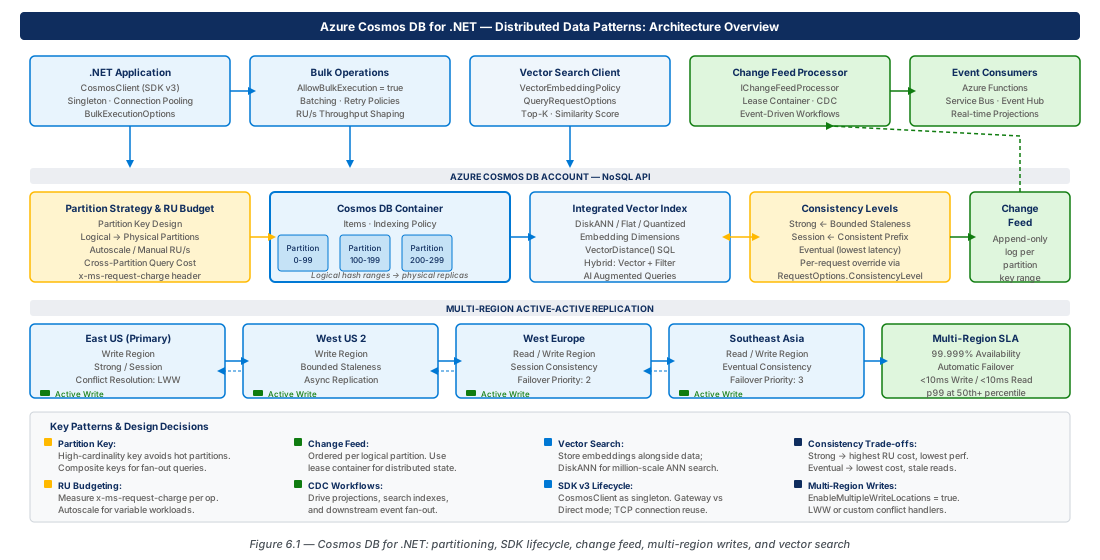
Every Cosmos DB deployment starts with an account — the unit of geo-distribution, network isolation, and identity. Beneath the account sit databases (logical namespaces for billing and access policy) and containers (independently scalable, partitioned collections of JSON documents). Throughput provisioning, partition key selection, and indexing policy decisions are all made at the container level.
When creating a container choose between provisioned throughput and serverless. Provisioned throughput reserves Request Units per second (RU/s) and supports autoscale; serverless charges per consumed RU with no pre-commitment. For production workloads with predictable traffic, provisioned autoscale is almost always the right choice — it gives latency guarantees and absorbs spikes without cold-start penalty.
The container's storage is divided into logical partitions (all documents sharing a partition key value) and physical partitions (SSD-backed replica sets). Cosmos DB maps logical to physical partitions and splits physical partitions as data grows, transparently to your application. ACID transactions are only guaranteed within a single logical partition.
Request Units: The Universal Currency
A Request Unit (RU) is calibrated so that reading a 1 KB document by its primary key costs exactly 1 RU. Writes cost roughly 5× more than point reads for the same document size. The .NET SDK surfaces RU consumption on every response via the RequestCharge property — log it for every operation and alert when it exceeds your baseline by more than 20%.
Important
Cross-partition queries fan out across every physical partition, multiplying RU cost by the partition count. Design partition keys so the most frequent query patterns are single-partition scans.
Tip
Start with autoscale at a maximum of 4,000 RU/s for new containers. Let Azure Monitor's RU consumption metrics guide your first capacity review after two weeks of real traffic.
2. Partition Key Design and RU Budgeting
Choosing a Partition Key That Scales
Partition key selection is the highest-leverage architectural decision for a Cosmos DB container — and it is immutable. Choose a property with high cardinality, present on every document, that aligns with the natural access unit of your application. For multi-tenant SaaS, tenantId is almost always the right choice. The classic anti-pattern is choosing a low-cardinality property like status or region, which creates hot partitions that absorb the majority of traffic regardless of provisioned RU/s.
Cosmos DB supports hierarchical partition keys (up to three properties, e.g., ["tenantId","userId"]), useful when a single key creates too few logical partitions or when you need transactional atomicity across a two-level hierarchy. For most workloads, a single well-chosen key is sufficient.
Warning
Hot partitions produce 429 TooManyRequests errors on that specific partition while others remain underutilized. Increasing RU/s does not fix the distribution skew — only a data migration to a better-keyed container does.
Synthetic Keys and Bucketing
When no natural high-cardinality field exists, construct a synthetic partition key by combining fields: $"{customerId}:{orderDate:yyyyMM}". This creates monthly buckets that bound the 20 GB logical-partition limit while retaining customer-month co-location. The bucket pattern extends this with a modulus suffix ($"{tenantId}:{documentId.GetHashCode() % bucketCount}") to distribute writes across bucketCount partitions at the cost of bounded read fan-out.
RU Budgeting for Production
RU budgeting is an ongoing capacity planning process: measure actual RU consumption per operation type in a pre-production load test, multiply by expected peak ops/s with a 25% margin, and set that as your autoscale maximum. Revisit monthly during the first year as usage patterns stabilize.
| Operation Type | Approx. RU (1 KB doc) | Notes |
|---|---|---|
| Point read (id + partition key) | 1 RU | Always prefer over queries for known IDs |
| Upsert / replace | 5–7 RU | Varies with index count; disable unused indexes |
| Single-partition query (indexed) | 2–5 RU | Scales with result set size |
| Single-partition query (unindexed) | 10–50+ RU | Full scan within partition |
| Cross-partition query | 2–5 RU × N | N = number of physical partitions |
| Change feed read (per page) | 2–5 RU | Very efficient; batched per continuation token |
Tip
Add a middleware layer that logs response.RequestCharge to Application Insights as a custom metric on every Cosmos DB operation, tagged with operation type and container name. This gives you a real-time RU heat map for both troubleshooting and capacity planning.
3. .NET SDK v3: Client Lifecycle and Bulk Operations
CosmosClient Lifecycle and Configuration
CosmosClient is a heavyweight, thread-safe singleton — creating one per request is a critical antipattern. Register it with AddSingleton in .NET DI. Use ConnectionMode.Direct for all Azure-hosted workloads (reduces latency by 1–3 ms per op), and authenticate with DefaultAzureCredential instead of account keys.
// Program.cs — Cosmos DB singleton with Direct mode + Managed Identity
builder.Services.AddSingleton<CosmosClient>(sp => {
    var cfg = sp.GetRequiredService<IConfiguration>();
    var opts = new CosmosClientOptions {
        ConnectionMode = ConnectionMode.Direct,
        MaxRetryAttemptsOnRateLimitedRequests = 9,
        MaxRetryWaitTimeOnRateLimitedRequests = TimeSpan.FromSeconds(30),
        ApplicationPreferredRegions = [Regions.EastUS2, Regions.WestUS2]
    };
    return new CosmosClient(cfg["CosmosDb:AccountEndpoint"], new DefaultAzureCredential(), opts);
});Important
Always use Managed Identity rather than account keys. Account keys are 512-bit symmetric secrets that grant full data-plane access to your entire Cosmos DB account with no scope limit. Grant the minimum required role: Cosmos DB Built-in Data Contributor.
Optimized Read and Write Patterns
Point reads (by id + partition key) cost 1 RU and have P99 latency under 5 ms in the same region. Use GetItemQueryIterator only when the document ID is unknown. For atomic multi-document operations within a partition, use TransactionalBatch (up to 100 ops, single round trip) instead of stored procedures.
// Point read — 1 RU, O(1)
var response = await _container.ReadItemAsync<Order>(
    id: orderId, partitionKey: new PartitionKey(tenantId), cancellationToken: ct);
ActivitySource.AddTag("cosmos.ru", response.RequestCharge);

// Transactional batch — atomic within one partition key
var batch = _container.CreateTransactionalBatch(new PartitionKey(tenantId));
batch.CreateItem(newOrder);
batch.UpsertItem(updatedInventory);
using var res = await batch.ExecuteAsync(ct);
if (!res.IsSuccessStatusCode) throw new CosmosException(res.ErrorMessage, res.StatusCode, ...);
Bulk Operations and High-Throughput Ingestion
For data migrations and initial loads, enable AllowBulkExecution = true in CosmosClientOptions. The SDK switches from single-item path to a micro-batching pipeline that groups operations by partition and issues server-side batches automatically. Use a SemaphoreSlim to bound concurrency and avoid overwhelming the client-side queue.
var bulkClient = new CosmosClient(endpoint, credential,
    new CosmosClientOptions { AllowBulkExecution = true });
var sem = new SemaphoreSlim(500, 500);
var tasks = new List<Task>();
await foreach (var order in orderStream.WithCancellation(ct)) {
    await sem.WaitAsync(ct);
    tasks.Add(Task.Run(async () => {
        try { await container.UpsertItemAsync(order, new PartitionKey(order.TenantId), cancellationToken: ct); }
        finally { sem.Release(); }
    }, ct));
}
await Task.WhenAll(tasks);Tip
For bulk jobs, set MaxRetryAttemptsOnRateLimitedRequests to at least 15 and MaxRetryWaitTimeOnRateLimitedRequests to 60 seconds. The bulk engine naturally spikes above provisioned RU/s during ramp-up; the retry policy prevents transient 429s from aborting the entire batch.
4. Change Feed Processor: CDC Workflows
Change Feed Architecture and Delivery Guarantees
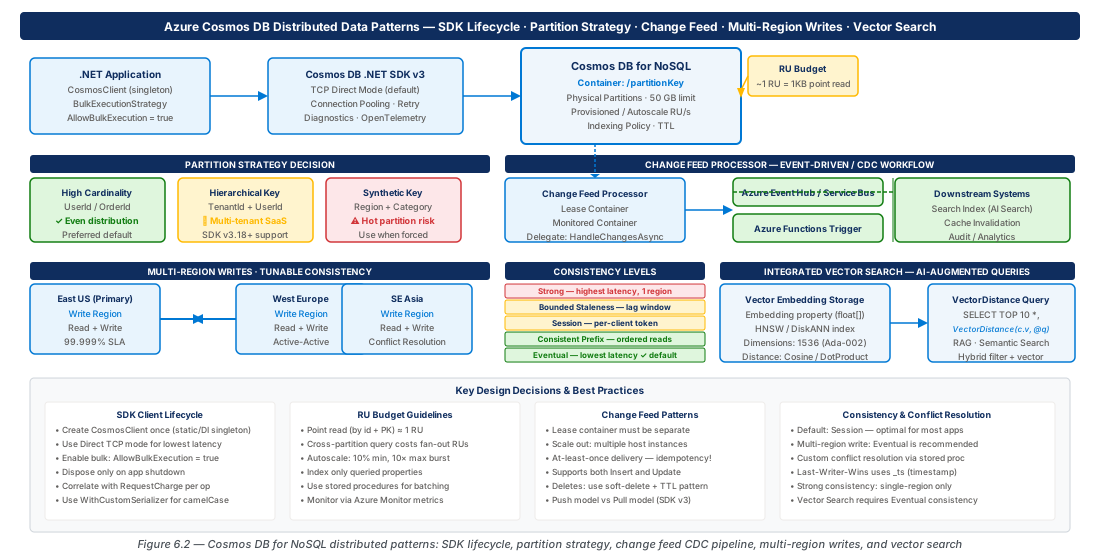
The Cosmos DB change feed is a persistent, ordered, append-only log of every document create and update, retained for the full life of the account. The change feed processor library provides distributed, load-balanced delivery via a leases container that tracks read position (continuation token) per physical partition. Multiple worker instances compete for leases, and adding workers increases processing throughput linearly up to the physical partition count.
Note
"Exactly-once" means exactly-once lease ownership. If your handler throws an unhandled exception, the processor retries from the last checkpoint, so handlers must be idempotent. Use the document's _etag or a versioned state store to achieve idempotency.
Implementing Change Feed Processor in .NET
Build the processor using the fluent builder API, supplying the monitored container, a dedicated leases container (partition key /id, 400 RU/s minimum), and an async handler delegate. The leases container tracks per-partition progress; checkpointing is automatic after the handler returns without exception.
var processor = monitoredContainer
    .GetChangeFeedProcessorBuilder<Order>(
        processorName: "order-search-indexer",
        onChangesDelegate: async (context, changes, innerCt) => {
            foreach (var order in changes)
                await indexer.UpsertOrderAsync(order, innerCt);
            // Checkpoint is automatic after handler returns without exception
        })
    .WithInstanceName(Environment.MachineName)
    .WithLeaseContainer(leasesContainer)
    .WithPollInterval(TimeSpan.FromSeconds(1))
    .Build();
await processor.StartAsync();
This pattern underpins CDC projections (maintaining a read-optimized Azure AI Search index), the event sourcing pattern (append-only event documents + change-feed aggregate hydration), and the outbox pattern (atomic batch write of domain doc + outbox event, then reliable change-feed forwarding to a message bus).
Soft Deletes and TTL for Delete Tracking
The change feed does not surface physical document deletions. Implement the soft delete pattern: set deleted: true and a ttl property instead of deleting. The change feed delivers the tombstone to your processor; Cosmos DB TTL physically removes the document after the specified seconds.
var patch = new[] {
    PatchOperation.Set("/deleted", true),
    PatchOperation.Set("/deletedAt", DateTimeOffset.UtcNow),
    PatchOperation.Set("/ttl", 86400) // Physical delete after 24 h
};
await _container.PatchItemAsync<Order>(orderId, new PartitionKey(tenantId), patch, ct);Warning
TTL expiry without the soft delete pattern leaves downstream read models (search indexes, caches, materialized views) serving stale data for deleted records indefinitely. Always pair TTL with the soft delete flag when any change feed consumer exists.
5. Multi-Region Writes and Consistency Levels
The Five Consistency Levels
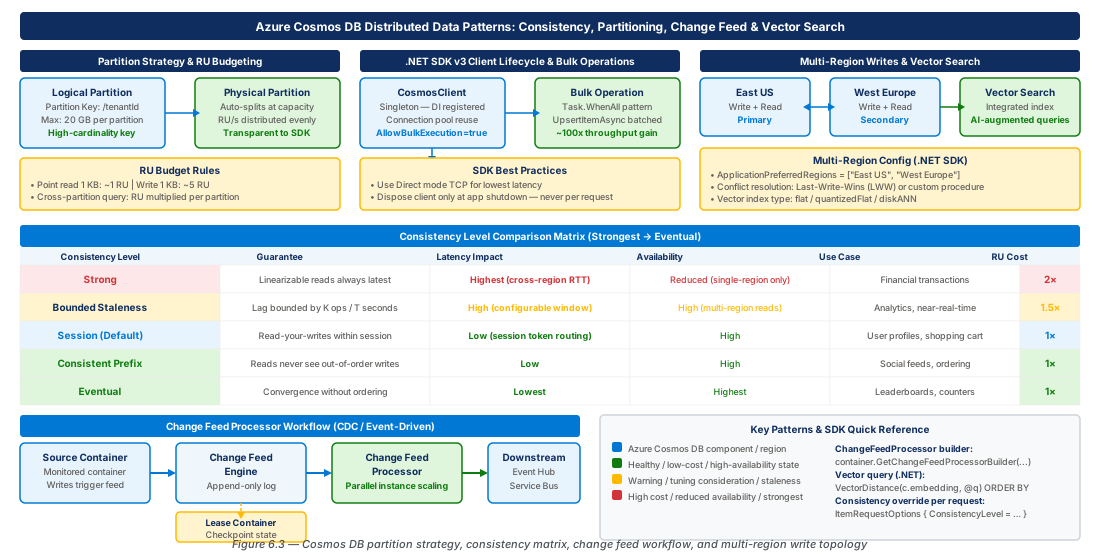
Cosmos DB offers five consistency levels from Strong (linearizable, highest latency) to Eventual (lowest latency, weakest guarantees). You set a default at the account level and may override per-request downward. Session consistency is the most widely appropriate choice for .NET web APIs: it guarantees a client always reads its own writes (tracked via a SDK-managed session token) with negligible overhead.
| Consistency Level | Read Your Writes | Multi-Region Write Latency | RU Premium |
|---|---|---|---|
| Strong | Yes | 2×–3× (blocked on all replicas) | ~2× reads |
| Bounded Staleness | Configurable lag | 1.5×–2× | ~1.5× reads |
| Session | Yes (within session) | 1× | Negligible |
| Consistent Prefix | No | 1× | Negligible |
| Eventual | No | 1× (lowest) | None |
Important
The account-level default consistency is a ceiling, not a floor. Lowering from Strong to Session often reduces read RU cost by 30–50% for read-heavy applications. Measure the impact across your workload after migrating.
Configuring Multi-Region Writes
Multi-region (multi-master) writes allow every geographic replica to accept writes simultaneously, providing sub-10 ms write acknowledgement for globally distributed users. The tradeoff is conflict resolution: the default Last-Write-Wins (LWW) policy uses _ts timestamp and works for most applications. Custom merge stored procedures are available for collaborative editing or distributed counter scenarios.
var options = new CosmosClientOptions {
    ApplicationPreferredRegions = [Regions.EastUS2, Regions.WestEurope],
    ConsistencyLevel = ConsistencyLevel.Session,
    // Omit response body on writes — reduces bandwidth for write-heavy workloads
    EnableContentResponseOnWrite = false
};
The SDK handles regional failover automatically via ApplicationPreferredRegions. Circuit breaker logic detects unavailability within 1–2 seconds and fails over in under 5 seconds, with no application-level intervention required. Setting EnableContentResponseOnWrite = false reduces latency and egress cost for write-heavy paths where the response body is not needed.
6. Integrated Vector Search for AI-Augmented Queries
Vector Search Architecture
Cosmos DB integrated vector search (GA late 2024) stores embeddings directly alongside documents and executes approximate nearest neighbor (ANN) searches within the same query engine, eliminating dual-write complexity. The feature is especially powerful for queries that combine vector similarity with standard filters: "find the 10 most semantically similar orders to this query, but only for tenantId = 'acme' and status = 'active'" — the filter and vector search execute together on the same physical data.
Define a vector policy on the container specifying the path, data type (float32), and dimensions, and an indexing policy with a vector index — flat (exact, suitable for <100K docs) or DiskANN (approximate, graph-based, sub-millisecond at millions of documents with ~95% recall). Always exclude vector paths from the standard inverted index to avoid enormous index overhead.
Important
The vector property path (e.g., /descriptionVector) must appear in excludedPaths of the standard index. Including it causes Cosmos DB to index each of the 1,536 float values individually, dramatically increasing write RU cost and potentially exceeding maximum index entry size.
Implementing Semantic Search in .NET
The application flow: generate an embedding for the search query using Azure OpenAI, execute a VectorDistance SQL query with partition key filter predicates, and return ranked results. Pre-filtering on a partition key (e.g., categoryId) constrains the ANN candidate set to a single logical partition, improving both recall and query cost.
// Generate embedding, then query with VectorDistance + equality filter
var qv = (await _embeddingClient.GenerateEmbeddingAsync(userQuery, ct)).Value.ToFloats().ToArray();
var sql = new QueryDefinition(@"
    SELECT TOP @topK c.id, c.name,
        (1.0 - VectorDistance(c.descriptionVector, @qv) / 2.0) AS similarity
    FROM c WHERE c.categoryId = @cat
    ORDER BY VectorDistance(c.descriptionVector, @qv)")
    .WithParameter("@topK", topK).WithParameter("@qv", qv).WithParameter("@cat", categoryId);
Managing Vector Freshness
Embeddings must be stored at document write time. For frequently changing documents, use a SHA-256 content hash to detect semantic changes and regenerate embeddings only when the hash changes. The change feed processor is the natural mechanism: the handler computes a new embedding and patches descriptionVector only when the content hash differs.
var hash = Convert.ToHexString(SHA256.HashData(Encoding.UTF8.GetBytes($"{p.Name}|{p.Description}")));
if (p.DescriptionVectorHash == hash) return; // Skip — embedding is current
var emb = (await _client.GenerateEmbeddingAsync($"{p.Name}. {p.Description}", ct)).Value.ToFloats().ToArray();
await _container.PatchItemAsync<Product>(p.Id, new PartitionKey(p.CategoryId), new[] {
    PatchOperation.Set("/descriptionVector", emb),
    PatchOperation.Set("/descriptionVectorHash", hash)
}, ct);
7. Lab Exercises
CE-11: Provision Production Cosmos DB with Multi-Region Writes
Create a multi-region Cosmos DB account with private endpoint, Session consistency, and Managed Identity RBAC for the application identity. The script provisions the account across East US 2 and West Europe, creates the sales database with orders and orders-leases containers, and assigns Cosmos DB Built-in Data Contributor to the application identity.
# CE-11 — Multi-region Cosmos DB account, private endpoint, Managed Identity RBAC
RG="rg-cosmos-db-dotnet-patterns-prod-001"; ACCOUNT="cosmos-db-prod-eastus2-001"
az group create --name "$RG" --location eastus2 --tags Environment=Production Project=DotNetPatterns
az cosmosdb create --name "$ACCOUNT" --resource-group "$RG" \
  --default-consistency-level Session \
  --locations regionName=eastus2 failoverPriority=0 isZoneRedundant=true \
  --locations regionName=westeurope failoverPriority=1 isZoneRedundant=true \
  --enable-multiple-write-locations true --enable-automatic-failover true \
  --enable-public-network-access false
az cosmosdb sql database create --account-name "$ACCOUNT" --resource-group "$RG" --name sales
az cosmosdb sql container create --account-name "$ACCOUNT" --resource-group "$RG" \
  --database-name sales --name orders --partition-key-path /tenantId --max-throughput 10000
az cosmosdb sql container create --account-name "$ACCOUNT" --resource-group "$RG" \
  --database-name sales --name orders-leases --partition-key-path /id --throughput 400
# Assign Cosmos DB Built-in Data Contributor to application managed identity
PRINCIPAL=$(az identity show --name id-order-api-prod-eastus2-001 --resource-group "$RG" --query principalId -o tsv)
ACCOUNT_ID=$(az cosmosdb show --name "$ACCOUNT" --resource-group "$RG" --query id -o tsv)
az cosmosdb sql role assignment create --account-name "$ACCOUNT" --resource-group "$RG" \
  --role-definition-id 00000000-0000-0000-0000-000000000002 \
--principal-id "$PRINCIPAL" --scope "$ACCOUNT_ID"CE-12: Deploy Change Feed Processor as Azure Container App
Build a .NET 8 change feed processor image via ACR Tasks, deploy it to Azure Container Apps with Managed Identity, and configure a KEDA scale rule based on Cosmos DB change feed lag so replicas scale between 2 and 10 based on unprocessed document count.
# CE-12 — Build, push, and deploy change feed processor as Container App
ACR="acrordersprocessorprod001"; CA_APP="ca-orders-cfp-prod-eastus2-001"
az acr create --name "$ACR" --resource-group "$RG" --sku Premium --admin-enabled false
az acr build --registry "$ACR" --image "orders-cfp:latest" .
IDENTITY_ID=$(az identity show --name id-order-api-prod-eastus2-001 --resource-group "$RG" --query id -o tsv)
COSMOS_EP=$(az cosmosdb show --name "$ACCOUNT" --resource-group "$RG" --query documentEndpoint -o tsv)
az containerapp create --name "$CA_APP" --resource-group "$RG" \
  --environment cae-orders-prod-eastus2-001 \
  --image "${ACR}.azurecr.io/orders-cfp:latest" \
  --user-assigned "$IDENTITY_ID" --min-replicas 2 --max-replicas 10 \
  --env-vars "CosmosDb__AccountEndpoint=${COSMOS_EP}" "CosmosDb__DatabaseName=sales"
az containerapp update --name "$CA_APP" --resource-group "$RG" \
  --scale-rule-name cosmos-cfp-lag --scale-rule-type azure-cosmosdb \
  --scale-rule-metadata databaseName=sales containerName=orders \
    leaseContainerName=orders-leases targetMetric=ResidualDocumentCount targetValue=500
8. Summary
| Concept | Key Point |
|---|---|
| Partition Key Design | High-cardinality, immutable; prefer tenantId/deviceId; use synthetic keys or bucket pattern when natural keys are hot or absent. |
| RU Budgeting | Point reads = 1 RU; writes ≈ 5×; cross-partition = N×. Log RequestCharge on every op; set autoscale max at 1.25× observed peak. |
| SDK Client Lifecycle | DI singleton; ConnectionMode.Direct; Managed Identity; AllowBulkExecution only for batch — not OLTP paths. |
| Change Feed Processor | Exactly-once per lease; idempotent handlers mandatory; outbox pattern eliminates dual-write; soft delete + TTL surfaces deletes. |
| Consistency Levels | Session is the right default for most .NET APIs; Strong adds 2–3× write latency in multi-region; Bounded Staleness suits reporting dashboards. |
| Multi-Region Writes | Sub-10 ms write latency globally; LWW conflict resolution covers most scenarios; SDK handles failover via ApplicationPreferredRegions. |
| Integrated Vector Search | Exclude vector path from standard index; use DiskANN at scale; pre-filter by partition key for pre-filtered ANN to improve recall and reduce cost. |
Chapter: 6 of 12 | Status: v0.1 Draft |