Azure for .NET Developers: Production-Grade Cloud Architecture and Operations
Messaging and Event-Driven Architecture on Azure
1. Foundations: Choosing the Right Messaging Primitive
The Three Pillars of Azure Messaging
Azure's messaging portfolio is not a single service with performance tiers — it is three services with fundamentally different guarantees. Azure Service Bus is an enterprise broker for reliable, at-least-once (or exactly-once with sessions) delivery of business-critical commands. Azure Event Grid is a reactive routing fabric that pushes lightweight notifications to dozens of subscribers with sub-second latency. Azure Event Hubs is a distributed commit log that retains events for 1–90 days, enabling independent consumers to replay history at their own pace.
The architectural decision is almost always mechanical: if losing a message is unacceptable, use Service Bus; if you need high-fan-out reactivity, use Event Grid; if you need telemetry ingestion or event replay at millions of events per second, use Event Hubs.
Selecting the Right Service: Decision Matrix
| Dimension | Azure Service Bus | Azure Event Grid | Azure Event Hubs |
|---|---|---|---|
| Primary pattern | Command / RPC replacement | Event notification / fan-out | Event streaming / log |
| Message size | 256 KB (Standard) / 100 MB (Premium) | Up to 1 MB per event | Up to 1 MB per event |
| Delivery guarantee | At-least-once; exactly-once with sessions | At-least-once (with retry) | At-least-once via checkpointing |
| Ordering | FIFO per session | Not guaranteed | Ordered within partition |
| Replay / retention | DLQ for failed messages only | No replay | 1–90 days (configurable) |
| Consumer model | Competing consumers (pull) | Push (webhook / EventGrid trigger) | Pull with offset checkpointing |
| Protocol | AMQP 1.0 / HTTP | HTTP (CloudEvents) | AMQP / Kafka protocol |
| Best for | Order processing, workflows, sagas | Reactive routing, fan-out triggers | Telemetry, analytics, audit logs |
Note
Service Bus Premium and Event Hubs Premium/Dedicated tiers provide network isolation via Private Link and VNet injection, which is mandatory for most enterprise compliance frameworks.
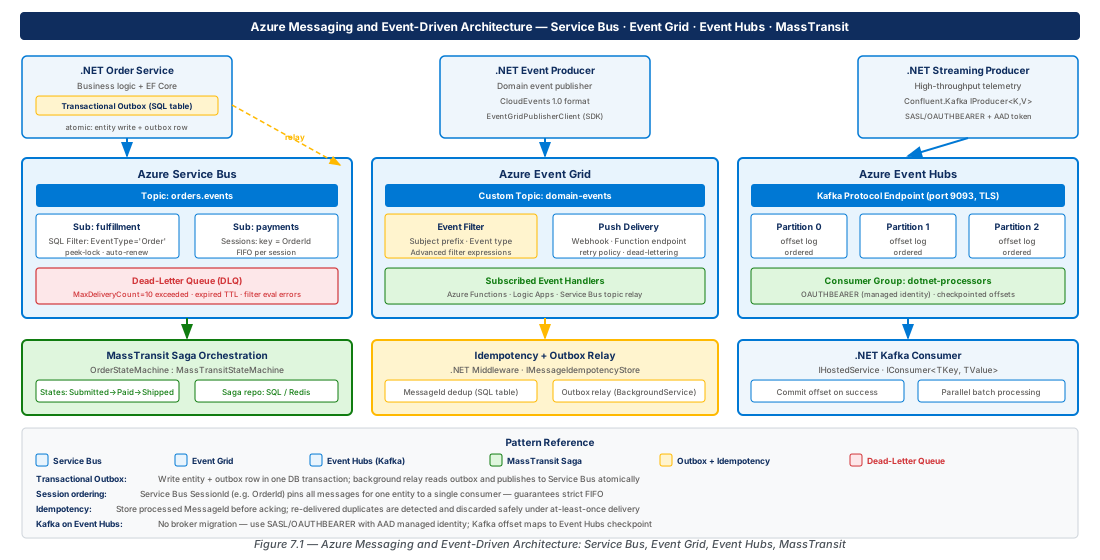
2. Azure Service Bus: Topics, Subscriptions, Sessions, and Dead-Letter Queues
Namespace Architecture and SKU Selection
A Service Bus namespace is the top-level billing unit. The Standard tier uses shared multi-tenant infrastructure and is appropriate for dev/test workloads; it does not support Private Link, geo-DR, or messages larger than 256 KB. The Premium tier provides single-tenant reserved messaging units (MUs), messages up to 100 MB, geo-disaster recovery, Private Link, and customer-managed keys — the minimum acceptable tier for production workloads handling PII or financial data.
SB_NS="messaging-event-prod-eastus2-001"
az servicebus namespace create \
  --name "$SB_NS" --resource-group "$RG_PROD" \
  --sku Premium --capacity 2 \
  --zone-redundant true --minimum-tls-version 1.2
az servicebus topic create \
  --namespace-name "$SB_NS" --name "orders" \
  --enable-duplicate-detection true \
  --duplicate-detection-history-time-window PT10M \
--enable-ordering true # truncated — see CE-13 lab for full scriptImportant
Always enable --enable-duplicate-detection on topics that handle financial or inventory commands. The rolling window (10 min default) suppresses re-delivered duplicates at the broker level with no application logic required.
Topics and Subscription Filters
Each subscription maintains an independent copy of messages matching its filter rules. Correlation filters match on up to 50 message properties using an optimized hash index — negligible overhead at any subscription count. SQL filters accept arbitrary SQL-92 WHERE clauses but are more expensive to evaluate; benchmark before deploying many SQL-filtered subscriptions on a single topic.
Model your domain events to carry enough metadata as application properties that downstream services can filter without parsing the body. Use the Subject property as a discriminated union for your event type name — all consumers inspect it before deserializing, keeping contracts explicit and filterable at the broker layer.
Tip
Use Subject (SDK v7.x) as the event type discriminator. A message with Subject = "OrderPlaced" and application properties for Region and Channel can be routed by correlation filters to multiple subscriptions at zero SQL evaluation cost.
Sessions for Ordered Processing
Without sessions, a subscription delivers messages to the first available consumer regardless of enqueue order. Sessions tie messages with the same SessionId to a single locked consumer — guaranteeing FIFO within a session while preserving horizontal scalability across different sessions. In .NET, use ServiceBusSessionProcessor with ProcessSessionMessageAsync and store per-session state via sessionArgs.GetSessionStateAsync().
Warning
Session support is set at entity creation time and cannot be added to an existing queue or topic without recreating it. Always design for sessions if ordered processing may be needed.
Dead-Letter Queues and Poison Message Handling
Every queue and subscription has an auto-provisioned DLQ at the /$DeadLetterQueue suffix. Messages land there when MaxDeliveryCount is exceeded, TTL expires with dead-lettering enabled, or a filter evaluation throws. A growing DLQ is a leading indicator of systemic failure — deploy a dedicated DLQ consumer per subscription with alerting and a replay mechanism.
Important
MaxDeliveryCount interacts with lock duration. Set lock duration to at least 2× your P99 processing time, and renew locks programmatically via processor.RenewMessageLockAsync() for long-running operations.
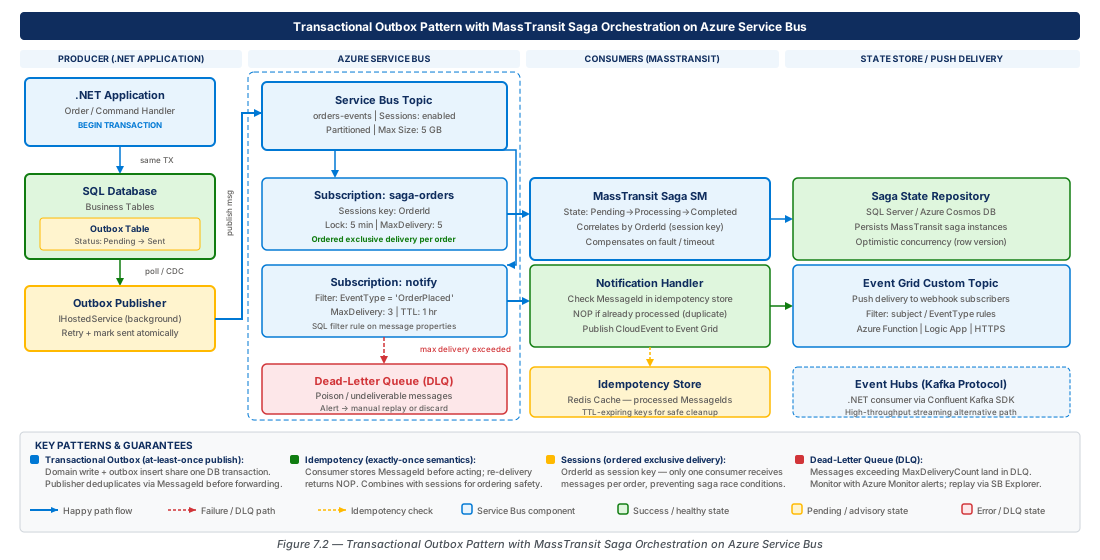
3. Azure Event Grid: Custom Topics, Event Filtering, and Push Delivery
Event Grid Architecture and System Topics
Event Grid's programming model has three components: an event source (Azure service or custom topic), an event subscription (routing rule), and an event handler (webhook, Function, Service Bus, Storage Queue, or Event Hubs). System topics are created automatically for supported Azure services; custom topics are first-class resources you create for domain events, authenticated via managed identity.
az eventgrid topic create \
  --name "evgt-orders-prod-eastus2-001" \
  --resource-group "$RG_PROD" --location eastus2 \
  --input-schema cloudeventschemav1_0
az eventgrid event-subscription create \
  --name "order-webhook-subscription" \
  --endpoint "https://api.contoso.com/webhooks/order-events" \
  --included-event-types "com.contoso.orders.placed" \
  --advanced-filter data.orderTotal NumberGreaterThan 100 \
  --max-delivery-attempts 30 --event-ttl 1440
Event Filtering: Basic and Advanced
Event type inclusion is the first filter layer — always declare a specific includedEventTypes list rather than using the wildcard default. The second layer is advanced filters using JSON path expressions (up to 25 clauses per subscription, implicit AND). They operate on data.*, subject, eventType, and other top-level properties.
Tip
Model your CloudEvents subject as a hierarchical path (e.g., /orders/EU/online/12345). Event Grid prefix/suffix matching on subject lets you filter by region or channel without any advanced filter overhead.
Webhook Delivery, Retries, and Dead-Lettering
Event Grid retries failed deliveries with exponential backoff for up to 24 hours or until maxDeliveryAttempts is exhausted. Your webhook must handle the subscription validation handshake (echo validationResponse) before receiving events. Dead-lettering for Event Grid requires a Blob Storage container — undeliverable events are written as JSON envelopes with last HTTP response code included.
Warning
Event Grid's 24-hour retry window may not be sufficient for extended outages. For business-critical delivery, route to an Azure Service Bus queue (natively supported as an Event Grid sink) and process from the durable queue when the downstream recovers.
4. Azure Event Hubs: High-Throughput Streaming with Kafka Protocol
Partitions, Consumer Groups, and the Data Model
Event Hubs is a distributed commit log. Each event hub has a fixed number of immutable partitions — ordered, append-only sequences. A consumer group maintains independent offsets per partition, enabling ten different consumers (analytics, search, cold storage) to read the same stream independently. Partition count equals maximum parallelism within a consumer group and cannot be changed after creation.
az eventhubs namespace create \
  --name "evhns-telemetry-prod-eastus2-001" \
  --sku Premium --enable-kafka true \
  --zone-redundant true
az eventhubs eventhub create \
  --namespace-name "evhns-telemetry-prod-eastus2-001" \
  --name "telemetry-events" \
  --partition-count 32 --message-retention 7
# See CE-14 lab for consumer groups, Capture, and SAS policy setup
Kafka Protocol Compatibility in .NET
Event Hubs exposes a Kafka-compatible endpoint at <namespace>.servicebus.windows.net:9093 using SASL_SSL. Existing Kafka applications can migrate by updating only the broker address and credentials — no application code changes. For greenfield .NET projects, the native Azure.Messaging.EventHubs SDK is preferred for its first-class managed identity integration and OpenTelemetry diagnostics.
Note
Enable Event Hubs Capture for all production hubs to archive events to Blob Storage or ADLS Gen2 in Avro format. If consumers fall behind the retention window, Capture provides a durability backstop for backfill.
Event Processor Client: Checkpointing and Load Balancing
EventProcessorClient manages partition ownership across instances via blob storage lease negotiation and raises ProcessEventAsync per message. Checkpoint frequency is a throughput-vs-reprocessing tradeoff: checkpointing every 100 events or 10 seconds is a practical default. Always checkpoint after a successful downstream write to maintain at-least-once semantics.
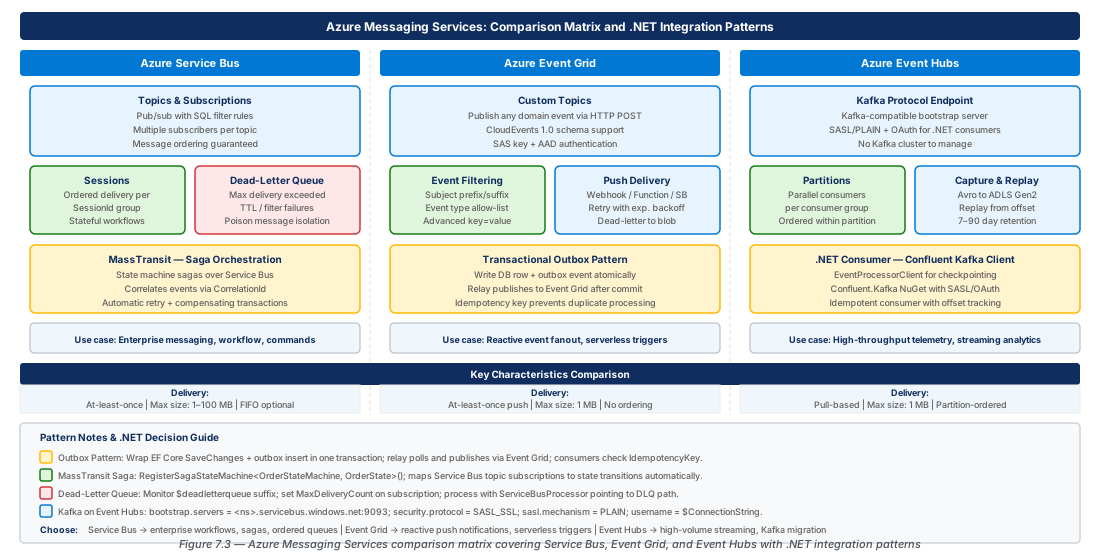
5. MassTransit on Azure Service Bus: Saga Orchestration
MassTransit Fundamentals for Azure
MassTransit maps its consumer and saga model onto Service Bus entities automatically — each message type gets a topic/subscription pair, sagas get a dedicated queue. Configure the transport using UsingAzureServiceBus with DefaultAzureCredential for managed identity. Disable AutoStart entity creation in production and pre-create infrastructure via Bicep or the Azure CLI.
builder.Services.AddMassTransit(x => {
    x.AddSagaStateMachine<OrderFulfillmentStateMachine, OrderFulfillmentState>()
        .EntityFrameworkRepository(r => { r.ExistingDbContext<OrderDbContext>(); r.UseSqlServer(); });
    x.UsingAzureServiceBus((ctx, cfg) => {
        cfg.Host(new Uri("sb://messaging-event-prod-eastus2-001.servicebus.windows.net/"),
            h => h.TokenCredential = new DefaultAzureCredential());
        cfg.UseEntityFrameworkOutbox<OrderDbContext>(ctx);
        cfg.UseMessageRetry(r => r.Exponential(5, TimeSpan.FromSeconds(1),
            TimeSpan.FromSeconds(30), TimeSpan.FromSeconds(2)));
        cfg.ConfigureEndpoints(ctx);
    });
});
State Machine Sagas for Long-Running Workflows
A saga coordinates a multi-step workflow (e.g., OrderPlaced → AwaitingPayment → AwaitingFulfillment → Completed) by persisting state and reacting to domain events. MassTransit's EF Core repository against Azure SQL is the standard production choice, enabling transactional outbox integration. For high-throughput scenarios, the Redis repository via Azure Cache for Redis offers lower latency.
Important
Every saga state machine handler must be idempotent. Service Bus delivers at-least-once, so design state transitions as no-ops for duplicate events by checking the current state before applying the transition.
Consumer Configuration and Error Handling
MassTransit retry (UseMessageRetry) runs in-process without consuming a Service Bus delivery count — only when MassTransit exhausts its retries does it dead-letter the message and increment the Service Bus count. The circuit breaker filter (UseCircuitBreaker) prevents cascade failures by faulting messages immediately when a downstream dependency is unavailable, allowing the broker to redeliver to other instances.
6. Transactional Outbox Pattern and Idempotency Guarantees
The Dual-Write Problem
It is impossible to atomically update a local database and publish a message to an external broker. Crash-after-write-but-before-publish means the message is never sent; crash-after-publish-but-before-write means the event is emitted without persisted state. The outbox pattern closes this gap: write the message into an OutboxMessage table in the same database transaction as the business data, then relay asynchronously.
MassTransit provides a first-class EF Core outbox: cfg.UseEntityFrameworkOutbox<TDbContext>(ctx) intercepts all Publish and Send calls inside consumers and writes them to the outbox table. A background OutboxDeliveryService sweeps the table and delivers pending messages to Service Bus. Combined with Service Bus duplicate detection keyed on the outbox row ID, the relay is safely retriable.
Implementing the Outbox in .NET with EF Core
Add outbox entities to your DbContext by calling modelBuilder.AddInboxStateEntity(), modelBuilder.AddOutboxMessageEntity(), and modelBuilder.AddOutboxStateEntity() in OnModelCreating. Generate and apply EF migrations to create the three tables. The InboxState table tracks processed message IDs for exactly-once consumer semantics beyond the Service Bus duplicate detection window.
APP_MI_ID=$(az identity show --name "id-orders-api-prod-eastus2-001" \
  --resource-group "$RG_PROD" --query principalId -o tsv)
SB_NS_ID=$(az servicebus namespace show --name "$SB_NS" \
  --resource-group "$RG_PROD" --query id -o tsv)
az role assignment create --assignee "$APP_MI_ID" \
  --role "Azure Service Bus Data Sender" --scope "$SB_NS_ID"
az role assignment create --assignee "$APP_MI_ID" \
  --role "Azure Service Bus Data Receiver" --scope "$SB_NS_ID"
Idempotency at the Consumer Level
Even with an outbox on the producer side, consumer idempotency must be designed explicitly. Store (MessageId, ConsumerType) in a processed-messages table within the same transaction as your business operation. Before processing, check if the key exists and acknowledge without reprocessing if found. Use EF Core's RowVersion property for optimistic concurrency so that concurrent deliveries of the same message result in a concurrency exception (triggering retry) rather than silent data corruption.
Note
MassTransit's InboxState table extends idempotency coverage beyond Service Bus's 10-minute duplicate detection window to the full retention period of the InboxState row, providing a long-lived deduplication store at no extra infrastructure cost.
7. Lab: Service Bus Topology and Event Hubs Kafka Provisioning
CE-13: Provision a Complete Service Bus Messaging Topology
Create a Standard Service Bus namespace with an orders topic (duplicate detection, 14-day TTL) and three subscriptions: fulfillment-service (all events), notification-service (correlation filter for OrderPlaced), and a sessions-enabled payments topic with payment-processor subscription. Enable diagnostic settings to a Log Analytics workspace.
set -euo pipefail
RG_DEV="rg-messaging-event-driven-architecture-dev-001"
SB_NS_DEV="messaging-event-dev-eastus2-001"
az group create --name "$RG_DEV" --location eastus2 \
  --tags Environment=Development Lab=CE-13
az servicebus namespace create --name "$SB_NS_DEV" \
  --resource-group "$RG_DEV" --sku Standard
az servicebus topic create --namespace-name "$SB_NS_DEV" \
  --name orders --enable-duplicate-detection true \
  --default-message-time-to-live P14D
# Add subscriptions and payments topic — see full script in repoCE-14: Deploy Event Hubs for Telemetry Ingestion with Kafka Protocol
Create a Standard Event Hubs namespace with Kafka enabled, a device-telemetry hub (16 partitions, 3-day retention, Capture to Blob Storage), and three consumer groups. Retrieve the Kafka endpoint and connection string for client configuration.
set -euo pipefail
EH_NS_DEV="evhns-telemetry-dev-eastus2-001"
az eventhubs namespace create --name "$EH_NS_DEV" \
  --resource-group "$RG_DEV" --sku Standard \
  --enable-kafka true --capacity 2
az eventhubs eventhub create --namespace-name "$EH_NS_DEV" \
  --name device-telemetry --partition-count 16 \
  --message-retention 3 --enable-capture true
# bootstrap.servers=${EH_NS_DEV}.servicebus.windows.net:9093
8. Summary
| Concept | Key Point |
|---|---|
| Service Bus vs Event Grid vs Event Hubs | Service Bus = reliable commands; Event Grid = reactive notifications; Event Hubs = high-throughput streaming. Match the service to the delivery semantic. |
| Subscription Filters | Use correlation filters over SQL filters for low-overhead routing. Model event type in Subject and domain attributes as application properties for broker-side routing. |
| Sessions for Ordering | Enable at entity creation — cannot be added later. FIFO per SessionId with horizontal scalability across sessions. |
| Dead-Letter Queues | A growing DLQ signals systemic failure. Deploy a dedicated DLQ consumer per subscription with alerting and replay capability. |
| Event Grid Filtering | Use event type inclusion lists and advanced filters. For high-durability delivery, use Service Bus as the Event Grid sink. |
| Event Hubs and Kafka | Partition count is immutable. Checkpoint after a successful downstream write. Kafka protocol enables migration without application changes. |
| Transactional Outbox | Write messages to a database outbox within the same transaction as business data, then relay asynchronously. Use Service Bus duplicate detection keyed on the outbox row ID. |
Chapter: 7 of 12 | Status: v0.1 Draft |