Azure for .NET Developers: Production-Grade Cloud Architecture and Operations
Azure AI Services for .NET Developers
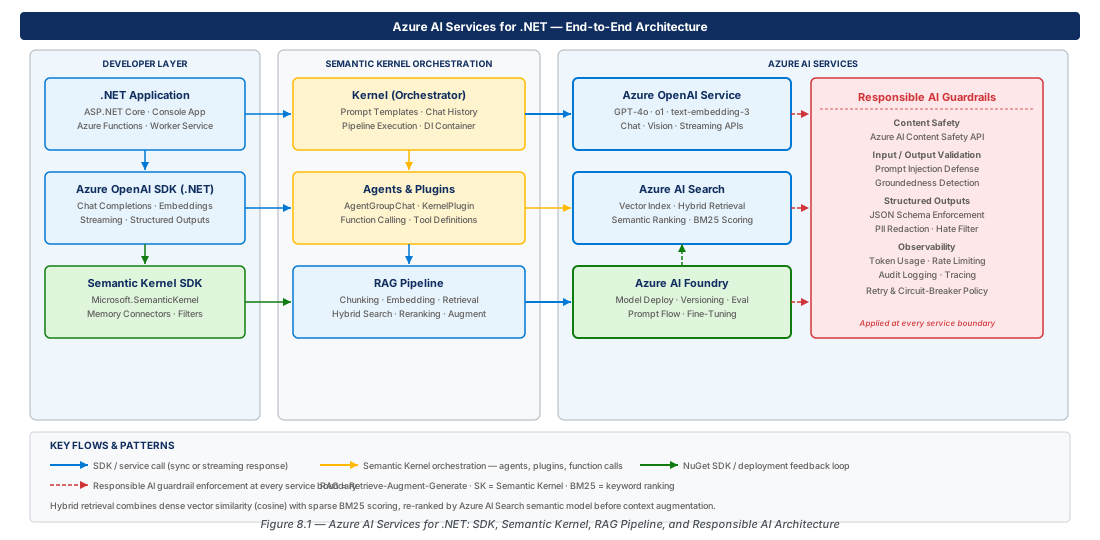
Artificial intelligence has moved from a specialized discipline into a core architectural concern. Azure's AI platform gives .NET developers a cohesive set of primitives—managed language models, vector search, evaluation tooling, and orchestration frameworks—that compose into production-grade intelligent systems. This chapter walks the full stack, from raw SDK calls against Azure OpenAI through Semantic Kernel agent orchestration, hybrid RAG pipelines backed by Azure AI Search, and the deployment governance workflows provided by Azure AI Foundry.
Azure OpenAI Foundations for .NET
The Azure OpenAI SDK Architecture
The Azure OpenAI SDK for .NET (Azure.AI.OpenAI v2.x) is built on the Azure.Core pipeline, inheriting retry policies, distributed tracing hooks, and TokenCredential-based authentication. The AzureOpenAIClient sits at the top; ChatClient and EmbeddingClient are sub-clients scoped to a specific deployment name. Pinning the API version with AzureOpenAIClientOptions prevents unexpected breaking changes when the service updates.
var credential = new DefaultAzureCredential();
var azureOpenAIClient = new AzureOpenAIClient(
    new Uri("https://azure-ai-prod-eastus2-001.openai.azure.com/"),
    credential);
// Sub-client scoped to the GPT-4o deployment
var chatClient = azureOpenAIClient.GetChatClient("gpt-4o");Important
Managed identity is required for regulated environments (PCI-DSS, HIPAA, FedRAMP). Set disableLocalAuth=true on the Azure OpenAI resource network rule to enforce keyless access in production.
Chat Completions and Streaming
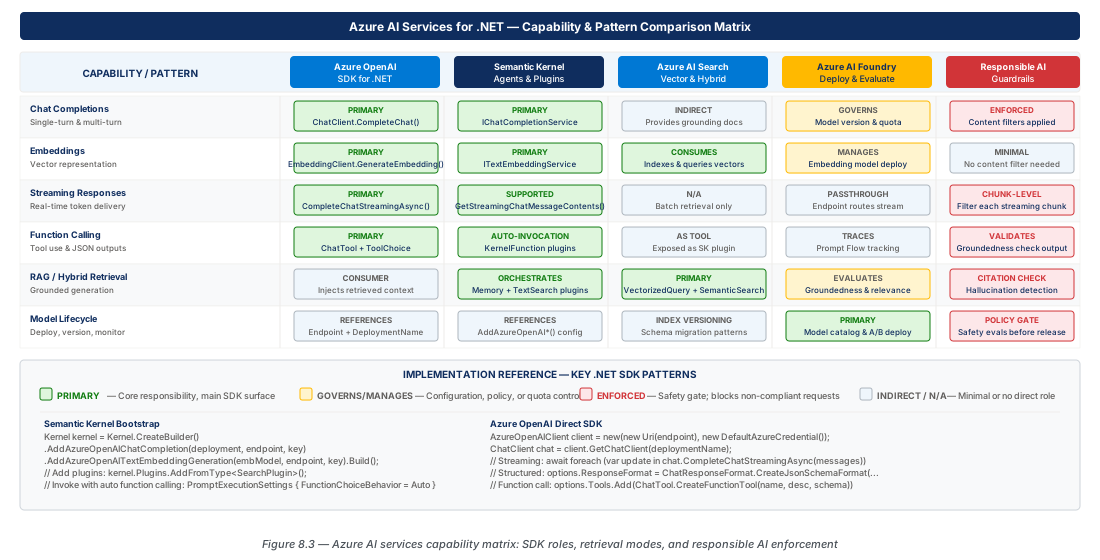
Chat completions are the primary interface for conversational AI. The API is stateless—you maintain conversation history and re-send it on each turn. Streaming via CompleteChatStreamingAsync returns an AsyncCollectionResult<StreamingChatCompletionUpdate> enumerated with await foreach, reducing perceived latency because the first tokens appear within milliseconds.
await foreach (var update in chatClient.CompleteChatStreamingAsync(messages, options))
{
    foreach (var part in update.ContentUpdate)
        Console.Write(part.Text);
    if (update.FinishReason.HasValue)
        Console.WriteLine($"Finish: {update.FinishReason}");
}Tip
In ASP.NET Core minimal APIs, return IAsyncEnumerable<string> with Content-Type: text/event-stream for chunked transfer. In Blazor Server, push each token delta via StateHasChanged on the render thread.
Embeddings and Vector Operations
Embeddings encode the semantic content of text as fixed-length float vectors. text-embedding-3-small (1536 dims) balances accuracy and storage cost for most retrieval tasks; text-embedding-3-large (3072 dims) provides better recall on complex domain-specific corpora. The EmbeddingClient batches up to 2048 inputs per request and returns results in the same order. Avoid JSON serialisation of full-precision vectors—use binary encoding via MemoryMarshal.AsBytes for high-volume indexing.
Semantic Kernel: Agents, Plugins, and Memory
The Semantic Kernel Programming Model
Semantic Kernel (SK) is Microsoft's open-source orchestration framework sitting between your application and one or more AI backends. The core abstraction is the Kernel—a dependency-injection container holding connectors and plugins. It integrates deeply with Microsoft.Extensions.DependencyInjection: you build a Kernel through a fluent IKernelBuilder using the same IServiceCollection patterns used throughout ASP.NET Core, Azure Functions, and Worker Services.
var builder = Kernel.CreateBuilder();
builder.AddAzureOpenAIChatCompletion(
    deploymentName: "gpt-4o",
    endpoint: "https://azure-ai-prod-eastus2-001.openai.azure.com/",
    credentials: new DefaultAzureCredential());
builder.Services.AddSingleton<IDocumentRepository, CosmosDocumentRepository>();
var kernel = builder.Build();Note
Register Kernel as a singleton; it is lightweight and thread-safe. Plugin instances that hold per-request state (user identity, scoped DB connections) should be registered as scoped or transient.
Plugins and the KernelFunction Model
Plugins are C# classes whose methods are decorated with [KernelFunction] and [Description]. SK reflects over the class at registration and builds a JSON schema for each function's parameters—this schema is serialized into the tool-call payload so the model knows when and how to invoke the function. Setting FunctionChoiceBehavior.Auto() on PromptExecutionSettings enables automatic invocation loops with a configurable round cap via MaximumAutoInvokeAttempts.
Agents and the Agent Framework
The SK Agent Framework creates autonomous, multi-step task executors. ChatCompletionAgent runs entirely in-process; AzureAIAgent delegates to Azure AI Foundry's managed runtime for persistent threads and file attachments. Multi-agent workflows use AgentGroupChat with a SelectionStrategy and TerminationStrategy—useful for code-review pipelines (write, review, security-scan) or multi-domain Q&A.
Warning
Agent loops that call external APIs are vulnerable to prompt injection if model inputs include untrusted text. Sanitise tool-call results before reinserting them into the conversation, and cap MaximumAutoInvokeAttempts to prevent runaway loops.
Memory and Vector Store Connectors
SK memory abstracts the retrieval side of RAG through IVectorStore and IVectorStoreRecordCollection<TKey, TRecord> interfaces. Map .NET data classes to index schemas using [VectorStoreRecordKey], [VectorStoreRecordData], and [VectorStoreRecordVector] attributes. Built-in connectors exist for Azure AI Search, Cosmos DB (MongoDB vCore and NoSQL), Redis Enterprise, PostgreSQL with pgvector, and in-memory stores for testing.
RAG Pipeline Design with Azure AI Search
Vector and Hybrid Retrieval Architecture
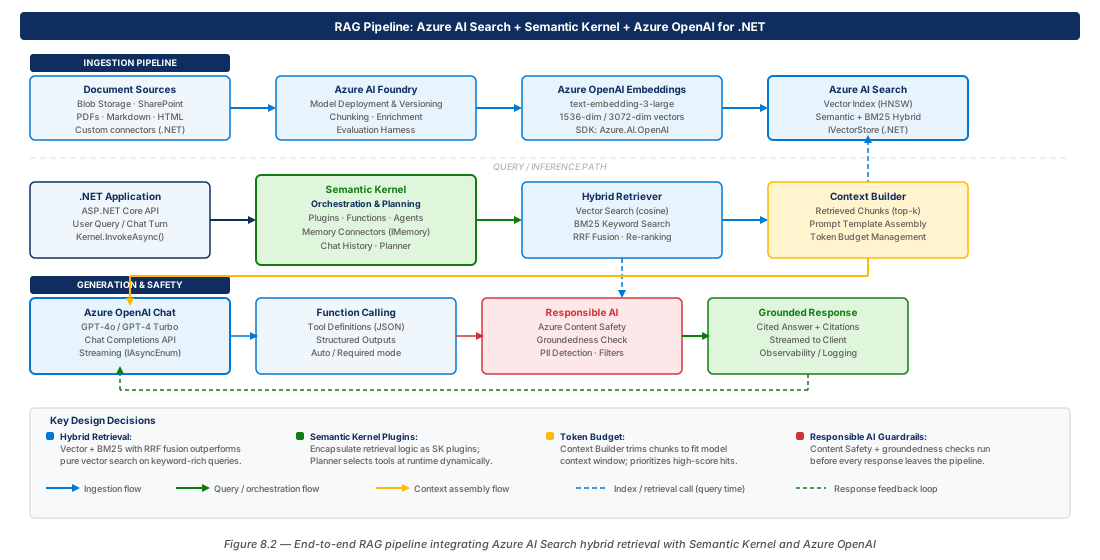
RAG injects retrieved documents into the model's context before generation—the quality of the answer is bounded by the quality of retrieval. Azure AI Search combines BM25 full-text search, HNSW vector search, and a semantic cross-encoder re-ranker in one managed service. Hybrid retrieval fuses keyword and vector queries via Reciprocal Rank Fusion (RRF), consistently outperforming pure vector search because keyword search recovers exact matches (product codes, error codes) that vectors miss when domain vocabulary is out-of-distribution.
var searchOptions = new SearchOptions
{
    VectorSearch = new VectorSearchOptions {
        Queries = { new VectorizedQuery(queryVector) { Fields = { "ContentVector" }, KNearestNeighborsCount = 50 } }
    },
    QueryType = SearchQueryType.Semantic,
    SemanticSearch = new SemanticSearchOptions { SemanticConfigurationName = "default-semantic-config" },
    Size = 5
};
var results = await searchClient.SearchAsync<KnowledgeArticle>(userQuery, searchOptions);
Chunking Strategies and Index Schema Design
Chunk size is the single most impactful RAG design decision. Large chunks dilute the embedding's semantic signal; small chunks lack context for coherent answers. The hierarchical (parent-child) pattern gives the best of both: index small child chunks (128–256 tokens) for high-precision retrieval, then fetch the larger parent chunks (512–1024 tokens) for generation.
| Strategy | Chunk Size | Best For | Trade-offs |
|---|---|---|---|
| Fixed-size token | 512 tokens / 64 overlap | General-purpose prose | May break mid-sentence |
| Sentence-boundary | 3–8 sentences | Conversational text, FAQs | Uneven chunk lengths |
| Paragraph-boundary | 1–3 paragraphs | Structured documents | Paragraph quality varies |
| Semantic / late-chunking | Variable (model-defined) | Dense technical docs | Higher indexing cost |
| Hierarchical (parent/child) | Small child, large parent | Precise retrieval + wide context | Two-query retrieval pattern |
Grounding the Model with Retrieved Context
Construct the model's system message to include retrieved chunks and instruct it to answer using only the provided material. A model without explicit fall-through instructions will confabulate using parametric knowledge—dangerous in regulated domains. Monitor Usage.InputTokenCount and implement sliding-window history truncation; a 10-turn conversation with five 1024-token chunks can easily exceed a 16k token budget.
private static string BuildGroundingSystemPrompt(IReadOnlyList<string> chunks)
{
    var context = string.Join("\n\n---\n\n", chunks.Select((c, i) => $"[DOCUMENT {i+1}]\n{c}"));
    return $"""
        Answer using ONLY the documents below. If the answer is not present, say so.
        Cite document numbers. --- BEGIN DOCUMENTS --- {context} --- END DOCUMENTS ---
        """;
}
Azure AI Foundry: Deployment, Versioning, and Evaluation
Organising Model Deployments with AI Foundry
Azure AI Foundry is the control plane for the AI layer. A Hub is the top-level organisational boundary owning shared infrastructure (Key Vault, Storage, Container Registry, Application Insights). Within a Hub, Projects represent individual workstreams—e.g., books-rag-prod and books-rag-dev—each with independent model deployments, token-per-minute quotas, content filter policies, and evaluation runs.
Model Versioning and Blue/Green Deployment
When a new model version ships, you need to evaluate compatibility before full rollout. A blue/green pattern routes a configurable percentage of traffic to the candidate version while the majority continues on the stable version. In .NET, implement the traffic split as configuration-driven routing based on request attributes (user segment, query type) rather than load-balancer rules.
| Pattern | Traffic Split | Rollback Time | Best For |
|---|---|---|---|
| Shadow (dark launch) | 100% / 0% copy | Instant | Initial offline validation |
| Canary | 95% / 5% | Minutes (config) | Gradual rollout with real signal |
| Blue/Green | 50%/50% → 0%/100% | Minutes (config) | Planned major version migrations |
| Feature flag per user | Variable | Instant | Beta programme or internal users |
public ChatClient CreateForRequest(string userId)
{
    var greenPct = _config.GetValue<int>("AI:GreenDeploymentPercent", 5);
    var isGreen = Math.Abs(userId.GetHashCode()) % 100 < greenPct;
    return _client.GetChatClient(isGreen ? "gpt-4o-green" : "gpt-4o-blue");
}
Evaluation with Azure AI Foundry Evaluation SDK
Evaluating LLM systems requires measuring whether outputs stay within a distribution of acceptable responses. The Foundry evaluation SDK ships built-in evaluators for groundedness, relevance, coherence, fluency, and safety. Gate green deployments on: groundedness ≥ 4.0/5.0, relevance ≥ 4.2/5.0, and a 100% safety pass rate on all harm categories. Run evaluations automatically in CI/CD on every model configuration change.
Important
The Foundry evaluation SDK uses a judge model (typically GPT-4o) to score outputs. For a 200-question golden set with five evaluators, budget 50k–80k tokens per run. Run offline evaluations on the dev endpoint first to control costs.
Function Calling, Structured Outputs, and Responsible AI
Function Calling Architecture
The model never directly calls your functions—it returns a ToolCall object and your code dispatches it. This keeps your application in full control of execution, allowing authorisation, rate-limiting, and audit logic before honouring any model-requested call. Use ChatTool.CreateFunctionTool with a JSON schema derived from your .NET types, and handle the FinishReason == ToolCalls branch to close the agentic loop.
Tip
Use ToolChoice = ChatToolChoice.CreateRequiredChoice() with a single tool definition when you need the model to always return structured data (entity extraction). This eliminates branching logic around FinishReason.
Structured Outputs
Structured outputs guarantee the model's JSON conforms exactly to a schema via constrained server-side decoding—unlike prompt-engineering approaches that occasionally produce malformed output. Enable with ChatResponseFormat.CreateJsonSchemaFormat(..., jsonSchemaIsStrict: true). This eliminates an entire class of defensive parsing code from extraction pipelines, classification tasks, and any scenario where downstream code must act on the model's response.
Responsible AI Guardrails
Responsible AI is enforced at multiple layers. Azure AI Content Safety filters (hate, violence, sexual, self-harm) run as middleware in the OpenAI request pipeline and are mandatory for public-facing deployments. PromptShield detects prompt injection attempts in user input before it reaches the model. SK's IPromptRenderFilter hook enables application-layer rules: PII redaction, domain topic restriction, per-user rate limits, and audit logging.
var shieldRequest = new ShieldPromptOptions(userInput, retrievedChunks);
var shieldResult = await contentSafetyClient.ShieldPromptAsync(shieldRequest);
if (shieldResult.Value.UserPromptAnalysis?.AttackDetected == true)
return "I'm unable to process this request."; // safe fallbackImportant
Service content filters do not protect against business-specific misuse (e.g., a chatbot disclosing pricing not intended for public access). Combine SK prompt render filters with a topic-restriction system prompt, and conduct a structured prompt injection threat model before any public launch.
Lab
CE-15: Provision Azure AI Infrastructure and Deploy Models
Provision the full Azure AI Services stack—Azure OpenAI (no local auth, private network), AI Search (S1 with semantic ranker), Content Safety, and RBAC assignments for the app managed identity. Deploy gpt-4o-blue and text-embedding-3-small on GlobalStandard SKU.
# CE-15: Provision Azure AI infrastructure
OPENAI_ACCOUNT="azure-ai-prod-eastus2-001"
az cognitiveservices account create --name "$OPENAI_ACCOUNT" --resource-group "$RG_PROD" \
  --kind OpenAI --sku S0 --api-properties disableLocalAuth=true --public-network-access Disabled
az cognitiveservices account deployment create --name "$OPENAI_ACCOUNT" --resource-group "$RG_PROD" \
  --deployment-name gpt-4o-blue --model-name gpt-4o --model-version "2024-11-20" \
  --sku-capacity 150 --sku-name GlobalStandard
# ... assign RBAC: Cognitive Services OpenAI User + Search Index Data ContributorCE-16: Build and Evaluate a Hybrid RAG Pipeline
Create the Azure AI Search index with HNSW vector and semantic configurations, ingest documents, and submit an AI Foundry evaluation job against the green deployment candidate. Promote green to blue only when groundedness ≥ 4.0 and safety pass rate = 100%.
# CE-16: Create HNSW index and run AI Foundry evaluation
az search service update --name "$SEARCH_SERVICE" --resource-group "$RG_PROD" \
  --semantic-search standard
az ml job create --resource-group "$RG_DEV" --workspace-name prj-books-rag-dev-001 \
  --file ./evaluation/eval-config-green.yaml \
  --set inputs.deployment_name="gpt-4o-green" --stream
# Promote after evaluation passes: update blue deployment, delete green
Summary
| Concept | Key Point |
|---|---|
| Azure OpenAI SDK for .NET | Use AzureOpenAIClient with DefaultAzureCredential and scoped sub-clients; disable local auth on all production resources. |
| Streaming completions | CompleteChatStreamingAsync returns AsyncCollectionResult<StreamingChatCompletionUpdate>; consume with await foreach to minimise perceived latency. |
| Semantic Kernel plugins | Decorate methods with [KernelFunction] and [Description] for automatic tool-call schema generation; use FunctionChoiceBehavior.Auto() with a hard round cap. |
| RAG with Azure AI Search | Hybrid BM25 + HNSW retrieval with RRF fusion and semantic re-ranking consistently outperforms pure vector search; design chunk hierarchy before model selection. |
| Azure AI Foundry | Organise deployments into Hubs and Projects; gate blue/green model promotions with automated groundedness, relevance, and safety evaluation runs. |
| Responsible AI | Layer service content filters, PromptShield injection detection, and SK IPromptRenderFilter hooks; run a prompt injection threat model before any public launch. |
Chapter: 8 of 12 | Status: v0.1 Draft |