Azure for .NET Developers: Production-Grade Cloud Architecture and Operations
Identity, Security, and Zero Trust for .NET
Modern cloud applications do not inherit security from the network perimeter — they must earn it at every layer, from the token a user exchanges at login to the certificate a background service uses to prove its identity to a downstream API. This chapter walks through the full identity and security stack available to .NET developers on Azure, anchoring every pattern in the Zero Trust principle that no actor — human or machine — is trusted by default.
1. Foundations: Zero Trust Architecture on Azure
The Three Pillars of Zero Trust
Zero Trust is organized around three core principles: verify explicitly, use least privilege access, and assume breach. For .NET developers on Azure, these translate into concrete engineering choices at design time — not network configuration afterthoughts.
Verify explicitly means every HTTP call carries a bearer token issued by Microsoft Entra ID and every service validates that token on arrival. Least privilege means a background worker gets Azure Service Bus Data Receiver on a specific queue — never Contributor on the subscription. Assume breach drives the use of private endpoints, deny-by-default NSGs, secret rotation, and Defender for Cloud alerts so that compromise of one layer does not cascade to the next.
Zero Trust Network Topology for .NET Workloads
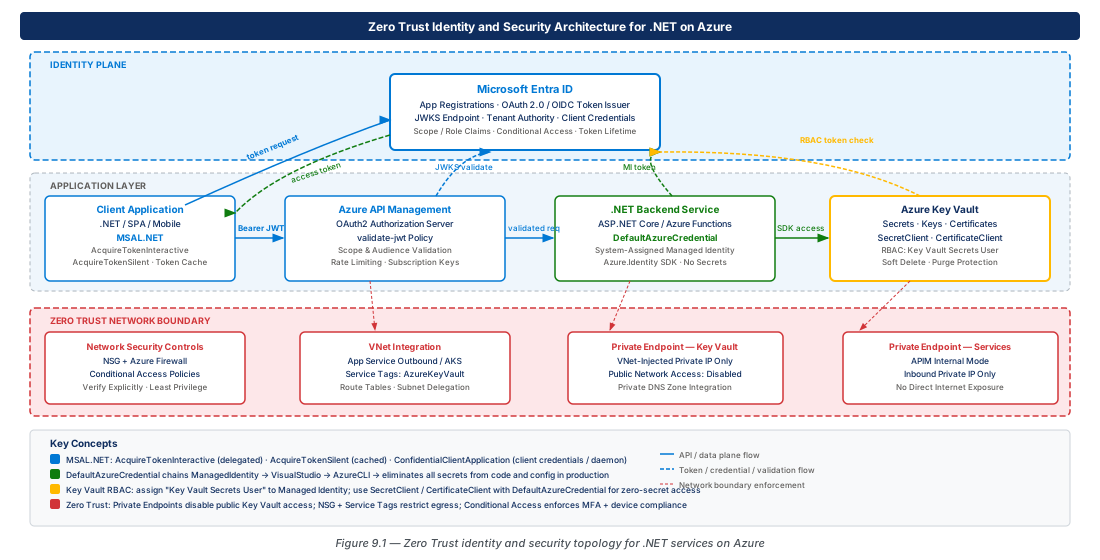
The hub-and-spoke virtual network model keeps all service-to-service traffic on the Azure backbone. The hub hosts shared infrastructure — Azure Firewall, Bastion, and a DNS private resolver. Spoke VNets host application workloads in dedicated subnets for App Service integration, AKS node pools, and private endpoints.
Private endpoints pull Azure PaaS services (Key Vault, Service Bus, SQL, Storage) out of the public internet and into your private address space via a DNS A-record in a private DNS zone. Service tags (AzureKeyVault, AzureActiveDirectory, AzureMonitor) replace manually maintained IP lists in NSG rules and are kept current automatically by Microsoft.
2. Microsoft Entra ID App Registrations and MSAL.NET
Application Registrations: The Identity Contract
An app registration defines what your application is allowed to do: which API permissions it may request, which redirect URIs are valid, and which client credentials it may present. Every .NET application that participates in Entra ID authentication begins here.
For APIs, configure an Application ID URI under "Expose an API" and declare scopes such as api://{client-id}/Orders.Read. Client applications request these scopes; your middleware validates that the incoming token carries the scopes required for each operation. For daemon services, shift to application permissions granted by a tenant admin — the token represents the application itself, and you distinguish these tokens by the presence of roles claims rather than scp.
MSAL.NET: Token Acquisition Patterns
The Microsoft.Identity.Web package wraps MSAL.NET in ASP.NET Core middleware and handles token caching, refresh, and claims principal construction automatically for the authorization code flow:
builder.Services.AddAuthentication(OpenIdConnectDefaults.AuthenticationScheme)
    .AddMicrosoftIdentityWebApp(builder.Configuration.GetSection("AzureAd"))
    .EnableTokenAcquisitionToCallDownstreamApi(["https://graph.microsoft.com/.default"])
    .AddInMemoryTokenCaches();
// In production, replace AddInMemoryTokenCaches() with a distributed cache
For daemon services using the client credentials flow, prefer certificate credentials over client secrets. For multi-instance deployments, replace the in-memory token cache with a Redis-backed distributed cache — without it, every pod acquires tokens independently and can exhaust Entra ID throttling limits.
var app = ConfidentialClientApplicationBuilder
    .Create(clientId)
    .WithAuthority(AzureCloudInstance.AzurePublic, tenantId)
    .WithCertificate(certificate) // prefer certificate over secret
    .Build();
var result = await app.AcquireTokenForClient(["api://downstream-api-id/.default"]).ExecuteAsync();
httpClient.DefaultRequestHeaders.Authorization = new AuthenticationHeaderValue("Bearer", result.AccessToken);
Token Validation in ASP.NET Core APIs
Microsoft.Identity.Web validates signature (via JWKS), issuer, audience, and expiry automatically when you call AddMicrosoftIdentityWebApi. Layer authorization policies on top to enforce required scopes:
builder.Services.AddAuthentication(JwtBearerDefaults.AuthenticationScheme)
    .AddMicrosoftIdentityWebApi(builder.Configuration.GetSection("AzureAd"));
builder.Services.AddAuthorization(options => options.AddPolicy("OrdersRead", policy =>
policy.RequireClaim("http://schemas.microsoft.com/identity/claims/scope", "Orders.Read")));Warning
Never set ValidateIssuer = false or ValidateAudience = false in JwtBearerOptions in production. Doing so allows tokens minted for any audience to be accepted. Fix the configuration — do not disable the check.
3. Managed Identities and DefaultAzureCredential
The Case for Passwordless Authentication
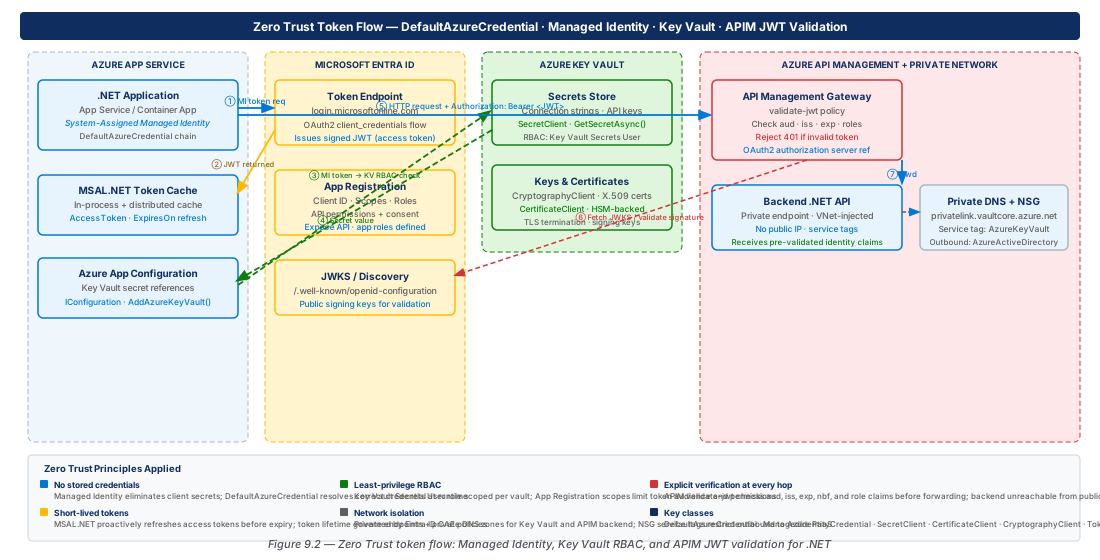
Managed identities let Azure compute resources acquire an Entra ID identity without storing any credentials. The platform provisions and rotates credentials automatically, eliminating leaked secrets in source control, hardcoded connection strings, and the operational cost of credential rotation.
User-assigned managed identities are the preferred pattern for production: they survive compute resource deletion and recreation (supporting blue-green deploys), they can be shared across multiple resources to reduce RBAC assignment sprawl, and they are independently auditable resources in Azure.
DefaultAzureCredential: The Unified Credential Chain
DefaultAzureCredential from Azure.Identity tries credential sources in order — environment, workload identity, managed identity, Visual Studio, Azure CLI — stopping at the first success. On Azure compute it reaches managed identity; locally it falls through to the developer's Azure CLI session. Register it as a singleton:
// Register once; inject TokenCredential into SDK client constructors
builder.Services.AddSingleton<TokenCredential, DefaultAzureCredential>();

var secretClient = new SecretClient(new Uri("https://kv-prod-eastus2-001.vault.azure.net/"), credential);
var sbClient   = new ServiceBusClient("sb-prod-eastus2-001.servicebus.windows.net", credential);
var blobClient = new BlobServiceClient(new Uri("https://stprod001.blob.core.windows.net/"), credential);Tip
In local development, authenticate with az login rather than environment variables. The CLI credential respects your Entra ID conditional access policies and avoids reintroducing the secret management problem that managed identities are designed to eliminate.
RBAC Role Assignment at the Right Scope
Zero Trust demands the narrowest RBAC scope — individual resource, not resource group or subscription. The table below lists the built-in roles most commonly needed by .NET workloads:
| Azure Service | Operation | Built-in Role | Recommended Scope |
|---|---|---|---|
| Key Vault | Read secrets | Key Vault Secrets User | Individual Key Vault |
| Key Vault | Decrypt/Sign with keys | Key Vault Crypto User | Individual Key Vault |
| Key Vault | Read certificates | Key Vault Certificate User | Individual Key Vault |
| Service Bus | Receive messages | Azure Service Bus Data Receiver | Individual queue/subscription |
| Service Bus | Send messages | Azure Service Bus Data Sender | Individual queue/topic |
| Storage | Read blobs | Storage Blob Data Reader | Individual container |
| Storage | Write blobs | Storage Blob Data Contributor | Individual container |
| Azure OpenAI | Call inference | Cognitive Services OpenAI User | Individual OpenAI resource |
Note
Azure SQL does not use RBAC for data-plane access. Create a contained database user mapped to the managed identity: CREATE USER [mi-name] FROM EXTERNAL PROVIDER; then add it to the appropriate database role. Use Authentication=Active Directory Default in the connection string.
4. Azure Key Vault: Secrets, Keys, and Certificates from .NET
Key Vault Architecture and Access Control
Key Vault stores secrets (connection strings, API keys), cryptographic keys (RSA/EC for encryption and signing), and X.509 certificates. The RBAC authorization model — strongly preferred over the legacy access policy model — lets you assign built-in roles at individual-secret scope, enabling least-privilege compliance in regulated environments.
Reading Secrets from .NET
The Key Vault configuration provider loads secrets into IConfiguration at startup using the double-hyphen naming convention (ConnectionStrings--DefaultConnection → ConnectionStrings:DefaultConnection):
builder.Configuration.AddAzureKeyVault(
    new Uri("https://kv-identity-security-prod-eastus2-001.vault.azure.net/"),
    new DefaultAzureCredential());
// After this call: IConfiguration["ConnectionStrings:DefaultConnection"] reads from Key VaultImportant
Key Vault enforces 2,000 requests per 10 seconds (Standard tier). Applications that fetch secrets on every request can exhaust this limit. Cache secret values in memory with an expiry aligned to the secret's validity period using IMemoryCache or the built-in caching in the Azure configuration provider.
Cryptographic Operations and Certificate Lifecycle
CryptographyClient performs encrypt, decrypt, sign, and verify operations using keys that never leave the Key Vault HSM boundary. For large payloads, use envelope encryption: generate a symmetric DEK locally, encrypt the payload with AES-256-GCM, then wrap the DEK with Key Vault — one API call per operation, no throughput concerns.
Configure automatic certificate renewal in Key Vault by setting a lifecycle action at 80% of the certificate's lifetime. Key Vault publishes a CertificateNearExpiry event to Event Grid, which can trigger a Function to reload the certificate or restart the compute resource to pick up the new version.
5. Azure API Management: OAuth2 and JWT Validation Policies
APIM as the Security Enforcement Point
Azure API Management enforces authentication and authorization at the ingress before requests reach .NET backend services. The validate-jwt policy extracts the token from Authorization, validates the signature via JWKS, checks issuer and audience claims, and returns 401 Unauthorized for invalid tokens — reducing the attack surface of every downstream service.
<validate-jwt header-name="Authorization" failed-validation-httpcode="401"
              require-expiration-time="true" require-signed-tokens="true">
  <openid-config url="https://login.microsoftonline.com/{tenant-id}/v2.0/.well-known/openid-configuration"/>
  <audiences><audience>api://identity-security-prod-eastus2-001</audience></audiences>
  <required-claims><claim name="scp" match="any">
    <value>Orders.Read</value><value>Orders.Write</value>
  </claim></required-claims>
</validate-jwt>
Subscription Keys and Layered Authorization
APIM subscription keys provide product-level access control independent of OAuth2. The layered model: the subscription key identifies and throttles the consuming application; the JWT validates user identity and permissions; the backend .NET API re-validates the JWT and applies fine-grained business logic authorization. Each layer is independent defense in depth.
Tip
Use APIM named values backed by Key Vault secrets to store tenant IDs, API audience URIs, and backend keys. Reference them as {{my-named-value}} in policy XML so sensitive values never appear in policy documents.
Rate Limiting and Quota Policies for Security
Rate limiting by JWT subject prevents a single compromised token from flooding the backend and bounds the blast radius of credential theft. Combined with per-subscription quotas, these policies make anomaly detection practical:
<rate-limit-by-key calls="100" renewal-period="60"
    counter-key="@(context.Request.Headers.GetValueOrDefault("Authorization","").AsJwt()?.Subject ?? "anonymous")"/>
<quota-by-key calls="10000" renewal-period="86400"
    counter-key="@(context.Subscription.Id)"/>
6. Zero Trust Network Architecture with Private Endpoints and Service Tags
Hub-and-Spoke Network Design
Each environment (dev, staging, prod) gets its own spoke VNet with dedicated subnets: /28 for App Service integration, /21 for AKS node pools, /27 for private endpoints. Private DNS zones are linked to the hub so all spokes resolve private endpoint names without replicating zone links.
The Azure Firewall policy in the hub governs all outbound traffic. Create explicit application rules for external APIs by FQDN; deny all other outbound internet traffic by default. This prevents a compromised .NET service from exfiltrating data or downloading malware.
Private Endpoint Configuration
Private endpoints bind a PaaS resource to a subnet private IP via DNS A-records in private DNS zones. After enabling them, set publicNetworkAccess: Disabled on each resource. External actors receive a network-level refusal rather than an authentication challenge — the attack surface drops to zero for the public internet.
| Azure Service | Private DNS Zone | Example A Record |
|---|---|---|
| Key Vault | privatelink.vaultcore.azure.net | kv-prod-001.privatelink.vaultcore.azure.net → 10.x.x.x |
| Service Bus | privatelink.servicebus.windows.net | sb-prod-001.privatelink.servicebus.windows.net → 10.x.x.x |
| SQL Database | privatelink.database.windows.net | sql-prod-001.privatelink.database.windows.net → 10.x.x.x |
| Storage (Blob) | privatelink.blob.core.windows.net | stprod001.privatelink.blob.core.windows.net → 10.x.x.x |
| Container Registry | privatelink.azurecr.io | acr-prod-001.privatelink.azurecr.io → 10.x.x.x |
| API Management | privatelink.azure-api.net | apim-prod-001.privatelink.azure-api.net → 10.x.x.x |
| Cosmos DB | privatelink.documents.azure.com | cosmos-prod-001.privatelink.documents.azure.com → 10.x.x.x |
Network Security Groups and Service Tags
The Zero Trust NSG baseline is: deny all inbound except known service tags and source prefixes; deny all outbound except required service tags and private endpoint subnets. Critical outbound service tags for .NET workloads include AzureActiveDirectory, AzureKeyVault, AzureMonitor, AzureContainerRegistry, Sql, and Storage.
Warning
Service tags cover broad IP ranges for the named service — not just your specific instance. For true least-privilege network access, use private endpoints (routed to a specific private IP) and NSG rules targeting the private endpoint subnet, not the service tag.
7. Lab
CE-17: Provision Identity Infrastructure with Private Endpoints
This script creates the resource group, VNet with subnets, a user-assigned managed identity, a Key Vault with RBAC authorization and public network access disabled, and a private endpoint with a private DNS zone for the vault.
RG="rg-identity-security-zero-trust-prod-001"
KV="kv-identity-security-prod-eastus2-001"
MI="mi-identity-security-prod-eastus2-001"
az group create --name "$RG" --location eastus2
az identity create --name "$MI" --resource-group "$RG"
MI_PID=$(az identity show --name "$MI" --resource-group "$RG" --query principalId -o tsv)
az keyvault create --name "$KV" --resource-group "$RG" --enable-rbac-authorization true --public-network-access Disabled
KV_ID=$(az keyvault show --name "$KV" --resource-group "$RG" --query id -o tsv)
az role assignment create --role "Key Vault Secrets User" --assignee-object-id "$MI_PID" --scope "$KV_ID"
# Create VNet, private endpoint, and private DNS zone — see full script in chapter repoCE-18: Entra ID App Registration, APIM JWT Policy, and NSG Service Tag Rules
This script registers the Orders API in Entra ID, exposes Orders.Read and Orders.Write scopes, stores configuration in Key Vault, deploys an APIM instance with a validate-jwt policy, and creates an NSG with Zero Trust service-tag-based inbound/outbound rules applied to the app subnet.
TENANT_ID=$(az account show --query tenantId -o tsv)
APP_ID=$(az ad app create --display-name "api-orders-prod-001" --sign-in-audience AzureADMyOrg --query appId -o tsv)
az ad app update --id "$APP_ID" --identifier-uris "api://$APP_ID"
az keyvault secret set --vault-name "$KV" --name Entra--TenantId --value "$TENANT_ID"
az keyvault secret set --vault-name "$KV" --name Entra--ApiAudience --value "api://$APP_ID"
az network nsg create --name nsg-app-prod-001 --resource-group "$RG"
az network nsg rule create --nsg-name nsg-app-prod-001 --resource-group "$RG" --name Allow-Inbound-APIM \
  --priority 100 --direction Inbound --source-address-prefixes ApiManagement --destination-port-ranges 443 --access Allow
# Apply APIM JWT policy XML and deny-all rules — see full script in chapter repo
8. Summary
| Concept | Key Point |
|---|---|
| Zero Trust Principles | Verify explicitly, least privilege, assume breach — implemented as JWT validation at every layer, per-resource RBAC, and private endpoint network isolation. |
| Entra ID App Registrations | Define exposed scopes for delegated permissions and app roles for application permissions; the client ID is the universal reference in all SDK clients. |
| MSAL.NET / Microsoft.Identity.Web | Use Microsoft.Identity.Web for ASP.NET Core; use ConfidentialClientApplicationBuilder with certificate credentials for daemons; always use a distributed token cache for multi-instance deployments. |
| Managed Identities | User-assigned managed identities with DefaultAzureCredential eliminate stored credentials; assign RBAC roles at the narrowest possible scope. |
| Azure Key Vault | Use RBAC model, the configuration provider for startup secrets, SecretClient with caching for runtime access, and CryptographyClient for envelope encryption with keys that never leave the HSM. |
| APIM JWT Validation | The validate-jwt policy enforces token validation before requests reach the backend; layer subscription keys, JWT validation, and per-subject rate limiting for defense in depth. |
| Private Endpoints & Service Tags | Private endpoints bind PaaS services to private IPs; combine with private DNS zones, deny-by-default NSGs, and service tag allowlists for Zero Trust network posture. |
Chapter: 9 of 12 | Status: v0.1 Draft |