Azure for .NET Developers: Production-Grade Cloud Architecture and Operations
Distributed Configuration, Caching, and Resilience
Modern cloud-native .NET applications must handle dynamic configuration changes without downtime, serve high-frequency reads from in-memory caches to reduce latency, and recover gracefully from transient faults in distributed systems. This chapter builds each capability in turn — centralizing settings and feature flags in Azure App Configuration, accelerating data access with Azure Cache for Redis, and wrapping remote calls in Polly v8 resilience pipelines.
1. Foundations: A Resilient .NET Application Architecture
Azure App Configuration, Azure Cache for Redis, and Polly address three distinct problem classes but are most powerful when composed. Configuration drives feature flags that govern which code paths execute; Redis absorbs repeated reads that would otherwise hammer the primary datastore; and Polly wraps every remote call — including calls to App Configuration and Redis themselves — so a momentary network blip cannot cascade into an outage.
The Configuration, Caching, and Resilience Triangle
App Configuration externalizes settings from deployment artifacts, supports labeled environments, tracks change history, and notifies connected applications when a value changes so they reload without restarting. Redis turns expensive origin reads into sub-millisecond cache hits. Polly v8 composes strategies declaratively in a ResiliencePipelineBuilder, producing a single immutable pipeline that ASP.NET Core's DI container injects anywhere in the application.
Resource Naming and Environment Layout
Resources follow the CAF naming convention: {resource-type}-{workload}-{environment}-{region}-{instance}. A development group hosts lower-tier SKUs; the production group hosts high-availability configurations. Both groups share the same workload tag so cost reports can filter across environments.
# CH10-ENV-01: Create resource groups
az group create \
  --name rg-configuration-caching-resilience-prod-001 \
  --location eastus2 \
  --tags environment=production workload=configuration-caching chapter=10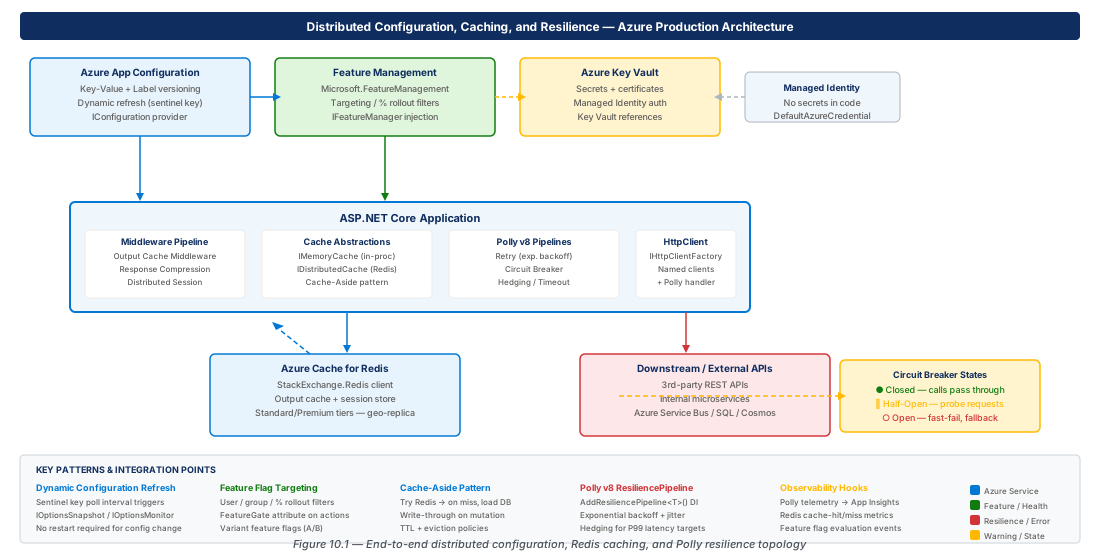
2. Azure App Configuration: Centralized Settings and Dynamic Refresh
Azure App Configuration centralizes non-secret hierarchical configuration data: feature flags, timeout thresholds, rate limits, and any value that might need to change between deployments or across environments. The Standard tier is required for production — Free tier has no SLA and a hard daily request cap that a single application can exhaust.
Provisioning and Connecting App Configuration
| Feature | Free Tier | Standard Tier |
|---|---|---|
| Stores per subscription | 1 | Unlimited |
| Storage | 10 MB | 1 GB |
| Request quota | 1,000 / day | 20,000 / hour |
| SLA | None | 99.9% |
| Geo-replication / Private endpoints | No | Yes |
| Recommended for | Dev/test | Production |
Important
The Free tier has no SLA and a hard daily request cap. A single busy application can exhaust the 1,000-request quota within minutes if dynamic refresh is misconfigured. Always use the Standard tier in production and set the refresh interval no lower than 30 seconds.
# CH10-ENV-02: Create Standard-tier App Configuration store
az appconfig create \
  --name configuration-caching-prod-eastus2-001 \
  --resource-group rg-configuration-caching-resilience-prod-001 \
  --location eastus2 \
  --sku Standard \
  --retention-days 7
The .NET Configuration Provider
The Microsoft.Azure.AppConfiguration.AspNetCore NuGet package integrates with the standard IConfiguration pipeline. In hosted environments pass a Uri and DefaultAzureCredential; the sentinel-key pattern means only one poll read is needed per refresh cycle regardless of store size.
// Program.cs — App Configuration with dynamic refresh
builder.Configuration.AddAzureAppConfiguration(options =>
{
    options.Connect(new Uri(endpoint), new DefaultAzureCredential())
           .Select(KeyFilter.Any, builder.Environment.EnvironmentName)
           .ConfigureRefresh(refresh => refresh
               .Register("Application:SentinelKey", refreshAll: true)
               .SetCacheExpiration(TimeSpan.FromSeconds(30)));
});
builder.Services.AddAzureAppConfiguration();
app.UseAzureAppConfiguration();Tip
Use IOptionsSnapshot<T> (scoped, refreshes per request) for settings that should take effect quickly. Use IOptionsMonitor<T> (singleton with OnChange callback) when background services need to react to changes without an incoming HTTP request.
Labels, Revisions, and Environment Promotion
Labels represent environments (Development, Staging, Production) or deployment slots. The .Select() call filters which label to load at startup. Revisions provide a complete audit trail; az appconfig kv export / import automates environment promotion pipelines.
3. Feature Flags with Microsoft.FeatureManagement
Feature flags decouple deployment from release. With App Configuration as the backend and Microsoft.FeatureManagement.AspNetCore as the SDK, you can ship code to production disabled, enable it for internal users, gradually roll it out, and roll it back instantly by flipping a toggle — no redeployment required.
Setting Up Feature Management
// Program.cs — register feature management filters
builder.Services.AddFeatureManagement()
    .AddFeatureFilter<PercentageFilter>()
    .AddFeatureFilter<TimeWindowFilter>()
    .AddFeatureFilter<TargetingFilter>();
builder.Services.AddSingleton<ITargetingContextAccessor,
    HttpContextTargetingContextAccessor>();
Targeting Filters: Gradual Rollouts and Canary Releases
The TargetingFilter evaluates a flag against an audience definition with individual user overrides, group-level rollout percentages, and a default rollout percentage. The evaluation is deterministic — a given user ID always maps to the same bucket, ensuring a consistent experience across requests and sessions.
Warning
Use TargetingFilter over PercentageFilter for any feature with a user-visible behavior change. Inconsistent assignment causes features to flicker on and off across page loads, eroding user trust and making A/B test results unreliable.
Time Window and Percentage Filters
The TimeWindowFilter enables time-boxed features for planned maintenance windows, scheduled promotions, or conference demos — configured entirely in App Configuration with no code change required. The PercentageFilter provides a quick A/B split when consistency across requests is not required.
4. Azure Cache for Redis: Distributed Caching at Scale
Azure Cache for Redis is a fully managed, high-throughput data store shared across all instances of a horizontally scaled application. It replaces IDistributedCache backed by in-memory or SQL Server implementations that are not shared across pods, and serves as the foundation for the cache-aside pattern, output caching, and distributed session.
Provisioning Redis and Choosing a Tier
| Tier | Max Memory | Replication | SLA | Use Case |
|---|---|---|---|---|
| Basic | 53 GB | No | None | Dev/test only |
| Standard | 53 GB | Primary + replica | 99.9% | Production, moderate load |
| Premium | 120 GB | Yes + clustering | 99.9% | High-throughput production |
| Enterprise | 2 TB | Active geo-replication | 99.99% | Mission-critical, global |
Important
Never use Basic tier in production. It has no SLA, no replication, and a single node failure takes your cache offline — which may cascade into database overload as every cache miss falls through to the origin.
# CH10-ENV-04: Create Standard C1 Redis cache
az redis create \
  --name cache-configuration-caching-prod-eastus2-001 \
  --resource-group rg-configuration-caching-resilience-prod-001 \
  --sku Standard --vm-size C1 \
  --enable-non-ssl-port false \
  --minimum-tls-version 1.2
StackExchange.Redis: Connection Management
ConnectionMultiplexer is an expensive, thread-safe object that must be created once and reused for the application lifetime. Set AbortOnConnectFail = false so applications start and degrade gracefully when Redis is temporarily unreachable during a pod restart or rolling upgrade.
// Program.cs — singleton ConnectionMultiplexer
builder.Services.AddSingleton<IConnectionMultiplexer>(sp => {
    var opts = ConfigurationOptions.Parse(connStr);
    opts.AbortOnConnectFail = false;
    opts.ConnectRetry = 5;
    opts.ReconnectRetryPolicy = new ExponentialRetry(1_000, 10_000);
    return ConnectionMultiplexer.Connect(opts);
});
The Cache-Aside Pattern
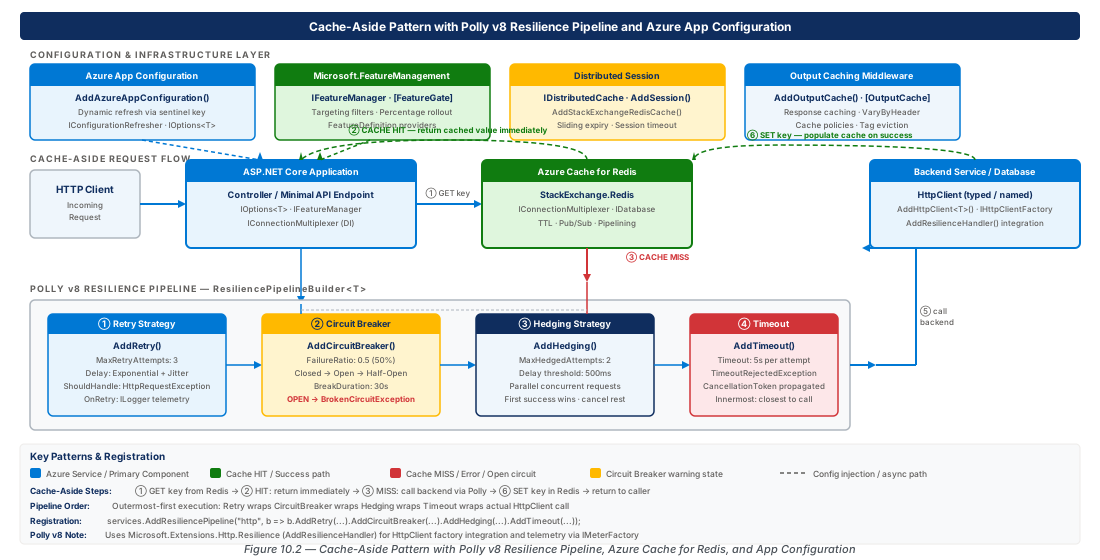
Cache-aside (lazy loading) checks the cache first; on a miss it queries the origin, writes the result to cache with a TTL, and returns the result. This keeps the cache populated with only data that is actually requested, unlike write-through caching which populates the cache regardless of whether the data will be read.
Warning
Stampede (thundering herd) occurs when many concurrent requests for the same cold cache key all miss simultaneously and issue parallel origin queries. Mitigate with a distributed lock (SET NX) to ensure only one request populates the cache while others wait.
Output Caching and Distributed Session
ASP.NET Core 7+ Output Caching backed by Redis caches full HTTP responses server-side and supports programmatic invalidation via tags: await outputCacheStore.EvictByTagAsync("catalog-products", ct). Distributed session requires only AddSession() plus app.UseSession() when IDistributedCache is already wired to Redis.
Tip
Minimize session payload size. Each HTTP request that reads or writes session deserializes and serializes the entire session dictionary on every round-trip to Redis. Store only scalar identifiers in session and fetch full objects from the cache-aside layer.
5. Polly v8 Resilience Pipelines: Retry, Circuit Breaker, and Hedging
Polly v8 introduces ResiliencePipeline and ResiliencePipelineBuilder with native Microsoft.Extensions.Http.Resilience integration. Strategies are evaluated outermost-first in the builder chain, which means pipeline ordering directly determines failure behavior — particularly the scope of timeout enforcement.
Retry Strategies
Retry handles transient failures (timeouts, 429, 503) by re-issuing the same operation after a delay. The UseJitter = true flag adds a ±25% random offset to each attempt delay — critical when many instances retry simultaneously after a shared dependency failure, preventing the retry spike from recreating the original overload.
// AddResilienceHandler — retry + circuit breaker + timeout
pipelineBuilder.AddRetry(new HttpRetryStrategyOptions {
    MaxRetryAttempts = 3, Delay = TimeSpan.FromMilliseconds(500),
    BackoffType = DelayBackoffType.Exponential, UseJitter = true
});
pipelineBuilder.AddCircuitBreaker(new HttpCircuitBreakerStrategyOptions {
    FailureRatio = 0.5, SamplingDuration = TimeSpan.FromSeconds(30),
    MinimumThroughput = 5, BreakDuration = TimeSpan.FromSeconds(15)
});
pipelineBuilder.AddTimeout(TimeSpan.FromSeconds(10));
Circuit Breaker: Protecting Failing Dependencies
The circuit breaker tracks the ratio of failed calls within a sampling window and opens the circuit when the ratio exceeds a threshold (subject to a minimum throughput guard). In the Open state all calls are rejected with BrokenCircuitException without touching the downstream service; catch this exception to fall through to a degraded code path.
Tip
Set an aggressive timeout on Redis calls (200–500 ms). Redis should respond in microseconds; if a call exceeds half a second the connection is degraded, and falling through to the origin is preferable to holding a thread. The circuit breaker tracks these timeouts and opens the circuit when Redis is consistently slow.
Hedging: Parallel Speculative Execution
Hedging issues a second request after a configurable delay and returns whichever response arrives first, trading a small increase in total request volume for significant P99 latency reduction. Only hedge idempotent, read-only operations — never POST/PATCH/DELETE where issuing multiple identical requests violates safety guarantees.
Observability: Metrics and Telemetry
Polly v8 emits telemetry via ResilienceEvent. Integrate with OpenTelemetry by adding metrics.AddMeter("Polly") and tracing.AddSource("Polly"). Alert on polly.circuit_breaker.open.duration — a circuit that stays open more than 60 seconds signals a dependency that has not self-healed and requires operator intervention.
| Metric | Description | Alert Threshold |
|---|---|---|
polly.retry.attempt.duration | Duration per retry attempt | P99 > 2× base latency |
polly.circuit_breaker.open.duration | Time circuit stayed open | > 0 (any open event) |
polly.circuit_breaker.state | 0=closed, 1=open, 2=half-open | state = 1 for > 30 s |
polly.timeout.exceeded | Count of timed-out executions | > 1% of total |
6. Lab
CE-19: Deploy App Configuration with Feature Flags
Provision a Standard-tier App Configuration store, seed it with settings and a feature flag, then verify sentinel-key dynamic refresh delivers a changed value to a running application without restart.
# Step 1: Create store and seed settings with Development label
az appconfig kv set --name configuration-caching-prod-eastus2-001 \
  --key "Catalog:DefaultPageSize" --value "20" --label Development --yes
az appconfig kv set --name configuration-caching-prod-eastus2-001 \
  --key "Application:SentinelKey" --value "v1" --label Development --yes
# Step 2: Create feature flag with 25% rollout filter
az appconfig feature filter add --name configuration-caching-prod-eastus2-001 \
  --feature BetaProductRecommendations \
  --filter-name Microsoft.Percentage --filter-parameters Value=25 \
  --label Development --yes
# Step 3: Trigger refresh by bumping sentinel key to v2
az appconfig kv set --name configuration-caching-prod-eastus2-001 \
  --key "Application:SentinelKey" --value "v2" --label Development --yes
echo "Running app reloads settings within 30 s — no restart needed."CE-20: Provision Redis and Build a Polly v8 Pipeline
Provision Azure Cache for Redis (Standard C1), store the connection string in App Configuration, add required NuGet packages, and verify Polly telemetry in Application Insights.
# Step 1: Create Standard C1 Redis and wait for provisioning
az redis create --name cache-configuration-caching-dev-eastus2-001 \
  --resource-group rg-configuration-caching-resilience-dev-001 \
  --sku Standard --vm-size C1 \
  --enable-non-ssl-port false --minimum-tls-version 1.2
az redis wait --name cache-configuration-caching-dev-eastus2-001 \
  --resource-group rg-configuration-caching-resilience-dev-001 --created
# Step 2: Add NuGet packages
dotnet add package Microsoft.Azure.AppConfiguration.AspNetCore
dotnet add package StackExchange.Redis
dotnet add package Microsoft.Extensions.Http.Resilience
dotnet add package OpenTelemetry.Extensions.Hosting
# Step 3: Query Polly metrics from Application Insights
az monitor app-insights query --app ai-configuration-caching-prod-eastus2-001 \
  --analytics-query "customMetrics | where name startswith 'polly' | take 20"
7. Summary
| Concept | Key Point |
|---|---|
| App Configuration tier | Use Standard in all production workloads — Free has no SLA and a hard daily request cap |
| Sentinel-key refresh | One poll read per interval regardless of store size; set cache expiration no lower than 30 s |
| Feature flag targeting | TargetingFilter provides deterministic, user-stable rollout; prefer over PercentageFilter for user-visible features |
| Redis connection | ConnectionMultiplexer must be singleton; set AbortOnConnectFail = false for graceful startup |
| Cache-aside stampede | Mitigate cold-key race with a distributed lock (SET NX) around origin fallback |
| Polly pipeline ordering | Strategies evaluate outermost-first; timeout at the end bounds total pipeline duration including retries |
| Circuit breaker alerting | Alert on open duration > 60 s — a circuit that does not self-heal requires operator intervention |
Chapter: 10 of 12 | Status: v0.1 Draft |