Azure for .NET Developers: Production-Grade Cloud Architecture and Operations
Azure DevOps and CI/CD for .NET Applications
Modern .NET applications deployed to Azure require automated, repeatable delivery pipelines that enforce quality gates, manage infrastructure state, and minimize deployment risk across every environment. This chapter establishes a production-grade CI/CD foundation covering Azure Pipelines, GitHub Actions, Azure Artifacts feed management, IaC pipeline integration, and progressive delivery patterns.
1. Foundations of .NET CI/CD on Azure
Why Pipeline Architecture Matters Before the First Commit
A production .NET pipeline must answer three structural questions: where does the authoritative artifact come from, how does every stage prove the artifact is safe to promote, and what is the blast radius of any given deployment? These map directly to pipeline stages: a deterministic build, quality gate stages, and a deployment strategy. The Azure DevOps ecosystem provides two complementary surfaces—Azure Pipelines (tightly integrated with Azure AD and the DevOps suite) and GitHub Actions (workflow-native to GitHub)—both supporting YAML-as-code, matrix builds, reusable components, and OIDC authentication to Azure.
Treating the pipeline as a reactive fix rather than a designed system leads to pipelines that are hard to maintain and brittle in the face of organizational change. Before writing any YAML, document the artifact origin, promotion criteria, and rollback procedure as architectural decisions.
CAF-Aligned Resource Organization for DevOps Infrastructure
CAF naming conventions apply equally to CI/CD resources. A production resource group rg-devops-cicd-dotnet-prod-001 holds stable assets (production Key Vault, environment objects, service connections); a dev resource group rg-devops-cicd-dotnet-dev-001 holds ephemeral assets (integration environments, feature-branch infrastructure). The Azure DevOps organization devops-cicd-prod-eastus2-001 uses the target region suffix, not the organization host location.
Note
Azure DevOps organizations are global resources, not region-scoped. The region suffix in devops-cicd-prod-eastus2-001 reflects the primary Azure region your pipelines deploy into, preventing naming confusion when managing workloads across multiple regions.
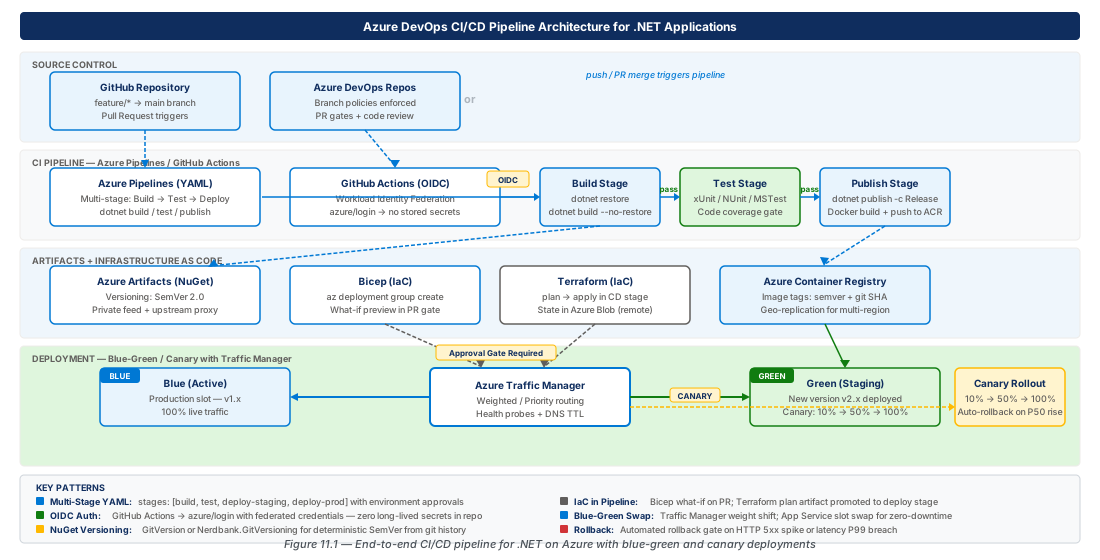
2. Azure Pipelines YAML Multi-Stage Pipelines for .NET
Designing the Stage Topology
A YAML multi-stage pipeline models the promotion path as an explicit DAG of stages. Each stage represents an environment boundary—build, integration, staging, production—and Azure Pipelines tracks each independently, enabling re-runs of failed stages without re-building. The artifact produced in the build stage is the exact artifact deployed in every subsequent stage, eliminating behavioral drift from rebuilding.
The minimal viable topology for a .NET web API is four stages. Build compiles, tests, and publishes a versioned artifact without deploying anything. Integration deploys to an ephemeral environment and runs contract tests. Staging deploys to a production-mirroring slot and runs smoke and performance baseline tests. Production deploys using the progressive strategy described later.
# azure-pipelines.yml — Multi-stage .NET 8 API pipeline
trigger:
  branches:
    include: [main, release/*]
variables:
  buildConfiguration: 'Release'
  dotnetVersion: '8.x'
  artifactName: 'webapp-drop'
  azureSubscription: 'sc-devops-cicd-dotnet-prod-eastus2-001'
  appServiceName: 'app-cicd-dotnet-prod-eastus2-001'
  resourceGroup: 'rg-devops-cicd-dotnet-prod-001'
# ... stages: Build → Integration → Staging → Production (see lab CE-21)
Pipeline Variables, Secrets, and Service Connections
Azure Pipelines offers three variable scopes: YAML-level (non-sensitive config), Key Vault-linked variable groups (secrets retrieved at runtime via managed identity), and queue-time parameters (release switches). Service connections are the trust boundary between pipelines and Azure—every AzureWebApp or ARM deployment task must reference one. The current best practice is workload identity federation (WIF), which issues a short-lived OIDC token per run with no stored credential to rotate.
Warning
Do not use legacy service principal credentials with client secrets for new Azure Pipelines service connections. Secret-based credentials expire unpredictably and cannot be rotated automatically. Workload identity federation eliminates the rotation problem entirely and is the Microsoft-recommended approach as of late 2024.
Approval Gates, Compliance Checks, and Rollback
Deployment environments in Azure Pipelines add human approvals and automated checks to stage boundaries. An environment named production can require approval from a specific group, enforce a soak time, run Azure Policy compliance checks, or invoke an external REST endpoint for change management validation—all before deployment steps execute.
Rollback is intentional, not automatic, to avoid applying code rollback without schema rollback. App Service deployment slots make rollback clean: the previous version remains in the staging slot after a swap, and swapping back takes under two minutes. Artifact retention defaults to 30 days; configure explicit retention policies for longer compliance windows.
Important
Azure Pipelines retains pipeline artifacts for 30 days by default. If your rollback window must extend beyond this—such as for compliance-mandated deployments—configure the retention property explicitly or publish critical artifacts to Azure Artifacts, which has independent retention policies.
3. GitHub Actions Workflows with OIDC-Based Azure Deployment
Workflow Architecture and Trigger Strategy
GitHub Actions models CI/CD as event-driven workflows stored in .github/workflows/. Unlike Azure Pipelines, there is no first-class stage concept—promotion is implemented through needs job dependencies and environment protection rules. The canonical trigger strategy for a .NET production pipeline uses three separate workflow files: ci.yml (every push/PR), cd.yml (push to main), and hotfix.yml (manual or hotfix branch). Keeping them separate prevents CI feedback loops from being blocked by deployment gates.
# .github/workflows/cd.yml — CD pipeline with OIDC Azure auth
permissions:
  id-token: write   # Required for OIDC token request
  contents: read
jobs:
  deploy-production:
    environment:
      name: production
      url: https://app-cicd-dotnet-prod-eastus2-001.azurewebsites.net
    steps:
      - uses: azure/login@v2
        with:
          client-id: ${{ secrets.AZURE_CLIENT_ID }}
          tenant-id: ${{ secrets.AZURE_TENANT_ID }}
          subscription-id: ${{ secrets.AZURE_SUBSCRIPTION_ID }}
Configuring OIDC Trust Between GitHub Actions and Azure
OIDC authentication eliminates stored credentials entirely. You configure a federated identity credential on an Azure AD application that trusts tokens from GitHub's OIDC provider (https://token.actions.githubusercontent.com). The subject claim encodes the repository, branch, and environment, so the trust policy can be scoped precisely—for example, only tokens from the main branch of a specific repository deploying to the production environment.
# Create app registration and federated credential for GitHub OIDC
APP_ID=$(az ad app create \
  --display-name "sp-github-actions-cicd-dotnet-prod-001" \
  --query appId --output tsv)
SP_ID=$(az ad sp create --id $APP_ID --query id --output tsv)
az ad app federated-credential create --id $APP_ID --parameters '{
  "name":"github-prod-trust","issuer":"https://token.actions.githubusercontent.com",
  "subject":"repo:MyOrg/MyApi:environment:production",
  "audiences":["api://AzureADTokenExchange"]}'
# Set GitHub secrets: AZURE_CLIENT_ID, AZURE_TENANT_ID, AZURE_SUBSCRIPTION_ID
Reusable Workflows and Composite Actions
Reusable workflows (workflow_call) encapsulate a complete deployment job with an explicit interface contract—secrets and inputs are passed explicitly. Composite actions bundle a sequence of steps within a caller's job, suited for operations like dotnet publish with standardized flags. For platform teams managing ten or more microservices, publish reusable workflows to a platform-workflows repository.
Tip
Pin reusable workflow references to a SHA rather than a mutable tag (uses: MyOrg/platform-workflows/.github/workflows/dotnet-deploy.yml@sha256:abc123). Pinning creates a traceable change in source history when you intentionally upgrade and prevents silent behavioral drift in downstream consumers.
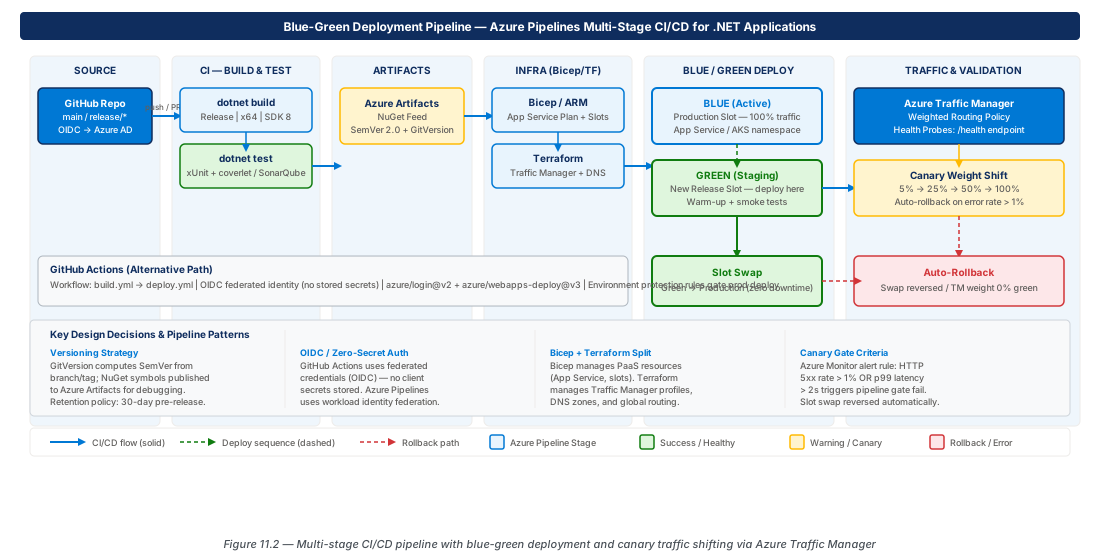
4. Azure Artifacts NuGet Feed Management and Versioning
Designing a Feed Topology for Enterprise .NET Development
A mature .NET organization uses three logical feed layers. The upstream proxy feed proxies NuGet.org with caching—build pipelines consume packages from here, never directly from NuGet.org. The private packages feed contains internally developed NuGet packages, with the upstream proxy as an upstream source, providing a single feed URL for all dependencies. The release promotion feed holds packages that have passed integration testing and are approved for production use.
Important
Never configure NuGet.org directly as an upstream source on your private packages feed if the upstream proxy feed is in place. Packages matching an internal package name would be resolved from NuGet.org if an internal version doesn't exist—this is the dependency confusion attack vector. Use the upstream proxy with package-prefix allow-listing.
| Feed Type | Scope | Write Access | Consumers |
|---|---|---|---|
| Upstream Proxy | Organization | Pipeline CI identity only | All internal build pipelines |
| Private Packages | Project | Library build pipelines | Application build pipelines |
| Release Promotion | Organization | Release pipeline identity only | Production deployments, external consumers |
Semantic Versioning and the NuGet Publish Pipeline
GitVersion derives a SemVer version from the Git branch and tag structure without manual version file maintenance. In Mainline Development mode, a PR merged to main increments the patch version; a release/2.1 branch produces 2.1.x-prefixed packages; tags produce exact versions. This aligns version history with Git history so any commit can be traced to its produced package.
# Create the private packages feed with upstream NuGet.org source
az artifacts feed create \
  --org "https://dev.azure.com/devops-cicd-prod-eastus2-001" \
  --project MyDotNetProject \
  --name "feed-private-dotnet-prod-eastus2-001" \
  --upstream-sources '[{"name":"NuGet Gallery","protocol":"NuGet",
    "location":"https://api.nuget.org/v3/index.json",
    "upstreamSourceType":"Public","status":"Ok"}]'
Package Promotion and Retention Policies
Promotion copies a package from the private feed to the release feed to signal quality level—it creates a view reference, not a republished artifact. Configure retention at the feed level to keep the latest N versions per package (recommended: 10 per major series, 5 for pre-release). Packages pinned by a downstream feed as an upstream source are exempt from retention and form a permanent record of every version released to production.
5. Bicep and Terraform Integration in CI/CD Pipelines
Infrastructure Validation Gates in the Pipeline
IaC must be linted, validated, reviewed, and applied through the same controlled promotion process as application code. The IaC pipeline mirrors the application pipeline: a validation stage (syntax check + policy compliance via Checkov or PSRule for Azure), a plan/what-if stage that generates a change set published as a pipeline artifact for human review, and an apply stage that executes the deployment. The what-if artifact shows exactly what Azure resources will be created, modified, or deleted before any approval is given.
# Bicep validation and what-if for rg-devops-cicd-dotnet-prod-001
az bicep build --file infra/main.bicep --stdout > /dev/null
az deployment group what-if \
  --resource-group rg-devops-cicd-dotnet-prod-001 \
  --template-file infra/main.bicep \
  --parameters @infra/parameters/prod.bicepparam \
  --result-format FullResourcePayloads | tee infra-whatif-prod.json
# Review changes, then apply with --mode Incremental
Terraform Remote State and Pipeline Integration
Terraform requires a remote state backend to prevent concurrent pipeline runs from corrupting state. Azure Blob Storage with lease-based locking is the standard choice. The pipeline identity needs Storage Blob Data Contributor scoped to the state container specifically, not the storage account. Enable blob versioning and soft delete (minimum 30 days) on the state container so an accidentally deleted state file can be recovered.
Comparing Bicep and Terraform for .NET Pipeline IaC
Bicep is purpose-built for Azure with zero state management, day-one resource coverage, and native what-if integration—the right default for Azure-only .NET teams. Terraform is the right choice when the organization already manages non-Azure infrastructure and needs a single IaC toolchain across all providers; its azurerm provider is mature but lags new Azure resource types by weeks to months.
| Dimension | Bicep | Terraform |
|---|---|---|
| Azure resource coverage (new features) | Day-one (ARM native) | Weeks–months lag via azurerm provider |
| State management | Stateless (ARM tracks state) | Explicit state file (Blob Storage backend) |
| Multi-cloud support | Azure only | AWS, GCP, K8s, 1000+ providers |
| Pipeline integration | Native az CLI, no extra tooling | Requires Terraform CLI install in pipeline |
| What-if / plan output | az deployment group what-if | terraform plan -out |
Tip
If you are starting a new .NET project on Azure with no existing Terraform investment, choose Bicep. Zero state management overhead and tight Azure CLI alignment make it the path of least resistance for a pipeline that must stay operational without dedicated platform engineering support.
6. Blue-Green and Canary Deployment with Azure Traffic Manager
Blue-Green Deployment Architecture
Blue-green deployment maintains two identical production environments and shifts traffic between them atomically. In Azure, App Service deployment slots provide a simplified blue-green pattern within a single App Service plan: production slot is blue, staging slot is green, and the swap is an atomic ~60-second operation. For multi-region workloads, Azure Traffic Manager with weighted routing provides the traffic switching layer above any compute endpoint.
Note
App Service slot swaps are not instantaneous at the TCP level. During a swap, new requests are routed to the new slot while existing connections to the old slot complete. Design your API to be backwards-compatible across one minor version boundary to handle this window gracefully, especially for long-lived WebSocket connections.
Canary Deployment with Traffic Manager Weighted Routing
Traffic Manager's weighted routing distributes DNS queries proportionally across endpoints by integer weight. A stable endpoint at weight 95 and a canary at weight 5 routes approximately 5% of new DNS resolutions to the canary. Traffic Manager operates at the DNS layer—it resolves DNS queries to different endpoint IP addresses rather than intercepting individual HTTP requests, so the canary percentage affects the fraction of clients directed to the canary, not a strict per-request split.
# Create Traffic Manager profile and canary endpoints (95/5 split)
az network traffic-manager profile create \
  --name tm-cicd-dotnet-prod-eastus2-001 \
  --resource-group rg-devops-cicd-dotnet-prod-001 \
  --routing-method Weighted --ttl 30 \
  --monitor-protocol HTTPS --monitor-path /health
az network traffic-manager endpoint update \
  --name endpoint-prod-stable \
  --profile-name tm-cicd-dotnet-prod-eastus2-001 \
  --resource-group rg-devops-cicd-dotnet-prod-001 --weight 95
# Canary endpoint weight set to 5 during initial rollout
Automated Canary Analysis and Rollback Triggers
Automated canary analysis queries Application Insights via the Azure Monitor REST API after a warm-up period (10–15 minutes). The pipeline compares the canary's error rate and p99 latency against the stable endpoint's metrics over the same window. If the canary's error rate exceeds the tolerance band (e.g., >0.5% or p99 >500ms relative to stable), the pipeline sets the canary Traffic Manager endpoint weight to 0, creates an incident, and fails the run.
Warning
Traffic Manager's DNS TTL determines the minimum effective canary granularity, not the weight value. A 60-second TTL means the same set of clients receives all canary traffic for their cache duration. Set TTL to 30 seconds or lower during canary deployments, and restore it to 300+ seconds post-deployment to reduce DNS query costs.
7. Lab: CI/CD Pipeline Exercises
CE-21: Build a Multi-Stage Azure Pipeline for a .NET 8 API
Provision the Azure resources and Azure Pipelines configuration for a multi-stage CI/CD pipeline targeting App Service with workload identity federation service connections and approval-gated deployment environments.
# CE-21: Provision resource groups, App Service, slots, and WIF service principal
LOCATION="eastus2"
az group create --name rg-devops-cicd-dotnet-prod-001 --location $LOCATION
az group create --name rg-devops-cicd-dotnet-dev-001 --location $LOCATION
az webapp create --name app-cicd-dotnet-prod-eastus2-001 \
  --resource-group rg-devops-cicd-dotnet-prod-001 \
  --plan asp-cicd-dotnet-prod-eastus2-001 --runtime "DOTNETCORE:8.0"
az webapp deployment slot create --name app-cicd-dotnet-prod-eastus2-001 \
  --resource-group rg-devops-cicd-dotnet-prod-001 --slot staging
# Create WIF service principal — output values for service connection setupCE-22: Configure GitHub Actions OIDC and Deploy a Canary Release
Configure OIDC trust between GitHub Actions and Azure, create an Azure Traffic Manager profile for canary deployments, and walk through the incremental traffic shift and canary health evaluation workflow.
# CE-22: OIDC trust + canary Traffic Manager setup
APP_ID=$(az ad app create --display-name sp-github-actions-cicd-dotnet-prod-001 \
  --query appId --output tsv)
az ad app federated-credential create --id $APP_ID --parameters '{
  "name":"github-prod-trust","issuer":"https://token.actions.githubusercontent.com",
  "subject":"repo:MyOrg/MyDotNetApi:environment:production",
  "audiences":["api://AzureADTokenExchange"]}'
gh secret set AZURE_CLIENT_ID --body "$APP_ID" --repo "MyOrg/MyDotNetApi"
# Create Traffic Manager profile with 95/5 weighted routing (see section 6)
8. Summary
| Concept | Key Point |
|---|---|
| Multi-stage YAML pipelines | Model the promotion path as a DAG; the build stage produces one artifact deployed without rebuilding across all subsequent stages. |
| OIDC / WIF service connections | Workload identity federation eliminates stored client secrets and issues short-lived, per-run scoped tokens for both Azure Pipelines and GitHub Actions. |
| Azure Artifacts feed topology | Layer feeds as upstream proxy → private packages → release promotion to control the NuGet.org path and mitigate dependency confusion. |
| IaC pipeline integration | Treat Bicep/Terraform with the same gate discipline as app code: validate → what-if/plan → human approval → apply, per environment. |
| Blue-green deployment | App Service slot swaps for single-region; Traffic Manager weighted routing for multi-region—both enable near-instant rollback. |
| Canary analysis and rollback | Automate canary evaluation by comparing error rates and latency against the stable endpoint; trigger rollback by setting the canary endpoint weight to 0. |
Chapter: 11 of 12 | Status: v0.1 Draft |