Azure Integration Services: Production Patterns
API Management Gateway Design
Azure API Management (APIM) is the primary API facade layer in production integration architectures, providing a single, governed entry point through which backend services are exposed to internal consumers, partners, and external developers. Rather than allowing clients to call microservices, Functions, Logic Apps, or legacy systems directly, APIM enforces a consistent contract — validating tokens, applying rate limits, transforming payloads, and routing traffic — so that backend implementations can evolve without breaking consumers. Understanding how to design this gateway layer correctly, from policy pipeline execution through versioning strategy to quota enforcement, is the foundational skill every integration architect must master before placing a single service in production.
Foundations: APIM Architecture and SKU Selection
Gateway, Management Plane, and Developer Portal
Azure API Management is composed of three logical components that cooperate to deliver a production API platform. The gateway is the data-plane component that receives every inbound API call, executes the policy pipeline, forwards traffic to backends, transforms responses, and returns results to callers. It is deployed as a regionally redundant set of gateway nodes that run the policy engine in-process, meaning policies execute at wire speed without additional network hops. The management plane is the control plane — exposed through the Azure portal, the ARM REST API, and Azure CLI — through which operators configure APIs, products, policies, subscriptions, and certificates. Configuration changes made through the management plane are propagated to all gateway nodes asynchronously, typically within 15 seconds for policy changes and within a few minutes for new APIs. The developer portal is an auto-generated, customisable website that documents APIs, lets developers test endpoints interactively, and manages the subscription key lifecycle. In enterprise architectures the developer portal is often customised with corporate branding and restricted to authenticated Azure AD users.
Understanding this three-component topology is important because each component has its own availability posture. Gateway nodes are the latency-critical path, and in the Premium SKU they can be deployed across multiple Azure regions with active-active traffic distribution. The management plane is a shared Azure service with a separate SLA from the gateway, and brief management-plane outages do not interrupt traffic that is already in flight — the gateway continues serving requests using its cached configuration. Architects who treat APIM configuration changes as zero-downtime operations are correct for in-flight traffic, but they must still account for the brief propagation delay when rolling out new policy versions during high-traffic periods.
The self-hosted gateway is a fourth deployment mode introduced in APIM v2 that allows the same gateway runtime to run as a container on-premises, in a third-party cloud, or in an Azure Arc-enabled Kubernetes cluster. Configuration is still managed centrally in the Azure management plane, but the data plane executes locally, making the self-hosted gateway appropriate for scenarios where API backends run in environments without Azure network connectivity or where data sovereignty regulations prohibit traffic leaving a specific jurisdiction. From a policy pipeline perspective, the self-hosted gateway behaves identically to cloud-hosted gateways, and the same policies, certificates, and named values are available.
SKU Tiers: Capability and Capacity Decision Framework
Selecting the appropriate APIM SKU at the start of a project prevents costly migrations later. The following table compares the five main tiers across the dimensions most relevant to production decisions.
| Tier | Developer | Basic | Standard | Premium | Consumption |
|---|---|---|---|---|---|
| SLA | None | 99.9% | 99.9% | 99.95% | 99.95% |
| Units / Scale | 1 (fixed) | 1–2 | 1–4 | 1–10 per region | Auto-scale |
| Multi-region | No | No | No | Yes (active-active) | No |
| VNet Integration | No | No | No | Yes (internal/external) | No |
| Self-hosted gateway | Yes | No | No | Yes | No |
| Built-in cache | 10 MB | 50 MB | 50 MB | 50 MB per unit | External only |
| External Redis cache | Yes | No | Yes | Yes | Yes |
| Azure AD B2C dev portal | Yes | Yes | Yes | Yes | Yes |
| Typical monthly cost (1 unit) | ~$50 | ~$150 | ~$700 | ~$3,500 | Per-call |
| Best for | Prototype / PoC | Small internal APIs | Mid-size workloads | Enterprise / regulated | Serverless / burst |
Important
The Developer SKU carries no SLA and must never be used in production. Teams routinely underestimate the migration effort when they later promote a Developer-tier instance to Standard or Premium because subscription keys, products, and policy configurations must all be reprovisioned through the ARM API or Terraform — the Azure portal does not support in-place tier upgrades.
The Premium SKU is the only tier that supports full VNet integration in both internal and external modes, making it mandatory for architectures where APIM must reach private backends over an Azure Virtual Network or must itself be deployed without a public IP address. Internal mode places the APIM gateway exclusively on a private IP in your VNet, requiring custom DNS and either an Application Gateway or Azure Front Door in front for public exposure. External mode keeps the public IP on the gateway while adding the VNet interface for outbound connectivity to private backends.
Note
As of 2025, Microsoft introduced APIM v2 tiers (Basic v2, Standard v2, Premium v2) with faster provisioning (minutes rather than 45+ minutes), zone redundancy built in at the Standard v2 level, and a revised networking model. These tiers are generally available and are the preferred choice for new deployments, though the v1 tiers remain supported for existing workloads.
Provisioning with CAF-Aligned Naming
Production APIM instances should be provisioned through infrastructure-as-code using the Cloud Adoption Framework naming conventions from day one. The following CLI sequence provisions a Premium-tier APIM instance in East US 2 inside a dedicated resource group.
# CE-00: Provision APIM production instance with CAF naming
# Resource groups for production and development environments
az group create \
  --name rg-apim-gateway-design-prod-001 \
  --location eastus2 \
  --tags "Environment=Production" "Workload=APIM" "CostCenter=Platform" "Owner=platform-team@contoso.com"

az group create \
  --name rg-apim-gateway-design-dev-001 \
  --location eastus2 \
  --tags "Environment=Development" "Workload=APIM" "CostCenter=Platform"

# Provision Premium-tier APIM (provisioning takes 30-45 minutes for v1, ~5 min for v2)
az apim create \
  --name apim-gateway-prod-eastus2-001 \
  --resource-group rg-apim-gateway-design-prod-001 \
  --location eastus2 \
  --publisher-name "Contoso Platform Team" \
  --publisher-email "platform-team@contoso.com" \
  --sku-name Premium \
  --sku-capacity 1 \
  --virtual-network-type External \
  --no-wait

# Tag the APIM resource for cost tracking
az apim update \
  --name apim-gateway-prod-eastus2-001 \
  --resource-group rg-apim-gateway-design-prod-001 \
--tags "Environment=Production" "Tier=Premium" "Region=eastus2" "ManagedBy=platform-team"Tip
Use --no-wait when provisioning APIM and then poll with az apim show --query "provisioningState" in your deployment pipeline, rather than blocking the pipeline thread for 45 minutes. Configure a pipeline timeout of 90 minutes with polling every 60 seconds to handle transient ARM delays.
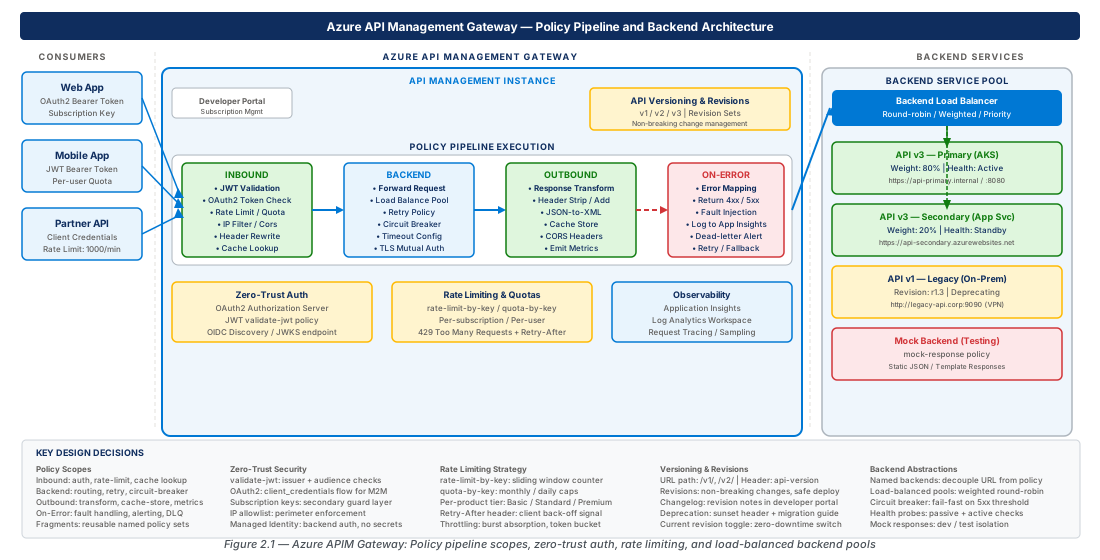
Policy Pipeline Execution: Inbound, Backend, Outbound, and On-Error
The Four-Scope Execution Model
Every API call that enters an APIM gateway traverses a deterministic, ordered pipeline composed of four execution scopes. Understanding the precise order of scope execution, the order of policy inheritance within each scope, and the conditions that cause the pipeline to branch into the on-error scope is foundational to writing policies that behave predictably in production.
Inbound scope executes before the request is forwarded to the backend. This is where you validate JWT tokens, check subscription keys, apply rate limits, transform request headers and bodies, set context variables, and perform IP filtering. The inbound scope can short-circuit the pipeline entirely by returning a response directly to the caller using the return-response policy — this is the mechanism behind mock responses and request caching. Policies in the inbound scope execute in a defined inheritance order: the global (all-APIs) policy base runs first, followed by the product policy base, then the API policy base, and finally the operation-level policy. Within each level, policies execute in the XML document order in which they appear in the <inbound> element. The special <base /> element controls exactly where the parent level's policies are inserted — omitting <base /> at an intermediate level suppresses all ancestor policies for that scope.
Backend scope executes immediately before the actual HTTP request is sent to the backend service. The <forward-request> policy is the pivot point of this scope: it dispatches the (possibly transformed) request and blocks until the backend responds. Policies placed before <forward-request> run before the outbound call; policies placed after run after the backend responds but before the outbound scope begins. The backend scope is where load-balanced pool routing, backend circuit breakers, and backend authentication (e.g., certificate attachment or managed identity token acquisition for backend OAuth) are applied. In most architectures the backend scope is left at its default (forward request with a timeout), but complex routing scenarios — such as fan-out to multiple backends or conditional routing based on inbound request properties — are expressed here.
Outbound scope executes after the backend response is received. Here you transform response headers and bodies, strip internal headers that must not be leaked to callers (such as X-Powered-By, Server, or internal correlation IDs), apply CORS headers, and perform response caching population. Like the inbound scope, outbound policies execute in the same four-level inheritance order. The context.Response variable is populated by this point and its properties are available to policy expressions. A common production pattern is to use an outbound policy to call set-header to strip backend-specific headers and then use find-and-replace to rewrite backend hostnames in redirect Location headers so that callers always see the APIM gateway hostname rather than the raw backend URL.
On-error scope executes whenever an unhandled exception occurs anywhere in the pipeline — a backend connection timeout, a policy exception thrown by an invalid expression, a JWT validation failure that throws rather than returning 401, or an explicit <raise-exception> policy. If no on-error policy is configured, APIM returns a default 500 response. Production architectures must always define a global on-error policy that logs the error context, emits a correlation ID to the caller, and formats the response as a consistent error envelope matching your API's error schema. Leaving on-error unconfigured leaks internal error details including stack traces in some gateway builds.
Policy Scopes and Inheritance: Practical Design Patterns
The four execution scopes interact with four configuration levels — global, product, API, and operation — creating a matrix of 16 possible policy attachment points. Correctly choosing where to attach a policy determines whether it applies globally, per-product, per-API, or per-operation, and choosing wrongly causes either policy gaps (a policy not applied where needed) or policy duplication (the same policy attached redundantly at multiple levels).
The recommended production pattern is to attach cross-cutting security and observability policies at the global scope, business-domain-specific rate limits at the product scope, API-specific transformations at the API scope, and operation-specific validation or mock responses at the operation scope. For example, JWT validation should typically be applied at the API scope rather than the global scope, because different APIs may trust different identity providers or use different token audiences. Rate-limit policies should be applied at the product scope because products model the consumption tier (e.g., "Bronze — 100 calls/minute", "Gold — 5,000 calls/minute") and each product has its own subscription key namespace.
Warning
Placing the <rate-limit-by-key> policy at the global scope with the subscription key as the counter key will cause all products' rate limits to share a single counter, meaning a burst from a Bronze-tier subscription can consume the quota of a Gold-tier subscription. Always scope rate limits to the product level or lower, and use separate named counters per product by incorporating the product ID into the counter-key expression.
Policy expressions are C# lambda expressions wrapped in @(...) syntax that execute inline within the gateway process. They have access to the context object, which exposes the request, response, subscription, user, product, API, and operation properties. Complex logic that cannot fit cleanly in a single expression should be decomposed into named values (for static configuration) and policy fragments (for reusable policy blocks) rather than embedded as large inline C# expressions, which are difficult to test and audit.
# CE-01: Configure global on-error policy and APIM diagnostic settings
# Retrieve APIM resource ID for diagnostics
APIM_ID=$(az apim show \
  --name apim-gateway-prod-eastus2-001 \
  --resource-group rg-apim-gateway-design-prod-001 \
  --query id --output tsv)

# Create Log Analytics workspace for APIM diagnostics
az monitor log-analytics workspace create \
  --workspace-name log-apim-gateway-prod-eastus2-001 \
  --resource-group rg-apim-gateway-design-prod-001 \
  --location eastus2 \
  --sku PerGB2018 \
  --retention-time 90

LOG_WS_ID=$(az monitor log-analytics workspace show \
  --workspace-name log-apim-gateway-prod-eastus2-001 \
  --resource-group rg-apim-gateway-design-prod-001 \
  --query id --output tsv)

# Enable diagnostic settings to send APIM gateway logs to Log Analytics
az monitor diagnostic-settings create \
  --name diag-apim-gateway-prod-001 \
  --resource "$APIM_ID" \
  --workspace "$LOG_WS_ID" \
  --logs '[{"category":"GatewayLogs","enabled":true,"retentionPolicy":{"enabled":false,"days":0}}]' \
  --metrics '[{"category":"AllMetrics","enabled":true}]'

# Set named value for backend base URL (avoid hardcoding in policies)
az apim nv create \
  --service-name apim-gateway-prod-eastus2-001 \
  --resource-group rg-apim-gateway-design-prod-001 \
  --named-value-id "orders-backend-url" \
  --display-name "orders-backend-url" \
  --value "https://orders-api.internal.contoso.com" \
  --secret false
On-Error Policy Design for Production Observability
The on-error scope is frequently the most neglected part of an APIM configuration, yet it is the scope that determines what developers and operations teams see when something goes wrong. A well-designed on-error policy accomplishes three goals: it records structured error context to the logging pipeline, it returns a consistent error envelope to callers that does not expose internal details, and it preserves the original HTTP status code where semantically appropriate rather than blindly returning 500.
The recommended on-error policy structure uses context.LastError to capture the error source, reason, and message, then emits these as structured properties to Azure Application Insights or Event Hubs through the <log-to-eventhub> or Azure Monitor sink of the <trace> policy. The caller-facing response should include a correlationId drawn from context.RequestId so that the caller can provide this value to support teams, who can then query Log Analytics to find the exact gateway log entry. The error message returned to callers should be a generic human-readable string like "An internal error occurred. Please contact support with correlation ID {id}" rather than the raw exception message from context.LastError.Message, which may contain hostnames, query strings, or other internal topology details.
Important
The context.LastError.Source property identifies which policy caused the error. Values include "configuration" (policy XML parsing error), "backend" (backend connection or timeout error), "expression" (C# expression runtime exception), and "policy" (policy-level exception such as JWT validation failure). Logging this value allows you to build dashboard panels that distinguish backend failures from policy bugs without needing to parse raw error message strings.
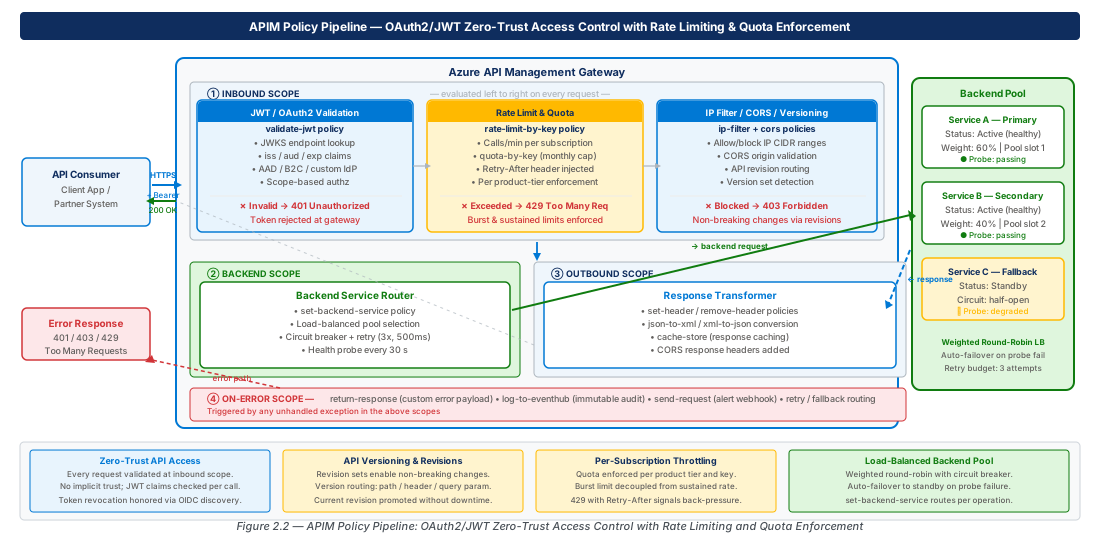
Backend Service Abstractions and Load-Balanced Pool Configuration
Backend Entities and Service Fabric Integration
In Azure API Management, a backend is a first-class resource that decouples the logical API definition from the physical service endpoint. Rather than hardcoding a backend URL directly in the <forward-request> policy, you create a backend entity that encapsulates the URL, credentials, TLS settings, and circuit-breaker configuration. The API's <set-backend-service> policy then references the backend by name, meaning you can change the physical backend endpoint (promote a deployment, migrate a service, change a hostname) by updating the backend entity without modifying any policy XML.
Backend entities support two authentication models for backend calls: client certificate authentication, where APIM attaches a certificate from its certificate store to outbound requests, and managed identity authentication, where APIM acquires an OAuth2 token from Azure AD using its system-assigned or user-assigned managed identity and attaches it as a Bearer token. The managed identity pattern is the recommended approach for backends hosted in Azure because it eliminates client secrets and enables end-to-end auditability: the token subject is the APIM managed identity's principal ID, and the backend can validate this identity in its own token validation middleware. For on-premises backends reachable through Azure Hybrid Connections or VPN, mutual TLS with a client certificate is often the only option.
# CE-02: Create backend entities with circuit breaker for production APIs
# Create the primary backend for the Orders API
az apim backend create \
  --service-name apim-gateway-prod-eastus2-001 \
  --resource-group rg-apim-gateway-design-prod-001 \
  --backend-id "orders-api-primary" \
  --url "https://orders-api-primary.internal.contoso.com/api" \
  --protocol http \
  --description "Orders API primary backend node in East US 2" \
  --title "Orders API Primary"

# Create the failover backend for the Orders API
az apim backend create \
  --service-name apim-gateway-prod-eastus2-001 \
  --resource-group rg-apim-gateway-design-prod-001 \
  --backend-id "orders-api-secondary" \
  --url "https://orders-api-secondary.internal.contoso.com/api" \
  --protocol http \
  --description "Orders API secondary backend in East US 2 (DR failover)" \
  --title "Orders API Secondary"
Load-Balanced Backend Pools
The backend pool resource, introduced in APIM alongside the load-balanced backend type, allows multiple backend entities to be grouped into a pool with a specified load-balancing algorithm and optional priority and weight configuration. APIM supports three load-balancing algorithms for backend pools: round-robin (distributes requests equally across all healthy backends), least-requests (routes each new request to the backend with the fewest active in-flight requests — appropriate for backends with variable response times), and ip-hash (uses a hash of the caller's IP address to achieve session affinity without cookies — appropriate for stateful backends that cache per-caller state locally).
Backend pool configuration includes health probe settings that determine when a backend is removed from rotation. The circuit-breaker pattern in APIM backend pools uses a failure-count threshold and a sampling window: if a backend returns more than N failures in a W-second window, it is tripped to the open state and excluded from the pool for a configured recovery interval. After the recovery interval elapses, the backend transitions to the half-open state and receives a single probe request; if that probe succeeds, the backend returns to the closed (healthy) state. This automatic recovery prevents operations teams from manually re-enabling backends after transient infrastructure events and reduces mean time to recovery for partial backend failures.
Priority and weight parameters in the pool configuration enable sophisticated traffic distribution patterns. Setting priority: 1 on primary backends and priority: 2 on standby backends implements active-passive failover at the pool level: APIM routes all traffic to priority-1 backends as long as at least one is healthy, and only fails over to priority-2 backends when all priority-1 backends trip their circuit breakers. Within a priority group, the weight parameter distributes traffic proportionally — a backend with weight: 3 receives three times the traffic of a backend with weight: 1 in the same priority group. This mechanism is directly applicable to blue-green deployment scenarios where you want to shift 10% of traffic to a new backend version before promoting it to full weight.
Tip
When configuring health probes for backend pools, use a dedicated lightweight health endpoint (e.g., GET /health/ready) rather than probing a functional API endpoint. Functional endpoints may have side effects, consume rate-limit budget on the backend, or generate misleading application logs. The health endpoint should return 200 with a JSON body containing at minimum a status field and the backend's current version tag so that you can verify from APIM diagnostic logs which backend version is serving traffic during deployments.
API Versioning: Revision Sets and Non-Breaking Change Management
Versioning Schemes and the Version Set Resource
API versioning in Azure API Management is managed through the version set resource, which groups multiple API versions under a single logical API identity and specifies the versioning scheme used to distinguish them. APIM supports three versioning schemes: path-based versioning (/v1/orders, /v2/orders), header-based versioning (Api-Version: 2024-06-01), and query-string-based versioning (?api-version=2024-06-01). The choice of scheme is a contract decision that cannot easily be changed once clients are in production, so it warrants careful consideration at the architecture phase.
Path-based versioning is the most common choice for public APIs because the version is visible in the URL, easy to document, and naturally maps to CDN cache keys and proxy logs. However, it requires clients to update the base URL when upgrading between major versions, which can be a significant change if the URL is embedded in mobile app builds. Header-based and query-string versioning keep the URL stable and are favored by API platforms (notably Azure's own resource manager APIs use api-version query string versioning) because the version is a metadata concern rather than a resource identity concern. The critical architectural rule is that the versioning scheme must be uniform across all APIs in a given APIM instance — mixing path versioning for some APIs and query-string versioning for others creates a confusing developer experience in the portal and complicates client SDK generation.
Note
Azure API Management version sets are separate from APIM revisions. A revision is a draft mechanism for making non-breaking changes to an existing API version without creating a new version. A version is a breaking change boundary that requires consumers to explicitly opt in. The two mechanisms serve different purposes and are used in combination: you use revisions to iterate on the current version, and you promote to a new version only when a breaking change is unavoidable.
# CE-03: Create a version set and multiple API versions with revision management
# Create a version set using path-based versioning
az apim api versionset create \
  --service-name apim-gateway-prod-eastus2-001 \
  --resource-group rg-apim-gateway-design-prod-001 \
  --version-set-id "orders-api-versionset" \
  --display-name "Orders API" \
  --versioning-scheme Segment \
  --description "Version set for the Contoso Orders API — path-based versioning"

# Import v1 of the Orders API from an OpenAPI spec
az apim api import \
  --service-name apim-gateway-prod-eastus2-001 \
  --resource-group rg-apim-gateway-design-prod-001 \
  --api-id "orders-api-v1" \
  --path "orders/v1" \
  --display-name "Orders API v1" \
  --api-version "v1" \
  --api-version-set-id "/subscriptions/$(az account show --query id -o tsv)/resourceGroups/rg-apim-gateway-design-prod-001/providers/Microsoft.ApiManagement/service/apim-gateway-prod-eastus2-001/apiVersionSets/orders-api-versionset" \
  --specification-url "https://stcontosoapidev.blob.core.windows.net/specs/orders-api-v1.yaml" \
  --specification-format OpenApiJson

# Create revision 2 of v1 for a non-breaking change (add optional query param)
az apim api revision create \
  --service-name apim-gateway-prod-eastus2-001 \
  --resource-group rg-apim-gateway-design-prod-001 \
  --api-id "orders-api-v1" \
  --api-revision "2" \
  --api-revision-description "Add optional 'includeLineItems' query parameter to GET /orders/{id}"

# Make the revision current (promote to production)
az apim api release create \
  --service-name apim-gateway-prod-eastus2-001 \
  --resource-group rg-apim-gateway-design-prod-001 \
  --api-id "orders-api-v1" \
  --api-revision "2" \
  --notes "Non-breaking: added optional includeLineItems parameter. Backwards compatible."
Non-Breaking vs. Breaking Changes: The Versioning Decision Tree
The most common source of production API incidents is a change that the author classified as non-breaking but that actually broke existing clients. The canonical non-breaking changes for REST APIs are: adding optional query parameters, adding optional request body fields, adding new response body fields, adding new HTTP status codes that represent new success variants, and adding new operations. The canonical breaking changes are: removing or renaming fields, changing field types, changing required/optional status of fields, changing HTTP status codes for existing operations, changing authentication requirements, and removing operations. Any change to an operation's URL path or HTTP method is always breaking.
The revision mechanism in APIM is designed for the non-breaking change workflow. You create a new revision, test it using the revision-specific URL (which appends ;rev=N to the API path), validate the changes against a staging subscription key, write a human-readable release note, and then promote the revision to current. The promotion is atomic from the gateway's perspective — all new requests immediately start routing to the new revision. If you discover a regression after promotion, you roll back by promoting the previous revision to current, which is also an atomic operation with no downtime.
When a breaking change is genuinely unavoidable — typically because a domain model has been redesigned, a field has been renamed for semantic clarity, or a security requirement forces authentication scheme changes — you create a new API version in the version set. APIM will host both versions simultaneously: v1 continues serving existing clients under /orders/v1, and v2 serves clients that have migrated under /orders/v2. You can apply product-level policies that prevent new subscriptions from subscribing to v1 while allowing existing subscribers to continue, giving you a controlled deprecation window. Publish the deprecation timeline in the developer portal and emit a Deprecation response header from outbound policies on v1 operations so that clients who monitor HTTP headers receive an in-band deprecation notice.
Warning
Do not use APIM revisions as a feature-flag mechanism to serve different behaviour to different callers on the same revision. Revisions are a sequential versioning tool — they are numbered, linear, and only one revision is current at any time. If you need to serve different behaviour based on subscription identity (e.g., A/B testing, gradual feature rollout), use conditional policy expressions that inspect context.Subscription.Id or a custom subscription property, or use backend-side feature flags that APIM passes through as a request header.
Rate Limiting, Throttling, and Per-Subscription Quota Enforcement
Rate Limits vs. Quotas: Conceptual Distinction
Azure API Management provides two distinct mechanisms for protecting backends from overconsumption, and they serve different architectural purposes that are frequently conflated. A rate limit (implemented by the <rate-limit> and <rate-limit-by-key> policies) is a short-window rolling counter that caps calls per second or calls per minute. It is designed to prevent sudden bursts from overwhelming a backend during a finite time window. When the rate limit is exceeded, APIM returns HTTP 429 Too Many Requests with a Retry-After header telling the caller how many seconds to wait before retrying. Rate limits reset automatically as the sliding window advances; a caller that hits the limit at T+0 and waits 60 seconds will have their counter reset and can make requests again.
A quota (implemented by the <quota> and <quota-by-key> policies) is a long-window allocation that caps total calls or total data volume over a period of hours, days, weeks, or months. Quotas model business entitlements — a Bronze subscription might be allocated 10,000 API calls per month, a Gold subscription 500,000 calls per month. When a quota is exhausted, APIM returns HTTP 403 Forbidden (not 429), because the caller has consumed their full entitlement for the period and must either wait for the period to reset or upgrade to a higher-tier product. Quotas are not self-healing within a period; the operator must manually reset a quota if a customer legitimately needs an emergency increase.
Note
The <rate-limit> policy applies the limit defined on the APIM product and is subscription-key-aware by default, meaning each subscription key has its own counter. The <rate-limit-by-key> policy is more flexible — it accepts any policy expression as the counter key, allowing you to limit by caller IP address, by a JWT claim, by a custom header value, or by any combination of request properties. Use <rate-limit> for simple product-level enforcement and <rate-limit-by-key> when you need fine-grained, expression-driven counter keys.
Throttling Configuration and Back-Pressure Design
Effective throttling design requires understanding the entire call chain from APIM to the backend. Setting APIM rate limits that are higher than the backend's sustainable throughput is a common misconfiguration: clients appear to succeed at the APIM layer but the backend returns 503 or times out, causing APIM to return 502 Bad Gateway. The correct approach is to profile the backend's maximum sustainable request rate under production-realistic payloads (using a tool like Azure Load Testing or k6), apply a safety margin of 20–30%, and set the APIM product rate limit to that reduced value. APIM becomes the enforcement point that protects the backend from breaching its capacity ceiling.
The <retry> policy in APIM's backend scope can interact badly with rate limiting if misconfigured. If a backend returns 429 or 503 and APIM's retry policy immediately retries without honoring the Retry-After header, the retry traffic exacerbates the overload condition on the backend. The <retry> policy's retry-on attribute should be used to retry only on specific idempotent-safe status codes, and the delta and max-interval attributes should implement exponential backoff. For non-idempotent operations (POST, PATCH with side effects), retry policies should be disabled entirely to avoid duplicate processing.
# CE-04: Create APIM products with rate limits and quota policies via ARM template
# Create Bronze product with conservative limits
az apim product create \
  --service-name apim-gateway-prod-eastus2-001 \
  --resource-group rg-apim-gateway-design-prod-001 \
  --product-id "bronze" \
  --product-name "Bronze — Developer Tier" \
  --description "Development and testing tier: 60 req/min, 10,000 req/month" \
  --subscription-required true \
  --approval-required false \
  --subscriptions-limit 50 \
  --state published

# Create Gold product for production consumers
az apim product create \
  --service-name apim-gateway-prod-eastus2-001 \
  --resource-group rg-apim-gateway-design-prod-001 \
  --product-id "gold" \
  --product-name "Gold — Production Tier" \
  --description "Production tier: 1,000 req/min, 500,000 req/month" \
  --subscription-required true \
  --approval-required true \
  --subscriptions-limit 20 \
  --state published

# Add the Orders API to both products
az apim product api add \
  --service-name apim-gateway-prod-eastus2-001 \
  --resource-group rg-apim-gateway-design-prod-001 \
  --product-id "bronze" \
  --api-id "orders-api-v1"

az apim product api add \
  --service-name apim-gateway-prod-eastus2-001 \
  --resource-group rg-apim-gateway-design-prod-001 \
  --product-id "gold" \
  --api-id "orders-api-v1"
The policy XML for the Bronze product would be configured via the management plane as follows. Note that both a rate limit and a monthly quota are applied, and the rate limit uses a sliding window of 60 seconds to implement the 60 req/min cap.
<!-- Bronze product policy — attach at product scope in APIM policy editor -->
<policies>
  <inbound>
    <base />
    <!-- 60 calls per 60-second window per subscription key -->
    <rate-limit calls="60" renewal-period="60"
                remaining-calls-header-name="X-RateLimit-Remaining"
                retry-after-header-name="Retry-After" />
    <!-- 10,000 calls per calendar month per subscription key -->
    <quota calls="10000" renewal-period="2592000" />
  </inbound>
  <backend>
    <base />
  </backend>
  <outbound>
    <base />
    <!-- Surface quota usage to callers via standard headers -->
    <set-header name="X-Quota-Remaining" exists-action="override">
      <value>@(context.Response.Headers.GetValueOrDefault("X-Quota-Remaining", "unknown"))</value>
    </set-header>
  </outbound>
  <on-error>
    <base />
  </on-error>
</policies>Tip
Expose rate-limit and quota remaining counts to callers via response headers (X-RateLimit-Remaining, X-Quota-Remaining). Well-behaved clients use these headers to implement proactive back-off before hitting the limit, which improves their effective throughput and reduces the 429 error volume that clutters your gateway logs.
OAuth2 and JWT Token Validation for Zero-Trust API Access
Zero-Trust API Authentication Architecture
Zero-trust API access means that the APIM gateway validates every request's identity claims before forwarding to the backend, regardless of network location. Subscription keys alone are insufficient for zero-trust architectures: they are bearer tokens with no expiry, no audience binding, and no revocation mechanism short of key regeneration. In a zero-trust model, subscription keys are relegated to a coarse-grained routing hint (which product/consumer tier is being used), while a JWT bearer token provides the fine-grained identity, authorization claims, and temporal validity that the backend needs to make access decisions.
The <validate-jwt> policy is the primary instrument for JWT validation in APIM. It accepts the token from a configurable location (Authorization header by default), validates the signature against one or more JWKS endpoints (with automatic key rotation detection), checks the iss (issuer), aud (audience), exp (expiry), and nbf (not before) standard claims, and can extract custom claims into context variables for use in subsequent policies. The policy can be configured to fail on any of these checks with a 401 Unauthorized response, or to continue without failing and allow downstream policies to make the authorization decision based on the populated context variables.
Important
APIM caches JWKS endpoint responses to avoid fetching the public key on every request. The default cache duration is 1 hour, which is appropriate for most identity providers. However, if your identity provider rotates signing keys more frequently (some Zero Trust platforms rotate every 15 minutes), set the openid-config-ttl or configure the <openid-config> element's cache interval to match your provider's rotation schedule. A stale JWKS cache will cause all requests to fail with signature validation errors for up to 1 hour after a key rotation event.
The recommended architecture for B2B API access is to require both a valid subscription key (enforced automatically by APIM when subscription-required: true is set on the product) and a valid JWT. The subscription key enforces product-level throttling and identifies the consumer organisation, while the JWT identifies the specific calling application or user principal, carries the scopes granted to that principal, and has a short expiry (typically 1 hour for application tokens, 15 minutes for user delegated tokens). The backend receives the validated JWT as a forwarded header (after APIM strips the original Authorization header to avoid leaking it beyond the gateway boundary) along with context variables populated by the <validate-jwt> policy, such as the extracted sub, oid, and scp claims.
Configuring validate-jwt for Azure AD and Custom Identity Providers
APIM's <validate-jwt> policy supports two discovery modes: OIDC discovery, where you specify an openid-config-url pointing to the identity provider's /.well-known/openid-configuration endpoint and APIM auto-discovers the JWKS URI, issuers, and supported algorithms; and manual configuration, where you specify JWKS URIs and issuers explicitly. The OIDC discovery mode is strongly preferred because it automatically handles issuer URL changes and key rotation without policy redeployment.
For Azure Active Directory (now Entra ID), the OIDC discovery URL follows the pattern https://login.microsoftonline.com/{tenant-id}/v2.0/.well-known/openid-configuration. The token audience (aud claim) in AAD tokens is the Application (client) ID of the registered API application, not the APIM gateway's own resource URI. A common configuration error is setting required-claims aud to the APIM gateway's resource URI or to https://management.azure.com — the audience must match the App Registration that represents the backend API in Entra ID.
# CE-05: Configure Azure AD OAuth2 app registration and APIM named values for JWT validation
# Register the Orders API backend application in Entra ID
APP_ID=$(az ad app create \
  --display-name "apim-orders-api-backend-prod" \
  --sign-in-audience AzureADMyOrg \
  --identifier-uris "api://apim-orders-api-backend-prod" \
  --query appId \
  --output tsv)

echo "Orders API App ID: $APP_ID"

# Expose the API scope for calling applications
az ad app update \
  --id "$APP_ID" \
  --set api.oauth2PermissionScopes='[{
    "id": "'"$(python -c "import uuid; print(uuid.uuid4())")"'",
    "adminConsentDescription": "Allows calling the Orders API on behalf of the signed-in user",
    "adminConsentDisplayName": "Access Orders API",
    "isEnabled": true,
    "type": "User",
    "userConsentDescription": "Access Orders API on your behalf",
    "userConsentDisplayName": "Access Orders API",
    "value": "Orders.Read"
  }]'

# Store the App ID as a named value in APIM for use in policy expressions
az apim nv create \
  --service-name apim-gateway-prod-eastus2-001 \
  --resource-group rg-apim-gateway-design-prod-001 \
  --named-value-id "orders-api-app-id" \
  --display-name "orders-api-app-id" \
  --value "$APP_ID" \
  --secret false

# Store the tenant ID as a named value
TENANT_ID=$(az account show --query tenantId --output tsv)
az apim nv create \
  --service-name apim-gateway-prod-eastus2-001 \
  --resource-group rg-apim-gateway-design-prod-001 \
  --named-value-id "aad-tenant-id" \
  --display-name "aad-tenant-id" \
  --value "$TENANT_ID" \
  --secret false
The <validate-jwt> policy in the Orders API's inbound scope would reference these named values as follows:
<!-- Orders API inbound policy — JWT validation with Entra ID -->
<policies>
  <inbound>
    <base />
    <validate-jwt header-name="Authorization"
                  failed-validation-httpcode="401"
                  failed-validation-error-message="Unauthorized: valid bearer token required"
                  require-expiration-time="true"
                  require-signed-tokens="true"
                  clock-skew="300">
      <openid-config url="https://login.microsoftonline.com/{{aad-tenant-id}}/v2.0/.well-known/openid-configuration" />
      <required-claims>
        <claim name="aud" match="all">
          <value>{{orders-api-app-id}}</value>
        </claim>
      </required-claims>
      <!-- Extract roles and scopes into context variables for backend use -->
      <output-token-variables>
        <variable name="jwt-subject" claim-name="sub" />
        <variable name="jwt-oid" claim-name="oid" />
        <variable name="jwt-scopes" claim-name="scp" />
        <variable name="jwt-roles" claim-name="roles" />
      </output-token-variables>
    </validate-jwt>
    <!-- Pass validated identity claims to backend as trusted headers -->
    <set-header name="X-Authenticated-Subject" exists-action="override">
      <value>@((string)context.Variables["jwt-subject"])</value>
    </set-header>
    <set-header name="X-Authenticated-ObjectId" exists-action="override">
      <value>@((string)context.Variables["jwt-oid"])</value>
    </set-header>
  </inbound>
  <backend>
    <base />
  </backend>
  <outbound>
    <!-- Strip the Authorization header from outbound responses to prevent token leakage -->
    <set-header name="Authorization" exists-action="delete" />
    <base />
  </outbound>
  <on-error>
    <base />
  </on-error>
</policies>
Scope-Based Authorization and Claims Transformation
Once JWT validation confirms that the token is authentic, unexpired, and audience-bound, the next layer of access control is scope-based authorization: verifying that the token contains the specific scope or role required to invoke the current operation. APIM does not have a built-in scope-checking policy equivalent to ASP.NET Core's [Authorize(Policy = "...")] attribute, so scope enforcement must be implemented using <choose> conditional policies that inspect the extracted claim context variables.
The pattern is to extract the scp (delegated scopes) and roles (application roles) claims from the JWT using output-token-variables, then at each operation or operation-group level use a <choose> block to verify that the required scope is present in the space-separated scope string. If the required scope is absent, the policy returns a 403 Forbidden response with a structured error body before the request reaches the backend. This pattern keeps authorization logic in the gateway policy layer, meaning the backend can trust all forwarded identity headers without implementing its own token parsing — a significant simplification for backends that are not identity-provider-aware (legacy .NET Framework services, third-party SaaS systems, on-premises APIs).
Tip
For microservice architectures where multiple APIM operations map to operations on the same backend service, define a policy fragment that contains the reusable scope-check logic and reference it from each API's inbound policy using the <include-fragment> policy. This keeps the authorization logic DRY (Don't Repeat Yourself) and ensures that a scope name change only requires updating one fragment rather than dozens of operation-level policies. Policy fragments are versioned through APIM's built-in revision mechanism and can be exported and audited from the management plane.
Lab
CE-03: Deploy a Rate-Limited Multi-Product APIM Configuration
# CE-03: Full APIM setup — API import, products, rate limits, and JWT validation
# Prerequisite: APIM instance apim-gateway-prod-eastus2-001 exists in rg-apim-gateway-design-prod-001

# Step 1: Import the Orders API from an OpenAPI specification stored in Azure Blob Storage
az apim api import \
  --service-name apim-gateway-prod-eastus2-001 \
  --resource-group rg-apim-gateway-design-prod-001 \
  --api-id "orders-api-v2" \
  --path "orders/v2" \
  --display-name "Orders API v2" \
  --api-version "v2" \
  --api-version-set-id "/subscriptions/$(az account show --query id -o tsv)/resourceGroups/rg-apim-gateway-design-prod-001/providers/Microsoft.ApiManagement/service/apim-gateway-prod-eastus2-001/apiVersionSets/orders-api-versionset" \
  --specification-url "https://stcontosoapidev.blob.core.windows.net/specs/orders-api-v2.yaml" \
  --specification-format OpenApiJson

# Step 2: Create a developer subscription for the Bronze product
az apim product subscription create \
  --service-name apim-gateway-prod-eastus2-001 \
  --resource-group rg-apim-gateway-design-prod-001 \
  --product-id "bronze" \
  --subscription-id "sub-orders-dev-team-bronze" \
  --name "Orders API — Dev Team (Bronze)" \
  --owner-id "/subscriptions/$(az account show --query id -o tsv)/resourceGroups/rg-apim-gateway-design-dev-001/providers/Microsoft.ApiManagement/service/apim-gateway-prod-eastus2-001/users/1"

# Step 3: Retrieve subscription keys for testing
az apim product subscription show \
  --service-name apim-gateway-prod-eastus2-001 \
  --resource-group rg-apim-gateway-design-prod-001 \
  --product-id "bronze" \
  --subscription-id "sub-orders-dev-team-bronze" \
  --query "{primaryKey:primaryKey, secondaryKey:secondaryKey}" \
  --output json

# Step 4: Test rate limiting — send 65 requests to trigger HTTP 429
GATEWAY_URL="https://apim-gateway-prod-eastus2-001.azure-api.net"
SUBSCRIPTION_KEY="<retrieved-from-step-3>"

for i in $(seq 1 65); do
  STATUS=$(curl -s -o /dev/null -w "%{http_code}" \
    -H "Ocp-Apim-Subscription-Key: $SUBSCRIPTION_KEY" \
    "$GATEWAY_URL/orders/v2/orders?pageSize=10")
  echo "Request $i: HTTP $STATUS"
done
# Requests 1-60 should return 200, requests 61-65 should return 429

# Step 5: Verify gateway logs in Log Analytics
az monitor log-analytics query \
  --workspace "log-apim-gateway-prod-eastus2-001" \
  --resource-group rg-apim-gateway-design-prod-001 \
  --analytics-query "
    ApiManagementGatewayLogs
    | where TimeGenerated > ago(15m)
    | where ResponseCode == 429
    | summarize count() by SubscriptionId, bin(TimeGenerated, 1m)
    | order by TimeGenerated desc
  " \
--output tableCE-04: Configure JWT Validation and Scope-Based Authorization for the Orders API
# CE-04: JWT validation end-to-end — Entra ID token acquisition and APIM policy verification

# Step 1: Register a client application that will call the Orders API
CLIENT_APP_ID=$(az ad app create \
  --display-name "apim-orders-api-client-test" \
  --sign-in-audience AzureADMyOrg \
  --query appId \
  --output tsv)

# Create a service principal and client secret for the test client
az ad sp create --id "$CLIENT_APP_ID"

CLIENT_SECRET=$(az ad app credential reset \
  --id "$CLIENT_APP_ID" \
  --years 1 \
  --query password \
  --output tsv)

echo "Client App ID: $CLIENT_APP_ID"
echo "Client Secret: $CLIENT_SECRET  (store in Key Vault, not in source code)"

# Step 2: Grant the client app the Orders.Read scope on the backend app
ORDERS_APP_ID=$(az apim nv show \
  --service-name apim-gateway-prod-eastus2-001 \
  --resource-group rg-apim-gateway-design-prod-001 \
  --named-value-id "orders-api-app-id" \
  --query value \
  --output tsv)

az ad app permission add \
  --id "$CLIENT_APP_ID" \
  --api "$ORDERS_APP_ID" \
  --api-permissions "$(az ad app show --id "$ORDERS_APP_ID" --query "api.oauth2PermissionScopes[?value=='Orders.Read'].id" -o tsv)=Scope"

az ad app permission grant \
  --id "$CLIENT_APP_ID" \
  --api "$ORDERS_APP_ID" \
  --scope "Orders.Read"

# Step 3: Acquire a bearer token using client credentials flow
TENANT_ID=$(az account show --query tenantId --output tsv)

TOKEN_RESPONSE=$(curl -s -X POST \
  "https://login.microsoftonline.com/$TENANT_ID/oauth2/v2.0/token" \
  -H "Content-Type: application/x-www-form-urlencoded" \
  -d "grant_type=client_credentials" \
  -d "client_id=$CLIENT_APP_ID" \
  -d "client_secret=$CLIENT_SECRET" \
  -d "scope=api://apim-orders-api-backend-prod/.default")

ACCESS_TOKEN=$(echo "$TOKEN_RESPONSE" | python3 -c "import sys,json; print(json.load(sys.stdin)['access_token'])")

# Step 4: Call the Orders API through APIM with both subscription key and JWT
GATEWAY_URL="https://apim-gateway-prod-eastus2-001.azure-api.net"
SUBSCRIPTION_KEY="<gold-tier-subscription-key>"

curl -s -w "\nHTTP Status: %{http_code}\n" \
  -H "Authorization: Bearer $ACCESS_TOKEN" \
  -H "Ocp-Apim-Subscription-Key: $SUBSCRIPTION_KEY" \
  "$GATEWAY_URL/orders/v2/orders?pageSize=5" | python3 -m json.tool

# Step 5: Verify JWT validation is enforced — call without token (expect 401)
curl -s -w "\nHTTP Status: %{http_code}\n" \
  -H "Ocp-Apim-Subscription-Key: $SUBSCRIPTION_KEY" \
  "$GATEWAY_URL/orders/v2/orders?pageSize=5"
# Expected: HTTP 401 — Unauthorized: valid bearer token required

# Step 6: Check APIM gateway logs for JWT validation events
az monitor log-analytics query \
  --workspace "log-apim-gateway-prod-eastus2-001" \
  --resource-group rg-apim-gateway-design-prod-001 \
  --analytics-query "
    ApiManagementGatewayLogs
    | where TimeGenerated > ago(30m)
    | where ApiId == 'orders-api-v2'
    | project TimeGenerated, ResponseCode, DurationMs, ClientIp,
              CallerIpAddress, SubscriptionId, ApimSubscriptionId,
              BackendId, BackendResponseCode
    | order by TimeGenerated desc
    | take 20
  " \
  --output table
Summary
| Concept | Key Point |
|---|---|
| APIM SKU Selection | Premium SKU is required for VNet integration, multi-region active-active, and self-hosted gateway; never use Developer SKU in production; v2 tiers offer faster provisioning and built-in zone redundancy. |
| Policy Pipeline Scopes | Four ordered scopes (inbound → backend → outbound → on-error) execute with four-level inheritance (global → product → API → operation); <base /> placement controls ancestor policy insertion. |
| Backend Entities | Decouple physical service endpoints from API policy definitions; backend pools with round-robin/least-requests/ip-hash algorithms and circuit-breaker thresholds provide automatic failover without operator intervention. |
| API Versioning | Version sets group related API versions with a uniform scheme (path, header, or query string); revisions are for non-breaking changes within a version; new versions are for breaking changes requiring consumer opt-in. |
| Rate Limits vs. Quotas | Rate limits (per-second/per-minute windows, return 429) protect against bursts; quotas (per-month allocations, return 403) enforce business entitlements; scope both at the product level, never globally. |
| JWT Validation | <validate-jwt> with OIDC discovery validates signature, expiry, issuer, and audience; subscription keys handle tier routing while JWTs carry fine-grained identity and scopes for zero-trust access. |
| On-Error Policy | Always define a global on-error policy that logs structured error context to Application Insights, returns a consistent error envelope with a correlation ID, and avoids leaking internal topology details to callers. |
Chapter: 2 of 11 | Status: v0.1 Draft |