Chapter 4 — Event-Driven Architecture
Event Grid Event-Driven Patterns
Multi-tenant routing, advanced filters, dead-lettering, CloudEvents governance, and the push-to-pull bridge.
Azure Event Grid occupies a unique position in the Azure Integration Services portfolio: it is the platform's native reactive backbone, designed to propagate state-change notifications across loosely coupled services with sub-second latency and at massive scale. Unlike message brokers that hold payloads in transit, Event Grid functions as a high-throughput routing layer—matching events to subscribers through attribute-based filters and delivering them via push semantics—freeing producers from any knowledge of who consumes their events. This chapter dissects the production patterns that transform Event Grid from a simple webhook dispatcher into a governed, resilient event fabric: multi-tenant routing through Event Grid Domains, schema enforcement with CloudEvents 1.0, advanced filter composition, dead-lettering with exponential backoff, and the push-to-pull bridge that connects Event Grid's push delivery to Service Bus's pull-based consumers.
Event Grid Architecture Fundamentals
The Event Routing Model
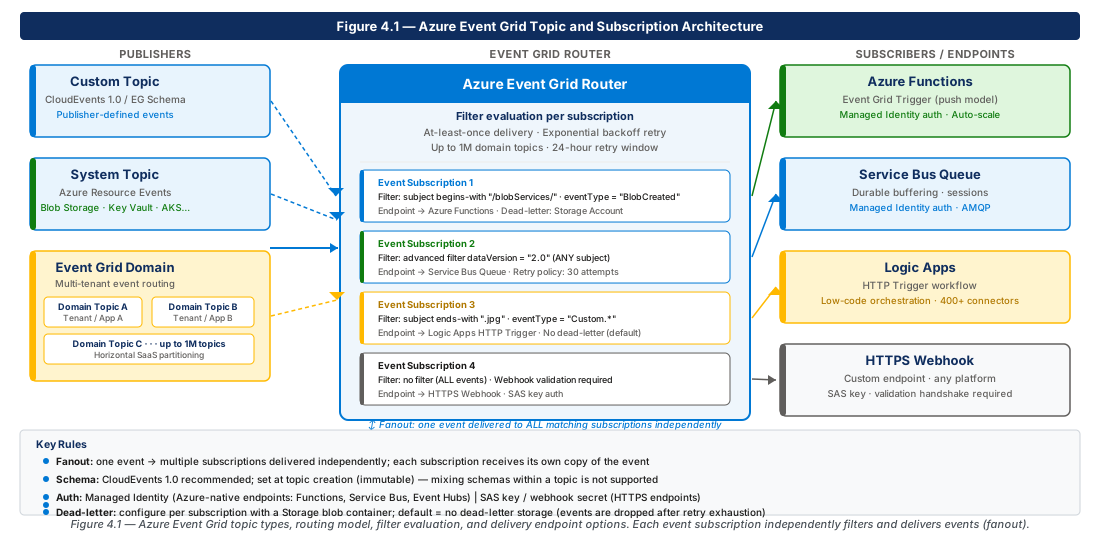
Azure Event Grid is built on a publish-subscribe model in which event sources publish discrete notifications to either a custom topic, a system topic (emitted by an Azure resource), or an Event Grid Domain. Subscribers—called event subscriptions—attach to those topics and declare a destination endpoint and an optional filter set that controls which events the subscription receives. Event Grid's router evaluates every inbound event against every active subscription's filter set and delivers matching events to each subscriber's endpoint independently. This fanout capability means a single event can simultaneously trigger a webhook, populate an Azure Service Bus queue, and invoke an Azure Function without any coordination logic on the publisher side.
The delivery contract guarantees at-least-once semantics. When an endpoint is unreachable or returns a non-success HTTP status code (anything other than 200–299 for webhooks), Event Grid retries according to a configurable exponential backoff policy. Each retry attempt is independent; an event that fails for subscriber A does not block delivery to subscriber B. The router maintains per-subscription delivery state, so failures in one subscription never bleed into another.
Understanding the event payload contract is critical before designing production routing. Event Grid supports two payload schemas: the Event Grid schema (a proprietary envelope) and the CloudEvents 1.0 schema (the CNCF standard). Both carry the same routing metadata—source, subject, event type, time—but CloudEvents provides interoperability with non-Azure toolchains and is the recommended choice for any greenfield deployment. Schema selection is made at the topic level and cannot be changed after creation, making the initial decision a long-lived architectural constraint.
Topics, Domains, and System Topics
Event Grid exposes three topic types that serve distinct architectural needs. A custom topic is a standalone, independently addressable endpoint to which any authorized publisher can post events. Custom topics are the correct unit of isolation when a single bounded context owns a well-defined event catalogue. System topics are created automatically when you configure diagnostics or event subscriptions on Azure resource types that natively support Event Grid (Storage Accounts, Azure Container Registry, Service Bus Namespaces, etc.); they require no publisher-side SDK integration.
Event Grid Domains extend the custom topic model to scenarios involving many publishers or many tenants. A domain is a management namespace that automatically provisions up to one million subordinate domain topics—lightweight addressable endpoints at the path <domain-endpoint>/topics/<topic-name>. Publishers post to their assigned domain topic, and subscribers create event subscriptions scoped either to the entire domain or to individual domain topics. This structure is ideal for SaaS platforms, microservice meshes, and multi-tenant IoT backends.
Event Grid Domains have a hard limit of 100,000 active event subscriptions per domain by default. For deployments that approach this ceiling, request a limit increase through Azure Support before reaching 80% utilization to avoid throttling during the quota review process.
The operational characteristics of the three topic types differ in ways that affect monitoring strategy. System topics emit to Azure Monitor automatically and do not expose a publisher key. Custom topics and domain topics require publisher authentication via either a topic access key (SAS key) or an Azure Active Directory application—the recommended production approach. Diagnostic logs for custom and domain topics must be explicitly routed to a Log Analytics workspace; enabling them at deployment time rather than reactively after an incident is a non-negotiable production hygiene step.
Event Subscriptions and Delivery Endpoints
An event subscription binds a topic to a destination and is the unit at which filters, retry policies, dead-letter settings, and delivery identity are configured. Azure Event Grid supports the following destination types natively: Azure Functions, Azure Logic Apps, Azure Automation Runbooks, Azure Service Bus Queues and Topics, Azure Storage Queues, Azure Event Hubs, Azure Relay Hybrid Connections, and generic HTTPS webhooks.
Webhook endpoints must complete a validation handshake during subscription creation. Event Grid sends a SubscriptionValidationEvent containing a validationCode that the endpoint must echo back synchronously within 30 seconds. Endpoints that fail this handshake will have the subscription creation rejected. Always implement the validation response before attempting subscription creation—a common oversight that causes confusing 400-series errors in the portal.
For Azure-native destination types, Event Grid can authenticate using the subscription's system-assigned or user-assigned managed identity. Assigning the managed identity the minimum required RBAC role (e.g., Azure Service Bus Data Sender on the target namespace) eliminates the need to manage shared access keys and participation in secret rotation cycles. Legacy key-based delivery is supported but should be treated as a migration path rather than a design target for new implementations.
Dead-letter configuration and retry policy are also properties of the event subscription. Both settings default to conservative values that are rarely appropriate for production traffic. The architectural principle to internalize is that each subscription is a separate reliability domain: dead-letter storage, retry exhaustion, and event TTL apply per subscription, not per topic.
Event Grid Domains for Multi-Tenant Routing
Domain Design and Topic Partitioning Strategy
Choosing the granularity at which domain topics are partitioned is the most consequential design decision in a domain-based architecture. When each tenant or microservice has its own domain topic, access control and subscription scope are naturally aligned. The downside is that high-cardinality partitioning pushes toward the domain's topic limit and increases the subscription management overhead.
A practical heuristic for SaaS platforms is to partition by tenant at the domain topic level and use subject-based filtering within each topic to distinguish event types. A domain topic named after a tenant identifier (e.g., tenant-acme-corp) receives all events for that tenant; subscribers create subscriptions on that single topic with subject prefix filters to select only the event types they care about. This keeps the topic count bounded by the number of tenants rather than the Cartesian product of tenants and event types.
For microservice mesh scenarios, partition by service or aggregate root. Each microservice owns one domain topic and publishes only events that fall within its bounded context. Subscribers from other bounded contexts create cross-topic subscriptions to precisely the event types they need to react to.
RESOURCE_GROUP="rg-event-grid-patterns-prod-001"
LOCATION="eastus2"
DOMAIN_NAME="evgd-integration-prod-eastus2-001"
DOMAIN_TOPIC_ORDERS="orders-service"
DOMAIN_TOPIC_INVENTORY="inventory-service"
DOMAIN_TOPIC_NOTIFICATIONS="notifications-service"

# Create the resource group
az group create \
  --name "$RESOURCE_GROUP" \
  --location "$LOCATION" \
  --tags environment=prod workload=event-grid-patterns costcenter=platform

# Create the Event Grid Domain with CloudEvents schema and public network access disabled
az eventgrid domain create \
  --name "$DOMAIN_NAME" \
  --resource-group "$RESOURCE_GROUP" \
  --location "$LOCATION" \
  --input-schema cloudeventschemav1_0 \
  --public-network-access disabled \
  --sku Basic \
  --tags environment=prod workload=event-grid-patterns

# Create domain topics for each bounded context
az eventgrid domain topic create \
  --domain-name "$DOMAIN_NAME" \
  --resource-group "$RESOURCE_GROUP" \
  --name "$DOMAIN_TOPIC_ORDERS"

az eventgrid domain topic create \
  --domain-name "$DOMAIN_NAME" \
  --resource-group "$RESOURCE_GROUP" \
  --name "$DOMAIN_TOPIC_INVENTORY"

az eventgrid domain topic create \
  --domain-name "$DOMAIN_NAME" \
  --resource-group "$RESOURCE_GROUP" \
  --name "$DOMAIN_TOPIC_NOTIFICATIONS"

# Retrieve the domain endpoint for publisher configuration
DOMAIN_ENDPOINT=$(az eventgrid domain show \
  --name "$DOMAIN_NAME" \
  --resource-group "$RESOURCE_GROUP" \
  --query "endpoint" -o tsv)
echo "Domain endpoint: $DOMAIN_ENDPOINT"
Access Control and Publisher Authorization
Event Grid Domains support two publisher authentication models: shared access keys and Azure Active Directory (AAD) bearer tokens. Shared keys are symmetric secrets appropriate for development and testing but carry unacceptable risk in production because key leakage grants unbounded publish access to every domain topic. AAD authentication assigns the EventGrid Data Sender built-in role to a service principal or managed identity, providing audit-trail accountability and supporting just-in-time access patterns.
For multi-tenant SaaS platforms, per-tenant publisher isolation is achievable by assigning the EventGrid Data Sender role at the domain topic scope—not the domain scope. A tenant's application identity receives role assignment only on domains/<domain-name>/topics/<tenant-topic-name>, which prevents it from publishing to any other tenant's topic.
Never assign EventGrid Data Sender at the domain scope for multi-tenant workloads. A misconfigured or compromised publisher application with domain-scope access can publish events to any domain topic, enabling cross-tenant event injection. Always scope role assignments to the individual domain topic that the identity legitimately owns.
Domain-level subscriber access follows a separate access control surface. Subscribers creating event subscriptions on a domain topic need the EventGrid EventSubscription Contributor role at minimum. In regulated environments, requiring subscription management to flow through an IaC pipeline—rather than permitting ad-hoc portal or CLI operations—provides the change control record needed for compliance audits.
Multi-Tenant Routing Topology
A complete multi-tenant routing topology combines domain topics with subscription-level filtering to achieve logical isolation within a shared infrastructure footprint. Each tenant lands on a dedicated domain topic; each downstream system creates an event subscription on that topic with a filter that matches only the event types it handles.
RESOURCE_GROUP="rg-event-grid-patterns-prod-001"
DOMAIN_NAME="evgd-integration-prod-eastus2-001"
DOMAIN_ID=$(az eventgrid domain show \
  --name "$DOMAIN_NAME" \
  --resource-group "$RESOURCE_GROUP" \
  --query "id" -o tsv)

# Provision domain topics for three tenants
for TENANT in "tenant-acme" "tenant-contoso" "tenant-fabrikam"; do
  az eventgrid domain topic create \
    --domain-name "$DOMAIN_NAME" \
    --resource-group "$RESOURCE_GROUP" \
    --name "$TENANT"
  echo "Created domain topic: $TENANT"
done

# Managed identity object IDs for each tenant's publisher application
ACME_PUBLISHER_OID="00000000-0000-0000-0000-000000000001"
CONTOSO_PUBLISHER_OID="00000000-0000-0000-0000-000000000002"

# Assign EventGrid Data Sender at the domain TOPIC scope (not domain scope)
ACME_TOPIC_ID="$DOMAIN_ID/topics/tenant-acme"
CONTOSO_TOPIC_ID="$DOMAIN_ID/topics/tenant-contoso"

az role assignment create \
  --assignee-object-id "$ACME_PUBLISHER_OID" \
  --assignee-principal-type ServicePrincipal \
  --role "EventGrid Data Sender" \
  --scope "$ACME_TOPIC_ID"

az role assignment create \
  --assignee-object-id "$CONTOSO_PUBLISHER_OID" \
  --assignee-principal-type ServicePrincipal \
  --role "EventGrid Data Sender" \
  --scope "$CONTOSO_TOPIC_ID"

echo "Topic-scoped role assignments complete — cross-tenant publish blocked"Automate domain topic provisioning and role assignment as part of tenant onboarding pipelines in Azure DevOps or GitHub Actions. Treating tenant provisioning as an infrastructure operation—idempotent, version-controlled, and gated by pull request approval—prevents configuration drift in long-lived multi-tenant domains and provides an audit trail for compliance reviews.
Advanced Filter Operators for Attribute-Based Routing
Filter Types and Composition Model
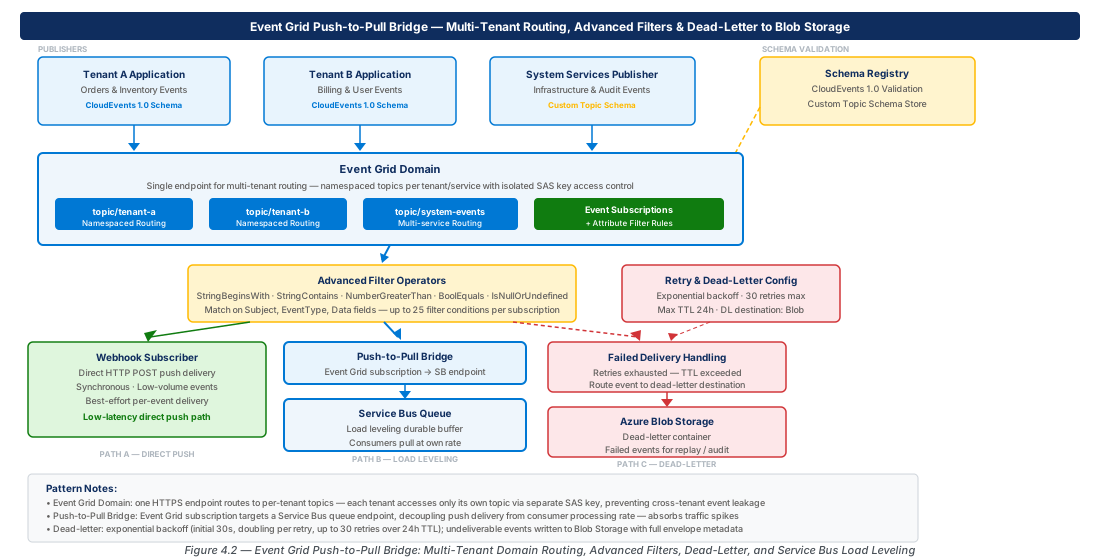
Event Grid event subscriptions support a rich filter language that operates on event envelope attributes rather than event body content. Filters are evaluated by the Event Grid router before the event is delivered to the subscriber, which means rejected events are never transmitted to the endpoint. Filtering at the router level reduces endpoint invocation cost, protects downstream systems from events they cannot handle, and enables fan-out topologies where dozens of subscribers each receive a carefully scoped subset of the event stream.
Event Grid supports seven filter operator families. The Subject filter matches the event's subject field using prefix or suffix string comparisons. Advanced filters extend this with per-attribute operators: StringIn, StringNotIn, StringBeginsWith, StringEndsWith, StringContains, StringNotContains, NumberIn, NumberNotIn, NumberLessThan, NumberLessThanOrEquals, NumberGreaterThan, NumberGreaterThanOrEquals, NumberInRange, NumberNotInRange, BoolEquals, IsNullOrUndefined, and IsNotNull. Advanced filters can target any attribute in the CloudEvents envelope, including extension attributes.
Advanced filters are composed with AND semantics within a single subscription. To achieve OR semantics—for example, "deliver events of type order.created OR order.updated"—use the StringIn operator on the event type field with multiple values, or create multiple subscriptions. The maximum number of advanced filter values across all filters in a single subscription is 25, and the maximum number of advanced filter clauses per subscription is 25.
Designing Filter Hierarchies
Well-designed filter hierarchies reduce unnecessary delivery attempts by making each subscription's intent unambiguous. A three-tier hierarchy—event type at the coarsest level, subject prefix at the middle level, and extension attribute at the finest level—handles the majority of production routing requirements without exhausting the per-subscription filter clause budget.
The coarsest tier uses eventType filtering to divide the event stream by semantic category. In an e-commerce platform, separate subscriptions for order.*, inventory.*, and payment.* event type families ensure that the inventory service never receives payment events. The middle tier uses subject prefix filtering to scope delivery to specific resource identifiers. The finest tier uses CloudEvents extension attributes for operational metadata such as dataregion, tenantid, or eventversion.
Advanced filter values are case-sensitive for all string operators. A filter for StringIn with values ["OrderCreated", "orderCreated"] will NOT match an event with type ordercreated. Normalize event type casing at the publisher and define a casing convention in your event catalogue before filters are built against it, because changing casing conventions after subscriptions are live requires coordinated republishing and subscription updates.
RESOURCE_GROUP="rg-event-grid-patterns-prod-001"
DOMAIN_NAME="evgd-integration-prod-eastus2-001"
SERVICEBUS_NAMESPACE="sbns-integration-prod-eastus2-001"
SERVICEBUS_QUEUE_ORDERS="orders-processor"
SERVICEBUS_QUEUE_PRIORITY="priority-orders-processor"

# Get the Service Bus queue resource ID for delivery target
SB_QUEUE_ID=$(az servicebus queue show \
  --namespace-name "$SERVICEBUS_NAMESPACE" \
  --resource-group "$RESOURCE_GROUP" \
  --name "$SERVICEBUS_QUEUE_ORDERS" \
  --query "id" -o tsv)

# Subscription 1: All order events → orders processing queue
az eventgrid event-subscription create \
  --name "sub-orders-all-to-sbqueue" \
  --source-resource-id "/subscriptions/$(az account show --query id -o tsv)/resourceGroups/$RESOURCE_GROUP/providers/Microsoft.EventGrid/domains/$DOMAIN_NAME/topics/orders-service" \
  --endpoint-type servicebusqueue \
  --endpoint "$SB_QUEUE_ID" \
  --included-event-types "com.contoso.orders.created" "com.contoso.orders.updated" "com.contoso.orders.cancelled" \
  --delivery-identity-endpoint "$SB_QUEUE_ID" \
  --delivery-identity systemassigned

# Get the priority orders queue ID
SB_PRIORITY_QUEUE_ID=$(az servicebus queue show \
  --namespace-name "$SERVICEBUS_NAMESPACE" \
  --resource-group "$RESOURCE_GROUP" \
  --name "$SERVICEBUS_QUEUE_PRIORITY" \
  --query "id" -o tsv)

# Subscription 2: Only high-priority order creation events → priority queue
# Combines event type filter + subject prefix + advanced attribute filter
az eventgrid event-subscription create \
  --name "sub-orders-priority-to-sbqueue" \
  --source-resource-id "/subscriptions/$(az account show --query id -o tsv)/resourceGroups/$RESOURCE_GROUP/providers/Microsoft.EventGrid/domains/$DOMAIN_NAME/topics/orders-service" \
  --endpoint-type servicebusqueue \
  --endpoint "$SB_PRIORITY_QUEUE_ID" \
  --included-event-types "com.contoso.orders.created" \
  --subject-begins-with "/orders/priority/" \
  --advanced-filter "data.priority StringIn High Critical" \
  --delivery-identity-endpoint "$SB_PRIORITY_QUEUE_ID" \
  --delivery-identity systemassigned

echo "Event subscriptions created with advanced filter routing"
Extension Attributes and Dynamic Routing
CloudEvents 1.0 supports extension attributes—custom key-value pairs added to the event envelope alongside the standard attributes. Extension attributes are first-class citizens in Event Grid's filter language; any extension attribute on an inbound CloudEvents event can be referenced by name in an advanced filter clause. This capability enables dynamic routing patterns that are invisible to the event consumer.
A practical example is data residency routing. A single global event stream contains events from users in multiple regulatory jurisdictions. Each event is stamped with a dataregion extension attribute by the publisher (e.g., eu-west, us-east, ap-southeast). Separate event subscriptions filter on dataregion StringIn eu-west or dataregion StringIn us-east. Events are automatically routed to the appropriate regional processor with no application-layer routing code.
Define extension attribute names in a central event catalogue document and enforce them through a schema registry or publisher-side validation library. Extension attributes that drift in naming (e.g., dataregion vs data-region vs DataRegion) silently break filters. A lightweight publisher SDK wrapper that stamps required extension attributes on every event is one of the highest-leverage reliability investments in an event-driven platform.
Dead-Lettering and Retry Policy Configuration
Retry Policy Mechanics
When Event Grid cannot deliver an event to a subscription's endpoint, it enters a retry cycle governed by the subscription's retry policy. The retry policy has two configuration parameters: max-delivery-attempts (1–30, default 30) and event-ttl (1–1440 minutes, default 1440 minutes). Event Grid uses an exponential backoff schedule with jitter between attempts: the base interval starts at approximately 10 seconds and doubles with each attempt, bounded by a cap of approximately 10 minutes between retries.
Understanding the interaction between max-delivery-attempts and event-ttl is essential for designing appropriate SLAs. Consider a subscription with 30 attempts and a 60-minute TTL. The exponential backoff schedule will exhaust the 60-minute TTL before the 30th attempt is reached; in practice, an event that fails consistently will be dead-lettered or dropped after roughly 60 minutes regardless of the attempt cap.
If dead-lettering is NOT configured and a subscription exhausts its max-delivery-attempts, the event is silently dropped. There is no automatic notification, no counter in the default Azure Monitor metrics that distinguishes "drop after exhaustion" from "successful delivery," and no recovery path. For any production subscription processing events with business value, dead-letter storage configuration is mandatory—not optional.
The appropriate retry policy depends on the nature of the subscriber. Idempotent, stateless consumers (Azure Functions processing discrete events) can tolerate aggressive retries and should use the default 30-attempt configuration to maximize delivery probability. Stateful or rate-limited consumers should reduce max-delivery-attempts to avoid hammering a temporarily unavailable endpoint and use the push-to-pull bridge pattern to interpose a buffer between Event Grid's push delivery and the downstream consumer.
Dead-Letter Storage Configuration
Dead-lettering redirects undeliverable events to an Azure Blob Storage container rather than dropping them silently. The dead-letter destination is configured per event subscription as a storage account and container pair. The blob naming convention is <topic-name>/<subscription-name>/<year>/<month>/<day>/<hour>/<minute>/<uniqueid>.json. This hierarchy makes it practical to build reprocessing pipelines: an Azure Function triggered by blob creation events in the dead-letter container can inspect the reason code, apply remediation logic, and republish the event to the original topic.
Set an Azure Blob Storage lifecycle management policy on the dead-letter container to move blobs to Cool tier after 7 days and delete them after 90 days. Dead-letter blobs accumulate at a rate proportional to failure volume and can incur surprising storage costs in high-throughput systems. Lifecycle policies prevent runaway storage growth without requiring manual cleanup operations.
RESOURCE_GROUP="rg-event-grid-patterns-prod-001"
DOMAIN_NAME="evgd-integration-prod-eastus2-001"
STORAGE_ACCOUNT_NAME="stevtgdlprod001"
DEADLETTER_CONTAINER="event-grid-deadletter"

# Create the storage account for dead-lettering
az storage account create \
  --name "$STORAGE_ACCOUNT_NAME" \
  --resource-group "$RESOURCE_GROUP" \
  --location eastus2 \
  --sku Standard_LRS \
  --kind StorageV2 \
  --access-tier Hot \
  --min-tls-version TLS1_2 \
  --allow-blob-public-access false \
  --tags environment=prod workload=event-grid-deadletter

# Create the dead-letter container
az storage container create \
  --name "$DEADLETTER_CONTAINER" \
  --account-name "$STORAGE_ACCOUNT_NAME" \
  --auth-mode login

# Get the storage account resource ID
STORAGE_ID=$(az storage account show \
  --name "$STORAGE_ACCOUNT_NAME" \
  --resource-group "$RESOURCE_GROUP" \
  --query "id" -o tsv)

# Assign Event Grid domain managed identity the Storage Blob Data Contributor role
DOMAIN_PRINCIPAL_ID=$(az eventgrid domain show \
  --name "$DOMAIN_NAME" \
  --resource-group "$RESOURCE_GROUP" \
  --query "identity.principalId" -o tsv)

az role assignment create \
  --assignee-object-id "$DOMAIN_PRINCIPAL_ID" \
  --assignee-principal-type ServicePrincipal \
  --role "Storage Blob Data Contributor" \
  --scope "$STORAGE_ID"

# Update subscription: add dead-letter destination and tuned retry policy
# 10 delivery attempts over 60 minutes with exponential backoff
az eventgrid event-subscription update \
  --name "sub-orders-all-to-sbqueue" \
  --source-resource-id "/subscriptions/$(az account show --query id -o tsv)/resourceGroups/$RESOURCE_GROUP/providers/Microsoft.EventGrid/domains/$DOMAIN_NAME/topics/orders-service" \
  --deadletter-endpoint "$STORAGE_ID/blobServices/default/containers/$DEADLETTER_CONTAINER" \
  --max-delivery-attempts 10 \
  --event-ttl 60

echo "Dead-letter and retry policy configured"
Exponential Backoff Tuning
Event Grid's built-in exponential backoff is not configurable beyond the max-delivery-attempts and event-ttl parameters. Where it becomes a constraint is in scenarios with transient failure patterns shorter than the backoff schedule's intervals, such as a subscriber that restarts every two minutes during a rolling deployment. The appropriate mitigation is to architect the subscriber as a Service Bus consumer—where events accumulate in the queue during the restart window—rather than a direct webhook target.
The interaction between Event Grid retry and downstream circuit breaker patterns deserves attention. If the subscriber endpoint is protected by API Management or Azure Front Door with its own retry logic, double-retry can occur. Under high failure rates, this multiplies the load on the failing downstream system. The recommended architecture for retry-sensitive endpoints is the push-to-pull bridge.
| Configuration Parameter | Default | Min / Max | Recommended Production Value |
|---|---|---|---|
max-delivery-attempts | 30 | 1 / 30 | 10–15 for webhook targets; 30 for Service Bus targets |
event-ttl (minutes) | 1440 | 1 / 1440 | 60–240 for time-sensitive events; 1440 for audit/compliance events |
| Dead-letter destination | None | — | Always configure for production subscriptions |
| Delivery identity | None (key-based) | — | System-assigned or user-assigned managed identity |
CloudEvents 1.0 Schema Adoption and Governance
Why CloudEvents Over the Event Grid Schema
The Event Grid proprietary schema predates the CloudEvents standard and reflects early design decisions that prioritize Azure-internal consumption. Its data envelope is unversioned, its attribute names are PascalCased, and it lacks built-in support for extension attributes. The CloudEvents 1.0 specification, ratified by the CNCF in 2019, addresses each of these limitations: it defines a lowercase attribute envelope, standardizes extension attribute registration, and provides a versioned contract implemented by SDKs in Go, Java, Python, .NET, JavaScript, and Rust.
The operational argument for CloudEvents is portability. An event pipeline built on the CloudEvents schema can route events through Azure Event Grid for regional processing and simultaneously forward to a Kafka cluster or AWS EventBridge without re-serialization. For platforms that must interoperate with partners, third-party SaaS systems, or multi-cloud consumers, CloudEvents is not optional; it is the shared contract that makes integration tractable.
Azure Event Grid supports CloudEvents 1.0 in both JSON and binary content modes. JSON mode embeds the event data in the CloudEvents envelope; binary mode carries the event data as the HTTP body with CloudEvents attributes in HTTP headers. For webhook and Service Bus delivery, JSON mode is universally supported. Binary mode is only relevant when the downstream consumer is an HTTP/2-native service that benefits from header-based routing without JSON parsing overhead.
When a topic is configured with --input-schema cloudeventschemav1_0, Event Grid validates that inbound requests conform to the CloudEvents HTTP binding specification: the Content-Type header must be application/cloudevents+json; charset=UTF-8, and the required attributes (specversion, id, source, type) must be present and non-empty. Events that fail this validation are rejected at ingestion with a 400 response—they are not dead-lettered. Publisher-side CloudEvents validation should happen before events reach the topic endpoint to prevent silent data loss.
Custom Schema Validation and Event Catalogues
Schema validation in Event Grid operates at two levels. The first level is envelope validation—verifying that the CloudEvents mandatory attributes are present. The second level is data schema validation, which verifies the structure and content of the data field against a JSON Schema definition. Event Grid does not perform data schema validation natively; this must be implemented either at the publisher or at the subscriber.
The recommended architecture for governed event schemas is a schema registry pattern. A schema registry stores versioned JSON Schema definitions for each event type—Azure API Management's schema validation policies, an Azure Storage-backed schema catalogue, or the Azure Schema Registry within Azure Event Hubs. Publishers reference the registry to validate their events before publication; subscribers use the registry to deserialize and validate incoming events.
RESOURCE_GROUP="rg-event-grid-patterns-prod-001"
DOMAIN_NAME="evgd-integration-prod-eastus2-001"

# Verify the domain is configured with CloudEvents 1.0 schema
az eventgrid domain show \
  --name "$DOMAIN_NAME" \
  --resource-group "$RESOURCE_GROUP" \
  --query "{name:name, inputSchema:inputSchema, endpoint:endpoint}" \
  --output table

# Post a well-formed CloudEvents 1.0 event to a domain topic (for testing)
DOMAIN_ENDPOINT=$(az eventgrid domain show \
  --name "$DOMAIN_NAME" \
  --resource-group "$RESOURCE_GROUP" \
  --query "endpoint" -o tsv)

DOMAIN_KEY=$(az eventgrid domain key list \
  --name "$DOMAIN_NAME" \
  --resource-group "$RESOURCE_GROUP" \
  --query "key1" -o tsv)

# Publish a CloudEvents 1.0 compliant event (for validation testing only; use AAD in prod)
curl -X POST "$DOMAIN_ENDPOINT/topics/orders-service/api/events" \
  -H "Content-Type: application/cloudevents+json; charset=UTF-8" \
  -H "aeg-sas-key: $DOMAIN_KEY" \
  -d '{
    "specversion": "1.0",
    "type": "com.contoso.orders.created",
    "source": "/services/order-management/v2",
    "subject": "/orders/priority/ORD-20260708-00001",
    "id": "a1b2c3d4-e5f6-7890-abcd-ef1234567890",
    "time": "2026-07-08T10:30:00Z",
    "datacontenttype": "application/json",
    "dataregion": "us-east",
    "data": {
      "orderId": "ORD-20260708-00001",
      "customerId": "CUST-00042",
      "priority": "High",
      "totalAmount": 4750.00,
      "currency": "USD"
    }
  }'
Event Versioning Strategies
Event schemas evolve over time, and managing that evolution without breaking existing subscribers is one of the harder operational challenges in event-driven systems. Two conventions are widely used: semantic versioning in the type URI (e.g., com.contoso.orders.created.v2) and version-as-extension-attribute (e.g., adding a custom eventversion: "2.0" extension attribute).
Semantic versioning in the type URI is explicit and discoverable: subscribers can filter by event type to receive only the versions they support, and new versions are additive. The downside is that a version increment requires updating every subscription that should receive the new version. Version-as-extension-attribute allows a single event type to carry multiple versions under one subscription, placing complexity in every subscriber rather than at the routing layer.
Adopt a consumer-driven contract testing approach for event schema evolution. Before publishing a breaking change to an event schema, verify that all known subscribers can handle the new schema by running contract tests against their handlers. Tools like Pact or custom schema compatibility checkers integrated into the CI pipeline catch breaking changes before they reach production.
| Evolution Type | Type URI Versioning | Extension Attr Versioning | Recommendation |
|---|---|---|---|
| Additive field (new optional field) | No bump required | No bump required | No version bump; use additionalProperties: true |
| Renamed field (breaking) | Increment major version | Increment eventversion | Type URI versioning; parallel publish old + new during migration |
| Removed field (breaking) | Increment major version | Increment eventversion | Type URI versioning with deprecation notice period |
| Changed field type (breaking) | Increment major version | Increment eventversion | Type URI versioning; avoid if possible |
| New event subtype (additive) | New type URI | New type URI | New type URI; no impact on existing subscribers |
Push-to-Pull Bridge: Integrating Event Grid with Service Bus
The Impedance Mismatch Between Push and Pull
Azure Event Grid's native delivery model is push: when an event matches a subscription, the router proactively calls the subscriber's endpoint. This is optimal for serverless consumers that spin up on demand and have no persistent in-process state. It is problematic for workloads that are rate-limited, stateful, long-running, or deployed as fixed-capacity pools—database writers, ML inference pipelines, third-party integrations with API quotas, and batch processors all fall into this category.
The fundamental impedance mismatch is between Event Grid's push rate (driven by the upstream event production rate) and the consumer's processing capacity (bounded by its own resource limits). When a burst of events arrives, Event Grid will attempt to deliver all of them concurrently to the registered endpoint. A stateless, horizontally scaled Azure Function can absorb this burst. A fixed-capacity application pool cannot—the burst overwhelms the pool, triggers back-pressure, causes Event Grid to enter retry cycles, and eventually dead-letters events that should have been processed.
The push-to-pull bridge pattern resolves this impedance by interposing a durable, buffered queue between Event Grid and the rate-limited consumer. Event Grid delivers events to an Azure Service Bus queue at whatever rate it can sustain. The downstream consumer polls the Service Bus queue at a rate it controls, bounded by its processing capacity. Load leveling, back-pressure, and dead-letter handling are all managed within Service Bus's well-understood messaging semantics.
Bridge Architecture and Configuration
The bridge architecture has three components: the Event Grid subscription with a Service Bus queue endpoint, the Service Bus namespace with appropriate queue configuration, and the consumer application that polls the queue. The Event Grid subscription configuration is straightforward—the endpoint type is servicebusqueue or servicebustopic, and authentication should use a managed identity with the Azure Service Bus Data Sender role on the target queue or topic.
Service Bus queue configuration for the bridge pattern requires attention to three parameters. First, max-delivery-count on the queue should accommodate the consumer's own retry logic. Second, the dead-letter-on-message-expiration setting should be enabled. Third, the lock-duration should match or exceed the consumer's maximum processing time for a single event.
Service Bus Standard and Premium tiers differ in message size limits (256 KB vs 100 MB), session support (Premium only), and geo-disaster recovery (Premium only). For Event Grid bridge scenarios, Standard tier is sufficient unless individual events exceed 256 KB or session-ordered processing is required. If your events routinely exceed 200 KB, consider externalizing the payload to Blob Storage and carrying only a reference URI in the CloudEvents data field.
RESOURCE_GROUP="rg-event-grid-patterns-prod-001"
DOMAIN_NAME="evgd-integration-prod-eastus2-001"
SERVICEBUS_NAMESPACE="sbns-integration-prod-eastus2-001"
BRIDGE_QUEUE_NAME="evtgd-bridge-orders"

# Create the Service Bus namespace (Premium for geo-redundancy in prod)
az servicebus namespace create \
  --name "$SERVICEBUS_NAMESPACE" \
  --resource-group "$RESOURCE_GROUP" \
  --location eastus2 \
  --sku Premium \
  --tags environment=prod workload=event-bridge

# Create the bridge queue with lock duration matching max processing time
az servicebus queue create \
  --namespace-name "$SERVICEBUS_NAMESPACE" \
  --resource-group "$RESOURCE_GROUP" \
  --name "$BRIDGE_QUEUE_NAME" \
  --lock-duration "PT5M" \
  --max-delivery-count 5 \
  --dead-lettering-on-message-expiration true \
  --default-message-time-to-live "P1D" \
  --max-size-in-megabytes 5120

# Assign the Event Grid domain's managed identity the Service Bus Data Sender role
DOMAIN_PRINCIPAL_ID=$(az eventgrid domain show \
  --name "$DOMAIN_NAME" \
  --resource-group "$RESOURCE_GROUP" \
  --query "identity.principalId" -o tsv)

SB_QUEUE_ID=$(az servicebus queue show \
  --namespace-name "$SERVICEBUS_NAMESPACE" \
  --resource-group "$RESOURCE_GROUP" \
  --name "$BRIDGE_QUEUE_NAME" \
  --query "id" -o tsv)

az role assignment create \
  --assignee-object-id "$DOMAIN_PRINCIPAL_ID" \
  --assignee-principal-type ServicePrincipal \
  --role "Azure Service Bus Data Sender" \
  --scope "$SB_QUEUE_ID"

# Create the Event Grid subscription delivering to the Service Bus bridge queue
az eventgrid event-subscription create \
  --name "sub-orders-bridge-to-servicebus" \
  --source-resource-id "/subscriptions/$(az account show --query id -o tsv)/resourceGroups/$RESOURCE_GROUP/providers/Microsoft.EventGrid/domains/$DOMAIN_NAME/topics/orders-service" \
  --endpoint-type servicebusqueue \
  --endpoint "$SB_QUEUE_ID" \
  --included-event-types "com.contoso.orders.created" "com.contoso.orders.updated" \
  --delivery-identity systemassigned \
  --max-delivery-attempts 30 \
  --event-ttl 1440

echo "Push-to-pull bridge configured: Event Grid → Service Bus queue"
echo "Service Bus queue: $BRIDGE_QUEUE_NAME"
echo "Consumer applications should poll queue using AMQP with prefetch enabled"
Consumer Patterns for Bridge Queues
The consumer side of the push-to-pull bridge can be implemented with any Azure Service Bus client SDK, but the choice of consumer pattern significantly affects throughput and reliability. Three patterns are relevant to event-driven architectures: single-receiver polling, competing consumers, and session-aware serial processing.
Single-receiver polling uses one instance of the consumer application, pulling messages in a loop with a configurable prefetch count. Prefetch instructs the Service Bus client to pre-stage a batch of messages in a local buffer, reducing per-message round-trip latency. A prefetch count of 10–50 is appropriate for most latency-sensitive consumers; higher values increase throughput but increase the risk of lock expiry for slow-processing events.
Competing consumers—multiple instances of the consumer application polling the same queue—achieve horizontal scaling. Service Bus guarantees that each message is delivered to exactly one consumer instance at a time. When combined with Azure Container Apps or Azure Kubernetes Service, competing consumers enable autoscaling based on the queue's active-message-count metric via KEDA (Kubernetes Event-Driven Autoscaling), creating a feedback loop between queue depth and consumer capacity.
Do not use Service Bus sessions on the bridge queue unless the consumer application requires session-ordered processing and is fully session-aware. Sessions serialize delivery within a session group, preventing competing consumers from processing messages from the same session group concurrently. Enabling sessions without implementing session-aware consumers causes messages to pile up in locked sessions indefinitely.
Lab Exercises
This lab provisions a complete multi-tenant Event Grid Domain with per-tenant routing, configures advanced filter subscriptions, wires dead-lettering and a Service Bus bridge, and validates end-to-end event delivery.
set -euo pipefail

RESOURCE_GROUP="rg-event-grid-patterns-dev-001"
LOCATION="eastus2"
DOMAIN_NAME="evgd-integration-dev-eastus2-001"
STORAGE_ACCOUNT="stegdeveastus2001"
DEADLETTER_CONTAINER="deadletter"
SERVICEBUS_NAMESPACE="sbns-integration-dev-eastus2-001"

echo "=== CE-07: Multi-Tenant Event Grid Domain Lab ==="

# Step 1: Create the dev resource group
az group create \
  --name "$RESOURCE_GROUP" \
  --location "$LOCATION" \
  --tags environment=dev workload=event-grid-lab lab=CE-07

# Step 2: Create the Event Grid Domain with CloudEvents schema
az eventgrid domain create \
  --name "$DOMAIN_NAME" \
  --resource-group "$RESOURCE_GROUP" \
  --location "$LOCATION" \
  --input-schema cloudeventschemav1_0 \
  --sku Basic \
  --tags environment=dev lab=CE-07

# Step 3: Create domain topics for two tenants
az eventgrid domain topic create \
  --domain-name "$DOMAIN_NAME" \
  --resource-group "$RESOURCE_GROUP" \
  --name "tenant-alpha"

az eventgrid domain topic create \
  --domain-name "$DOMAIN_NAME" \
  --resource-group "$RESOURCE_GROUP" \
  --name "tenant-beta"

echo "Domain topics created: tenant-alpha, tenant-beta"

# Step 4: Create storage for dead-lettering
az storage account create \
  --name "$STORAGE_ACCOUNT" \
  --resource-group "$RESOURCE_GROUP" \
  --location "$LOCATION" \
  --sku Standard_LRS \
  --kind StorageV2 \
  --allow-blob-public-access false \
  --min-tls-version TLS1_2

az storage container create \
  --name "$DEADLETTER_CONTAINER" \
  --account-name "$STORAGE_ACCOUNT" \
  --auth-mode login

STORAGE_ID=$(az storage account show \
  --name "$STORAGE_ACCOUNT" \
  --resource-group "$RESOURCE_GROUP" \
  --query "id" -o tsv)

# Step 5: Create Service Bus for bridge pattern
az servicebus namespace create \
  --name "$SERVICEBUS_NAMESPACE" \
  --resource-group "$RESOURCE_GROUP" \
  --location "$LOCATION" \
  --sku Standard

az servicebus queue create \
  --namespace-name "$SERVICEBUS_NAMESPACE" \
  --resource-group "$RESOURCE_GROUP" \
  --name "alpha-events" \
  --lock-duration "PT2M" \
  --max-delivery-count 5 \
  --dead-lettering-on-message-expiration true

az servicebus queue create \
  --namespace-name "$SERVICEBUS_NAMESPACE" \
  --resource-group "$RESOURCE_GROUP" \
  --name "beta-events" \
  --lock-duration "PT2M" \
  --max-delivery-count 5 \
  --dead-lettering-on-message-expiration true

ALPHA_QUEUE_ID=$(az servicebus queue show \
  --namespace-name "$SERVICEBUS_NAMESPACE" \
  --resource-group "$RESOURCE_GROUP" \
  --name "alpha-events" --query "id" -o tsv)

BETA_QUEUE_ID=$(az servicebus queue show \
  --namespace-name "$SERVICEBUS_NAMESPACE" \
  --resource-group "$RESOURCE_GROUP" \
  --name "beta-events" --query "id" -o tsv)

# Step 6: Assign managed identity roles
DOMAIN_PRINCIPAL_ID=$(az eventgrid domain show \
  --name "$DOMAIN_NAME" \
  --resource-group "$RESOURCE_GROUP" \
  --query "identity.principalId" -o tsv)

az role assignment create \
  --assignee-object-id "$DOMAIN_PRINCIPAL_ID" \
  --assignee-principal-type ServicePrincipal \
  --role "Storage Blob Data Contributor" \
  --scope "$STORAGE_ID"

az role assignment create \
  --assignee-object-id "$DOMAIN_PRINCIPAL_ID" \
  --assignee-principal-type ServicePrincipal \
  --role "Azure Service Bus Data Sender" \
  --scope "$(az servicebus namespace show --name $SERVICEBUS_NAMESPACE --resource-group $RESOURCE_GROUP --query id -o tsv)"

# Step 7: Create subscriptions with advanced filters and dead-letter config
SUBSCRIPTION_ID=$(az account show --query id -o tsv)
ALPHA_TOPIC_PATH="/subscriptions/$SUBSCRIPTION_ID/resourceGroups/$RESOURCE_GROUP/providers/Microsoft.EventGrid/domains/$DOMAIN_NAME/topics/tenant-alpha"
BETA_TOPIC_PATH="/subscriptions/$SUBSCRIPTION_ID/resourceGroups/$RESOURCE_GROUP/providers/Microsoft.EventGrid/domains/$DOMAIN_NAME/topics/tenant-beta"

az eventgrid event-subscription create \
  --name "sub-alpha-to-sbqueue" \
  --source-resource-id "$ALPHA_TOPIC_PATH" \
  --endpoint-type servicebusqueue \
  --endpoint "$ALPHA_QUEUE_ID" \
  --delivery-identity systemassigned \
  --deadletter-endpoint "$STORAGE_ID/blobServices/default/containers/$DEADLETTER_CONTAINER" \
  --max-delivery-attempts 5 \
  --event-ttl 60

az eventgrid event-subscription create \
  --name "sub-beta-to-sbqueue" \
  --source-resource-id "$BETA_TOPIC_PATH" \
  --endpoint-type servicebusqueue \
  --endpoint "$BETA_QUEUE_ID" \
  --delivery-identity systemassigned \
  --deadletter-endpoint "$STORAGE_ID/blobServices/default/containers/$DEADLETTER_CONTAINER" \
  --max-delivery-attempts 5 \
  --event-ttl 60

echo "=== CE-07 Complete: Multi-tenant routing topology deployed ==="
echo "Tenant Alpha → alpha-events queue"
echo "Tenant Beta  → beta-events queue"
echo "Dead-letter → $STORAGE_ACCOUNT/$DEADLETTER_CONTAINER"This lab creates a blob-triggered Azure Function that reads dead-lettered events from the storage container, evaluates the failure reason, and republishes recoverable events to the Event Grid domain.
set -euo pipefail

RESOURCE_GROUP="rg-event-grid-patterns-dev-001"
LOCATION="eastus2"
FUNCTION_APP_NAME="func-evtgd-dlreprocess-dev-001"
STORAGE_ACCOUNT="stfuncevtgddev001"
DOMAIN_NAME="evgd-integration-dev-eastus2-001"
DEADLETTER_STORAGE="stegdeveastus2001"
DEADLETTER_CONTAINER="deadletter"

echo "=== CE-08: Dead-Letter Reprocessing Pipeline ==="

# Step 1: Create storage account for the Function App
az storage account create \
  --name "$STORAGE_ACCOUNT" \
  --resource-group "$RESOURCE_GROUP" \
  --location "$LOCATION" \
  --sku Standard_LRS \
  --kind StorageV2 \
  --allow-blob-public-access false \
  --min-tls-version TLS1_2

# Step 2: Create the Function App with system-assigned managed identity
az functionapp create \
  --name "$FUNCTION_APP_NAME" \
  --resource-group "$RESOURCE_GROUP" \
  --storage-account "$STORAGE_ACCOUNT" \
  --consumption-plan-location "$LOCATION" \
  --runtime dotnet-isolated \
  --runtime-version 8 \
  --functions-version 4 \
  --assign-identity '[system]' \
  --tags environment=dev workload=deadletter-reprocess lab=CE-08

# Step 3: Grant the Function App access to dead-letter storage and Event Grid
FUNC_PRINCIPAL_ID=$(az functionapp identity show \
  --name "$FUNCTION_APP_NAME" \
  --resource-group "$RESOURCE_GROUP" \
  --query "principalId" -o tsv)

DEADLETTER_STORAGE_ID=$(az storage account show \
  --name "$DEADLETTER_STORAGE" \
  --resource-group "$RESOURCE_GROUP" \
  --query "id" -o tsv)

DOMAIN_ID=$(az eventgrid domain show \
  --name "$DOMAIN_NAME" \
  --resource-group "$RESOURCE_GROUP" \
  --query "id" -o tsv)

az role assignment create \
  --assignee-object-id "$FUNC_PRINCIPAL_ID" \
  --assignee-principal-type ServicePrincipal \
  --role "Storage Blob Data Reader" \
  --scope "$DEADLETTER_STORAGE_ID"

az role assignment create \
  --assignee-object-id "$FUNC_PRINCIPAL_ID" \
  --assignee-principal-type ServicePrincipal \
  --role "EventGrid Data Sender" \
  --scope "$DOMAIN_ID"

# Step 4: Configure Function App settings with domain endpoint
DOMAIN_ENDPOINT=$(az eventgrid domain show \
  --name "$DOMAIN_NAME" \
  --resource-group "$RESOURCE_GROUP" \
  --query "endpoint" -o tsv)

az functionapp config appsettings set \
  --name "$FUNCTION_APP_NAME" \
  --resource-group "$RESOURCE_GROUP" \
  --settings \
    "EVENTGRID_DOMAIN_ENDPOINT=$DOMAIN_ENDPOINT" \
    "DEADLETTER_STORAGE_ACCOUNT=$DEADLETTER_STORAGE" \
    "DEADLETTER_CONTAINER=$DEADLETTER_CONTAINER" \
    "AZURE_CLIENT_ID="

# Step 5: Create Event Grid system topic on the dead-letter storage account
az eventgrid system-topic create \
  --name "systo-deadletter-storage-dev" \
  --resource-group "$RESOURCE_GROUP" \
  --location "$LOCATION" \
  --topic-type microsoft.storage.storageaccounts \
  --source "$DEADLETTER_STORAGE_ID"

# Step 6: Create subscription that triggers the function on blob creation
FUNC_ENDPOINT="https://$FUNCTION_APP_NAME.azurewebsites.net/api/DeadLetterReprocessor"

az eventgrid system-topic event-subscription create \
  --name "sub-deadletter-trigger-function" \
  --resource-group "$RESOURCE_GROUP" \
  --system-topic-name "systo-deadletter-storage-dev" \
  --endpoint-type azurefunction \
  --endpoint "$FUNC_ENDPOINT" \
  --included-event-types "Microsoft.Storage.BlobCreated" \
  --subject-begins-with "/blobServices/default/containers/$DEADLETTER_CONTAINER"

echo "=== CE-08 Complete: Dead-letter reprocessing pipeline deployed ==="
echo "Blob created in $DEADLETTER_CONTAINER → triggers $FUNCTION_APP_NAME"
echo "Function reads dead-letter event, evaluates reason, republishes if recoverable"

# Step 7: Verify the pipeline with a diagnostic summary
az eventgrid domain show \
  --name "$DOMAIN_NAME" \
  --resource-group "$RESOURCE_GROUP" \
  --query "{domain:name, schema:inputSchema, endpoint:endpoint}" \
  --output table

az functionapp show \
  --name "$FUNCTION_APP_NAME" \
  --resource-group "$RESOURCE_GROUP" \
  --query "{functionApp:name, state:state, identityType:identity.type}" \
  --output table
Summary
| Concept | Key Point |
|---|---|
| Event Grid Domains | Provision up to 1 million domain topics under a single management namespace; scope publisher role assignments to individual domain topics to enforce multi-tenant isolation |
| Advanced Filters | Compose up to 25 attribute-based filter clauses per subscription using operators across string, numeric, and boolean types; filters use AND semantics and evaluate on CloudEvents envelope attributes including extension attributes |
| Retry Policy | Configure max-delivery-attempts (max 30) and event-ttl (max 1440 minutes) per subscription; without dead-letter configuration, events dropped after exhaustion are permanently lost with no notification |
| Dead-Lettering | Direct undeliverable events to an Azure Blob Storage container per subscription; enable lifecycle management policies to control long-term storage cost; build blob-triggered reprocessing pipelines for operational recovery |
| CloudEvents 1.0 | Adopt CloudEvents at topic creation time—schema selection is immutable; use JSON mode for broad compatibility; enforce type attribute casing conventions in the event catalogue to prevent silent filter mismatches |
| Push-to-Pull Bridge | Interpose a Service Bus queue between Event Grid and rate-limited consumers; Event Grid pushes at full speed into Service Bus; consumers pull at a rate they control; configure lock-duration to match maximum processing time |
| Schema Governance | Implement publisher-side validation using a schema registry; Event Grid validates CloudEvents envelope attributes but not data field schema; version event types using URI conventions (e.g., .v2) for breaking changes |