Azure Integration Services: Production Patterns
Hybrid and Multi-Cloud Connectivity
Enterprise integration rarely operates within the clean boundaries of a single cloud. The reality of modern architecture is a hybrid fabric: on-premises systems of record that cannot be migrated, partner networks with strict firewall policies, edge locations with intermittent connectivity, and workloads distributed across competing cloud providers. This chapter examines the Azure Integration Services connectivity layer that bridges these environments — from the outbound-only relay patterns that traverse firewall restrictions without opening inbound ports, to the DNS resolution topology that makes private endpoints work correctly across a hybrid DNS namespace. Mastering this layer is the difference between an integration platform that is theoretically capable and one that is operationally reliable at enterprise scale.
Hybrid Connectivity Foundations
The Connectivity Spectrum and Architectural Drivers
Before selecting a specific connectivity technology, architects must understand the forces that constrain the decision. Connectivity choices in hybrid integration are not purely technical — they are shaped by security policy, network operations team ownership, compliance requirements, and the organizational appetite for managing infrastructure. A security policy that prohibits inbound firewall rules to the on-premises network immediately eliminates site-to-site VPN as a peer connectivity model and pushes the design toward relay-based or outbound-only patterns. A compliance requirement for dedicated private circuits eliminates the public internet entirely and mandates ExpressRoute.
The fundamental connectivity challenge in hybrid integration is the asymmetry between what the cloud service needs and what the on-premises environment permits. Azure Integration Services components — Logic Apps, API Management, Service Bus — operate as managed services in the Azure fabric. When they need to reach an on-premises SAP system, an on-premises SQL Server, or a Kafka broker behind a corporate firewall, they must initiate or receive a network connection across a trust boundary. The on-premises environment typically controls this boundary with a strict inbound firewall policy, a DMZ architecture, and a network team that approves every rule change through a change management process. The relay and gateway patterns in this chapter exist precisely to work within these organizational constraints.
The connectivity spectrum ranges from fully public (no dedicated path, traffic traverses the internet) to fully private (dedicated circuit, no public internet exposure, end-to-end encryption at the network layer). Most enterprise integration architectures occupy the middle of this spectrum: dedicated paths for bulk data replication and sensitive system-of-record traffic, relay-based paths for lightweight event-driven integrations where the overhead of a dedicated circuit is not justified. The architecture decision is not binary — these patterns coexist in a mature integration platform, each carrying the workloads best suited to its characteristics.
Network Topology Patterns for Integration Workloads
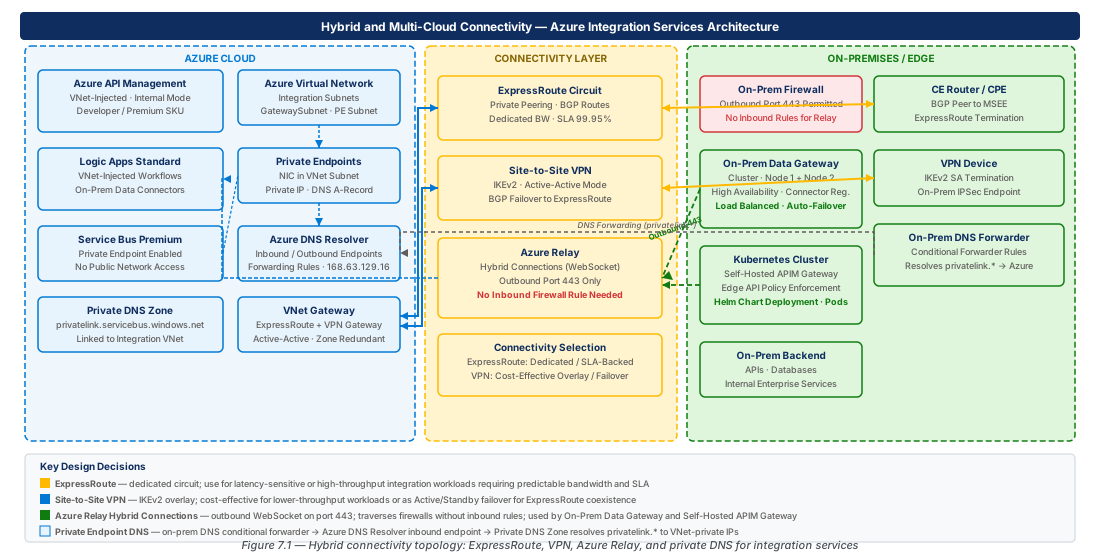
Azure integration services deployed with Virtual Network injection follow a hub-and-spoke topology. The integration hub VNet contains the shared components — API Management, Service Bus private endpoints, Event Grid private endpoints — and connects via VNet peering to spoke VNets that host application workloads. On-premises connectivity terminates in the hub, either via ExpressRoute Gateway or VPN Gateway, and routes to spokes through the hub. This topology centralizes the on-premises connectivity path and avoids the complexity of connecting each spoke independently to the on-premises network.
The critical design consideration in the hub-and-spoke integration topology is the placement of the connectivity components relative to the integration services. Azure Relay namespaces are public-facing by design — the relay service is the broker that both sides connect to, and it must be reachable from on-premises without VPN. The on-premises data gateway communicates outbound to Azure Service Bus relay endpoints on port 443 and 5671. The self-hosted API Management gateway communicates outbound to the Azure management plane. All three of these components use outbound-only connectivity from on-premises, which means they traverse the existing internet path without requiring inbound firewall rules.
VNet-injected integration services require careful consideration of subnet sizing and NSG rules. Integration Service Environments (the predecessor to Premium Logic Apps in VNet) required dedicated subnets with /27 or larger. Logic Apps Standard deployed in App Service Environment v3 requires a /24 subnet. API Management deployed in external or internal VNet mode requires a dedicated subnet. Network Security Groups applied to these subnets must permit the management traffic that Azure uses to maintain the service — specific source service tags must be allowed. Blocking management traffic is one of the most common causes of integration service deployment failures in VNet-injected configurations.
Azure Relay Hybrid Connections
Architecture and Protocol
Azure Relay provides a cloud-hosted intermediary that enables bidirectional communication between cloud services and on-premises applications without requiring inbound firewall rules or VPN. The service has two modes: WCF Relays (the legacy mode, using the WCF protocol stack) and Hybrid Connections (the modern mode, using WebSockets over HTTPS). This chapter focuses exclusively on Hybrid Connections, which is the mode used by Azure App Service Hybrid Connections, Azure Logic Apps on-premises connectors via the data gateway relay path, and custom listener implementations.
The Hybrid Connections protocol operates as follows: a listener process on the on-premises side establishes a persistent outbound WebSocket connection to the Azure Relay endpoint. This connection authenticates using a Shared Access Signature and registers the listener as available on a specific Hybrid Connection path. When a sender (the cloud side) wants to reach the on-premises listener, it connects to the same Azure Relay endpoint and initiates a rendezvous. The relay service then creates a dedicated WebSocket channel connecting the sender and the listener. From the listener's perspective, it receives a connection that looks like an inbound TCP connection, but no inbound port was ever opened — the listener initiated the connection to the relay, and the relay orchestrated the rendezvous. This is the fundamental security advantage of the relay model.
Hybrid Connections support both HTTP request/response semantics (for REST endpoints) and raw TCP byte streams (for protocols like SQL, AMQP, or any binary protocol). The TCP mode is especially powerful because it enables cloud-to-on-premises connectivity for any TCP-based protocol without requiring a VPN. An Azure Function can connect to an on-premises SQL Server using the standard SqlClient library by tunneling through a Hybrid Connection — the application code sees a normal TCP socket, unaware that the connection is traversing the relay. This protocol transparency is what distinguishes Azure Relay from application-level gateway patterns that require protocol-specific adapters.
Important
Azure Relay Hybrid Connections are not a replacement for VPN or ExpressRoute when bulk data transfer, low latency, or guaranteed bandwidth are requirements. The relay path traverses the public internet and adds relay broker latency. For SAP integration patterns that replicate large data sets, or for real-time integration requiring sub-10ms latency, ExpressRoute is the appropriate foundation.
Provisioning and Listener Configuration
Azure Relay namespaces are provisioned as standalone resources in a resource group and priced on a per-listener-hour and per-message basis. A namespace can host multiple Hybrid Connections, each with its own listener endpoint and SAS authorization rules. The listener endpoint is a path within the namespace, such as sb://hybrid-multi-prod-eastus2-001.servicebus.windows.net/sql-northwind-connection. Access to the namespace and to individual connections is controlled by SAS policies with Send, Listen, and Manage permissions. Listener processes receive Listen permission; cloud-side senders receive Send permission.
# CE-13 PREREQ: Provision Azure Relay namespace and Hybrid Connections
RELAY_RG="rg-hybrid-multi-cloud-connectivity-prod-001"
RELAY_NAMESPACE="hybrid-multi-prod-eastus2-relay-001"
RELAY_LOCATION="eastus2"

# Create resource group
az group create \
  --name "$RELAY_RG" \
  --location "$RELAY_LOCATION" \
  --tags "environment=production" "workload=integration" "chapter=07"

# Create Relay namespace (Standard tier — only tier supporting Hybrid Connections)
az relay namespace create \
  --resource-group "$RELAY_RG" \
  --name "$RELAY_NAMESPACE" \
  --location "$RELAY_LOCATION" \
  --sku Standard

# Create Hybrid Connection for on-premises SQL Server
az relay hyco create \
  --resource-group "$RELAY_RG" \
  --namespace-name "$RELAY_NAMESPACE" \
  --name "sql-northwind-prod" \
  --requires-client-authorization true

# Create Hybrid Connection for SAP RFC endpoint
az relay hyco create \
  --resource-group "$RELAY_RG" \
  --namespace-name "$RELAY_NAMESPACE" \
  --name "sap-rfc-s4h-prod" \
  --requires-client-authorization true

# Create SAS authorization rule — on-premises listener (Listen only)
az relay hyco authorization-rule create \
  --resource-group "$RELAY_RG" \
  --namespace-name "$RELAY_NAMESPACE" \
  --hybrid-connection-name "sql-northwind-prod" \
  --name "OnPremisesListener" \
  --rights Listen

# Create SAS authorization rule — cloud-side sender (Send only)
az relay hyco authorization-rule create \
  --resource-group "$RELAY_RG" \
  --namespace-name "$RELAY_NAMESPACE" \
  --hybrid-connection-name "sql-northwind-prod" \
  --name "CloudSender" \
  --rights Send

# Retrieve listener connection string for on-premises deployment
az relay hyco authorization-rule keys list \
  --resource-group "$RELAY_RG" \
  --namespace-name "$RELAY_NAMESPACE" \
  --hybrid-connection-name "sql-northwind-prod" \
  --name "OnPremisesListener" \
  --query primaryConnectionString \
  --output tsv
The on-premises listener is a process that must remain running continuously to keep the relay connection alive. Microsoft provides the Microsoft.Azure.Relay .NET library for building custom listeners, but for the common scenario of tunneling TCP connections to local services, the azbridge open-source tool provides a command-line listener that requires no custom code. The azbridge tool reads a YAML configuration file that maps Hybrid Connection paths to local TCP endpoints, establishes the outbound WebSocket connection, and proxies TCP traffic between the relay channel and the local endpoint. This tool is deployable as a Windows Service or systemd unit, ensuring the listener restarts automatically after host reboots.
Tip
Run multiple listener instances of azbridge pointing to the same Hybrid Connection to achieve high availability. The Azure Relay service supports multiple concurrent listeners on a single connection, load-balancing incoming sender connections across available listeners. Deploy at least two listener instances on separate on-premises hosts to eliminate the listener host as a single point of failure.
Monitoring and Connection Health
Azure Relay provides namespace-level metrics in Azure Monitor covering listener connections, sender connections, messages transferred, and bytes transferred. These metrics are essential for distinguishing between three failure modes: the listener is not connected (no listener connections metric), the sender cannot reach the relay (connection errors metric), and the relay is forwarding connections but the on-premises service is rejecting them (application-level errors, visible only in listener-side logging).
Setting up alerts on the ListenerConnections-Success metric with a threshold of zero triggers when the on-premises listener drops its connection to the relay. This alert is the primary indicator that the on-premises listener process has crashed, the host has rebooted, or network connectivity between the on-premises host and Azure has been interrupted. The alert should page the on-premises infrastructure team, not the cloud integration team, because the remediation is on the on-premises side.
# Configure Azure Monitor alert for Hybrid Connection listener disconnection
RELAY_RESOURCE_ID=$(az relay namespace show \
  --resource-group "$RELAY_RG" \
  --name "$RELAY_NAMESPACE" \
  --query id --output tsv)

ACTION_GROUP_ID=$(az monitor action-group show \
  --resource-group "$RELAY_RG" \
  --name "ag-integration-ops-prod-001" \
  --query id --output tsv)

az monitor metrics alert create \
  --name "alert-relay-listener-disconnected-sql-northwind" \
  --resource-group "$RELAY_RG" \
  --scopes "$RELAY_RESOURCE_ID" \
  --condition "avg ListenerConnections-Success < 1" \
  --window-size 5m \
  --evaluation-frequency 1m \
  --severity 1 \
  --description "SQL Northwind Hybrid Connection listener has no active connections" \
--action "$ACTION_GROUP_ID"Warning
Azure Relay SAS tokens expire. If your on-premises listener is configured with a SAS token rather than a connection string, and the token has a short expiry, the listener will silently drop the relay connection when the token expires. Always configure listeners with SAS connection strings (which embed a non-expiring key) and rotate keys through Azure Key Vault rather than using short-lived tokens.
On-Premises Data Gateway
Architecture and Installation
The on-premises data gateway (OPDG) is the connectivity bridge between Power Platform connectors, Azure Logic Apps connectors, and Azure Analysis Services on one side, and on-premises data sources on the other. Unlike Azure Relay Hybrid Connections, which operate at the TCP layer, the data gateway operates at the data connector layer — it understands the protocol of each connector (SQL, Oracle, SAP, SharePoint on-premises, file systems) and translates between the connector's wire format and the data source's native protocol.
The data gateway uses Azure Service Bus relay under the covers. When a Logic App workflow triggers a connector that is configured to use an on-premises gateway, the Logic Apps runtime sends the connector request to a Service Bus relay queue associated with the gateway. The gateway process on-premises polls this queue using an outbound AMQP or HTTPS connection to Azure Service Bus, receives the connector request, executes it against the local data source, and posts the response back to the relay queue. The Logic Apps runtime receives the response and continues the workflow. This architecture means the gateway requires outbound access to Azure Service Bus endpoints on ports 443 and 5671 — no inbound rules are required.
The data gateway is installed as a Windows Service on an on-premises Windows Server host. The installation wizard authenticates the gateway to an Entra ID account, which is used to register the gateway resource in Azure. The gateway resource appears in the Azure portal under the subscription associated with the Entra ID account used during registration. This Entra ID account must be the same account used to create Logic Apps and Power Platform connections that reference the gateway — cross-account gateway sharing requires explicit gateway administrators to be added in the gateway's Azure portal settings.
Important
The data gateway is a Windows-only component. It cannot be installed on Linux. If your on-premises environment runs Linux servers exclusively, you must provision a Windows Server VM on-premises (or in a location with network access to on-premises data sources) specifically to host the gateway. This is a commonly overlooked constraint when organizations run containerized workloads on Linux.
Clustering for High Availability
A single data gateway installation is a single point of failure. The on-premises data gateway supports clustering: multiple gateway installations share a single gateway cluster resource in Azure, and the Azure Service Bus relay distributes requests across the available cluster members. When one gateway host is unavailable, the relay service routes requests to the remaining active members. This clustering is transparent to Logic Apps and Power Platform — connectors reference the cluster resource, not individual gateway nodes.
Configuring a gateway cluster requires installing the primary gateway first, then installing additional gateway members and joining them to the existing cluster. All cluster members must run the same gateway software version. Microsoft releases gateway updates monthly; plan the update process carefully to avoid version skew between cluster members, which can cause routing failures. The recommended update procedure is to update members one at a time, validating connectivity after each update before proceeding to the next.
# Register on-premises data gateway cluster resource in Azure
# Gateway installed on-premises via Windows installer; this creates the Azure-side resource

GATEWAY_RG="rg-hybrid-multi-cloud-connectivity-prod-001"
GATEWAY_LOCATION="eastus2"

# List registered gateway clusters visible to the current subscription
az resource list \
  --resource-group "$GATEWAY_RG" \
  --resource-type "Microsoft.Web/connectionGateways" \
  --output table

# Assign Logic Apps contributor to the gateway cluster
GATEWAY_RESOURCE_ID=$(az resource show \
  --resource-group "$GATEWAY_RG" \
  --resource-type "Microsoft.Web/connectionGateways" \
  --name "opgw-hybrid-multi-prod-eastus2-cluster-001" \
  --query id --output tsv)

az role assignment create \
  --assignee "la-hybrid-multi-prod-eastus2-001" \
  --role "Contributor" \
  --scope "$GATEWAY_RESOURCE_ID"

# Create API connection referencing the gateway cluster (SQL Server example)
az resource create \
  --resource-group "$GATEWAY_RG" \
  --resource-type "Microsoft.Web/connections" \
  --name "conn-sql-northwind-onprem-prod-001" \
  --location "$GATEWAY_LOCATION" \
  --properties '{
    "displayName": "SQL Northwind On-Premises Production",
    "api": {
      "id": "/subscriptions/'"$(az account show --query id -o tsv)"'/providers/Microsoft.Web/locations/eastus2/managedApis/sql"
    },
    "parameterValues": {
      "server": "sql-northwind.corp.contoso.com",
      "database": "NorthwindDB",
      "authType": "windows",
      "username": "svc-logicapps@corp.contoso.com",
      "gateway": {
        "id": "'"$GATEWAY_RESOURCE_ID"'"
      }
    }
  }'
Gateway cluster sizing depends on the volume of concurrent connector requests. Each gateway node handles requests sequentially within a connector session but can handle multiple concurrent sessions. A general guideline is to start with two nodes for high availability, then scale to three or four nodes when peak concurrent workflow executions consuming gateway-bound connectors exceeds 50. Monitor the gateway's Windows Performance Monitor counters for queue depth and request latency to identify when the cluster is saturating.
Note
The on-premises data gateway is distinct from the Power BI data gateway, even though they share similar names and architecture. The data gateway supports Logic Apps, Power Apps, Power Automate, Azure Analysis Services, and Power BI. The Power BI gateway (sometimes called the "personal mode" gateway) is for individual Power BI users and does not support Logic Apps or Power Platform connectors. Ensure you install the "on-premises data gateway" (standard mode) for enterprise integration scenarios.
Connector Registration and Version Management
The data gateway exposes connector capabilities through a connector registry. When a new version of a connector is released — for example, the SAP ERP connector adds support for a new BAPI — the connector update is deployed to the cloud-side Logic Apps runtime and the gateway-side connector library simultaneously. The gateway connector library lives in the gateway installation directory and is updated automatically when the gateway software updates. This coupling means that connector features are not available until the gateway is updated to the version that includes them.
For SAP connectivity specifically, the data gateway hosts the SAP .NET Connector (NCo) library, which must be installed separately on the gateway host and must match the bitness (32-bit or 64-bit) and version of the SAP system. SAP NCo is not included in the gateway installer — it is obtained from the SAP Software Download Center and requires an SAP support contract. This dependency is frequently missed during gateway provisioning planning and causes deployment delays.
API Management Self-Hosted Gateway
Use Cases and Deployment Architecture
The API Management self-hosted gateway is a containerized reverse proxy that carries the API Management policy engine to locations where the cloud-hosted gateway cannot reach. The primary use cases are: edge locations with intermittent internet connectivity (retail stores, manufacturing floor, field deployments), sovereign cloud environments that prohibit data traversal to Azure regions (government, defense), and on-premises API exposure where routing all traffic through Azure would create unacceptable latency or egress cost.
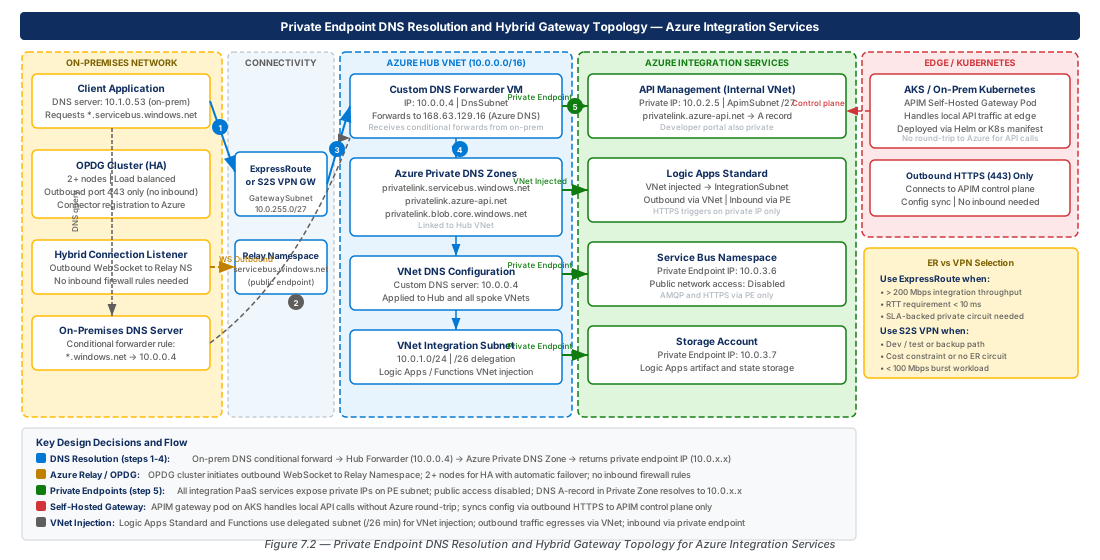
The self-hosted gateway runs as a Docker container or a Kubernetes deployment. It connects to the Azure API Management control plane to download its configuration — API definitions, policies, certificates, subscriptions — and then serves API traffic locally. When the connection to the Azure control plane is available, the gateway syncs configuration changes in near real time. When the connection is unavailable, the gateway continues operating with its last-known configuration. This resilience to control plane disconnection is what makes the self-hosted gateway suitable for edge locations where internet connectivity is intermittent.
The self-hosted gateway is a feature of the API Management Premium and Developer tiers. It is not available in the Consumption, Basic, or Standard tiers. Each API Management instance can host multiple self-hosted gateway resources, each representing a logical deployment location. Within a deployment location, multiple container instances of the gateway can run for horizontal scaling and availability. All instances within a location share the same configuration and appear as a single gateway to API Management management operations.
Note
The self-hosted gateway does not replicate the API Management developer portal. The developer portal is always hosted in Azure. If your edge deployment scenario requires local developer portal access, the self-hosted gateway alone does not satisfy that requirement — you would need to build a separate API catalog mechanism for local consumption.
Kubernetes Deployment and Configuration
Deploying the self-hosted gateway on Kubernetes involves creating a Kubernetes Secret containing the gateway token, a ConfigMap with the gateway configuration endpoint URL, a Deployment with appropriate resource limits, and a Service exposing the gateway's HTTP and HTTPS ports. Microsoft provides a Helm chart that packages these resources, but many organizations deploy the YAML manifests directly for tighter control over the deployment configuration.
# CE-14 PART A: Create the self-hosted gateway resource in API Management
APIM_RG="rg-hybrid-multi-cloud-connectivity-prod-001"
APIM_NAME="apim-hybrid-multi-prod-eastus2-001"
GATEWAY_NAME="shgw-edge-manufacturing-floor-001"

# Create the self-hosted gateway resource
az apim gateway create \
  --resource-group "$APIM_RG" \
  --service-name "$APIM_NAME" \
  --gateway-id "$GATEWAY_NAME" \
  --description "Self-hosted gateway for manufacturing floor edge location - Building 4" \
  --location-data name="Manufacturing Floor B4" \
                  city="Redmond" district="WA" country-or-region="US"

# Associate APIs with the self-hosted gateway
az apim gateway api create \
  --resource-group "$APIM_RG" \
  --service-name "$APIM_NAME" \
  --gateway-id "$GATEWAY_NAME" \
  --api-id "manufacturing-scada-api"

# Generate gateway token (valid for 30 days max — rotate before expiry)
GATEWAY_TOKEN=$(az apim gateway token generate \
  --resource-group "$APIM_RG" \
  --service-name "$APIM_NAME" \
  --gateway-id "$GATEWAY_NAME" \
  --key-type primary \
  --expiry "$(date -u -d '+30 days' '+%Y-%m-%dT%H:%M:%SZ')" \
  --query value --output tsv)

# CE-14 PART B: Deploy to Kubernetes
kubectl create namespace apim-gateway

kubectl create secret generic apim-gateway-token \
  --namespace apim-gateway \
  --from-literal=value="GatewayKey $GATEWAY_TOKEN"

# Apply Deployment manifest (2 replicas for HA)
kubectl apply -f - <<'EOF'
apiVersion: apps/v1
kind: Deployment
metadata:
  name: shgw-edge-manufacturing-floor-001
  namespace: apim-gateway
spec:
  replicas: 2
  selector:
    matchLabels:
      app: apim-self-hosted-gateway
  strategy:
    rollingUpdate:
      maxUnavailable: 0
  template:
    metadata:
      labels:
        app: apim-self-hosted-gateway
    spec:
      containers:
      - name: azure-api-management-gateway
        image: mcr.microsoft.com/azure-api-management/gateway:2.6.0
        ports:
        - name: http
          containerPort: 8080
        - name: https
          containerPort: 8081
        env:
        - name: config.service.endpoint
          value: "https://apim-hybrid-multi-prod-eastus2-001.configuration.azure-api.net/..."
        - name: config.service.auth
          valueFrom:
            secretKeyRef:
              name: apim-gateway-token
              key: value
        resources:
          requests:
            cpu: "500m"
            memory: "512Mi"
          limits:
            cpu: "2000m"
            memory: "2Gi"
        livenessProbe:
          httpGet:
            path: /status-0123456789abcdef
            port: 8080
          initialDelaySeconds: 30
          periodSeconds: 15
        readinessProbe:
          httpGet:
            path: /status-0123456789abcdef
            port: 8080
          initialDelaySeconds: 10
          periodSeconds: 5
EOF

# PodDisruptionBudget — ensure at least one replica available during maintenance
kubectl apply -f - <<'EOF'
apiVersion: policy/v1
kind: PodDisruptionBudget
metadata:
  name: apim-gateway-pdb
  namespace: apim-gateway
spec:
  minAvailable: 1
  selector:
    matchLabels:
      app: apim-self-hosted-gateway
EOFTip
Configure Kubernetes PodDisruptionBudgets to ensure at least one gateway replica remains available during node maintenance and rolling updates. Set minAvailable: 1 on the gateway Deployment's PodDisruptionBudget. Also configure the Deployment's strategy.rollingUpdate.maxUnavailable: 0 to ensure zero-downtime updates.
Policy Behavior in Disconnected Scenarios
When the self-hosted gateway loses its connection to the Azure control plane, it enters a degraded-but-operational mode. The gateway continues to serve API traffic using its last-synced configuration. Policies continue executing. Subscriptions are validated against the local cache. Certificates cached locally remain valid until they expire. This behavior requires careful consideration in security-sensitive deployments — if a subscription key is revoked in Azure while the gateway is disconnected, the gateway will continue accepting requests using that key until it reconnects and syncs the revocation.
The gateway exposes a local metrics endpoint that can be scraped by Prometheus. In disconnected scenarios where the gateway cannot emit telemetry to Azure Monitor or Application Insights, local Prometheus scraping and Grafana dashboards provide observability. This local observability stack should be part of the edge deployment design — planning it as an afterthought leaves the operations team blind to API health during connectivity events, which are precisely the times when observability is most critical.
Token rotation for self-hosted gateway authentication is a critical operational concern. Gateway tokens expire with a maximum validity period of 30 days. If a token expires, the gateway can no longer sync configuration changes from the control plane. Implement a Kubernetes CronJob or an external secrets manager rotation process to regenerate the gateway token before expiry and update the Kubernetes Secret automatically.
| API Management Tier | Self-Hosted Gateway | Built-in VNet Injection | Max Gateways | Notes |
|---|---|---|---|---|
| Consumption | Not supported | Not supported | N/A | Serverless, no dedicated infrastructure |
| Developer | Supported (1 unit) | External VNet only | 1 | Not for production workloads |
| Basic v2 | Not supported | Not supported | N/A | Entry-level managed |
| Standard v2 | Not supported | External + Internal VNet | N/A | VNet via injection, no self-hosted |
| Premium | Supported (unlimited) | External + Internal VNet | Unlimited | Multi-region, enterprise features |
Warning
The self-hosted gateway container image must be kept updated. Microsoft releases security patches for the gateway image. Running an outdated gateway image in an edge location that has restricted update processes creates a security debt. Establish a patching cadence for the container image and test updates in a staging environment before rolling to production edge locations.
Private Endpoint DNS Resolution
DNS Resolution Architecture for VNet-Injected Services
Private endpoints for Azure Integration Services create network interfaces with private IP addresses within a VNet subnet. When a Logic App Standard deployed in VNet sends a request to an Azure Service Bus private endpoint, the TCP connection must resolve the Service Bus namespace FQDN (namespace.servicebus.windows.net) to the private IP address of the endpoint's network interface, not to the public IP address. This DNS resolution is the critical path that makes private connectivity work — if the DNS resolves to the public IP, the traffic leaves the VNet and traverses the public internet regardless of whether a private endpoint exists.
Azure Private DNS Zones are the managed DNS infrastructure for private endpoint resolution. Each service type has a well-known Private DNS Zone name: privatelink.servicebus.windows.net for Service Bus, privatelink.azurewebsites.net for App Service (Logic Apps Standard), privatelink.azure-api.net for API Management, and privatelink.eventgrid.azure.net for Event Grid. When a private endpoint is created for a resource, Azure creates an A record in the corresponding Private DNS Zone mapping the resource's FQDN to the private endpoint IP address. The Private DNS Zone must be linked to the VNet where the resolution is needed; without the VNet link, the zone's records are not visible to workloads in the VNet.
The hybrid DNS challenge arises because on-premises DNS resolvers must also resolve Azure FQDNs to private IPs when on-premises workloads connect to private-endpoint-protected Azure services. The resolution to this challenge is conditional forwarding: the on-premises DNS server forwards queries for servicebus.windows.net (and other Azure service domains) to the Azure DNS Private Resolver inbound endpoint in the hub VNet.
Azure DNS Private Resolver Configuration
The Azure DNS Private Resolver is the recommended solution for hybrid DNS forwarding. It provides inbound endpoints (on-premises DNS servers forward Azure service domain queries to these endpoints) and outbound endpoints (Azure workloads query on-premises DNS zones via these endpoints). The resolver is a fully managed service that does not require managing DNS VMs, ensuring 99.99% availability SLA.
# Configure Azure DNS Private Resolver for hybrid DNS resolution
RESOLVER_RG="rg-hybrid-multi-cloud-connectivity-prod-001"
RESOLVER_VNET="vnet-hub-connectivity-prod-eastus2-001"
RESOLVER_NAME="dnspr-hybrid-multi-prod-eastus2-001"
RESOLVER_LOCATION="eastus2"

# Create DNS Private Resolver
az dns-resolver create \
  --resource-group "$RESOLVER_RG" \
  --name "$RESOLVER_NAME" \
  --location "$RESOLVER_LOCATION" \
  --id "/subscriptions/$(az account show --query id -o tsv)/resourceGroups/$RESOLVER_RG/providers/Microsoft.Network/virtualNetworks/$RESOLVER_VNET"

# Create inbound endpoint (receives conditional forwards from on-premises DNS)
INBOUND_ENDPOINT_IP=$(az dns-resolver inbound-endpoint create \
  --resource-group "$RESOLVER_RG" \
  --dns-resolver-name "$RESOLVER_NAME" \
  --name "inbound-from-onpremises" \
  --location "$RESOLVER_LOCATION" \
  --ip-configurations '[{"privateIpAllocationMethod":"Dynamic","subnet":{"id":"/subscriptions/'"$(az account show --query id -o tsv)"'/resourceGroups/'"$RESOLVER_RG"'/providers/Microsoft.Network/virtualNetworks/'"$RESOLVER_VNET"'/subnets/snet-dns-resolver-inbound-prod-001"}}]' \
  --query "ipConfigurations[0].privateIpAddress" --output tsv)

echo "Inbound endpoint IP: $INBOUND_ENDPOINT_IP"
echo "Configure this IP as conditional forwarder target on on-premises DNS server"

# Create outbound endpoint for Azure-to-on-premises DNS forwarding
az dns-resolver outbound-endpoint create \
  --resource-group "$RESOLVER_RG" \
  --dns-resolver-name "$RESOLVER_NAME" \
  --name "outbound-to-onpremises" \
  --location "$RESOLVER_LOCATION" \
  --subnet-id "/subscriptions/$(az account show --query id -o tsv)/resourceGroups/$RESOLVER_RG/providers/Microsoft.Network/virtualNetworks/$RESOLVER_VNET/subnets/snet-dns-resolver-outbound-prod-001"

# Create forwarding ruleset and rule for corporate domain
az dns-resolver forwarding-ruleset create \
  --resource-group "$RESOLVER_RG" \
  --name "frs-onpremises-corp-prod-001" \
  --location "$RESOLVER_LOCATION" \
  --outbound-endpoints '[{"id":"/subscriptions/'"$(az account show --query id -o tsv)"'/resourceGroups/'"$RESOLVER_RG"'/providers/Microsoft.Network/dnsResolvers/'"$RESOLVER_NAME"'/outboundEndpoints/outbound-to-onpremises"}]'

az dns-resolver forwarding-rule create \
  --resource-group "$RESOLVER_RG" \
  --forwarding-ruleset-name "frs-onpremises-corp-prod-001" \
  --name "rule-corp-contoso-com" \
  --domain-name "corp.contoso.com." \
  --target-dns-servers '[{"ipAddress":"10.0.0.4","port":53},{"ipAddress":"10.0.0.5","port":53}]' \
  --forwarding-rule-state Enabled

# Link forwarding ruleset to hub VNet
az dns-resolver vnet-link create \
  --resource-group "$RESOLVER_RG" \
  --forwarding-ruleset-name "frs-onpremises-corp-prod-001" \
  --name "link-hub-vnet" \
  --virtual-network-id "/subscriptions/$(az account show --query id -o tsv)/resourceGroups/$RESOLVER_RG/providers/Microsoft.Network/virtualNetworks/$RESOLVER_VNET"
Private DNS Zone Topology for Integration Services
The complete set of Private DNS Zones required for a full Azure Integration Services deployment covers every service that participates in the integration platform. The zones must be linked to every VNet that hosts workloads consuming those services, including spoke VNets in the hub-and-spoke topology. A common implementation error is linking zones only to the hub VNet, which makes private endpoint resolution work for workloads in the hub but not for workloads in spokes.
| Service | Private DNS Zone | Record Type | Notes |
|---|---|---|---|
| Service Bus | privatelink.servicebus.windows.net | A | Covers Event Hubs as well |
| Event Grid | privatelink.eventgrid.azure.net | A | Topics and domains |
| Logic Apps Standard | privatelink.azurewebsites.net | A | Shared with App Service |
| API Management | privatelink.azure-api.net | A | Internal VNet mode only |
| Azure Functions | privatelink.azurewebsites.net | A | Shared with App Service |
| Storage (Blob) | privatelink.blob.core.windows.net | A | Workflow state storage |
| Storage (Table) | privatelink.table.core.windows.net | A | Workflow state storage |
| Storage (Queue) | privatelink.queue.core.windows.net | A | Workflow state storage |
| Storage (File) | privatelink.file.core.windows.net | A | Workflow state storage |
| Key Vault | privatelink.vaultcore.azure.net | A | Secrets and certificates |
| Azure Monitor | privatelink.monitor.azure.com | A | Log ingestion and query |
Warning
The privatelink.azurewebsites.net Private DNS Zone is shared between Logic Apps Standard, Azure Functions, and regular App Service. If multiple teams create private endpoints for different app services and share the same Private DNS Zone, ensure the zone is in a centrally managed resource group with RBAC controlling who can write A records. Auto-registration at private endpoint creation time can cause record conflicts if zone ownership is not clearly defined.
Managing Private DNS Zone links at scale requires Azure Policy. A policy with the deployIfNotExists effect can automatically link a Private DNS Zone to a VNet when the VNet is created in the organization's landing zone. This automation ensures that new spoke VNets receive the correct DNS zone links without requiring manual intervention. The policy assignment scope should be the connectivity subscription, and the policy should target VNets tagged with the hub or spoke designation.
ExpressRoute and Site-to-Site VPN Selection
Decision Framework
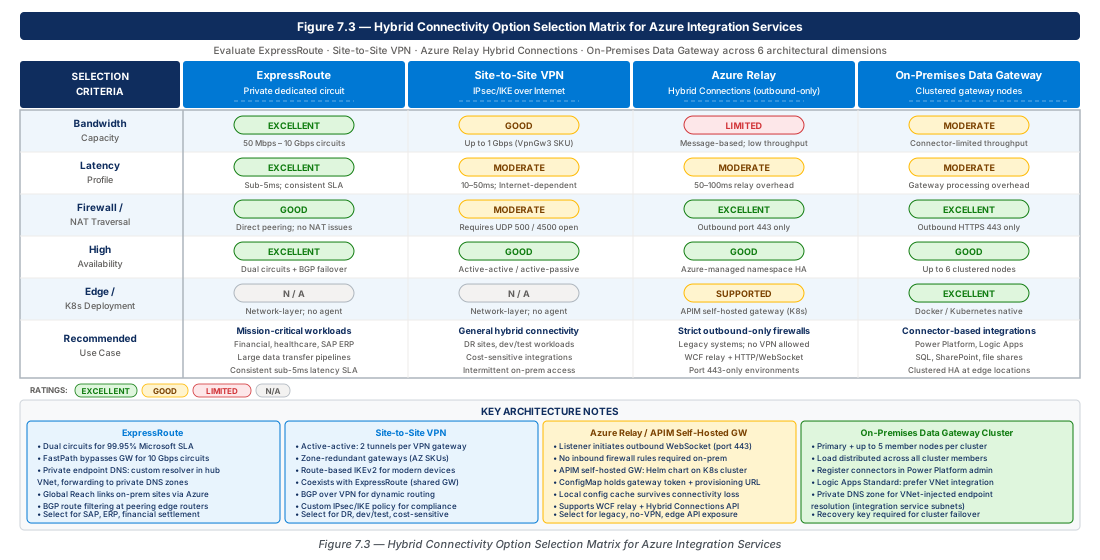
The choice between ExpressRoute and site-to-site VPN for integration workload connectivity is a risk and performance decision, not a cost optimization. ExpressRoute provides dedicated bandwidth, predictable latency (because traffic does not traverse the public internet), and a financially-backed 99.95% SLA. Site-to-site VPN runs over the public internet, is subject to internet routing variability, and provides a 99.9% SLA at the gateway level. For integration workloads, the relevant question is: what is the cost of latency spikes, bandwidth contention, or connectivity interruptions in the integration flow?
Integration workloads that are latency-sensitive or bandwidth-intensive favor ExpressRoute. Real-time data synchronization between Azure SQL and on-premises data warehouses, bulk file transfers for batch integration patterns, and SAP integration using synchronous RFC calls all benefit from ExpressRoute's predictable network characteristics. Integration workloads that are asynchronous, have built-in retry logic, and transfer small payloads can tolerate the variability of site-to-site VPN. Event-driven integrations using Service Bus, where the on-premises system publishes events and the cloud consumes them asynchronously, are resilient to VPN variability because the queue absorbs the timing uncertainty.
Tip
Even when ExpressRoute is the primary connectivity path, configure site-to-site VPN as a failover path. ExpressRoute circuits, while highly reliable, do have maintenance windows and occasional outages. VPN failover allows integration workloads to continue operating at reduced performance during ExpressRoute events. Configure the VPN gateway with the same routing priorities as the ExpressRoute gateway so failover is automatic via BGP route withdrawal.
ExpressRoute Circuit Sizing for Integration Workloads
ExpressRoute circuits are available in bandwidths from 50 Mbps to 100 Gbps. Integration workloads typically do not require the highest bandwidth tiers, but they do benefit from the lowest latency tiers available at each peering location. The correct sizing approach is to model the peak aggregate bandwidth of all integration flows that will traverse the circuit, add 40% headroom for growth and burst, and select the next available bandwidth tier above that figure.
For Logic Apps and API Management traffic, the bandwidth requirement is typically modest — integration workloads are characterized by high message rate and small payload size rather than bulk transfer. The exception is file-based integration patterns (SFTP pickup, EDI file exchange, blob-based batch processing) where individual files can be megabytes to gigabytes in size. If file-based patterns are part of the integration portfolio, model their contribution to circuit bandwidth separately from event-driven patterns.
| Connectivity Option | Bandwidth | Latency | SLA | Best For |
|---|---|---|---|---|
| Site-to-Site VPN (Basic) | Up to 100 Mbps | Variable (internet) | 99.9% | Dev/test, low-priority async flows |
| Site-to-Site VPN (VpnGw2) | Up to 1.25 Gbps | Variable (internet) | 99.95% | Production async integration |
| ExpressRoute (50 Mbps) | 50 Mbps dedicated | Predictable (<10ms typical) | 99.95% | Low-volume latency-sensitive |
| ExpressRoute (1 Gbps) | 1 Gbps dedicated | Predictable (<10ms typical) | 99.95% | Standard enterprise integration |
| ExpressRoute (10 Gbps) | 10 Gbps dedicated | Predictable (<5ms typical) | 99.95% | Bulk replication, SAP bulk transfer |
| ExpressRoute Global Reach | Circuit-dependent | Predictable | 99.95% | Cross-region on-premises routing |
Routing and BGP Configuration for Integration Traffic
ExpressRoute uses BGP for route exchange between the Azure gateway and the on-premises edge router. The Azure ExpressRoute Gateway advertises Azure VNet address spaces to on-premises, and on-premises advertises its address ranges to Azure. For hub-and-spoke topologies, the hub VNet address space is advertised by default, but spoke VNet address spaces must be explicitly enabled for advertisement. The allowGatewayTransit peering property on the hub VNet and useRemoteGateways on spoke VNets enable spoke address ranges to be included in the ExpressRoute BGP advertisements.
Integration services in spoke VNets reach on-premises resources through the ExpressRoute Gateway in the hub, traversing the hub-to-spoke peering. If spoke routes are not advertised through the ExpressRoute connection, on-premises systems that try to reach private endpoints in spoke VNets will fail at the routing level. Validate route advertisement completeness using the Azure ExpressRoute Gateway's learned routes and advertised routes views in the Azure portal or CLI after deploying a new spoke.
Important
ExpressRoute has a maximum route limit of 4,000 routes per BGP session for private peering. Organizations with complex on-premises networks advertising many subnets must aggregate routes before advertising them to Azure. Exceeding the route limit causes the BGP session to be dropped, resulting in complete connectivity loss. Use route summarization aggressively on the on-premises edge router to stay well within the limit.
Route filtering using BGP communities is important for multi-region ExpressRoute deployments. Azure advertises routes with specific BGP community values indicating the source region (for example, 12076:51004 for East US 2). On-premises routers can filter inbound routes using these communities to prefer local-region routes over remote-region routes, reducing latency by ensuring traffic flows to the nearest Azure region. Integration architectures with active-active regional deployments benefit significantly from BGP community-based route filtering to ensure flows are processed in the geographically closest region.
Lab
Provision an Azure Relay namespace, create Hybrid Connections for on-premises SQL Server, SAP RFC, and Oracle ERP endpoints, configure SAS authorization rules, create an Azure Monitor action group, and set up listener disconnection alerts.
# CE-13: Full relay namespace provisioning and monitoring setup
set -euo pipefail

RELAY_RG="rg-hybrid-multi-cloud-connectivity-prod-001"
RELAY_NAMESPACE="hybrid-multi-prod-eastus2-relay-001"
RELAY_LOCATION="eastus2"
MONITOR_ACTION_GROUP="ag-integration-ops-prod-001"
ALERT_EMAIL="integration-ops@contoso.com"

echo "=== Step 1: Create resource group ==="
az group create \
  --name "$RELAY_RG" \
  --location "$RELAY_LOCATION" \
  --tags \
    "environment=production" \
    "workload=integration" \
    "costcenter=IT-Integration" \
    "owner=integration-platform-team"

echo "=== Step 2: Create Relay namespace ==="
az relay namespace create \
  --resource-group "$RELAY_RG" \
  --name "$RELAY_NAMESPACE" \
  --location "$RELAY_LOCATION" \
  --sku Standard \
  --tags "environment=production" "workload=hybrid-relay"

echo "=== Step 3: Create Hybrid Connections ==="
for HC_NAME in "sql-northwind-prod" "sap-rfc-s4h-prod" "oracle-erp-prod"; do
  az relay hyco create \
    --resource-group "$RELAY_RG" \
    --namespace-name "$RELAY_NAMESPACE" \
    --name "$HC_NAME" \
    --requires-client-authorization true

  az relay hyco authorization-rule create \
    --resource-group "$RELAY_RG" \
    --namespace-name "$RELAY_NAMESPACE" \
    --hybrid-connection-name "$HC_NAME" \
    --name "OnPremisesListener" \
    --rights Listen

  az relay hyco authorization-rule create \
    --resource-group "$RELAY_RG" \
    --namespace-name "$RELAY_NAMESPACE" \
    --hybrid-connection-name "$HC_NAME" \
    --name "CloudSender" \
    --rights Send

  echo "Created Hybrid Connection: $HC_NAME"
done

echo "=== Step 4: Create Action Group ==="
az monitor action-group create \
  --resource-group "$RELAY_RG" \
  --name "$MONITOR_ACTION_GROUP" \
  --short-name "IntOps" \
  --action email "integration-ops" "$ALERT_EMAIL"

echo "=== Step 5: Create listener disconnection alerts ==="
RELAY_RESOURCE_ID=$(az relay namespace show \
  --resource-group "$RELAY_RG" \
  --name "$RELAY_NAMESPACE" \
  --query id --output tsv)

ACTION_GROUP_ID=$(az monitor action-group show \
  --resource-group "$RELAY_RG" \
  --name "$MONITOR_ACTION_GROUP" \
  --query id --output tsv)

az monitor metrics alert create \
  --name "alert-relay-listener-disconnected" \
  --resource-group "$RELAY_RG" \
  --scopes "$RELAY_RESOURCE_ID" \
  --condition "avg ListenerConnections-Success < 1" \
  --window-size 5m \
  --evaluation-frequency 1m \
  --severity 1 \
  --description "One or more Relay Hybrid Connection listeners have no active connections" \
  --action "$ACTION_GROUP_ID"

echo "=== Step 6: Display listener connection strings ==="
for HC_NAME in "sql-northwind-prod" "sap-rfc-s4h-prod" "oracle-erp-prod"; do
  echo ""
  echo "--- $HC_NAME listener connection string ---"
  az relay hyco authorization-rule keys list \
    --resource-group "$RELAY_RG" \
    --namespace-name "$RELAY_NAMESPACE" \
    --hybrid-connection-name "$HC_NAME" \
    --name "OnPremisesListener" \
    --query "primaryConnectionString" \
    --output tsv
done

echo ""
echo "=== CE-13 Complete ==="
echo "Store listener connection strings in Azure Key Vault before distributing to on-premises teams."Create a self-hosted gateway resource in API Management, associate manufacturing floor APIs, generate and store the gateway authentication token in Key Vault, deploy the gateway Deployment and PodDisruptionBudget to the edge Kubernetes cluster, and verify control plane connectivity.
# CE-14: Self-hosted gateway provisioning and Kubernetes deployment
set -euo pipefail

APIM_RG="rg-hybrid-multi-cloud-connectivity-prod-001"
APIM_NAME="apim-hybrid-multi-prod-eastus2-001"
GATEWAY_NAME="shgw-edge-manufacturing-floor-001"
GATEWAY_NAMESPACE="apim-gateway"
TOKEN_VALIDITY_DAYS=29

echo "=== Step 1: Verify API Management instance ==="
az apim show \
  --resource-group "$APIM_RG" \
  --name "$APIM_NAME" \
  --query "sku.name" --output tsv

echo "=== Step 2: Create self-hosted gateway resource ==="
az apim gateway create \
  --resource-group "$APIM_RG" \
  --service-name "$APIM_NAME" \
  --gateway-id "$GATEWAY_NAME" \
  --description "Edge gateway for manufacturing floor Building 4 - Redmond Campus" \
  --location-data \
    name="Manufacturing Floor B4" \
    city="Redmond" district="WA" country-or-region="US"

echo "=== Step 3: Associate APIs with gateway ==="
for API_ID in "manufacturing-scada-api" "mes-integration-api" "plc-telemetry-api"; do
  az apim gateway api create \
    --resource-group "$APIM_RG" \
    --service-name "$APIM_NAME" \
    --gateway-id "$GATEWAY_NAME" \
    --api-id "$API_ID" \
    2>/dev/null || echo "Warning: API $API_ID not found, skipping"
done

echo "=== Step 4: Generate and store gateway token ==="
TOKEN_EXPIRY=$(python3 -c "from datetime import datetime, timedelta; print((datetime.utcnow() + timedelta(days=$TOKEN_VALIDITY_DAYS)).strftime('%Y-%m-%dT%H:%M:%SZ'))")

GATEWAY_TOKEN=$(az apim gateway token generate \
  --resource-group "$APIM_RG" \
  --service-name "$APIM_NAME" \
  --gateway-id "$GATEWAY_NAME" \
  --key-type primary \
  --expiry "$TOKEN_EXPIRY" \
  --query value --output tsv)

KEYVAULT_NAME="kv-hybrid-multi-prod-eastus2-001"
az keyvault secret set \
  --vault-name "$KEYVAULT_NAME" \
  --name "apim-shgw-manufacturing-floor-token" \
  --value "GatewayKey $GATEWAY_TOKEN" \
  --expires "$TOKEN_EXPIRY" \
  --description "APIM self-hosted gateway token for $GATEWAY_NAME. Rotate before expiry."

echo "=== Step 5: Deploy to Kubernetes ==="
kubectl create namespace "$GATEWAY_NAMESPACE" --dry-run=client -o yaml | kubectl apply -f -

kubectl create secret generic apim-gateway-token \
  --namespace "$GATEWAY_NAMESPACE" \
  --from-literal=value="GatewayKey $GATEWAY_TOKEN" \
  --dry-run=client -o yaml | kubectl apply -f -

kubectl apply -f - <<EOF
apiVersion: policy/v1
kind: PodDisruptionBudget
metadata:
  name: apim-gateway-pdb
  namespace: $GATEWAY_NAMESPACE
spec:
  minAvailable: 1
  selector:
    matchLabels:
      app: apim-self-hosted-gateway
EOF

echo "=== Step 6: Verify gateway connectivity to control plane ==="
kubectl rollout status deployment/shgw-edge-manufacturing-floor-001 \
  --namespace "$GATEWAY_NAMESPACE" \
  --timeout=120s

az apim gateway show \
  --resource-group "$APIM_RG" \
  --service-name "$APIM_NAME" \
  --gateway-id "$GATEWAY_NAME" \
  --query "locationData" \
  --output json

echo ""
echo "=== CE-14 Complete ==="
echo "Validate API connectivity by sending a test request to the LoadBalancer service IP"
echo "from a device on the manufacturing floor network."
Summary
| Concept | Key Point |
|---|---|
| Azure Relay Hybrid Connections | Enables outbound-only TCP tunnel from on-premises to Azure without inbound firewall rules; uses WebSocket over HTTPS; listener hosts multiple instances for HA using azbridge. |
| On-Premises Data Gateway Clustering | Cluster multiple nodes for HA; all nodes must run the same software version; monthly updates require staged rollout; SAP NCo must be installed separately and must match SAP system bitness. |
| Self-Hosted APIM Gateway | Premium or Developer tier only; runs as container on Kubernetes; operates with last-synced config when disconnected from control plane; token expires every 30 days maximum — automate rotation. |
| Private Endpoint DNS Resolution | Azure DNS Private Resolver replaces DNS VM approach; inbound endpoint receives conditional forwards from on-premises; outbound endpoint forwards Azure queries to on-premises DNS. |
| Private DNS Zone Topology | Each integration service requires its specific privatelink.* zone; zones must be linked to every VNet (hub and all spokes) that hosts consuming workloads. |
| ExpressRoute vs. Site-to-Site VPN | ExpressRoute for latency-sensitive or bandwidth-intensive integration (SAP RFC, bulk replication); VPN for async event-driven flows with built-in retry; configure VPN as ExpressRoute failover. |
| BGP Route Advertisement | Spoke VNet addresses require allowGatewayTransit / useRemoteGateways to be advertised via ExpressRoute; maximum 4,000 routes per BGP session — aggregate aggressively. |