Azure Integration Services: Production Patterns
Integration DevOps and Testing Strategies
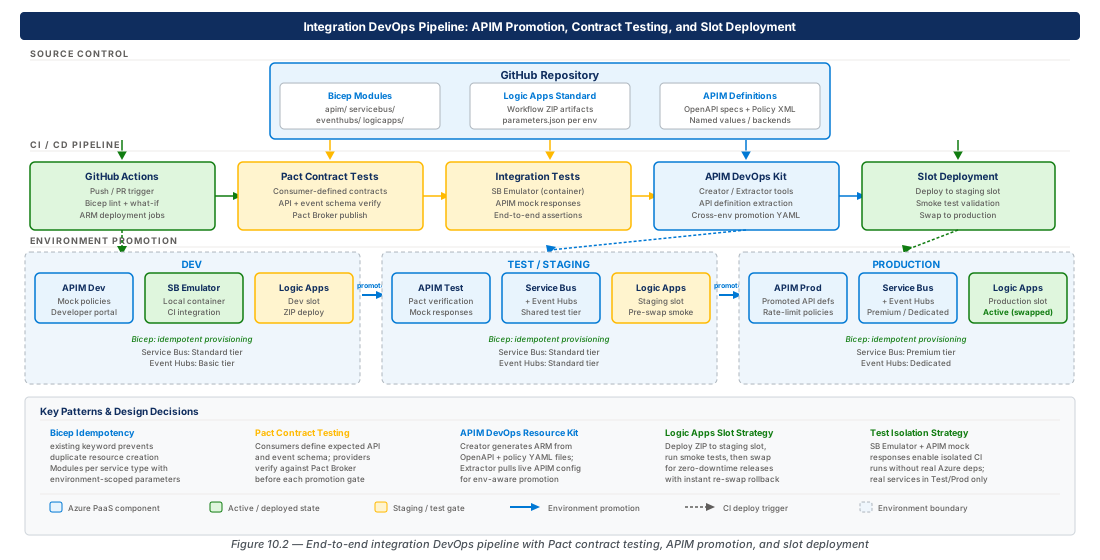
Deploying integration services without disciplined DevOps practices is a hidden form of technical debt — every manual configuration step is a divergence waiting to cause an outage. Azure Integration Services span multiple resource types across multiple environments, and the coupling between them means that an inconsistent deployment in one tier can silently corrupt data flows for weeks before the failure surfaces. This chapter establishes the repeatable pipelines, infrastructure-as-code patterns, and testing strategies that reduce deployment risk to a manageable level and enable teams to ship integration changes with the same confidence they bring to application code.
Foundations: Infrastructure-as-Code for Integration Services
The integration estate — APIM, Service Bus, Event Hubs, Logic Apps, and their supporting resources — presents a unique IaC challenge. Each resource type has its own configuration surface: APIM manages policies and API definitions, Service Bus manages topic and subscription filter rules, Event Hubs manages consumer groups, and Logic Apps manages workflow definitions as JSON. A mature IaC approach must address both the resource provisioning layer (handled by Bicep) and the configuration layer (handled by dedicated DevOps toolkits), and it must treat these as distinct concerns with distinct release cycles.
The Idempotency Contract
Idempotency is the most important property of any integration IaC module. An idempotent module applied twice to the same environment produces exactly the same result as applying it once. In practice, Bicep achieves this through the existing keyword for resources that should not be re-created, the resource declaration with a stable name field, and the @description decorator discipline that forces authors to reason about what they are declaring versus what they are referencing.
For integration services specifically, idempotency has sharp edges. A Service Bus topic maxSizeInMegabytes property can be set on creation but cannot be changed on an existing topic without deleting and re-creating it — a destructive operation. Similarly, APIM products and subscriptions have lifecycle state that Bicep cannot manage without carefully scoped conditions. The idempotency contract for integration IaC must therefore be explicit: modules declare the desired terminal state and any properties that cannot be changed in-place must be treated as immutable identifiers, with changes requiring a blue-green promotion rather than an in-place update.
A practical rule for integration teams is to separate Bicep modules by change velocity. Resources that change rarely — namespaces, hubs, APIM service instances — belong in a "foundation" module that runs in a slow release track. Resources that change frequently — Service Bus topics and subscriptions, Event Hub consumer groups, APIM APIs — belong in "configuration" modules that can be deployed independently without touching the foundation. This separation reduces blast radius and deployment time, and it aligns with the organizational reality that different teams own different layers of the integration estate.
Module Decomposition Strategy
A well-decomposed Bicep library for Azure Integration Services has four layers: shared modules for cross-cutting concerns (private endpoints, diagnostic settings, role assignments), foundation modules for long-lived resources, configuration modules for frequently-changing configuration, and orchestration templates that assemble modules for a given environment. Each layer has its own parameter file per environment, and the orchestration template is the only file that references environment-specific values directly.
The shared module layer is the most important investment. Diagnostic settings for integration services are consistently misconfigured — teams forget to enable allLogs categories, set insufficient retention periods, or route to the wrong Log Analytics workspace. A shared diagnosticSettings.bicep module that accepts a resource ID and a workspace ID, and emits the full set of supported categories, eliminates this class of error across the entire estate. Similarly, a shared privateEndpoint.bicep module that handles subnet delegation, DNS zone group linking, and approval state ensures that private connectivity is configured identically across all integration resources.
The parameter file strategy should follow the Azure Landing Zone convention: a main.parameters.dev.json, main.parameters.test.json, and main.parameters.prod.json at the orchestration level, with shared parameter values factored into a shared.parameters.json that is merged at pipeline time. This avoids the common mistake of duplicating parameters across environments, which leads to configuration drift that is invisible until a production deployment fails because a parameter was updated in dev but not in prod.
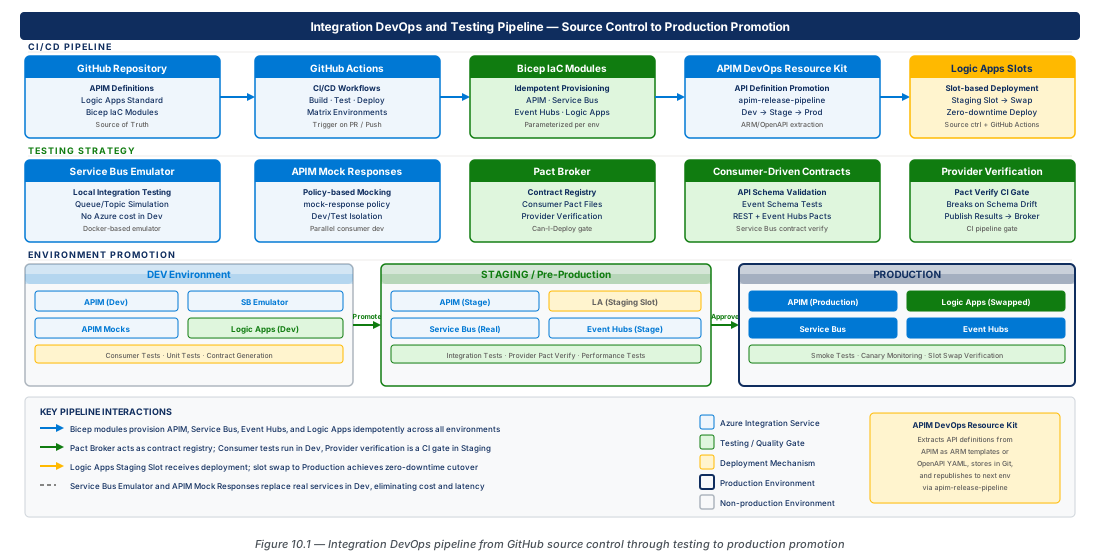
Bicep Modules for Idempotent Provisioning
The four core integration resource types — APIM, Service Bus, Event Hubs, and Logic Apps Standard — each require careful Bicep module design. This section provides production-ready patterns for each, with attention to the properties that require special handling and the output contracts that downstream modules depend on.
APIM Bicep Module
An APIM Bicep module must handle three distinct concerns: the service instance itself, the system-assigned or user-assigned managed identity required for Key Vault integration, and the virtual network integration that controls inbound and outbound connectivity. The service instance is expensive to create (provisioning takes 30–45 minutes for Developer and Premium SKUs) and expensive to re-create, so the module must be designed to be genuinely idempotent on every property that can be changed in-place.
# Deploy APIM foundation module to dev environment
# Assumes Bicep module is in infra/modules/apim/main.bicep

RESOURCE_GROUP="rg-integration-devops-testing-dev-001"
LOCATION="eastus2"
APIM_NAME="integration-devops-dev-eastus2-001"

# Create resource group if it does not exist
az group create \
  --name "$RESOURCE_GROUP" \
  --location "$LOCATION" \
  --tags environment=dev workload=integration-devops costCenter=platform

# Deploy APIM foundation — idempotent, safe to re-run
az deployment group create \
  --resource-group "$RESOURCE_GROUP" \
  --template-file infra/modules/apim/main.bicep \
  --parameters @infra/parameters/apim.parameters.dev.json \
  --parameters apimName="$APIM_NAME" \
               publisherEmail="platform-integration@contoso.com" \
               publisherName="Contoso Integration Platform" \
               skuName="Developer" \
               skuCapacity=1 \
  --name "apim-foundation-$(date +%Y%m%d%H%M%S)" \
  --mode Incremental
The APIM Bicep module should declare the publisherEmail and publisherName as required parameters with no defaults — these values vary by environment and must be explicitly provided. The skuName and skuCapacity parameters should have environment-appropriate defaults (Developer for non-production, Premium for production) enforced through the parameter file rather than the module itself, so the module remains generic. The module's outputs must include apimServiceId, apimHostname, apimManagedIdentityPrincipalId, and apimGatewayUrl, as these are consumed by dependent modules.
Important
The APIM hostnameConfigurations property is not idempotent if you reference a Key Vault certificate. If the certificate secret identifier changes (for example, after a certificate rotation), Bicep will attempt to update the hostname configuration, which triggers a full service restart. Always reference the certificate by its versionless URI (https://<vault>.vault.azure.net/secrets/<cert-name> without the version suffix) so that automatic rotation does not change the Bicep state.
The virtual network integration mode (External, Internal, or None) cannot be changed on an existing APIM instance without deleting and re-creating it. This is a hard architectural decision that must be made before the first deployment. For production integration platforms, Internal mode is strongly recommended: it places the gateway entirely inside the VNet, preventing any direct public internet access while allowing internal consumers and API backends to communicate over private connectivity. External mode exposes the gateway publicly, which is appropriate only for developer or sandbox environments.
Service Bus Bicep Module
Service Bus has two infrastructure layers: the namespace (a long-lived, expensive resource) and the entities (queues, topics, subscriptions, and rules), which change frequently as the integration estate evolves. These layers must be in separate Bicep modules with separate deployment cadences. The namespace module runs in the foundation pipeline; the entities module runs in a configuration pipeline that can be triggered by application team pull requests without requiring platform team review.
# Deploy Service Bus namespace and entities to dev
RESOURCE_GROUP="rg-integration-devops-testing-dev-001"
SB_NAMESPACE="integration-devops-dev-sb-001"

# Namespace foundation deployment
az deployment group create \
  --resource-group "$RESOURCE_GROUP" \
  --template-file infra/modules/servicebus/namespace.bicep \
  --parameters namespaceName="$SB_NAMESPACE" \
               skuName="Premium" \
               premiumMessagingPartitions=1 \
               zoneRedundant=false \
               minimumTlsVersion="1.2" \
               publicNetworkAccess="Disabled" \
  --name "sb-namespace-$(date +%Y%m%d%H%M%S)" \
  --mode Incremental

# Entity configuration deployment — runs independently
az deployment group create \
  --resource-group "$RESOURCE_GROUP" \
  --template-file infra/modules/servicebus/entities.bicep \
  --parameters @infra/parameters/servicebus-entities.dev.json \
  --name "sb-entities-$(date +%Y%m%d%H%M%S)" \
  --mode Incremental
The entities module must handle the full lifecycle of topics, subscriptions, and correlation filter rules. A common mistake is declaring subscriptions without their filter rules, which causes Bicep to leave the default TrueFilter in place — this passes all messages to all subscriptions and is almost never the desired behavior in production. Each subscription declaration in the entities module must include an explicit rules property that deletes the default $Default rule and replaces it with the intended correlation or SQL filter.
Warning
Service Bus topic maxSizeInMegabytes is an immutable property after namespace creation for the Standard SKU. On the Premium SKU with partitioning enabled, the effective storage capacity scales with partition count rather than the maxSizeInMegabytes setting. Changing maxSizeInMegabytes on an existing topic in Standard SKU requires deleting and re-creating the topic, which drops all in-flight messages. Model this constraint explicitly in your Bicep module by using a @allowed([1024, 2048, 3072, 4096, 5120]) decorator and documenting that it is set-once.
Event Hubs Bicep Module
Event Hubs namespace and hub entity separation mirrors the Service Bus pattern, but with additional complexity from the Capture feature and consumer group management. The Capture configuration — which writes event batches to Azure Blob Storage — is a hub-level property that can be updated in-place, making it a safer configuration target than the namespace-level throughput units (Standard SKU) or processing units (Premium SKU).
Consumer groups are frequently managed by application teams rather than the platform team, and this creates a governance challenge. A consumer group that is declared in Bicep but consumed by an application that has been decommissioned will accumulate an offset backlog forever. The Event Hubs Bicep module should require each consumer group to carry a purpose tag, and the pipeline should enforce that every consumer group has a corresponding application team owner in the CMDB or service catalog. This is enforced through a custom Azure Policy definition that runs in audit mode on non-production environments and deny mode on production.
# Deploy Event Hubs namespace with hub and consumer groups
RESOURCE_GROUP="rg-integration-devops-testing-dev-001"
EH_NAMESPACE="integration-devops-dev-eh-001"

az deployment group create \
  --resource-group "$RESOURCE_GROUP" \
  --template-file infra/modules/eventhubs/namespace.bicep \
  --parameters namespaceName="$EH_NAMESPACE" \
               skuName="Premium" \
               processingUnits=1 \
               zoneRedundant=false \
               minimumTlsVersion="1.2" \
  --name "eh-namespace-$(date +%Y%m%d%H%M%S)" \
  --mode Incremental

# Deploy hub configuration (entities module)
az deployment group create \
  --resource-group "$RESOURCE_GROUP" \
  --template-file infra/modules/eventhubs/hubs.bicep \
  --parameters @infra/parameters/eventhubs-hubs.dev.json \
  --name "eh-hubs-$(date +%Y%m%d%H%M%S)" \
  --mode Incremental
Logic Apps Standard Bicep Module
Logic Apps Standard runs as a single-tenant App Service-based runtime, which means its Bicep module must provision the underlying App Service Plan, the Logic App resource itself, and the associated storage account used for workflow state and runtime artifacts. All three resources have a tight coupling: the storage account connection string must be present in the Logic App's app settings before the runtime starts, and the App Service Plan SKU determines the scaling behavior and the availability of deployment slots.
The storage account for Logic Apps Standard should use a private endpoint and be configured with allowBlobPublicAccess: false and minimumTlsVersion: 'TLS1_2'. The Logic App's system-assigned managed identity must be granted the Storage Blob Data Contributor, Storage Queue Data Contributor, and Storage Table Data Contributor roles on this storage account. Bicep role assignment declarations for these three roles should be part of the Logic Apps module itself, not a separate module, because they have the same lifecycle as the Logic App resource.
Note
Logic Apps Standard supports up to 20 deployment slots (including production), each of which maintains its own app settings, connection strings, and workflow state. Slots share the same App Service Plan and therefore the same compute resources, but each slot has an independent storage account connection. When designing slot-based deployment pipelines, provision a separate storage account for each slot — do not share storage accounts between slots, as this can cause workflow state corruption during slot swaps.
Logic Apps Standard Source Control and Slot-Based Deployment
Logic Apps Standard workflows are stored as JSON files in the wwwroot directory of the underlying App Service file system, which means they participate in the same source control and deployment mechanisms as any App Service application. This is a significant advantage over Logic Apps Consumption, where workflow definitions are stored as ARM resource properties and must be managed through ARM/Bicep deployments or the dedicated Logic Apps export tool. With Standard, a git push can deploy a workflow change in seconds through a GitHub Actions pipeline.
GitHub Actions Pipeline for Logic Apps Standard
The canonical GitHub Actions pipeline for Logic Apps Standard has four stages: lint and validate, infrastructure deployment (Bicep), workflow package build, and workflow deployment to the staging slot followed by a slot swap. The lint and validate stage uses the @microsoft/logicapps-schema-validator npm package to validate all .json workflow files against the Logic Apps Standard schema before any Azure resources are touched. This catches schema errors that would otherwise surface only after a deployment attempt, which is an expensive failure mode.
The workflow package build stage assembles the deployment artifact: it runs npm install to resolve any NPM dependencies (used by inline scripts in JavaScript action steps), copies the workflow JSON files, connection configuration, and host.json into a ZIP file, and uploads the ZIP as a GitHub Actions artifact. The deployment stage downloads this artifact, deploys it to the staging slot using az logicapp deployment source config-zip, runs smoke tests against the staging slot endpoint, and then performs the slot swap. If the smoke tests fail, the swap is not performed and the staging slot is left in a failed state for investigation.
# Example deployment commands used in GitHub Actions pipeline
RESOURCE_GROUP="rg-integration-devops-testing-prod-001"
LOGICAPP_NAME="integration-devops-prod-eastus2-001"
SLOT_NAME="staging"

# Deploy ZIP package to staging slot
az logicapp deployment source config-zip \
  --resource-group "$RESOURCE_GROUP" \
  --name "$LOGICAPP_NAME" \
  --slot "$SLOT_NAME" \
  --src ./artifacts/logicapp-package.zip

# Verify staging slot health before swap
az logicapp show \
  --resource-group "$RESOURCE_GROUP" \
  --name "$LOGICAPP_NAME" \
  --slot "$SLOT_NAME" \
  --query "state" \
  --output tsv

# Swap staging to production
az webapp deployment slot swap \
  --resource-group "$RESOURCE_GROUP" \
  --name "$LOGICAPP_NAME" \
  --slot "$SLOT_NAME" \
  --target-slot production \
--verboseTip
Configure slot-specific app settings by marking connection string references and environment-specific values with the "sticky" flag (az webapp config appsettings set --slot-settings). Sticky settings are not transferred during a slot swap, which means the production slot always uses production connection strings even after a swap brings in staging workflow definitions. This is the correct pattern — never allow a staging workflow definition to execute against production backends.
Managed Connections and DevOps
The most problematic aspect of Logic Apps Standard source control is managed connections. When a workflow uses a managed connector (Office 365, SharePoint, Dynamics 365), the connection is represented as a reference to an Azure connection resource with an OAuth token stored in a separate credential store. These connections are environment-specific and cannot be committed to source control. The standard pattern is to declare connection resource names as parameter references in connections.json and resolve them to environment-specific resource IDs through the deployment pipeline's parameter substitution step.
The connections.json file in the Logic Apps Standard workspace uses a managedApiConnections section where each connection entry references an api.id and a connection.id. In a DevOps pipeline, the connection.id values must be parameterized using environment variable substitution tokens (e.g., #{OFFICE365_CONNECTION_ID}# for Azure DevOps variable groups, or ${{ secrets.OFFICE365_CONNECTION_ID }} for GitHub Actions secrets). A pipeline step before the ZIP build replaces these tokens with the actual resource IDs for the target environment.
| Deployment Approach | Workflow Update Speed | Connection Management | Environment Isolation | Recommended For |
|---|---|---|---|---|
| ZIP deploy to staging slot + swap | ~60 seconds | Token substitution in pipeline | Full via sticky settings | Production workloads |
| ARM/Bicep deployment | 3–5 minutes | Inline in template parameters | Full via parameter files | Foundation-only changes |
| VS Code direct publish | Immediate | Manual | None (targets single env) | Local development only |
| Azure Portal designer | Immediate | GUI wizard | None | Initial prototyping only |
| Git-based auto-deploy (App Service) | ~90 seconds | Token substitution via SCM | Full via slot settings | Teams with simple CI needs |
APIM DevOps Resource Kit for API Lifecycle Management
The APIM DevOps Resource Kit (APIOps) is a Microsoft-maintained open-source toolkit that bridges the gap between APIM's ARM-based configuration model and the developer-friendly artifact format that API teams can manage in source control. APIOps introduces a representation of each API as a directory of files: an apiInformation.json describing the API metadata, an apiPolicy.xml containing the inbound/outbound policies, an openApiSpec.json or openApiSpec.yaml containing the OpenAPI specification, and a productInformation.json for each product the API belongs to.
APIOps Pipeline Architecture
The APIOps pipeline has two phases: extraction and publishing. The extraction phase reads the current state of a reference APIM instance (typically a dev or test environment) and writes it to the source control repository as the directory-based artifact format. The publishing phase reads these artifacts from source control and applies them to a target APIM instance, performing a reconciliation between the desired state in source control and the current state in the target environment.
The extraction phase is typically triggered manually by a developer who has made changes through the APIM portal and wants to commit those changes to source control. The publishing phase is triggered automatically by a pull request merge to the main branch, using a GitHub Actions or Azure DevOps pipeline. The pipeline applies changes to dev first, then test, then production, with approval gates between environments. This gives API teams a familiar pull-request workflow for API changes while the pipeline handles the mechanics of translating the developer-friendly artifact format back into ARM API calls.
# APIOps extraction — run after making changes in dev APIM portal
RESOURCE_GROUP="rg-integration-devops-testing-dev-001"
APIM_NAME="integration-devops-dev-eastus2-001"
OUTPUT_DIR="./apim-artifacts"

# Extract current APIM state to local artifacts directory
# (uses APIOps extractor CLI tool)
dotnet run --project tools/extractor/extractor.csproj -- \
  --extractorConfig extractorConfig.dev.yaml \
  --apimServiceName "$APIM_NAME" \
  --resourceGroup "$RESOURCE_GROUP" \
  --apiSpecFormat OpenAPIV3Yaml \
  --outputFolder "$OUTPUT_DIR"

# Review extracted artifacts before committing
ls -la "$OUTPUT_DIR/apis/"Important
The APIOps extractor captures named values (APIM's configuration store) as redacted placeholders — it does not export the actual values. This is intentional for security: named values often contain API keys, backend credentials, or connection strings that must never be committed to source control. The pipeline's publishing phase resolves named value placeholders by reading from Azure Key Vault at deploy time, using a Key Vault reference resolver that is part of the APIOps toolkit's publisher configuration.
API Promotion Across Environments
API promotion in APIOps is controlled by environment-specific override files. For each environment, a configuration.<env>.yaml file in the repository root overrides environment-specific properties: backend URLs (which differ between dev, test, and prod), named value references (pointing to different Key Vault secrets per environment), and product associations (which APIs are visible in which developer portal environment). This overlay model means the core API definition — the OpenAPI spec and policies — lives in a single source of truth, while environment differences are expressed as minimal, reviewable diffs in the override files.
The promotion pipeline must validate the OpenAPI spec against a breaking-change detector before publishing to production. Microsoft's oasdiff tool or Optic can be used for this purpose. The pipeline runs the breaking-change check between the incoming spec and the spec currently deployed in production; if breaking changes are detected (removed endpoints, changed parameter types, removed response fields), the pipeline fails and requires explicit override with a justification comment. This gate prevents accidental breaking changes from reaching API consumers.
Note
APIOps does not manage APIM subscriptions or user accounts — these are operational concerns that live outside the API definition lifecycle. Subscription keys are provisioned through a separate process (typically an automated onboarding flow triggered by the developer portal or a service catalog request) and are not stored in source control.
Consumer-Driven Contract Testing with Pact
Consumer-driven contract testing inverts the traditional integration testing model. Instead of the API provider defining what responses look like and testing against a mock, the API consumer defines what it needs from the provider — its "contract" — and the provider verifies that it satisfies those contracts. The Pact framework implements this model: consumers generate Pact files (JSON documents describing the interactions they depend on) and providers verify against these Pact files in their own CI pipelines. The Pact Broker (or PactFlow, the managed SaaS version) acts as a shared repository for contracts and verification results.
Pact for REST API Contracts
For REST APIs exposed through APIM, the Pact contract captures the HTTP interactions a consumer depends on: the request shape (method, path, headers, query parameters, body schema) and the response shape (status code, headers, body schema). The consumer writes a Pact test using the Pact client library for their language (available for .NET, Java, Node.js, Python, Go, and others) that records interactions against a Pact mock server. The recorded interactions are written to a Pact file and published to the Pact Broker.
The APIM provider verification runs in the provider's CI pipeline. The provider test fetches the Pact file from the Pact Broker, replays each interaction against the real provider (or the provider running in a test environment), and reports the verification result back to the Pact Broker. The Pact Broker's "can I deploy" check then gates deployments: before a consumer or provider deploys to any environment, it queries the Pact Broker to confirm that the version it is deploying is compatible with all currently deployed versions of its counterparts.
Tip
For APIM specifically, run the Pact provider verification against the APIM gateway URL rather than the backend service directly. This ensures that the APIM policies (transformation, validation, rate limiting) are included in the verification. A backend service that passes Pact verification directly but fails when accessed through APIM indicates a policy misconfiguration — which is the scenario you most want to catch.
Pact for Event Schema Contracts
Pact's message pact feature extends consumer-driven contract testing to asynchronous messaging, which is directly applicable to Service Bus and Event Hubs-based integrations. A message consumer defines the message body schema it expects to receive on a given topic or hub. The producer verifies that it generates messages conforming to that schema. The contract captures both the structure (required fields, data types) and the semantics (the meaning of enumerated values, the units of numeric fields) through free-text descriptions in the contract file.
For Service Bus and Event Hubs, the Pact message contract should capture the message body JSON schema, the required and optional application properties (Service Bus custom properties or Event Hubs properties), and the content type header. The producer verification test runs the actual message production code and captures the output, then validates it against the consumer-defined contract. This is more valuable than a JSON Schema validation alone because it is linked to a specific consumer and a specific deployed version, enabling the Pact Broker to track which consumer versions are compatible with which producer versions across all environments.
# Publish Pact contracts to Pact Broker after consumer tests pass
PACT_BROKER_URL="https://integration-devops-pactbroker-001.azurewebsites.net"
CONSUMER_NAME="order-service"
CONSUMER_VERSION=$(git rev-parse --short HEAD)
PACT_FILES_DIR="./pacts"

# Publish consumer-generated contracts
npx pact-broker publish \
  --pact-files-or-dirs "$PACT_FILES_DIR" \
  --consumer-app-version "$CONSUMER_VERSION" \
  --broker-base-url "$PACT_BROKER_URL" \
  --broker-token "$PACT_BROKER_TOKEN" \
  --tag "$(git branch --show-current)"

# Check if safe to deploy to dev environment
npx pact-broker can-i-deploy \
  --pacticipant "$CONSUMER_NAME" \
  --version "$CONSUMER_VERSION" \
  --to-environment dev \
  --broker-base-url "$PACT_BROKER_URL" \
--broker-token "$PACT_BROKER_TOKEN"Warning
The Pact "can I deploy" check must be run against environments, not tags. The older tag-based workflow (--to main) does not accurately represent what is actually deployed in each environment. Migrate to the environment-based workflow by registering environments in the Pact Broker and recording deployments when they complete. This is a one-time migration but it is required before the "can I deploy" check is trustworthy in a multi-environment promotion pipeline.
Integration Test Environment Strategy
Integration tests for Azure Integration Services face a fundamental challenge: full fidelity requires running against real Azure resources, but doing so is expensive, slow, and introduces external dependencies that make tests flaky. The production-grade strategy is a tiered environment model where each tier trades fidelity for speed and isolation, and teams choose the appropriate tier based on what they are testing.
Azure Service Bus Emulator
The Azure Service Bus Emulator (released in 2024) is a Docker-based local emulator that supports the full AMQP protocol surface used by the Service Bus .NET, Java, and Python SDKs. It runs as a Docker container and is configured through a config.json file that declares namespaces, queues, topics, subscriptions, and rules — mirroring the actual Service Bus resource model. The emulator supports basic AMQP send and receive operations, message settlement (complete, abandon, deadletter, defer), scheduled messages, and session-based processing.
The Service Bus Emulator is appropriate for unit-level integration tests that need to exercise the message processing logic of a consumer or producer without requiring a real Azure namespace. A Logic Apps workflow that subscribes to a Service Bus topic, transforms the message, and publishes to a second topic can be tested end-to-end using the emulator for the Service Bus layer and a local Logic Apps runtime for the workflow layer. This combination runs entirely on a developer workstation and completes in seconds rather than the minutes required by tests against a real Azure namespace.
# Start Service Bus emulator for local integration testing
# Assumes Docker Desktop is running and emulator image is pulled
docker run -d \
  --name servicebus-emulator \
  -p 5672:5672 \
  -e ACCEPT_EULA=Y \
  -v "$(pwd)/tests/emulator/config.json:/ServiceBus_Emulator/ConfigFiles/Config.json" \
  mcr.microsoft.com/azure-messaging/servicebus-emulator:latest

# Verify emulator is accepting connections
docker logs servicebus-emulator --tail 20

# Run integration tests against emulator
dotnet test tests/integration \
  --filter "Category=EmulatorTests" \
  --environment "ServiceBusConnectionString=Endpoint=sb://localhost;SharedAccessKeyName=RootManageSharedAccessKey;SharedAccessKey=SAS_KEY_VALUE;UseDevelopmentEmulator=true;"
The emulator has known limitations that determine when it is insufficient and a real Azure namespace is required. It does not support geo-disaster recovery (GDR) pairing, RBAC-based authentication (Managed Identity), or the premium namespace features (message sessions beyond basic support, network isolation). For tests that specifically exercise these features — for example, a consumer that uses Managed Identity to authenticate — a shared test namespace in Azure is required. The tiered strategy maintains one shared test namespace per integration environment tier (dev-integration, test-integration) for these higher-fidelity scenarios.
APIM Mock Responses for Consumer Testing
APIM's mock response policy allows a backend service to be replaced with a policy-generated response for testing purposes. When a backend service is unavailable, under development, or too expensive to invoke in a test context, the APIM inbound policy can intercept the request and return a static or templated response without forwarding to the backend. The mock response policy reads the response definition from the API's OpenAPI specification, returning an example value from the examples section if one is present, or generating a schema-conformant response if not.
For consumer-side integration testing, APIM mock responses serve as a controlled stub that tests the consumer's handling of the full APIM gateway surface — including APIM policies for authentication, rate limiting, and transformation — without requiring a real backend. A dedicated APIM product called mock-testing can be configured with a subscription key that is distributed to test pipelines, and APIs can be cloned to a -mock variant that has the mock response policy applied. This allows consumers to test against the real APIM gateway URL with real authentication, while the backend responses are served from the mock policy.
Tip
Store mock response examples in the OpenAPI specification's examples section rather than hardcoding them in the APIM policy XML. When APIOps extracts the API, the examples travel with the spec and remain in sync with the API definition. Hardcoded policy XML responses that diverge from the actual API response schema are a persistent source of false-positive test results.
| Test Tier | Infrastructure | Fidelity | Speed | Cost | Appropriate For |
|---|---|---|---|---|---|
| Unit + Emulator | Docker (local) | Medium | <30 seconds | Free | Message processing logic, basic workflow behavior |
| APIM Mock Responses | Shared dev APIM | High (APIM policies) | <60 seconds | Low (shared) | Consumer API integration, policy behavior |
| Shared Dev Namespace | Azure dev tier | High | 1–3 minutes | Low-Medium | Managed Identity auth, premium features |
| Shared Test Namespace | Azure test tier | Full | 3–10 minutes | Medium | Cross-service contract validation, E2E flows |
| Production-equivalent | Azure prod-equivalent | Full | 10–30 minutes | High | Pre-prod smoke tests, release gate validation |
Lab
CE-19: Deploy Integration IaC Pipeline with Bicep and GitHub Actions
This lab deploys the complete Bicep-based integration infrastructure for a dev environment using a GitHub Actions pipeline, then validates idempotency by re-running the pipeline and confirming no changes are applied.
# CE-19: Deploy integration IaC — full Bicep stack to dev via GitHub Actions
# Prerequisites: az login completed, GitHub CLI authenticated

RESOURCE_GROUP_DEV="rg-integration-devops-testing-dev-001"
RESOURCE_GROUP_PROD="rg-integration-devops-testing-prod-001"
LOCATION="eastus2"

# Step 1: Create resource groups
az group create \
  --name "$RESOURCE_GROUP_DEV" \
  --location "$LOCATION" \
  --tags environment=dev workload=integration-devops \
         costCenter=platform owner=integration-team

az group create \
  --name "$RESOURCE_GROUP_PROD" \
  --location "$LOCATION" \
  --tags environment=prod workload=integration-devops \
         costCenter=platform owner=integration-team

# Step 2: Create federated credential for GitHub Actions OIDC authentication
SUBSCRIPTION_ID=$(az account show --query id --output tsv)
APP_ID=$(az ad app create \
  --display-name "sp-integration-devops-github-actions" \
  --query appId --output tsv)

az ad sp create --id "$APP_ID"
SP_OBJECT_ID=$(az ad sp show --id "$APP_ID" --query id --output tsv)

# Assign Contributor on dev resource group
az role assignment create \
  --assignee "$SP_OBJECT_ID" \
  --role "Contributor" \
  --scope "/subscriptions/$SUBSCRIPTION_ID/resourceGroups/$RESOURCE_GROUP_DEV"

# Create federated credential for the main branch
az ad app federated-credential create \
  --id "$APP_ID" \
  --parameters '{
    "name": "github-actions-main",
    "issuer": "https://token.actions.githubusercontent.com",
    "subject": "repo:contoso/integration-platform:ref:refs/heads/main",
    "audiences": ["api://AzureADTokenExchange"]
  }'

# Step 3: Store credentials as GitHub Actions secrets
gh secret set AZURE_CLIENT_ID --body "$APP_ID"
gh secret set AZURE_TENANT_ID --body "$(az account show --query tenantId --output tsv)"
gh secret set AZURE_SUBSCRIPTION_ID --body "$SUBSCRIPTION_ID"

# Step 4: Trigger infrastructure deployment pipeline
gh workflow run deploy-infrastructure.yml \
  --field environment=dev \
  --field dry_run=false

# Step 5: Monitor pipeline run
gh run list --workflow=deploy-infrastructure.yml --limit 1
gh run watch $(gh run list --workflow=deploy-infrastructure.yml --limit 1 --json databaseId --jq '.[0].databaseId')

# Step 6: Validate idempotency — re-run should show no changes
az deployment group create \
  --resource-group "$RESOURCE_GROUP_DEV" \
  --template-file infra/main.bicep \
  --parameters @infra/parameters/main.parameters.dev.json \
  --mode Incremental \
  --what-if \
  --what-if-result-format FullResourcePayloads \
  | grep -E "(Create|Modify|Delete|NoChange)" | sort | uniq -c
# Expected: all resources show "NoChange" on second run

# Step 7: Verify deployed resources
az resource list \
  --resource-group "$RESOURCE_GROUP_DEV" \
  --output table \
--query "[].{Name:name, Type:type, Location:location}"CE-20: Configure APIOps Pipeline and Pact Contract Testing
This lab sets up the APIOps extraction and publishing pipeline for an API, publishes a consumer Pact contract, runs provider verification, and demonstrates the "can I deploy" gate blocking an incompatible deployment.
# CE-20: APIOps pipeline + Pact contract testing integration

RESOURCE_GROUP="rg-integration-devops-testing-dev-001"
APIM_NAME="integration-devops-dev-eastus2-001"
PACT_BROKER_RG="rg-integration-devops-testing-dev-001"

# Step 1: Deploy Pact Broker as Azure Web App (Docker)
PACT_BROKER_NAME="integration-devops-pactbroker-001"
PACT_BROKER_DB_NAME="integration-devops-pactbroker-db-001"

az postgres flexible-server create \
  --resource-group "$PACT_BROKER_RG" \
  --name "$PACT_BROKER_DB_NAME" \
  --location eastus2 \
  --admin-user pactadmin \
  --admin-password "$(openssl rand -base64 16)Aa1!" \
  --sku-name Standard_B1ms \
  --tier Burstable \
  --storage-size 32 \
  --version 14 \
  --yes

# Create App Service Plan for Pact Broker
az appservice plan create \
  --name "asp-integration-devops-pactbroker-001" \
  --resource-group "$PACT_BROKER_RG" \
  --is-linux \
  --sku B1

# Deploy Pact Broker container
az webapp create \
  --resource-group "$PACT_BROKER_RG" \
  --plan "asp-integration-devops-pactbroker-001" \
  --name "$PACT_BROKER_NAME" \
  --deployment-container-image-name "pactfoundation/pact-broker:latest"

# Step 2: Configure APIOps for the dev APIM instance
APIOPS_SP_APP_ID=$(az ad sp create-for-rbac \
  --name "sp-integration-devops-apiops-dev" \
  --role "API Management Service Contributor" \
  --scopes "/subscriptions/$(az account show --query id --output tsv)/resourceGroups/$RESOURCE_GROUP" \
  --query appId --output tsv)

# Step 3: Extract current APIM APIs to source control artifacts
mkdir -p apim-artifacts/apis apim-artifacts/products apim-artifacts/gateways

apiops extract \
  --apim-service-name "$APIM_NAME" \
  --resource-group "$RESOURCE_GROUP" \
  --subscription-id "$(az account show --query id --output tsv)" \
  --output-folder apim-artifacts \
  --api-spec-format OpenAPIV3Yaml

echo "Extracted $(ls apim-artifacts/apis/ | wc -l) API artifacts"

# Step 4: Run provider Pact verification against APIM gateway
APIM_GATEWAY_URL=$(az apim show \
  --resource-group "$RESOURCE_GROUP" \
  --name "$APIM_NAME" \
  --query "gatewayUrl" --output tsv)

PROVIDER_VERSION=$(git rev-parse --short HEAD)
PROVIDER_NAME="order-api-provider"

dotnet test tests/provider-pact \
  --filter "Category=PactVerification" \
  --environment "ProviderBaseUrl=$APIM_GATEWAY_URL/order-api/v1" \
  --environment "PactBrokerUrl=https://$PACT_BROKER_NAME.azurewebsites.net" \
  --environment "ProviderVersion=$PROVIDER_VERSION" \
  --environment "ProviderTags=dev"

# Step 5: Record deployment in Pact Broker after successful pipeline
npx pact-broker record-deployment \
  --pacticipant "$PROVIDER_NAME" \
  --version "$PROVIDER_VERSION" \
  --environment dev \
  --broker-base-url "https://$PACT_BROKER_NAME.azurewebsites.net" \
  --broker-token "$PACT_BROKER_TOKEN"

# Step 6: Demonstrate "can I deploy" blocking an incompatible consumer version
CONSUMER_VERSION="incompatible-test-version"
npx pact-broker can-i-deploy \
  --pacticipant "order-service-consumer" \
  --version "$CONSUMER_VERSION" \
  --to-environment dev \
  --broker-base-url "https://$PACT_BROKER_NAME.azurewebsites.net" \
  --broker-token "$PACT_BROKER_TOKEN" \
  || echo "EXPECTED: Deployment blocked — consumer contract not verified against this provider version"

# Step 7: Verify APIM API is accessible and mock response returns correctly
APIM_SUBSCRIPTION_KEY=$(az apim nv show \
  --resource-group "$RESOURCE_GROUP" \
  --service-name "$APIM_NAME" \
  --named-value-id "test-subscription-key" \
  --query "value" --output tsv)

curl -s -X GET "$APIM_GATEWAY_URL/order-api/v1/orders/test-order-001" \
  -H "Ocp-Apim-Subscription-Key: $APIM_SUBSCRIPTION_KEY" \
  -H "Ocp-Apim-Trace: true" \
  | jq '.orderId'
Summary
| Concept | Key Point |
|---|---|
| Bicep module decomposition | Separate foundation modules (slow-change namespaces and services) from configuration modules (fast-change entities and settings) to reduce blast radius and enable independent release cadences |
| Idempotency in integration IaC | Properties that cannot be changed in-place (Service Bus topic size, APIM VNet mode) must be treated as immutable identifiers; changes require blue-green promotion rather than in-place updates |
| Logic Apps Standard deployment | ZIP deploy to a staging slot followed by a slot swap with sticky settings is the production pattern; sticky settings prevent staging connection strings from reaching production after the swap |
| APIOps for APIM lifecycle | APIOps separates the core API definition (OpenAPI spec + policies) from environment-specific overrides (backend URLs, named value references), enabling a single source of truth for API definitions across all environments |
| Consumer-driven contract testing | Pact's "can I deploy" check, run against environments rather than tags, is the enforcement mechanism that prevents incompatible consumer and provider versions from being deployed together |
| Service Bus Emulator | The Docker-based emulator enables fast, free integration tests for message processing logic but does not support Managed Identity or premium namespace features — reserve the shared test namespace for those scenarios |
| APIM mock responses | Mock response policies that read from OpenAPI spec examples (rather than hardcoded XML) stay in sync with the API definition through the APIOps source control workflow and provide genuine gateway-layer test fidelity |
Chapter: 10 of 11 | Status: v0.1 Draft |