Foundations: Zero-Trust Security Architecture for Integration Services
The Integration Attack Surface
Traditional perimeter security assumed that anything inside the network boundary was trustworthy. Integration services destroy that assumption by design: they must traverse organizational domains, call external APIs, read from databases, publish to message brokers, and invoke downstream services — all from within the same runtime. When a Logic App workflow runs, it holds active connections to dozens of systems simultaneously, and each of those connections represents an exploitable credential if stored improperly.
The zero-trust model reframes the security question from "is this traffic coming from inside the network?" to "is this specific identity authorized to perform this specific action on this specific resource at this specific time?" For Azure Integration Services, this means every service-to-service call must carry a verifiable identity token rather than a shared secret, every network path must be explicitly allowed rather than implicitly open, and every secret must be stored in a dedicated vault with audited access rather than embedded in configuration.
The five control planes that require distinct security treatment in an integration platform are: (1) the API gateway layer where external clients authenticate, (2) the workflow orchestration layer where Logic Apps and Function Apps execute business logic, (3) the messaging layer where Service Bus and Event Hubs broker asynchronous communication, (4) the secret management layer where Key Vault holds credentials and certificates, and (5) the network layer where NSG rules, service endpoints, and private endpoints control traffic flow. A compromise at any one layer should not propagate to the others — this is the operational definition of zero-trust for integration.
Identity Hierarchy and Trust Boundaries
Azure Active Directory (Entra ID) provides the identity fabric for the entire zero-trust architecture. Every Azure service that participates in integration — APIM, Logic Apps, Function Apps, Service Bus, Event Hubs, Key Vault — can be assigned a managed identity, which is a service principal whose credentials Azure manages automatically. Managed identities eliminate the root cause of most credential-related breaches: the human practice of generating long-lived secrets, storing them in source code or configuration files, and forgetting to rotate them.
Two types of managed identity serve different architectural needs. System-assigned managed identities are bound to a single service instance and share its lifecycle — when the Logic App is deleted, its identity is deleted. User-assigned managed identities are standalone identity resources that can be assigned to multiple service instances, enabling role inheritance across a fleet of Function Apps that all need the same Service Bus access. For integration platforms, user-assigned identities are generally preferable because they allow centralized role assignment management and survive individual service redeployments.
The trust boundary model for integration services defines three zones: the external zone (public internet, partner networks), the integration perimeter (APIM, API gateways, ingress points), and the internal zone (Logic Apps, Function Apps, Service Bus, Event Hubs, Key Vault). Traffic flowing inbound crosses the integration perimeter and must authenticate via OAuth2 or mutual TLS. Traffic flowing within the internal zone uses managed identity tokens issued by Entra ID and validated by Azure resource planes. No stored credentials should ever appear in the internal zone — every authentication is either a managed identity token or a certificate retrieved at runtime from Key Vault.
Security Baseline Requirements
Before deploying any integration service, the security baseline must be established at the subscription and resource group level. Azure Policy enforces that Logic Apps may not be created without managed identity enabled, that storage accounts backing integration services may not have public network access, and that Key Vault instances require soft-delete and purge protection. These policy assignments translate architectural intent into enforceable infrastructure constraints rather than documentation guidelines that teams may or may not follow.
Defender for Cloud provides the continuous security posture score for integration services. The relevant Defender plans for this architecture are: Defender for App Service (covers Logic Apps Standard and Function Apps), Defender for Key Vault (detects anomalous access patterns), Defender for Service Bus (not yet generally available but preview policies apply), and Defender for APIs (covers APIM-exposed endpoints). Enabling these plans at the subscription level ensures that any drift from the security baseline generates alerts before it becomes a production incident.
Resource group design also contributes to the security baseline. Separating integration services into dedicated resource groups — one per environment tier and one per functional domain — enables the application of distinct RBAC policies. A developer with Contributor rights on rg-security-identity-patterns-dev-001 has zero access to rg-security-identity-patterns-prod-001, and this separation is enforced by Azure RBAC rather than by trust in individual developers following naming conventions.
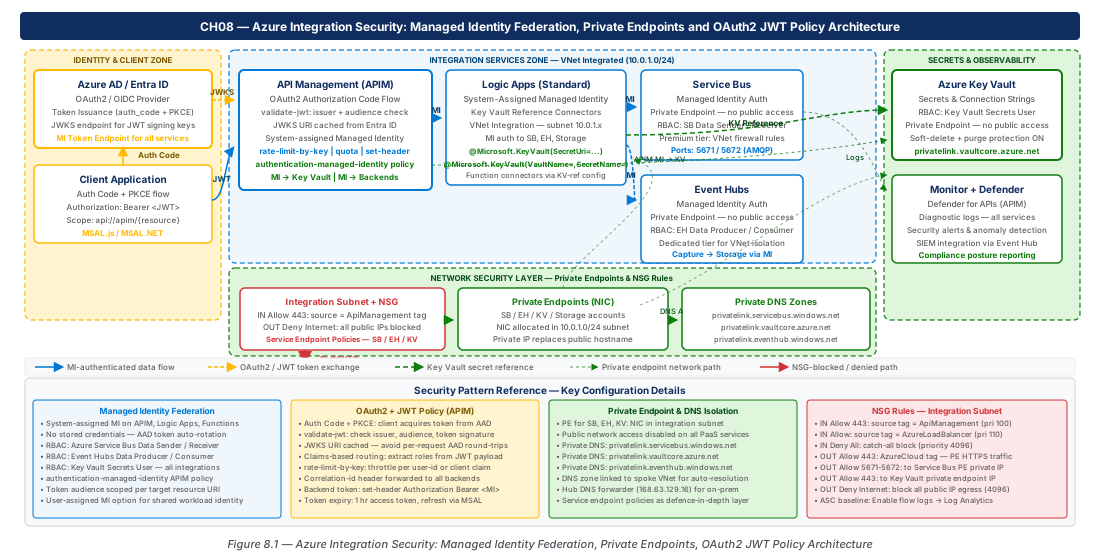
Managed Identity Federation Across APIM, Logic Apps, Service Bus, and Event Hubs
Enabling and Assigning Managed Identities
Managed identity federation begins with provisioning the identities themselves and then propagating role assignments to each resource that needs to be accessed. The architecture described in this chapter uses a user-assigned managed identity as the primary integration identity, with system-assigned identities on individual services for lifecycle-bound operations.
The following commands establish the foundational identity infrastructure using CAF naming conventions:
# CE-15 prep: Create the shared integration managed identity
# This identity is assigned to Logic Apps, Function Apps, and APIM

# Resource group for production identity resources
az group create \
  --name rg-security-identity-patterns-prod-001 \
  --location eastus2 \
  --tags environment=prod workload=integration-security

# User-assigned managed identity for integration platform
az identity create \
  --name uami-integration-security-prod-eastus2-001 \
  --resource-group rg-security-identity-patterns-prod-001 \
  --location eastus2

# Capture the identity's principal ID and client ID for role assignments
UAMI_PRINCIPAL_ID=$(az identity show \
  --name uami-integration-security-prod-eastus2-001 \
  --resource-group rg-security-identity-patterns-prod-001 \
  --query principalId --output tsv)

UAMI_CLIENT_ID=$(az identity show \
  --name uami-integration-security-prod-eastus2-001 \
  --resource-group rg-security-identity-patterns-prod-001 \
  --query clientId --output tsv)

echo "Principal ID: $UAMI_PRINCIPAL_ID"
echo "Client ID: $UAMI_CLIENT_ID"
Once the identity is created, role assignments propagate access rights to each downstream resource. The principle of least privilege dictates that the integration identity receives only the minimum role required for its specific operation on each resource. A Logic App that reads from Service Bus needs Azure Service Bus Data Receiver on the specific queue — not Owner on the entire Service Bus namespace.
# Assign Service Bus roles to the managed identity
SERVICE_BUS_NAMESPACE_ID=$(az servicebus namespace show \
  --name security-identity-prod-eastus2-001 \
  --resource-group rg-security-identity-patterns-prod-001 \
  --query id --output tsv)

# Logic Apps need Data Receiver on specific queues
az role assignment create \
  --assignee $UAMI_PRINCIPAL_ID \
  --role "Azure Service Bus Data Receiver" \
  --scope "$SERVICE_BUS_NAMESPACE_ID/queues/orders-inbound"

# Publishers need Data Sender on outbound topics
az role assignment create \
  --assignee $UAMI_PRINCIPAL_ID \
  --role "Azure Service Bus Data Sender" \
  --scope "$SERVICE_BUS_NAMESPACE_ID/topics/orders-processed"

# Event Hubs role for telemetry ingestion pipeline
EVENT_HUB_NAMESPACE_ID=$(az eventhubs namespace show \
  --name evhns-security-identity-prod-eastus2-001 \
  --resource-group rg-security-identity-patterns-prod-001 \
  --query id --output tsv)

az role assignment create \
  --assignee $UAMI_PRINCIPAL_ID \
  --role "Azure Event Hubs Data Sender" \
  --scope "$EVENT_HUB_NAMESPACE_ID/eventhubs/telemetry-stream"
APIM Managed Identity and Backend Authentication
API Management's managed identity serves a distinct purpose from the Logic App identity: APIM uses its identity to authenticate against backend services and to retrieve secrets from Key Vault at policy evaluation time. When APIM calls a backend API protected by Entra ID, the authentication-managed-identity policy obtains a token for the target resource's application ID and injects it as a Bearer token in the outbound request. This eliminates the need to store backend API credentials as APIM named values.
# Enable system-assigned managed identity on APIM
az apim update \
  --name apim-security-identity-prod-eastus2-001 \
  --resource-group rg-security-identity-patterns-prod-001 \
  --enable-managed-identity true

# Retrieve the APIM system identity principal ID
APIM_PRINCIPAL_ID=$(az apim show \
  --name apim-security-identity-prod-eastus2-001 \
  --resource-group rg-security-identity-patterns-prod-001 \
  --query identity.principalId --output tsv)

# Grant APIM's identity Key Vault Secrets User on the integration vault
KEY_VAULT_ID=$(az keyvault show \
  --name kv-security-identity-prod-001 \
  --resource-group rg-security-identity-patterns-prod-001 \
  --query id --output tsv)

az role assignment create \
  --assignee $APIM_PRINCIPAL_ID \
  --role "Key Vault Secrets User" \
--scope $KEY_VAULT_IDauthentication-managed-identity policy requires the backend application to be registered in Entra ID with an application ID URI. If the backend is an Azure resource (Function App, Logic App), ensure the Entra ID authentication feature is enabled on the App Service resource, which automatically provisions the app registration. Without this, the managed identity token has no audience claim to validate against.
Logic Apps Managed Identity for Service Bus and Storage
Logic Apps Standard supports managed identity authentication for all built-in connectors — Service Bus, Storage Account, Event Hubs, Key Vault, and HTTP actions calling Entra-ID-protected endpoints. The key configuration difference between managed identity and connection-string authentication is that managed identity requires no stored credentials and automatically uses fresh tokens with 1-hour validity, whereas connection strings are long-lived and require manual rotation.
When a Logic App workflow uses the Service Bus built-in connector with managed identity, the workflow designer shows an authentication dropdown set to "Managed Identity." At runtime, the Logic Apps Standard runtime calls the instance metadata service (169.254.169.254/metadata/identity/oauth2/token) to obtain a token for the Service Bus resource URI (https://servicebus.windows.net), then uses that token to authenticate the AMQP connection. This entire token acquisition flow is invisible to workflow authors — they configure the managed identity once at the connection level and the runtime handles token lifecycle.
az webapp identity assign --identities <uami-resource-id>. Then in each workflow's connection configuration, select "User Assigned Managed Identity" and provide the client ID of the UAMI. This separation allows multiple workflows in the same Logic App instance to use different managed identities if they require access to different resource scopes.
The role assignment granularity matters significantly for Service Bus. Logic Apps that only receive messages should hold Azure Service Bus Data Receiver at the queue or subscription scope — not at the namespace scope. This scoping ensures that if the Logic App's identity is somehow misused, the blast radius is limited to reading from that one queue rather than all queues in the namespace. Similarly, workflows that send messages should hold Azure Service Bus Data Sender only on their specific outbound topics.
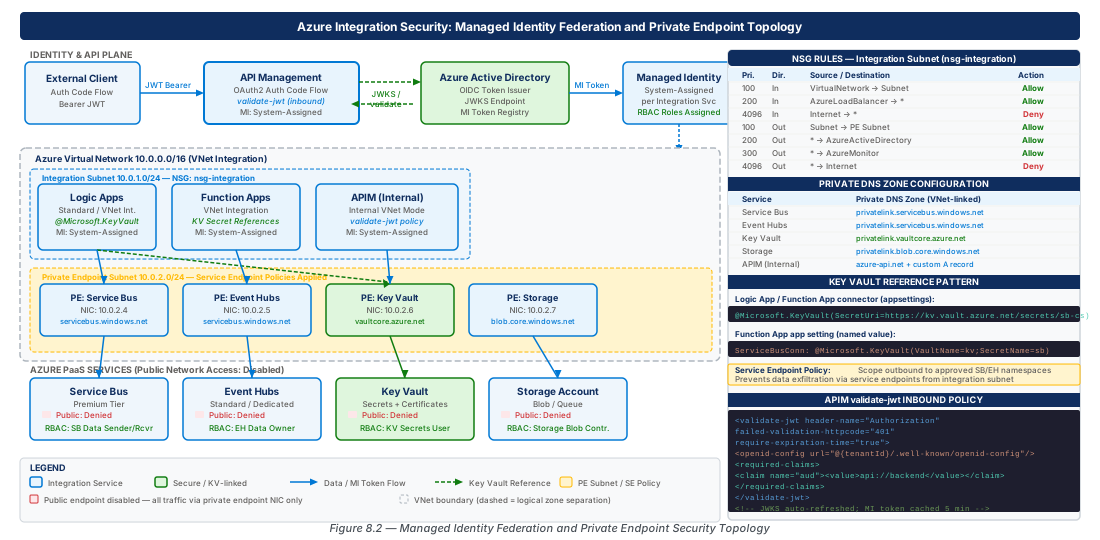
Private Endpoint Topology and DNS Zone Configuration
Architecture of Full Network Isolation
Private endpoints transform Azure PaaS services from resources with public DNS names resolving to public IP addresses into resources with private IP addresses on your virtual network. When a Logic App inside a virtual network calls a Service Bus endpoint configured with a private endpoint, the DNS resolution chain returns a private IP address in the 10.x.x.x range rather than the public IP of the Service Bus service, and the traffic never leaves the Microsoft backbone network.
The private endpoint topology for an integration platform requires careful planning because each service requires its own private DNS zone and the DNS zones must be resolvable from the virtual network where integration services run. The required private DNS zones for the integration security architecture are:
| Service | Private DNS Zone | Subresource |
|---|---|---|
| API Management | privatelink.azure-api.net | Gateway |
| Service Bus | privatelink.servicebus.windows.net | namespace |
| Event Hubs | privatelink.servicebus.windows.net | namespace |
| Key Vault | privatelink.vaultcore.azure.net | vault |
| Storage Account (Blob) | privatelink.blob.core.windows.net | blob |
| Storage Account (Queue) | privatelink.queue.core.windows.net | queue |
| Storage Account (Table) | privatelink.table.core.windows.net | table |
| Storage Account (File) | privatelink.file.core.windows.net | file |
Logic Apps Standard uses a storage account for state, history, and artifact storage, so all four storage subresources require private endpoints and corresponding DNS zone records. Event Hubs uses the same private DNS zone as Service Bus (privatelink.servicebus.windows.net) because both services are based on the same underlying AMQP namespace infrastructure.
az servicebus namespace update --public-network-access Disabled (or equivalent) on each protected resource.
Virtual Network Design and Subnet Delegation
The virtual network hosting integration services requires several dedicated subnets with distinct purposes and security characteristics. Subnet delegation assigns a specific subnet to an Azure service so that the service can inject resources (network interfaces, NAT gateways) into your network space. Logic Apps Standard and Function Apps require subnet delegation to Microsoft.Web/serverFarms for virtual network integration.
# Create the integration virtual network and subnets
az network vnet create \
  --name vnet-integration-security-prod-eastus2-001 \
  --resource-group rg-security-identity-patterns-prod-001 \
  --location eastus2 \
  --address-prefixes 10.100.0.0/16

# Integration services subnet (Logic Apps, Function Apps) — delegated
az network vnet subnet create \
  --name snet-integration-apps-prod-001 \
  --vnet-name vnet-integration-security-prod-eastus2-001 \
  --resource-group rg-security-identity-patterns-prod-001 \
  --address-prefixes 10.100.1.0/24 \
  --delegations Microsoft.Web/serverFarms \
  --service-endpoints Microsoft.KeyVault Microsoft.ServiceBus Microsoft.EventHub

# Private endpoints subnet — no delegation, no service endpoints
az network vnet subnet create \
  --name snet-private-endpoints-prod-001 \
  --vnet-name vnet-integration-security-prod-eastus2-001 \
  --resource-group rg-security-identity-patterns-prod-001 \
  --address-prefixes 10.100.2.0/24 \
  --private-endpoint-network-policies Disabled

# APIM subnet — requires dedicated /27 or larger
az network vnet subnet create \
  --name snet-apim-prod-001 \
  --vnet-name vnet-integration-security-prod-eastus2-001 \
  --resource-group rg-security-identity-patterns-prod-001 \
  --address-prefixes 10.100.3.0/27
Private endpoints must be placed in the private endpoints subnet with --private-endpoint-network-policies Disabled. This flag is counterintuitively named — it disables the enforcement of NSG rules and UDR routes on private endpoint network interfaces, which is a required platform limitation. Standard NSG rules in the subnet still apply to all other traffic; only the private endpoint NIC is exempt from route and NSG enforcement.
DNS Zone Linking and Private Endpoint Creation
Each private DNS zone must be created, linked to the virtual network, and populated with A records that map the service's fully qualified domain name to its private IP address. Azure can create these A records automatically when creating the private endpoint (using --connection-auto-approved and enabling --zone-configs), but in regulated environments with hub-and-spoke DNS architectures, DNS records are often managed centrally in a shared services subscription.
# Create and link the Service Bus private DNS zone
az network private-dns zone create \
  --resource-group rg-security-identity-patterns-prod-001 \
  --name "privatelink.servicebus.windows.net"

az network private-dns link vnet create \
  --resource-group rg-security-identity-patterns-prod-001 \
  --zone-name "privatelink.servicebus.windows.net" \
  --name pdnslink-servicebus-prod-001 \
  --virtual-network vnet-integration-security-prod-eastus2-001 \
  --registration-enabled false

# Create private endpoint for Service Bus namespace
SERVICE_BUS_ID=$(az servicebus namespace show \
  --name security-identity-prod-eastus2-001 \
  --resource-group rg-security-identity-patterns-prod-001 \
  --query id --output tsv)

az network private-endpoint create \
  --name pe-servicebus-security-identity-prod-001 \
  --resource-group rg-security-identity-patterns-prod-001 \
  --vnet-name vnet-integration-security-prod-eastus2-001 \
  --subnet snet-private-endpoints-prod-001 \
  --private-connection-resource-id $SERVICE_BUS_ID \
  --group-id namespace \
  --connection-name peconn-servicebus-security-identity-prod-001

# Create DNS zone group to auto-register the A record
az network private-endpoint dns-zone-group create \
  --resource-group rg-security-identity-patterns-prod-001 \
  --endpoint-name pe-servicebus-security-identity-prod-001 \
  --name servicebus-dns-zone-group \
  --private-dns-zone "privatelink.servicebus.windows.net" \
  --zone-name servicebus-zone

# Disable public network access after private endpoint is confirmed healthy
az servicebus namespace update \
  --name security-identity-prod-eastus2-001 \
  --resource-group rg-security-identity-patterns-prod-001 \
--public-network-access Disablednslookup security-identity-prod-eastus2-001.servicebus.windows.net from a VM in the virtual network to confirm that the name resolves to a private IP (10.100.x.x) rather than a public IP. If resolution returns a public IP, the DNS zone link is not functioning correctly and the traffic will fail once public access is disabled.
Key Vault Private Endpoint and Access Policy Migration
Key Vault private endpoint configuration requires an additional consideration: Key Vault's access control model must be migrated from access policies to Azure RBAC before the private endpoint architecture can scale properly. Access policies are limited to 1,024 entries per vault, which becomes a constraint in large integration platforms with many service identities. Azure RBAC integration removes this limit and enables the same role assignment syntax used for all other Azure resources.
az keyvault show --query properties.accessPolicies to enumerate all existing policies, create corresponding role assignments, verify them, and only then enable RBAC mode with az keyvault update --enable-rbac-authorization true.
APIM OAuth2 Authorization Code Flow and JWT Validation
Configuring the Entra ID Application Registration for APIM
API Management's OAuth2 integration with Entra ID requires two application registrations: a server application representing the APIM-protected API, and a client application representing the consumer calling the API. The server application defines the scopes that clients can request, and the client application is granted those scopes through admin consent. This two-application model aligns with the OAuth2 authorization server pattern and allows APIM to validate tokens without making calls back to Entra ID at policy evaluation time — the validation uses the tenant's JWKS endpoint to verify the token signature.
The server application registration requires specific configuration that differs from a standard web application registration. The application ID URI must be set to a value that consumers include in their scope parameter (e.g., api://apim-security-identity-prod-eastus2-001). The API must expose scopes — at minimum api://apim-security-identity-prod-eastus2-001/integration.read and api://apim-security-identity-prod-eastus2-001/integration.write — and these scopes must have admin consent enabled for enterprise applications to avoid per-user consent prompts.
The authorization code flow for APIM involves these steps: (1) the client application redirects the user to the Entra ID authorization endpoint, (2) the user authenticates and consents, (3) Entra ID issues an authorization code to the redirect URI, (4) the client application exchanges the code for an access token by calling the token endpoint, (5) the client includes the access token in the Authorization: Bearer <token> header on every APIM call, and (6) APIM's validate-jwt policy validates the token signature, issuer, audience, and required claims before forwarding the request to the backend.
Implementing the validate-jwt Policy
The validate-jwt policy is APIM's primary mechanism for enforcing authentication on APIs. It runs in the inbound processing section and evaluates the Bearer token against a set of validation rules. If validation fails, APIM returns a 401 Unauthorized response without forwarding the request to the backend, protecting backend services from unauthenticated traffic regardless of their own authentication configuration.
A production-grade validate-jwt policy includes signature validation against the Entra ID JWKS endpoint, issuer validation against the tenant-specific issuer URI, audience validation against the API's application ID URI, and required claims validation for role-based authorization. The following policy snippet illustrates a complete implementation:
<!-- APIM inbound policy: validate-jwt for Entra ID OAuth2 tokens -->
<inbound>
  <base />
  <validate-jwt header-name="Authorization"
                failed-validation-httpcode="401"
                failed-validation-error-message="Unauthorized: Invalid or missing token"
                require-expiration-time="true"
                require-scheme="Bearer"
                require-signed-tokens="true"
                clock-skew-in-seconds="300">
    <openid-config url="https://login.microsoftonline.com/{tenant-id}/v2.0/.well-known/openid-configuration" />
    <audiences>
      <audience>api://apim-security-identity-prod-eastus2-001</audience>
    </audiences>
    <issuers>
      <issuer>https://sts.windows.net/{tenant-id}/</issuer>
      <issuer>https://login.microsoftonline.com/{tenant-id}/v2.0</issuer>
    </issuers>
    <required-claims>
      <claim name="scp" match="any">
        <value>integration.read</value>
        <value>integration.write</value>
      </claim>
    </required-claims>
  </validate-jwt>
  <!-- Propagate the validated caller's object ID to backend -->
  <set-header name="X-Caller-Object-Id" exists-action="override">
    <value>@(context.Request.Headers.GetValueOrDefault("Authorization","").Split(' ')[1].AsJwt()?.Claims["oid"].FirstOrDefault())</value>
  </set-header>
</inbound>clock-skew-in-seconds="300" setting provides a 5-minute tolerance for token expiration validation. This accommodates clock drift between the client system generating the token and the APIM instance validating it. Without this tolerance, users in environments with imprecise system clocks receive intermittent 401 errors even with freshly-issued tokens. 300 seconds is the Microsoft-recommended value.
Role-Based Authorization with App Roles
Scope validation (scp claim) confirms that the delegated user granted the application permission to call the API, but it does not differentiate between different classes of callers. App roles in Entra ID enable role-based authorization where the roles claim in the token carries the specific roles assigned to the calling application or user.
For integration APIs, typical app roles include Integration.Admin (can invoke management operations), Integration.Publisher (can publish messages and trigger workflows), and Integration.Subscriber (read-only access to status and query endpoints). These roles are defined in the server application's manifest and assigned to client applications through enterprise application role assignments. The APIM policy validates the roles claim in addition to the scp claim, enabling fine-grained per-operation authorization without backend code changes.
The comparison table below summarizes OAuth2 token validation configuration options and their security implications:
| Validation Attribute | Recommended Setting | Risk if Omitted |
|---|---|---|
require-expiration-time |
true |
Tokens without expiry never expire — persistent access after revocation |
require-scheme |
Bearer |
Allows malformed or non-standard authentication schemes |
require-signed-tokens |
true |
Unsigned tokens (algorithm: none) bypass signature validation |
clock-skew-in-seconds |
300 |
Intermittent 401 errors for clients with minor clock drift |
<audiences> |
API Application ID URI | Any Entra ID token accepted — audience confusion attacks |
<issuers> |
Tenant-specific issuer URI | Tokens from other tenants accepted |
<required-claims> |
Minimum required scope or role | Over-privileged clients gain unintended access |
<audiences> element is one of the most dangerous APIM misconfigurations. Without audience validation, any valid Entra ID Bearer token — including tokens issued for Microsoft Graph, Azure Resource Manager, or other services — will pass validation. An attacker who obtains any Entra ID token from the same tenant can call your integration API. Always specify the application ID URI of your server application as the required audience.
Key Vault References for Connection Strings
Key Vault Reference Pattern in Logic Apps and Function Apps
Key Vault references allow Logic Apps Standard and Function Apps to retrieve secrets at startup rather than storing them in application settings as plaintext. The reference syntax @Microsoft.KeyVault(SecretUri=https://kv-security-identity-prod-001.vault.azure.net/secrets/storage-connection-string/) in an application setting tells the App Service runtime to resolve the secret value from Key Vault when the application starts, presenting the resolved value to application code as if it were a directly configured setting.
The runtime mechanics involve the App Service resource (Logic Apps Standard runs on App Service infrastructure) using its managed identity to call the Key Vault secrets API. The managed identity must hold Key Vault Secrets User role on the vault or the specific secret. At cold start, the runtime resolves all Key Vault references and caches the values for the duration of the process lifetime. When a secret is rotated in Key Vault, the application must be restarted (or the Key Vault reference cache must expire) to pick up the new value.
Key Vault references support two reference formats: the full secret URI including version (@Microsoft.KeyVault(SecretUri=https://vault.vault.azure.net/secrets/name/version)) and the version-less URI (@Microsoft.KeyVault(SecretUri=https://vault.vault.azure.net/secrets/name/)). The version-less format always resolves to the latest enabled version of the secret, which is the recommended pattern for automated secret rotation scenarios. The versioned format pins the application to a specific secret version, which is appropriate when a secret rotation requires coordinated deployment but creates operational risk if teams forget to update the reference.
az webapp config appsettings list --query "[?contains(value, '@Microsoft.KeyVault')]" combined with checking the App Service's system log for resolution errors. Failed Key Vault references cause the application setting to present an empty string, which typically causes cryptic authentication failures rather than obvious configuration errors.
Secret Lifecycle Management and Rotation
Connection string rotation without downtime requires a two-phase secret update pattern. When rotating a Service Bus connection string, both the old and new connection strings must be valid simultaneously during the transition window. The pattern works as follows: (1) create a new shared access policy (or new managed identity role assignment) for Service Bus, (2) store the new connection string as a new secret version in Key Vault, (3) restart the Logic App or Function App to pick up the new secret version, (4) verify that the application is functioning with the new credential, (5) revoke the old shared access policy.
For managed identity-based authentication (which is the recommended pattern), rotation is unnecessary because tokens are short-lived and automatically renewed. However, some connectors in Logic Apps still require connection strings for protocol reasons — for example, SFTP and legacy on-premises connectors that do not support OAuth2 authentication. These remaining connection strings should be stored in Key Vault with automated rotation enabled.
Key Vault's built-in rotation automation supports Azure Storage Account keys and SQL Database connection strings natively. For Service Bus shared access policies and other custom secrets, Azure Functions with Event Grid subscriptions on the Microsoft.KeyVault.SecretNearExpiry event provide the rotation trigger. This pattern fires a rotation Function App 30 days before a secret expires, which generates new credentials, stores them as a new secret version, and notifies the team via Service Bus or email.
# Store a Service Bus connection string as a Key Vault secret
# with 90-day expiry to force regular rotation review

SB_CONNECTION_STRING=$(az servicebus namespace authorization-rule keys list \
  --namespace-name security-identity-prod-eastus2-001 \
  --resource-group rg-security-identity-patterns-prod-001 \
  --name integration-listener-policy \
  --query primaryConnectionString --output tsv)

# Set expiry 90 days from today
EXPIRY_DATE=$(date -u -d "+90 days" +"%Y-%m-%dT%H:%M:%SZ")

az keyvault secret set \
  --vault-name kv-security-identity-prod-001 \
  --name sb-integration-listener-connection-string \
  --value "$SB_CONNECTION_STRING" \
  --expires "$EXPIRY_DATE" \
  --description "Service Bus listener connection string - rotate every 90 days"

# Configure Key Vault reference in Logic App Standard app settings
LOGIC_APP_NAME="la-security-identity-prod-eastus2-001"
SECRET_URI="https://kv-security-identity-prod-001.vault.azure.net/secrets/sb-integration-listener-connection-string/"

az functionapp config appsettings set \
  --name $LOGIC_APP_NAME \
  --resource-group rg-security-identity-patterns-prod-001 \
  --settings "ServiceBusConnectionString=@Microsoft.KeyVault(SecretUri=$SECRET_URI)"
Certificate Management for Mutual TLS
Mutual TLS (mTLS) authentication extends beyond token-based identity to cryptographic proof of client identity. APIM supports client certificate validation in inbound policies, and Logic Apps' HTTP action supports client certificate authentication for outbound calls to backends that require it. Certificates used for mTLS should be stored in Key Vault as certificate objects (not secrets), which enables automatic renewal through Key Vault's certificate management integration with DigiCert, GlobalSign, and internal enterprise CAs.
key_props.exportable attribute as true during certificate creation if the certificate will be used for mTLS in APIM.
Network Security Group Rules and Service Endpoint Policies
NSG Architecture for Integration Subnets
Network Security Groups applied to integration subnets enforce the principle of least privilege at the network layer, complementing the identity-layer controls described in earlier sections. Each subnet in the integration virtual network has a distinct NSG with rules tailored to the service running in that subnet. NSG rules operate on 5-tuple matching (source IP, source port, destination IP, destination port, protocol) and are evaluated in priority order — lower priority numbers are evaluated first.
The integration apps subnet NSG must allow outbound traffic to the private endpoint subnet (10.100.2.0/24) on the ports required by each service: Service Bus on 5671/5672 (AMQP) and 443 (HTTPS), Event Hubs on the same ports, Key Vault on 443 (HTTPS), and Storage Account on 443 (HTTPS). All other outbound traffic should be denied by default, which prevents the integration services from reaching arbitrary internet destinations even if their application code is compromised. Inbound traffic to the integration apps subnet from the internet should be blocked — all inbound traffic must arrive via APIM or through internal service invocation.
# Create NSG for the integration apps subnet
az network nsg create \
  --name nsg-integration-apps-prod-001 \
  --resource-group rg-security-identity-patterns-prod-001 \
  --location eastus2

# Allow outbound to private endpoints (Service Bus, Event Hubs, Key Vault, Storage)
az network nsg rule create \
  --nsg-name nsg-integration-apps-prod-001 \
  --resource-group rg-security-identity-patterns-prod-001 \
  --name Allow-Outbound-PrivateEndpoints \
  --priority 100 \
  --direction Outbound \
  --access Allow \
  --protocol Tcp \
  --source-address-prefixes 10.100.1.0/24 \
  --destination-address-prefixes 10.100.2.0/24 \
  --destination-port-ranges 443 5671 5672

# Allow outbound to Azure Monitor for diagnostics
az network nsg rule create \
  --nsg-name nsg-integration-apps-prod-001 \
  --resource-group rg-security-identity-patterns-prod-001 \
  --name Allow-Outbound-AzureMonitor \
  --priority 110 \
  --direction Outbound \
  --access Allow \
  --protocol Tcp \
  --source-address-prefixes 10.100.1.0/24 \
  --destination-address-prefixes AzureMonitor \
  --destination-port-ranges 443

# Deny all other outbound (overrides VNet default allow-all)
az network nsg rule create \
  --nsg-name nsg-integration-apps-prod-001 \
  --resource-group rg-security-identity-patterns-prod-001 \
  --name Deny-Outbound-All \
  --priority 4000 \
  --direction Outbound \
  --access Deny \
  --protocol "*" \
  --source-address-prefixes "*" \
  --destination-address-prefixes "*" \
  --destination-port-ranges "*"

# Associate NSG with the integration apps subnet
az network vnet subnet update \
  --name snet-integration-apps-prod-001 \
  --vnet-name vnet-integration-security-prod-eastus2-001 \
  --resource-group rg-security-identity-patterns-prod-001 \
  --network-security-group nsg-integration-apps-prod-001
Service Endpoint Policies for Controlled PaaS Access
Service endpoint policies extend service endpoints beyond simple "allow traffic to this Azure service type" rules to specify exactly which instances of a service are reachable. Without service endpoint policies, enabling the Microsoft.ServiceBus service endpoint on a subnet allows that subnet to reach any Service Bus namespace in any Azure subscription worldwide. Service endpoint policies restrict this to only the specific namespaces in your approved subscription list.
Service endpoint policies are critical in enterprise environments where data exfiltration via Azure services is a concern. An attacker who compromises a Logic App in your integration subnet could, without service endpoint policies, exfiltrate data by sending messages to an attacker-controlled Service Bus namespace. Service endpoint policies prevent this by ensuring that outbound connections from the subnet can only reach the organization's approved Service Bus namespaces.
# Create a service endpoint policy for Service Bus
az network service-endpoint policy create \
  --name sep-servicebus-security-identity-prod-001 \
  --resource-group rg-security-identity-patterns-prod-001 \
  --location eastus2

# Add policy definition to restrict to specific subscription's Service Bus
az network service-endpoint policy-definition create \
  --policy-name sep-servicebus-security-identity-prod-001 \
  --resource-group rg-security-identity-patterns-prod-001 \
  --name allowed-servicebus-namespaces \
  --service Microsoft.ServiceBus \
  --service-resources \
    "/subscriptions/{subscription-id}/resourceGroups/rg-security-identity-patterns-prod-001/providers/Microsoft.ServiceBus/namespaces/security-identity-prod-eastus2-001"

# Apply service endpoint policy to the integration subnet
az network vnet subnet update \
  --name snet-integration-apps-prod-001 \
  --vnet-name vnet-integration-security-prod-eastus2-001 \
  --resource-group rg-security-identity-patterns-prod-001 \
  --service-endpoint-policy sep-servicebus-security-identity-prod-001
APIM Network Mode Comparison
APIM supports three network modes with distinct security profiles. Choosing the right mode is a foundational architecture decision that cannot be changed after APIM deployment without destroying and recreating the instance.
| APIM Network Mode | External Accessibility | Backend Access | VNet Required | NSG Required | Recommended Scenario |
|---|---|---|---|---|---|
| None (default) | Public internet | Public internet | No | No | Development/test only |
| External VNet | Public internet | Private VNet + public internet | Yes (/27 minimum) | Yes | APIs consumed by external clients with private backends |
| Internal VNet | VNet only (no public) | Private VNet only | Yes (/27 minimum) | Yes | Fully private APIs consumed only within enterprise network |
| External + Private Endpoint | Public internet + private | Private VNet + public internet | Yes | Yes | Hybrid: external consumers + locked-down backend |
The APIM NSG for the dedicated APIM subnet has mandatory inbound and outbound rules that differ from standard subnet NSGs. APIM requires specific inbound ports for control-plane management traffic from the ApiManagement service tag (port 3443) and Azure Load Balancer health probes (port 6390). Missing these rules causes APIM to enter an unhealthy state and fail to process requests even if the application-level configuration is correct.
Lab Exercises
This lab provisions the identity, network, and secret management foundations for a zero-trust integration security architecture. All resources are deployed to a dev resource group for safe experimentation.
# CE-15: Deploy the complete zero-trust security infrastructure for integration services
# This lab provisions the identity, network, and secret management foundations
# Environment: rg-security-identity-patterns-dev-001 (dev tier for lab safety)

set -euo pipefail

RG_DEV="rg-security-identity-patterns-dev-001"
LOCATION="eastus2"
VNET_NAME="vnet-integration-security-dev-eastus2-001"
UAMI_NAME="uami-integration-security-dev-eastus2-001"
KV_NAME="kv-security-identity-dev-001"
SB_NAMESPACE="security-identity-dev-eastus2-001"
LOGIC_APP_NAME="la-security-identity-dev-eastus2-001"

echo "=== CE-15: Zero-Trust Integration Security Baseline ==="

# Step 1: Create dev resource group
echo "Step 1: Creating resource group..."
az group create \
  --name $RG_DEV \
  --location $LOCATION \
  --tags environment=dev workload=integration-security chapter=ch08

# Step 2: Create Key Vault with RBAC authorization mode
echo "Step 2: Creating Key Vault..."
az keyvault create \
  --name $KV_NAME \
  --resource-group $RG_DEV \
  --location $LOCATION \
  --sku standard \
  --enable-rbac-authorization true \
  --enable-soft-delete true \
  --soft-delete-retention-days 7 \
  --enable-purge-protection false  # false only for dev/lab; true for production

# Step 3: Create user-assigned managed identity
echo "Step 3: Creating managed identity..."
az identity create \
  --name $UAMI_NAME \
  --resource-group $RG_DEV \
  --location $LOCATION

UAMI_PRINCIPAL_ID=$(az identity show \
  --name $UAMI_NAME \
  --resource-group $RG_DEV \
  --query principalId --output tsv)

UAMI_CLIENT_ID=$(az identity show \
  --name $UAMI_NAME \
  --resource-group $RG_DEV \
  --query clientId --output tsv)

echo "UAMI Principal ID: $UAMI_PRINCIPAL_ID"
echo "UAMI Client ID: $UAMI_CLIENT_ID"

# Step 4: Grant managed identity Key Vault Secrets User role
echo "Step 4: Assigning Key Vault Secrets User role..."
KV_ID=$(az keyvault show --name $KV_NAME --resource-group $RG_DEV --query id --output tsv)

az role assignment create \
  --assignee $UAMI_PRINCIPAL_ID \
  --role "Key Vault Secrets User" \
  --scope $KV_ID

# Step 5: Create Service Bus namespace with local auth disabled (managed identity only)
echo "Step 5: Creating Service Bus namespace..."
az servicebus namespace create \
  --name $SB_NAMESPACE \
  --resource-group $RG_DEV \
  --location $LOCATION \
  --sku Standard \
  --disable-local-auth true

SB_ID=$(az servicebus namespace show \
  --name $SB_NAMESPACE \
  --resource-group $RG_DEV \
  --query id --output tsv)

# Step 6: Create queues for the integration workflow
echo "Step 6: Creating Service Bus queues..."
az servicebus queue create \
  --namespace-name $SB_NAMESPACE \
  --resource-group $RG_DEV \
  --name orders-inbound \
  --max-delivery-count 5 \
  --lock-duration PT1M \
  --dead-lettering-on-message-expiration true

az servicebus queue create \
  --namespace-name $SB_NAMESPACE \
  --resource-group $RG_DEV \
  --name orders-processed

# Step 7: Assign Service Bus roles to managed identity
echo "Step 7: Assigning Service Bus roles..."
az role assignment create \
  --assignee $UAMI_PRINCIPAL_ID \
  --role "Azure Service Bus Data Receiver" \
  --scope "$SB_ID/queues/orders-inbound"

az role assignment create \
  --assignee $UAMI_PRINCIPAL_ID \
  --role "Azure Service Bus Data Sender" \
  --scope "$SB_ID/queues/orders-processed"

# Step 8: Store a test secret in Key Vault to validate access
echo "Step 8: Storing test secret in Key Vault..."
# Assign current user Key Vault Secrets Officer to allow secret creation in lab
CURRENT_USER_OID=$(az ad signed-in-user show --query id --output tsv)
az role assignment create \
  --assignee $CURRENT_USER_OID \
  --role "Key Vault Secrets Officer" \
  --scope $KV_ID

az keyvault secret set \
  --vault-name $KV_NAME \
  --name lab-integration-test-secret \
  --value "CE-15-LabSecretValue-$(date +%s)" \
  --description "Lab test secret for CE-15"

echo "=== CE-15 Complete: Zero-trust baseline infrastructure deployed ==="
echo "Next: Run CE-16 to deploy Logic App with managed identity and private endpoints"This lab completes the network isolation layer and validates end-to-end secure connectivity. Prerequisite: CE-15 must be completed successfully before running this lab.
# CE-16: Configure private endpoints and validate the zero-trust integration security chain
# Prerequisite: CE-15 must be completed successfully

set -euo pipefail

RG_DEV="rg-security-identity-patterns-dev-001"
LOCATION="eastus2"
VNET_NAME="vnet-integration-security-dev-eastus2-001"
KV_NAME="kv-security-identity-dev-001"
SB_NAMESPACE="security-identity-dev-eastus2-001"

echo "=== CE-16: Private Endpoint Configuration and Zero-Trust Validation ==="

# Step 1: Create virtual network for the dev lab
echo "Step 1: Creating virtual network..."
az network vnet create \
  --name $VNET_NAME \
  --resource-group $RG_DEV \
  --location $LOCATION \
  --address-prefixes 10.200.0.0/16

# Integration apps subnet with service endpoints
az network vnet subnet create \
  --name snet-integration-apps-dev-001 \
  --vnet-name $VNET_NAME \
  --resource-group $RG_DEV \
  --address-prefixes 10.200.1.0/24 \
  --delegations Microsoft.Web/serverFarms \
  --service-endpoints Microsoft.KeyVault Microsoft.ServiceBus

# Private endpoints subnet (network policies disabled)
az network vnet subnet create \
  --name snet-private-endpoints-dev-001 \
  --vnet-name $VNET_NAME \
  --resource-group $RG_DEV \
  --address-prefixes 10.200.2.0/24 \
  --private-endpoint-network-policies Disabled

# Step 2: Create private DNS zones
echo "Step 2: Creating private DNS zones..."
for DNS_ZONE in "privatelink.servicebus.windows.net" "privatelink.vaultcore.azure.net"; do
  az network private-dns zone create \
    --resource-group $RG_DEV \
    --name "$DNS_ZONE"

  az network private-dns link vnet create \
    --resource-group $RG_DEV \
    --zone-name "$DNS_ZONE" \
    --name "pdnslink-$(echo $DNS_ZONE | cut -d. -f2)-dev-001" \
    --virtual-network $VNET_NAME \
    --registration-enabled false
done

# Step 3: Create private endpoint for Service Bus
echo "Step 3: Creating Service Bus private endpoint..."
SB_ID=$(az servicebus namespace show \
  --name $SB_NAMESPACE \
  --resource-group $RG_DEV \
  --query id --output tsv)

az network private-endpoint create \
  --name pe-servicebus-dev-001 \
  --resource-group $RG_DEV \
  --vnet-name $VNET_NAME \
  --subnet snet-private-endpoints-dev-001 \
  --private-connection-resource-id $SB_ID \
  --group-id namespace \
  --connection-name peconn-servicebus-dev-001

az network private-endpoint dns-zone-group create \
  --resource-group $RG_DEV \
  --endpoint-name pe-servicebus-dev-001 \
  --name servicebus-dns-group \
  --private-dns-zone "privatelink.servicebus.windows.net" \
  --zone-name servicebus-zone

# Step 4: Create private endpoint for Key Vault
echo "Step 4: Creating Key Vault private endpoint..."
KV_ID=$(az keyvault show --name $KV_NAME --resource-group $RG_DEV --query id --output tsv)

az network private-endpoint create \
  --name pe-keyvault-dev-001 \
  --resource-group $RG_DEV \
  --vnet-name $VNET_NAME \
  --subnet snet-private-endpoints-dev-001 \
  --private-connection-resource-id $KV_ID \
  --group-id vault \
  --connection-name peconn-keyvault-dev-001

az network private-endpoint dns-zone-group create \
  --resource-group $RG_DEV \
  --endpoint-name pe-keyvault-dev-001 \
  --name keyvault-dns-group \
  --private-dns-zone "privatelink.vaultcore.azure.net" \
  --zone-name keyvault-zone

# Step 5: Restrict public network access after private endpoints are healthy
echo "Step 5: Checking private endpoint health before disabling public access..."

SB_PE_STATE=$(az network private-endpoint show \
  --name pe-servicebus-dev-001 \
  --resource-group $RG_DEV \
  --query 'provisioningState' --output tsv)

KV_PE_STATE=$(az network private-endpoint show \
  --name pe-keyvault-dev-001 \
  --resource-group $RG_DEV \
  --query 'provisioningState' --output tsv)

echo "Service Bus PE state: $SB_PE_STATE"
echo "Key Vault PE state: $KV_PE_STATE"

if [[ "$SB_PE_STATE" == "Succeeded" && "$KV_PE_STATE" == "Succeeded" ]]; then
  echo "Step 5b: Private endpoints healthy — disabling public network access..."

  az servicebus namespace update \
    --name $SB_NAMESPACE \
    --resource-group $RG_DEV \
    --public-network-access Disabled

  az keyvault update \
    --name $KV_NAME \
    --resource-group $RG_DEV \
    --public-network-access Disabled

  echo "Public access disabled on Service Bus and Key Vault"
else
  echo "WARNING: Private endpoints not yet in Succeeded state. Skipping public access disable."
  echo "Re-run this step after endpoints are healthy."
fi

# Step 6: Validate DNS resolution from within the VNet using a test VM
echo "Step 6: Creating validation test VM in the integration subnet..."
az vm create \
  --name vm-dns-validation-dev-001 \
  --resource-group $RG_DEV \
  --location $LOCATION \
  --image Ubuntu2204 \
  --vnet-name $VNET_NAME \
  --subnet snet-integration-apps-dev-001 \
  --admin-username azureadmin \
  --generate-ssh-keys \
  --size Standard_B1s \
  --no-wait

echo "=== CE-16 Complete ==="
echo ""
echo "Validation steps (run from vm-dns-validation-dev-001):"
echo "  nslookup ${SB_NAMESPACE}.servicebus.windows.net"
echo "  Expected: returns 10.200.2.x (private IP)"
echo ""
echo "  nslookup ${KV_NAME}.vault.azure.net"
echo "  Expected: returns 10.200.2.x (private IP)"
echo ""
echo "  curl -s https://${KV_NAME}.vault.azure.net/healthstatus"
echo "  Expected: HTTP 200 (from within VNet)"
echo ""
echo "Architecture validated: Service Bus and Key Vault accessible only via private endpoints"
Chapter Summary
| Concept | Key Point |
|---|---|
| Managed Identity Federation | Replace stored credentials with system-managed tokens across APIM, Logic Apps, Service Bus, and Event Hubs; use user-assigned identities for portability across service instances |
| Least Privilege Role Assignment | Scope role assignments to the specific queue, topic, or secret — never to the entire namespace or vault — to limit blast radius from identity compromise |
| Private Endpoint Topology | Deploy private endpoints in a dedicated subnet with --private-endpoint-network-policies Disabled; always disable public network access after confirming private endpoint health |
| Private DNS Zone Linking | Each PaaS service requires its own private DNS zone linked to the virtual network; without DNS zone links, name resolution returns public IPs and private endpoint routing fails |
| APIM JWT Validation | Always specify <audiences> and <issuers> in the validate-jwt policy; omitting audiences allows any valid Entra ID token to pass, enabling audience confusion attacks |
| Key Vault References | Use version-less secret URIs in Key Vault references for automated rotation compatibility; version-pinned URIs require manual application updates on each rotation |
| Service Endpoint Policies | Restrict service endpoint scope to approved subscription resources to prevent data exfiltration to attacker-controlled Azure service instances |