Power BI Data Analyst PL-300
Data Source Connectivity and Storage Mode Selection
Data connectivity is the foundation of every Power BI solution. The storage mode decision made at design time determines whether a report scales gracefully under enterprise load or collapses under concurrent user demand. This chapter covers every connector category tested on the PL-300 exam, builds a repeatable decision framework for storage mode selection, and demonstrates on-premises gateway cluster configuration.
1. Foundations of Power BI Connectivity Architecture
The Connectivity Spectrum: From Cached to Live
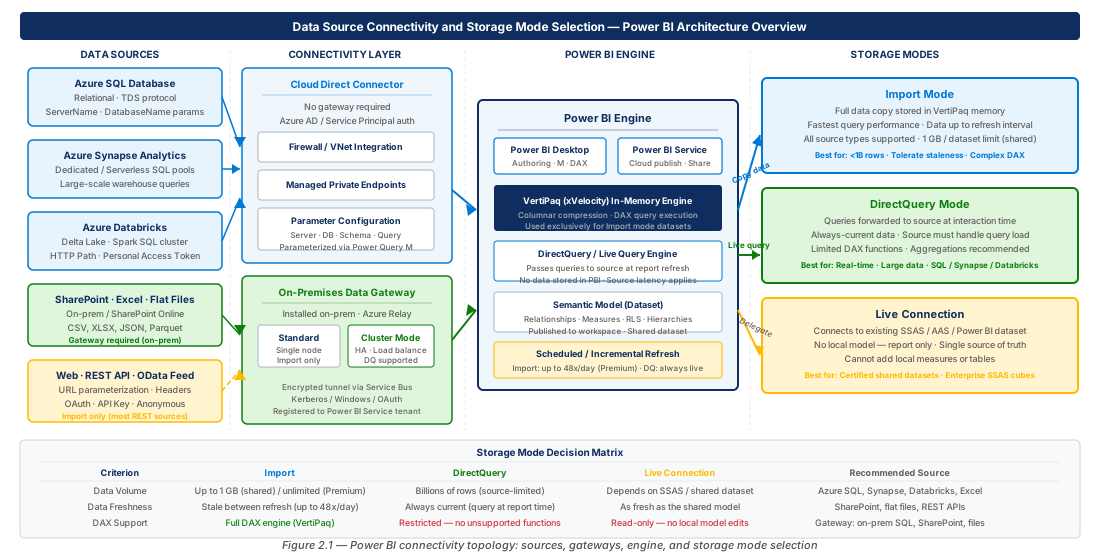
Power BI's data engine — Analysis Services Tabular — supports a layered connectivity model ranging from fully cached datasets to fully pass-through query execution. Import mode serialises source data into the VertiPaq in-memory engine using columnar compression (often 10:1 or higher), delivering sub-second DAX query performance with no runtime dependency on the source system. Staleness is bounded by the refresh schedule: up to 48 refreshes per day on Premium capacity, or 8 per day on shared capacity.
DirectQuery mode holds only schema metadata. Every slicer interaction or visual render sends a native query (T-SQL, SparkSQL) to the source system, delivering near-real-time freshness at the cost of placing the full query load on that source. Between these two poles, Composite models let individual tables choose their own mode, giving architects surgical control over freshness versus performance trade-offs.
Note
Power BI datasets are built on the same Analysis Services Tabular engine used by Azure Analysis Services and SQL Server Analysis Services. Live Connection to those services differs from DirectQuery because you connect to an already-processed model, not a row-level source.
Storage Mode: The Definition Power BI Uses Internally
Each table carries a storage mode property: Import, DirectQuery, or Dual. The Dual setting is a Composite-model concept — when queried alongside an Import table the Dual table acts as Import; alongside a DirectQuery table it acts as DirectQuery. This flexibility is especially valuable for shared dimension tables (date tables, geography lookups) reused across model islands.
Power BI Desktop enforces mode compatibility rules automatically. Mixing two DirectQuery sources creates a Composite model with two DirectQuery partitions. Not all connector combinations support this; some connectors are Import-only. Attempting to mix incompatible modes raises a validation error before publish.
Important
Changing a table's storage mode after relationships and measures are defined can invalidate calculated columns. Import tables support calculated columns backed by VertiPaq; DirectQuery tables do not. Plan storage mode before building complex measure logic.
2. Import vs DirectQuery vs Live Connection: The Decision Matrix
Import Mode: When to Choose Cached Data
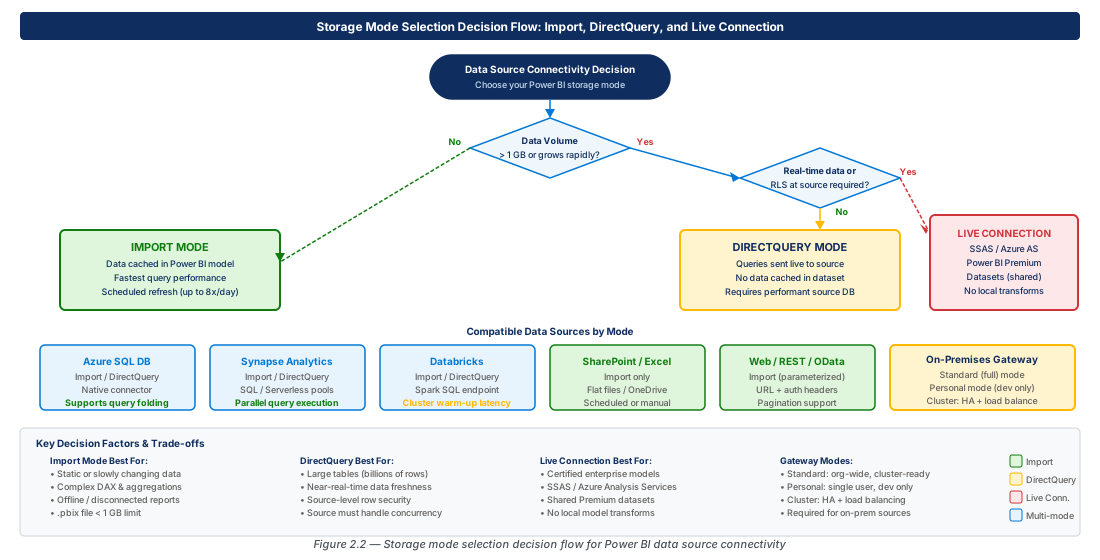
Import mode is right when the source cannot sustain concurrent report query load, when network latency makes live queries unacceptably slow, or when required Power Query transformations cannot fold to source SQL. The VertiPaq engine delivers consistent sub-100 ms response times regardless of source availability. On shared capacity the dataset size limit is 1 GB compressed; on Premium it rises to 400 GB, and with large dataset storage format the ceiling is the node's available memory.
Incremental refresh combined with RangeStart/RangeEnd parameters keeps Import viable at scale: define the policy to refresh only the last N days, archive older partitions, and achieve effective latency as low as 15 minutes — a common PL-300 scenario for "minimising staleness while retaining Import performance."
Tip
Enable incremental refresh on large Import tables by defining RangeStart and RangeEnd parameters in Power Query, then configure the policy to archive older partitions. This keeps refresh windows short and supports near-real-time data at 15-minute granularity.
DirectQuery Mode: When Live Pass-Through Is Required
DirectQuery is correct when freshness requirements fall below the minimum refresh interval, when regulations prohibit copying data out of the source, or when dataset size makes Import impractical even on Premium. The well-tested limitations include: no calculated columns on DirectQuery tables, only foldable Power Query steps supported, a maximum of one million rows per visual, and no scheduled refresh (data currency is determined by when the user loads the report).
Warning
DirectQuery against an underpowered source with ten or more visuals and ten concurrent users can generate hundreds of simultaneous queries per second. Always load-test with realistic concurrency before go-live.
Live Connection: Reusing Enterprise Semantic Models
Live Connection is a dataset connectivity mode — the Desktop file contains no data and no model definition, only report pages. It connects to a published Power BI dataset, Azure Analysis Services, or on-premises SSAS and uses that model as-is. The only model-level addition allowed is report-level measures. If a report author needs new tables or relationships, they must coordinate with the dataset owner or switch to a Composite model that extends the published dataset.
The Decision Matrix
| Criterion | Import | DirectQuery | Live Connection | Composite |
|---|---|---|---|---|
| Data freshness | Hours (configurable) | Near real-time | Inherits source model | Per-table (mixed) |
| Size limit (shared) | 1 GB compressed | No row cache | No row cache | Hybrid |
| Size limit (Premium) | 400 GB compressed | No row cache | No row cache | Hybrid |
| Calculated columns | Yes | No | N/A (model locked) | Yes (Import islands) |
| Scheduled refresh | Yes | No | No | Import tables only |
| Query performance | Fastest (VertiPaq) | Source-dependent | Model-dependent | Mixed |
| Max rows per visual | Unlimited (post-refresh) | 1 million | Inherits model | Per-island rules |
| Primary deciding factor | Freshness OK, perf priority | Freshness critical / data residency | Reuse certified model | Multiple sources / mixed freshness |
Important
Scenarios describing "combine real-time sales with slowly changing dimensions" or "join a DirectQuery source to a lookup table" explicitly test whether you recognise the Composite model pattern as the architecturally correct answer.
3. Azure SQL, Synapse Analytics, and Databricks Connectors
Azure SQL Database Connector
The Azure SQL connector supports Import and DirectQuery, full query folding, Entra ID OAuth2, and service principal authentication. In DirectQuery mode, Power BI translates DAX into T-SQL deterministically — inspect the generated SQL via SQL Server Profiler or Azure SQL Query Store to identify long-running patterns. For Import, verify query folding by right-clicking a Power Query step and selecting "View Native Query"; a greyed-out option means folding has broken at that step.
Service principal authentication is the preferred enterprise pattern for automated refresh: register an app in Entra ID, grant it db_datareader on the target database, and configure the dataset credentials in the Power BI service using the client ID and secret. A gateway is not required for Azure SQL over the public endpoint, but is mandatory when public access is disabled via private endpoint.
# CE-03-PREP-01: Provision Azure SQL for Power BI connectivity lab
RESOURCE_GROUP="rg-data-source-connectivity-storage-dev-001"
SQL_SERVER_NAME="sql-data-source-dev-eastus2-001"
SQL_DB_NAME="sqldb-adventureworks-dev-001"

az group create --name "$RESOURCE_GROUP" --location "eastus2"
az sql server create --name "$SQL_SERVER_NAME" --resource-group "$RESOURCE_GROUP" \
  --location "eastus2" --admin-user "sqladmin" --admin-password "P@ssw0rd2026!#Secure"
az sql server firewall-rule create --server "$SQL_SERVER_NAME" \
  --resource-group "$RESOURCE_GROUP" --name "AllowAzureServices" \
  --start-ip-address "0.0.0.0" --end-ip-address "0.0.0.0"
az sql db create --server "$SQL_SERVER_NAME" --resource-group "$RESOURCE_GROUP" \
  --name "$SQL_DB_NAME" --edition "GeneralPurpose" --family "Gen5" --capacity 4
echo "Provisioned: ${SQL_SERVER_NAME}.database.windows.net/${SQL_DB_NAME}"
Azure Synapse Analytics: Dedicated Pool vs Serverless
Power BI has two Synapse connection paths. The Dedicated SQL Pool endpoint (<workspace>.sql.azuresynapse.net) targets provisioned MPP compute ideal for terabyte-scale Import or DirectQuery. The Serverless SQL Pool endpoint (<workspace>-ondemand.sql.azuresynapse.net) queries raw Parquet, CSV, or Delta Lake files directly from ADLS Gen2 — cost-effective for lake-based Import but rarely used for DirectQuery due to cold-start latency exceeding 10 seconds.
Do not use DirectQuery against a dedicated pool that is paused between business hours — pausing disconnects compute and causes every DirectQuery interaction to fail until the pool resumes (2–5 minutes). The exam tests your ability to recommend serverless SQL for lake-based Import and dedicated pool for warehouse-scale DirectQuery.
Azure Databricks Connector: Delta Lake Integration
The Databricks connector uses the JDBC/ODBC endpoint of a SQL Warehouse — supply the server hostname, HTTP path, and an authentication token (personal access token or service principal OAuth). The connector supports Import and DirectQuery, with DirectQuery translating DAX into SparkSQL. Delta Lake's transaction log enables time-travel queries, preventing dirty reads when Spark jobs simultaneously write to a table during a long Import refresh.
Partner Connect, accessed from the Databricks workspace UI, is the fastest way to create a Power BI dataset pre-configured with the correct endpoint and authentication — the PL-300 answer for "fastest initial connection." The generated dataset requires refinement in Desktop (relationships, measures, RLS) before production publish.
Tip
Create a dedicated SQL Warehouse (Small or Medium) for Power BI report-serving, separate from engineering compute. Configure auto-stop after 10 minutes of inactivity and attach a Power BI query tag to isolate Power BI-generated SparkSQL in query history.
4. SharePoint, Excel, and Flat-File Source Configuration
SharePoint Online and SharePoint Lists
The SharePoint Online List connector requires the root site URL (https://contoso.sharepoint.com/sites/SiteName), not the full list URL — providing the list subpath causes an authentication error. Authentication in the Power BI service uses the dataset owner's OAuth2 credentials; there is no service principal option for the SharePoint connector as of early 2026. Use a dedicated service account to prevent refresh failures when individual accounts rotate passwords.
The SharePoint Folder connector retrieves all files in a document library as binary columns that Power Query expands and parses (Excel.Workbook, Csv.Document). This produces a dynamic Import dataset that grows automatically as new files are added — the standard pattern for monthly report aggregation without manual dataset maintenance.
Excel Workbooks: Local, Network, and SharePoint-Hosted
Local Excel files connected in Desktop are Import-only and cannot refresh in the Power BI service after publish — move files to SharePoint Online or OneDrive for Business before designing the dataset. OneDrive-hosted Excel files support a special "OneDrive refresh" mechanism (via Microsoft 365 change notifications) that propagates workbook changes within one hour, independently of any scheduled refresh configured on the dataset.
Always import from named Excel tables (Ctrl+T) rather than raw worksheets. Named tables have explicit column headers and enforced boundaries; raw worksheet imports infer the header row and break silently if a user inserts rows above the data.
Flat Files: CSV, JSON, and Parquet
The auto-generated "Changed Type" step in Power Query examines only the first 200 rows to infer data types — columns with predominantly null values in those rows may receive incorrect types. Best practice: delete the auto-generated step and assign types manually after understanding full column semantics. For production JSON sources with three or more nesting levels, materialise to Parquet or a SQL staging table upstream; Parquet sources benefit from column pruning and predicate pushdown, reducing memory pressure during refresh.
Warning
Never source flat files from a local file system path (C:\, D:\) for datasets published to the Power BI service. The refresh fails immediately with "Data source not found." Stage files to SharePoint Online, Azure Blob Storage, or an SFTP server behind the gateway.
5. On-Premises Data Gateway: Installation and Cluster Modes
Gateway Architecture and Installation Prerequisites
The on-premises data gateway is a Windows service that brokers outbound-only communication between Power BI cloud and non-public data sources. It polls Azure Service Bus relay endpoints over HTTPS (port 443) and AMQP (ports 5671–5672) — no inbound firewall rules are required. Production deployments need a minimum of 8 CPU cores and 16 GB RAM (32 GB for datasets over 5 GB or high-concurrency DirectQuery). Install on a Windows Server 2016+ machine that is always-on; workstation OS installs are not supported for production.
# CE-03: Provision gateway VM simulating on-premises gateway server
RESOURCE_GROUP="rg-data-source-connectivity-storage-dev-001"
VNET_NAME="vnet-data-source-dev-eastus2-001"

az network vnet create --name "$VNET_NAME" --resource-group "$RESOURCE_GROUP" \
  --location "eastus2" --address-prefix "10.10.0.0/16" \
  --subnet-name "snet-gateway-dev-001" --subnet-prefix "10.10.1.0/24"
az vm create --name "vm-gateway-dev-eastus2-001" --resource-group "$RESOURCE_GROUP" \
  --location "eastus2" --image "Win2022Datacenter" --size "Standard_D4s_v5" \
  --vnet-name "$VNET_NAME" --subnet "snet-gateway-dev-001" \
  --admin-username "azureadmin" --admin-password "P@ssw0rd2026!#Secure" \
  --public-ip-address "" --tags Environment=Dev Role=Gateway
Standard Mode vs Personal Mode Gateway
Standard mode (Enterprise mode) runs as a persistent Windows service, supports multiple datasets across workspaces, can be clustered, and is centrally administered by Power BI admins. Personal mode runs only while the installing user is logged in, supports only that user's datasets, cannot be clustered, and is explicitly unsupported for production.
The exam distinguishes these in governance scenarios: "refresh failures on weekends because a report author installed a gateway on their laptop" describes Personal mode — the remediation is Standard mode on a dedicated server. Any scenario mentioning governance, reliability, or multi-user access expects Standard mode as the answer.
Gateway Cluster Configuration for High Availability
A gateway cluster consists of two or more Standard-mode instances registered to the same logical gateway name. Traffic is distributed using round-robin for Import refresh jobs and affinity routing for DirectQuery sessions. All cluster members are peers — there is no primary/secondary designation. To add a member, install the gateway on a second machine and select "Add to an existing gateway cluster," providing the cluster name and recovery key.
Tip
Store the gateway recovery key in Azure Key Vault immediately after installation. Losing it means you cannot add cluster members or migrate the gateway — you must delete and recreate the gateway and re-enter all data source credentials.
6. Web, REST API, and OData Feed Parameterisation
Web Connector: Static URLs and Dynamic Parameters
The Web connector is Import-only — there is no standardised way to translate DAX filter predicates into HTTP query parameters across arbitrary REST APIs. In "Advanced" mode you can specify additional HTTP headers, query string parameters, and request bodies for POST-based APIs. Parameterise the base URL and environment using M language parameters; the Power BI service supports parameter overrides in dataset settings, enabling promotion from dev to prod API endpoints without republishing.
Note
The Web connector's Basic authentication mode encodes credentials in the HTTP Authorization header. Never use it for Entra ID credentials — use OAuth2 instead. Reserve Basic authentication for legacy APIs that support only username/password over HTTPS.
REST API Integration Patterns and Pagination
Most enterprise REST APIs paginate results. Power Query's Web.Contents function returns a single HTTP response per call, so pagination must be implemented manually using List.Generate to loop page requests until the nextLink property is null. This loop pattern is the most complex Power Query M code tested on the PL-300 exam — you should recognise it and understand why it is necessary.
When API throughput is a bottleneck, consider moving ingestion to an Azure Data Factory pipeline that handles parallelism explicitly, staging results to Azure Data Lake or SQL, and connecting Power BI to the staged data instead of the API directly.
OData Feeds: V4 and Dynamics 365 Integration
The OData Feed connector supports V3 and V4, with V4 being the current standard. Restricted DirectQuery is supported only for V4 feeds implementing the full OData query protocol; in practice, most OData endpoints (Dynamics 365, SharePoint REST) are not optimised for Power BI's generated query patterns, so Import is preferred. Dynamics 365 Finance & Operations and Business Central expose OData V4 with Entra ID OAuth2 — Power Query flattens navigation properties into expandable record columns for joining related entities without writing M join code.
# CE-04: Provision Azure API Management as OData/REST lab endpoint
RESOURCE_GROUP="rg-data-source-connectivity-storage-dev-001"
API_MGMT_NAME="apim-data-source-dev-eastus2-001"

az apim create --name "$API_MGMT_NAME" --resource-group "$RESOURCE_GROUP" \
  --location "eastus2" --publisher-email "admin@contoso.com" \
  --publisher-name "PL300 Lab Admin" --sku-name "Developer" --sku-capacity 1
APIM_URL=$(az apim show --name "$API_MGMT_NAME" --resource-group "$RESOURCE_GROUP" \
  --query "gatewayUrl" --output tsv)
echo "OData endpoint for Power BI: ${APIM_URL}/northwind"
Parameterisation Best Practices for Multi-Environment Deployments
Define Power Query parameters (env_DatabaseServer, env_DatabaseName, env_BaseURL) with default values pointing to the development environment. All connector calls reference these parameters rather than literal strings. When the dataset is promoted through a deployment pipeline, stage rules override parameter values per stage — setting production server and URL values — without modifying the .pbix file.
For datasets not on Premium capacity, parameter values must be changed manually in Desktop before publishing to each workspace, which is error-prone. When the exam asks "how to promote a dataset to production with different connection strings without modifying the .pbix," deployment pipelines with parameter binding is the correct answer.
7. Lab
CE-03: Configure On-Premises Data Gateway Cluster with High Availability
Provision two gateway VMs in separate Availability Zones and register them to the same gateway cluster. Store the recovery key in Azure Key Vault before completing the GUI installation.
# Provision second gateway VM in Zone 2; Zone 1 VM already exists
RESOURCE_GROUP="rg-data-source-connectivity-storage-dev-001"
az vm create --name "vm-gateway-dev-eastus2-002" --resource-group "$RESOURCE_GROUP" \
  --image "Win2022Datacenter" --size "Standard_D4s_v5" --zone 2 \
  --vnet-name "vnet-data-source-dev-eastus2-001" --subnet "snet-gateway-dev-001" \
  --admin-username "azureadmin" --admin-password "P@ssw0rd2026!#Secure" \
  --public-ip-address "" --tags Role=GatewayClusterMember2
az keyvault create --name "kv-data-source-dev-eastus2-001" \
  --resource-group "$RESOURCE_GROUP" --location "eastus2" --enable-rbac-authorization true
echo "Cluster infrastructure ready. Complete GUI install on both VMs."CE-04: Parameterise a Multi-Source Dataset for Environment Promotion
Provision dev and prod Azure SQL databases, then configure M language parameters in Power Query to reference each environment. Bind parameters to prod values via the deployment pipeline stage rules — no .pbix edit required during promotion.
# Provision production SQL server and database for parameter promotion lab
PROD_RG="rg-data-source-connectivity-storage-prod-001"
PROD_SQL="sql-data-source-prod-eastus2-001"
az group create --name "$PROD_RG" --location "eastus2" --tags Environment=Prod
az sql server create --name "$PROD_SQL" --resource-group "$PROD_RG" \
  --location "eastus2" --admin-user "sqladmin" --admin-password "P@ssw0rd2026!#Secure"
az sql db create --server "$PROD_SQL" --resource-group "$PROD_RG" \
  --name "sqldb-adventureworks-prod-001" --edition "GeneralPurpose" --family "Gen5" --capacity 8
echo "In Power Query M: Source = Sql.Database(env_DatabaseServer, env_DatabaseName)"
8. Summary
| Concept | Key Point |
|---|---|
| Import vs DirectQuery | Import maximises query performance via VertiPaq compression; DirectQuery delivers near-real-time freshness by passing every interaction to the source. Choose based on freshness tolerance and source query capacity. |
| Live Connection | Connects a report to an existing Analysis Services or published Power BI dataset model; no local model is created. Cannot add tables or modify relationships — use Composite models to extend a published dataset. |
| Composite Models | Allow individual tables to carry different storage modes (Import, DirectQuery, Dual) in the same dataset, enabling real-time islands to coexist with cached dimension tables. |
| Azure SQL and Synapse | Azure SQL supports full DirectQuery with T-SQL query folding. Synapse dedicated pool is optimal for Import at petabyte scale; serverless pool is cost-effective for lake-based Import. |
| Databricks Connector | Connects via JDBC/ODBC to a SQL Warehouse; Partner Connect simplifies initial setup. Delta Lake time-travel prevents dirty reads during concurrent Spark writes. |
| On-Premises Gateway | Standard mode gateways run as persistent Windows services, support clustering for HA, and are administered centrally. Personal mode is for development only and cannot be clustered. |
| Gateway Clusters | Two or more Standard mode gateways registered to the same logical name provide high availability. The recovery key must be stored in Key Vault immediately after installation. |
| Flat File Best Practices | Host files on SharePoint Online, OneDrive for Business, or Azure Blob Storage — never local paths. Use named Excel tables over raw worksheets to prevent header-detection failures. |
| OData and REST APIs | The Web connector is Import-only. Parameterise base URLs with M language parameters and promote values through deployment pipeline stage rules without modifying the .pbix. |
| Parameter Promotion | Define M parameters for all connection strings. Bind them to environment-specific values in deployment pipeline stage rules so the .pbix is never edited during promotion. |
Chapter: 2 of 12 | Status: v0.1 Draft |