Power BI Data Analyst PL-300
Power BI Service: Workspaces, Apps, and Dataset Sharing
Power BI Service transforms locally authored reports and data models into governed, collaborative analytical assets that entire organisations can consume at scale. This chapter covers the Service-side collaboration model most heavily tested on PL-300: workspace roles, dataset endorsement, Power BI Apps, dashboard tiles, and scheduled refresh.
1. The Power BI Service Collaboration Model
From Desktop to Service: The Publication Pipeline
Publishing a .pbix to the Power BI Service crosses a governance boundary. The Service separates the report from the dataset, creating two independent artefacts that can be managed, secured, refreshed, and shared independently. A single certified dataset can power dozens of reports authored by different teams, eliminating redundant modelling.
The pipeline begins with Home → Publish in Power BI Desktop and a target workspace selection. Understanding which actions affect the dataset, the report, or both is a core PL-300 exam theme.
Workspace Architecture and the Shared Dataset Pattern
A workspace holds datasets, reports, dashboards, and dataflows — and carries a permission model, a capacity assignment, and optionally a deployment pipeline association. The recommended enterprise pattern organises workspaces around data domains rather than teams. Cross-workspace dataset consumption is enabled by the Build permission, distinct from workspace membership.
Workspaces in Premium capacity (or PPU) unlock paginated reports, deployment pipelines, XMLA endpoint access, and free-user sharing. Shared capacity requires all consumers to hold a Pro licence.
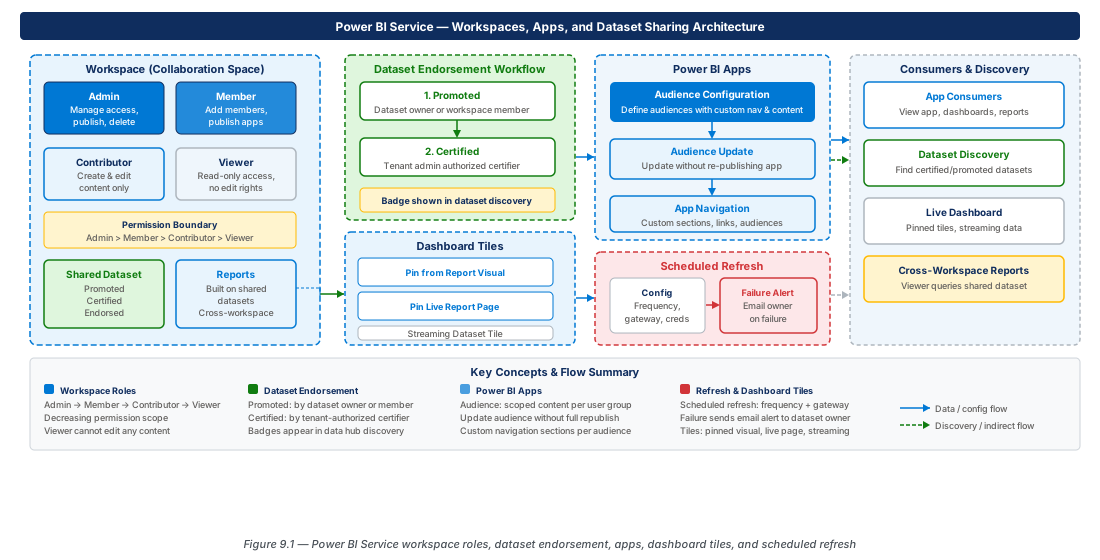
2. Workspace Roles: Permission Boundaries
The Four-Role Permission Model
Power BI workspaces implement a four-tier additive role hierarchy applying at the workspace level, not to individual artefacts.
| Role | Publish App | Add Members | Delete Workspace | Trigger Refresh |
|---|---|---|---|---|
| Admin | Yes | All roles | Yes | Yes |
| Member | Yes | Member, Contributor, Viewer | No | Yes |
| Contributor | No | No | No | Yes |
| Viewer | No | No | No | No |
The key PL-300 trap: Contributors can create and modify content but cannot publish the workspace app. A Contributor who wants to publish must be elevated to Member or Admin.
Build Permission: Cross-Workspace Dataset Consumption
Build permission allows a user to create new reports, dashboards, or composite models against a shared dataset without being a workspace member. It can be granted explicitly via the dataset's Manage permissions panel, inherited by Contributor+ workspace roles, or distributed automatically through app publication.
Important
Build permission grants the right to create new artefacts against a dataset but does NOT grant access to view existing reports in the dataset's workspace. The consumer must have Contributor+ rights in their own workspace to save the new report there.
Role Assignment Best Practices
Assign workspace roles to Azure AD security groups (e.g., SG-PBI-FinanceAnalytics-Contributor) rather than individual users to delegate maintenance to the identity team. Guest users can be added to workspaces only when both AAD cross-tenant invitation settings and the Power BI tenant setting "Allow guest users to edit and manage content" are enabled.
Tip
Use GET /v1.0/myorg/groups/{groupId}/users to programmatically audit workspace membership across all workspaces and surface anomalies in a nightly monitoring dataset.
3. Dataset Endorsement: Promotion and Certification
The Endorsement Hierarchy
Endorsement signals trustworthiness across the tenant with two tiers: Promoted (owner-applied, signals readiness) and Certified (governance-team-applied, signals organisational validation). Both tiers appear as badges in workspace views, the data hub, and Power BI Desktop's dataset discovery experience.
Note
Endorsement applies to datasets and dataflows only — not to reports or dashboards.
Promoted Endorsement
Applied by the dataset owner, or any workspace Admin or Member, via Endorsement and discovery in dataset settings. No tenant configuration required; available in all workspace types. The Promoted badge drives discovery in the data hub and encourages consumers to adopt governed data over shadow datasets.
Certified Endorsement
Requires a Power BI administrator to enable certification under Tenant settings → Endorsement and discovery → Certify datasets and to designate the authorised security groups. Only members of those groups can apply the Certified badge. The Service records the certifier's identity and timestamp, creating an audit trail.
Warning
Certification is not automatically revoked when data source schemas change, refresh history degrades, or the owner leaves. Implement a quarterly recertification review to avoid certified-but-stale datasets, which are more damaging than no certification programme at all.
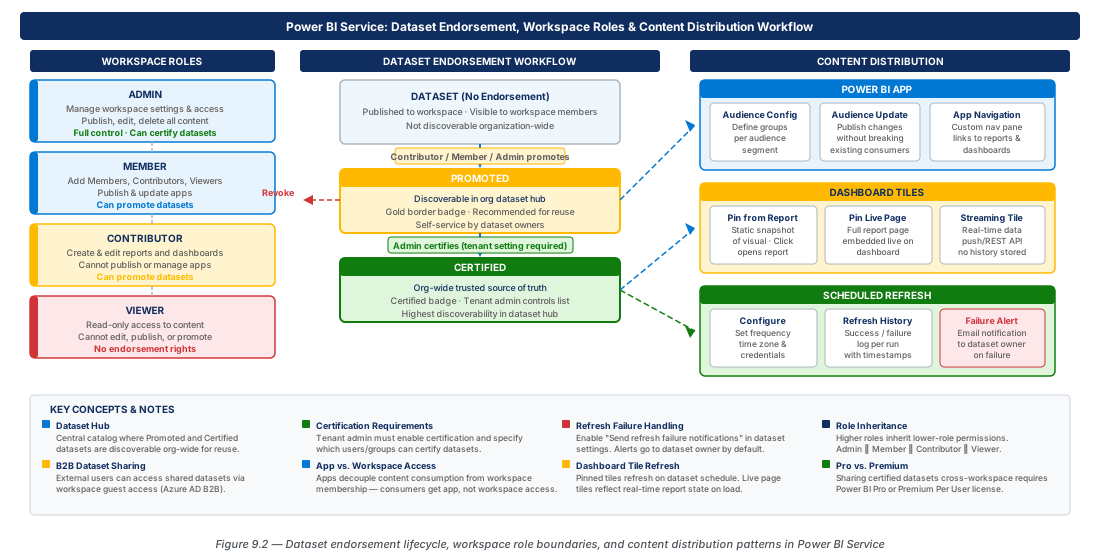
4. Power BI Apps: Packaging and Distributing Curated Content
App Architecture and the Audience Model
A Power BI App is a curated, read-only package of workspace content distributed to defined audiences. Apps solve a fundamental UX problem: workspace Viewers see all content including drafts, whereas app audiences see only the content the publisher has selected in a custom navigation structure. A single app can serve multiple audiences, each seeing a different content subset.
Row-level security interacts with the audience model: audience configuration controls which reports are visible; RLS controls which data rows are visible within those reports.
Creating and Publishing an App
Publishing requires at minimum the Member role. The publication panel guides through three steps: Setup (name, description, logo, theme), Navigation (content selection and structure), and Permissions (audience definition). Navigation items can be renamed independently of the underlying artefact's workspace name, insulating consumers from technical naming conventions.
Important
Publishing an app does NOT automatically expose new workspace reports to consumers. Data within existing reports updates live, but adding a new report to the app navigation requires an explicit Update app action by a Member or Admin.
Audience Configuration and Access Management
Audience members — users or security groups — receive app access automatically on publication without needing workspace membership. The Entire organisation option makes the app available to all licensed users while still respecting RLS. App consumers who hold Build permission on the underlying dataset can use Edit a copy to create personalised reports in their own workspace.
Tip
Align audience boundaries with Azure AD security groups so employee onboarding and offboarding automatically synchronise app access without requiring app updates.
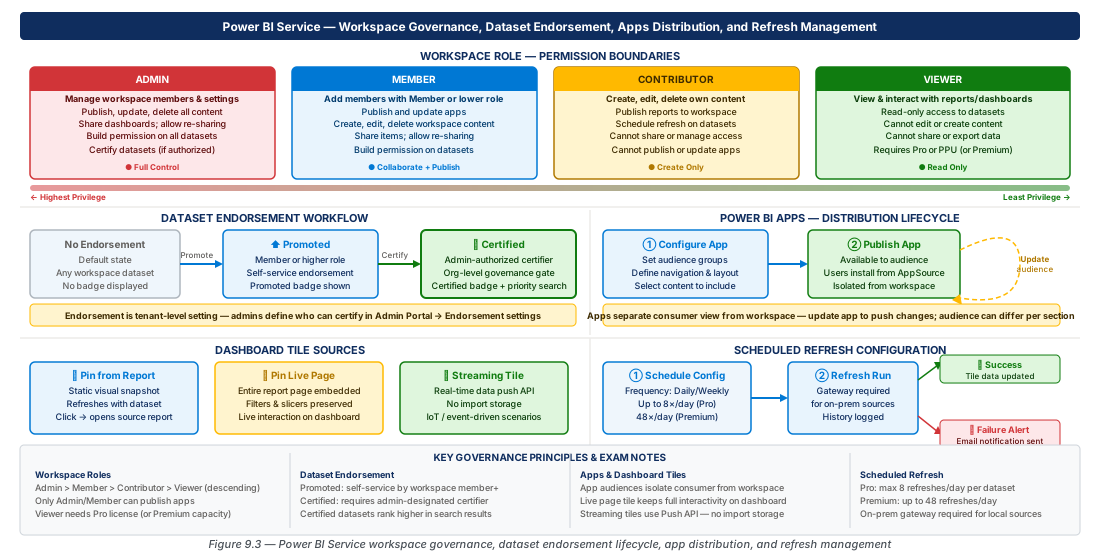
5. Dashboard Tiles: Pinning, Live Pages, and Streaming Data
Dashboards vs. Reports
Reports are multi-page analytical documents with cross-filtering, drill-through, and bookmarks, connected to a single dataset. Dashboards are single-page collections of tiles sourced from multiple reports and datasets — designed for at-a-glance monitoring without report-style interactivity. Dashboards are a Service-only artefact and cannot be created in Power BI Desktop.
Pinning Tiles from Reports
Analysts pin visuals from published Service reports using the Pin visual icon. Pinned tiles maintain a live connection to source reports: when the dataset refreshes, dashboard tiles reflect updated data automatically. Clicking a tile navigates consumers to the full interactive source report.
Pinning Live Report Pages
An entire report page can be pinned as a live page tile, rendering all its visuals in an interactive tile directly on the dashboard canvas — including slicer interaction without leaving the dashboard.
Important
Live page tiles require the report and dashboard to be in the same workspace. Cross-workspace live page pinning is not supported — only individual visual tiles can be pinned cross-workspace.
Streaming Datasets and Real-Time Tiles
Streaming datasets are push-based: external systems push rows via the Power BI REST API and dashboard tiles update within seconds. Three types exist with different storage and query characteristics:
| Type | Data Retention | Historical Queries | Tile Update |
|---|---|---|---|
| Streaming | No | No | Real-time push |
| Push | Yes (rolling window) | Yes | Push via API |
| Hybrid | Yes (with dataset) | Yes (via dataset) | Push + scheduled refresh |
Warning
Streaming datasets do not support scheduled refresh, relationships, or DAX calculated columns. Building composite models over streaming datasets is not supported. Use a separate import or DirectQuery dataset for historical analysis.
6. Scheduled Refresh: Configuration and Failure Management
Refresh Architecture and Prerequisites
Scheduled refresh pulls updated data from sources and reloads the in-memory dataset. Three prerequisites must be satisfied: (1) data source credentials configured in dataset settings, (2) an on-premises data gateway (or VNet gateway) for private-network sources, and (3) the dataset must not be a live connection to Analysis Services.
In shared capacity, datasets can be refreshed up to 8 times per day. In Premium capacity, up to 48 times per day (every 30 minutes).
Configuring Scheduled Refresh
Dataset owners navigate to Scheduled refresh in dataset settings to configure frequency, time zone, specific times, and failure notification recipients. The Service does not guarantee exact execution times — use the Power BI REST API triggered from Azure Data Factory or Logic Apps for precision SLAs.
Tip
Configure refresh failure notifications to a shared team mailbox or monitoring alias, not a personal email address, to ensure continuous operational coverage during leave or role changes.
Refresh Failure Notifications and Remediation
| Failure Category | Common Cause | Resolution |
|---|---|---|
| Credentials expired | Data source password changed | Re-enter credentials in dataset settings |
| Gateway offline | Gateway server rebooted | Restart gateway service; check cluster health |
| Connection timeout | Query exceeds 2-hour limit | Optimise query or implement incremental refresh |
| Row limit exceeded | Table exceeds 1 GB (shared) / 10 GB (Premium) | Implement incremental refresh or move to DirectQuery |
| Privacy level mismatch | Incompatible source privacy levels | Set appropriate privacy levels in data source settings |
| Capacity throttling | Premium memory or CPU exceeded | Scale capacity, optimise dataset, or stagger schedules |
7. Lab
CE-17: Configure Workspace Roles and Dataset Endorsement via REST API
Acquire a bearer token using client credentials, then add a security group as Contributor to a workspace and apply Promoted then Certified endorsement to a dataset. Finally grant Build permission to a consumer group.
# CE-17: Acquire token, assign Contributor group, endorse dataset, grant Build
TOKEN=$(curl -s -X POST "https://login.microsoftonline.com/${TENANT_ID}/oauth2/v2.0/token" \
  -d "client_id=${CLIENT_ID}&client_secret=${CLIENT_SECRET}&scope=https://analysis.windows.net/powerbi/api/.default&grant_type=client_credentials" \
  | jq -r '.access_token')
# Add security group as Contributor
curl -s -X POST "https://api.powerbi.com/v1.0/myorg/groups/${WORKSPACE_ID}/users" \
  -H "Authorization: Bearer ${TOKEN}" -H "Content-Type: application/json" \
  -d '{"identifier":"'${SG_OID}'","groupUserAccessRight":"Contributor","principalType":"Group"}'
# Apply Promoted endorsement
curl -s -X PATCH "https://api.powerbi.com/v1.0/myorg/datasets/${DATASET_ID}" \
  -H "Authorization: Bearer ${TOKEN}" -H "Content-Type: application/json" \
  -d '{"endorsementDetails":{"endorsement":"Promoted"}}'
# Grant Build permission to consumer group
curl -s -X POST "https://api.powerbi.com/v1.0/myorg/datasets/${DATASET_ID}/users" \
  -H "Authorization: Bearer ${TOKEN}" -H "Content-Type: application/json" \
-d '{"identifier":"'${CONSUMER_OID}'","datasetUserAccessRight":"Build","principalType":"Group"}'CE-18: Configure Scheduled Refresh and Monitor Refresh History
Configure a 30-minute refresh cadence for a Premium workspace dataset with failure notifications sent to a team mailbox. Trigger an on-demand refresh and poll the refresh history until completion.
# CE-18: Configure refresh schedule and monitor history
curl -s -X PATCH "https://api.powerbi.com/v1.0/myorg/datasets/${DATASET_ID}/refreshSchedule" \
  -H "Authorization: Bearer ${TOKEN}" -H "Content-Type: application/json" \
  -d '{"value":{"enabled":true,"days":["Monday","Tuesday","Wednesday","Thursday","Friday"],
    "times":["06:00","06:30","07:00","07:30","08:00","08:30"],
    "localTimeZoneId":"Eastern Standard Time","notifyOption":"MailOnFailure",
    "recipients":{"values":["powerbi-ops@contoso.com"]}}}'
# Trigger on-demand refresh
curl -s -X POST "https://api.powerbi.com/v1.0/myorg/datasets/${DATASET_ID}/refreshes" \
  -H "Authorization: Bearer ${TOKEN}" -d '{"notifyOption":"MailOnFailure"}'
# Poll refresh history (last 5 entries)
curl -s "https://api.powerbi.com/v1.0/myorg/datasets/${DATASET_ID}/refreshes?\$top=5" \
  -H "Authorization: Bearer ${TOKEN}" \
  | jq '.value[] | {status,startTime,endTime}'
8. Summary
| Concept | Key Point |
|---|---|
| Workspace Roles | Four additive roles; only Member and Admin can publish apps; Contributor cannot add members or publish apps |
| Build Permission | Enables cross-workspace report creation without workspace membership; granted explicitly, by role inheritance, or via app distribution |
| Promoted Endorsement | Applied by owner, Admin, or Member; no tenant config required; signals readiness for shared use |
| Certified Endorsement | Requires admin enablement and certification group membership; creates audit trail with certifier identity and timestamp |
| Power BI Apps | Curated read-only packages with audience-based access; data updates are live; navigation/content changes require explicit Update app |
| Dashboard Tiles | Individual visuals pin cross-workspace; live page tiles require same-workspace co-location; streaming datasets support real-time push tiles |
| Scheduled Refresh | Up to 8/day (shared) or 48/day (Premium); requires credentials + gateway for on-premises; failures trigger email to configured recipients |
Chapter: 9 of 12 | Status: v0.1 Draft |