Power BI Data Analyst PL-300
Power Query Transformations and M Language
Power Query sits at the boundary between raw enterprise data and analytical models, making it one of the most operationally consequential skills tested on the PL-300 exam. This chapter covers query folding behavior, reusable custom-function patterns, and data-quality profiling workflows — the three transformation areas that appear most persistently in exam scenarios.
Foundations of the M Formula Language
Power Query's computation engine evaluates a functional, lazily executed language called M. Unlike SQL or DAX, M is expression-oriented: every query is a single expression returning a value, and every transformation step is a named sub-expression inside a let block. Understanding M's evaluation model explains why reordering steps matters for performance and why some transformations prevent query folding.
Let Expressions and the Step Graph
Every Power Query query compiles to a let expression. Each step in the Applied Steps pane is one named binding; the expression after in is the query's output. Bindings form a dependency graph evaluated lazily — unreferenced bindings are never evaluated.
let
    Source       = Sql.Database("sql-bi-prod-eastus2-001.database.windows.net", "AdventureWorksDW"),
    SalesTable   = Source{[Schema="dbo", Item="FactInternetSales"]}[Data],
    FilteredRows = Table.SelectRows(SalesTable, each [OrderDateKey] >= 20230101),
    RenamedCols  = Table.RenameColumns(FilteredRows, {{"SalesAmount", "Revenue"}}),
    ChangedTypes = Table.TransformColumnTypes(RenamedCols,
                       {{"Revenue", type number}, {"OrderDateKey", type date}})
in
ChangedTypesNote
M bindings within a let block are not ordered execution statements — they form a dependency graph. The engine may evaluate them in any order that satisfies dependencies, and unreferenced bindings are never evaluated.
The each Keyword and Row-Level Transformations
The each keyword is syntactic sugar for a function literal accepting a single implicit argument _. When used inside table operations such as Table.AddColumn, _ refers to the current row as a record; inside List.Transform, _ refers to the current list element. Confusing these two contexts is a frequent source of type errors.
// These two expressions are exactly equivalent:
AddedColumn_A = Table.AddColumn(Source, "AdjustedRevenue",
                    each [SalesAmount] * 1.1, type number),
AddedColumn_B = Table.AddColumn(Source, "AdjustedRevenue",
                    (_) => _[SalesAmount] * 1.1, type number)
The M Type System and Type Assertions
M enforces types at runtime, so type errors surface on refresh against live data rather than at authoring time. The try … otherwise construct catches coercion failures and substitutes a fallback value — the standard pattern for columns with mixed types or unpredictable nulls.
SafeDate = Table.TransformColumns(
    FilteredRows,
    {{"OrderDate", each try Date.FromText(_) otherwise null, type nullable date}}
)Tip
Always add an explicit Table.TransformColumnTypes step as the last transformation before in. Explicit type assignment prevents the engine from inserting an implicit inference pass, reducing mashup memory consumption.
Query Folding: Pushing Work to the Source
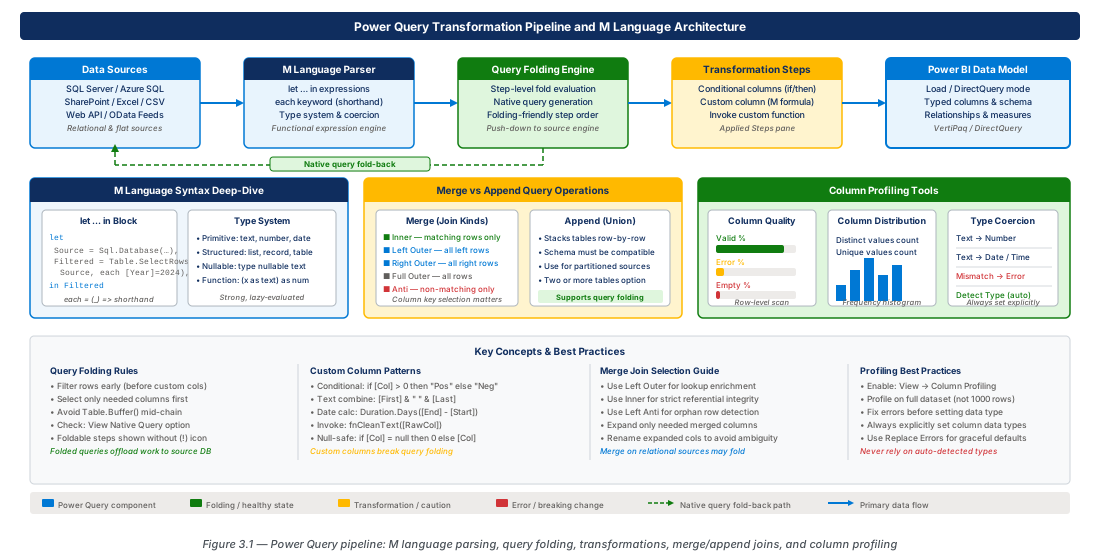
Query folding translates M transformations into native source queries — SQL for relational databases, OData filters for SharePoint — and executes them at the source rather than pulling raw data into the mashup engine. Folding is Power Query's most important performance optimization and the topic most likely to appear in PL-300 exam scenarios involving large datasets or incremental refresh.
How Folding Works and Why It Matters
When you apply Table.SelectRows to a SQL Server table, Power Query attempts to express the filter as a SQL WHERE clause. Chained foldable steps compose into a single native query. Once folding breaks at any step, no subsequent step can re-fold — this is the most critical constraint for PL-300 query optimization questions.
Important
Query folding is binary per step: a step either folds or it does not. Once folding breaks, no subsequent step can re-fold, regardless of whether those steps use folding-compatible operations.
| Connector Category | Filter | Projection | Aggregation | Join |
|---|---|---|---|---|
| SQL Server / Azure SQL | Full | Full | Full | Full |
| Azure Synapse Analytics | Full | Full | Full | Partial |
| PostgreSQL / MySQL | Full | Full | Full | Full |
| Oracle Database | Full | Full | Partial | Partial |
| OData (SharePoint, Dynamics) | Partial | Partial | None | None |
| CSV / Excel / Parquet | None | None | None | None |
Folding-Friendly Transformation Order
Common folding-breakers include Table.AddColumn using M functions with no SQL equivalent (e.g., Text.Combine), Table.Buffer, Table.AddIndexColumn, and cross-source merges. Place these as late as possible so the maximum number of prior steps fold to the source.
// Folding-FRIENDLY: filter and project early, transform late
FilteredRows = Table.SelectRows(SalesData, each [OrderDateKey] >= 20230101),  // FOLDS
SelectedCols = Table.SelectColumns(FilteredRows, {"OrderDateKey","SalesAmount"}),    // FOLDS
AddedCategory = Table.AddColumn(SelectedCols, "RevenueCategory",
each if [SalesAmount] >= 10000 then "High" else "Low", type text) // BREAKS — placed lastWarning
Placing Table.TransformColumnTypes before a row filter on a large table is a frequently observed anti-pattern. Always apply row filters as the first step after connecting, before any column-level transformations.
Verifying and Diagnosing Folding Status
Right-click any step and choose "View Native Query." If the option is greyed out, folding has broken at or before that step. Query Diagnostics (Tools > Start Diagnostics) captures a log of all queries sent to data sources; steps absent from the log are running in the mashup engine.
# Enable Query Store for folding verification
az sql db update \
  --resource-group rg-power-query-m-transformations-prod-001 \
  --server sql-bi-prod-eastus2-001 \
  --name SalesDW \
  --query-store-query-capture-mode all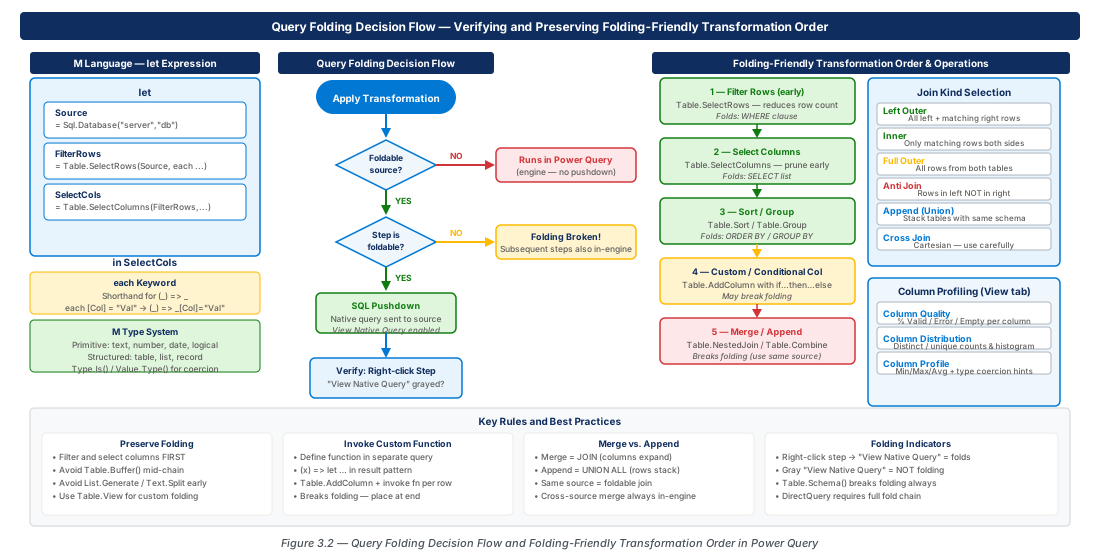
Merge and Append Queries
Power Query provides two mechanisms for combining data: Append (stacks rows vertically, equivalent to SQL UNION ALL) and Merge (joins two tables on key columns). Understanding which SQL join type each Merge join kind produces is essential for exam questions that present data scenarios and ask which join kind to use.
Append Queries: Stacking Row Sets
Append concatenates rows from two or more tables. When columns differ by name, Power Query matches by name and fills unmatched columns with null. The GUI generates Table.Combine({Query1, Query2}); the M function accepts an arbitrary list, enabling programmatic appends the GUI cannot replicate.
Merge Queries: Join Kinds and When to Use Each
The six join kinds map directly to SQL semantics. Left Anti is particularly valuable for data quality workflows — it surfaces fact rows whose foreign keys do not exist in the related dimension, a silent integrity problem that causes incorrect aggregate totals.
| Join Kind | SQL Equivalent | Output Rows | Primary Use Case |
|---|---|---|---|
| Left Outer | LEFT JOIN | All left; matching right; null where no match | Preserve all fact rows; enrich with dimension |
| Right Outer | RIGHT JOIN | All right; matching left; null where no match | Preserve all right-table rows |
| Full Outer | FULL OUTER JOIN | All rows from both; null on either side | Finding discrepancies between two datasets |
| Inner | INNER JOIN | Only matching rows from both tables | Strict key enforcement; eliminate orphans |
| Left Anti | LEFT JOIN … WHERE right IS NULL | Left rows with no right match | Orphaned fact rows; data quality checks |
| Right Anti | RIGHT JOIN … WHERE left IS NULL | Right rows with no left match | Dimension rows with no associated facts |
// Left Outer merge: enrich sales facts with customer dimension
MergedTable = Table.NestedJoin(
    FactSales, {"CustomerKey"},
    DimCustomer, {"CustomerKey"},
    "CustomerDetails", JoinKind.LeftOuter),
ExpandedCols = Table.ExpandTableColumn(MergedTable, "CustomerDetails",
    {"FirstName", "LastName", "EmailAddress"},
{"Customer.FirstName", "Customer.LastName", "Customer.Email"})Important
When both tables originate from the same SQL Server connection, Table.NestedJoin folds into a single SQL JOIN. Cross-source merges always run in the mashup engine and are a significant performance risk for large tables.
Custom Columns, Conditional Columns, and Invoke Custom Function
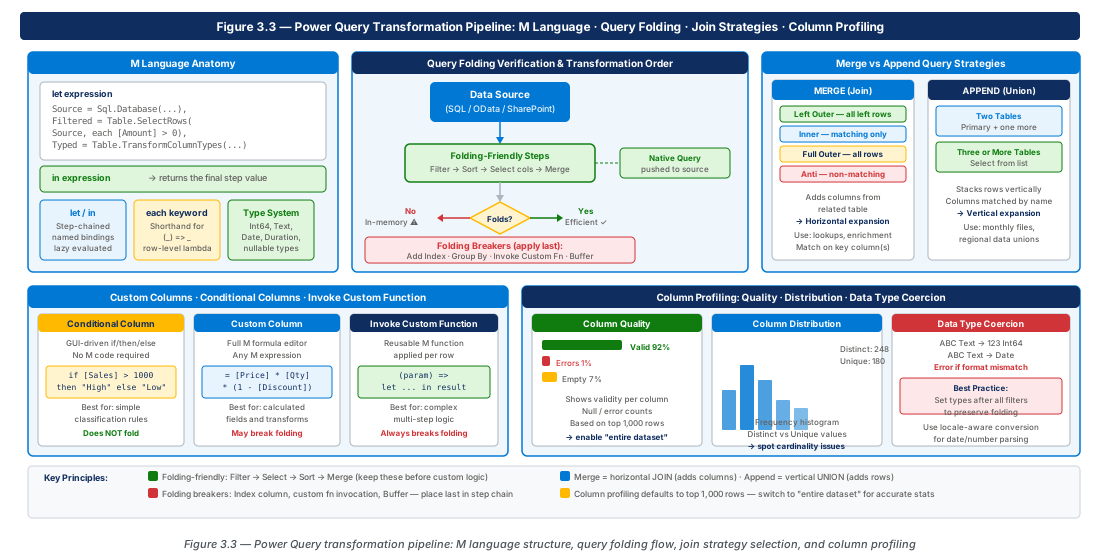
The Power Query GUI offers three column-derivation mechanisms: Conditional Column (wizard-driven if-then-else), Custom Column (free-form M expression), and Invoke Custom Function (applies a named query function per row). Recognizing the M constructs each mechanism generates is a tested PL-300 skill.
Conditional Columns and Custom Columns
The GUI Conditional Column wizard supports only flat conditions. Multi-level business rules require the Advanced Editor. Custom columns accept any M expression, including library function calls and record/list operations.
RevenueClassified = Table.AddColumn(FilteredSales, "RevenueClass",
    each
        if      [Revenue] >= 50000 then "Platinum"
        else if [Revenue] >= 10000 then "Gold"
        else if [Revenue] >= 1000  then "Silver"
        else                            "Bronze",
    type text)
Reusable Custom Functions
A custom function is a query whose return value is a function literal rather than a table. Once defined, it appears in the Navigator pane and can be applied per-row via the Invoke Custom Function dialog. This operation never folds to the source; apply row filters before invocation to minimize row count.
// Custom function query: fnCategorizeRevenue
(Revenue as number, FxRate as number) as text =>
let
    Converted = Revenue * FxRate,
    Category  = if Converted >= 50000 then "Platinum"
                else if Converted >= 10000 then "Gold"
                else "Standard"
in
CategoryWarning
Recursive M functions can cause stack overflows on deep hierarchies (typically >50 levels) and are not supported by query folding. For organizational hierarchies, flatten them in the source using a recursive CTE before connecting from Power Query.
Column Profiling: Quality, Distribution, and Type Coercion
Power Query's column profiling features provide statistical summaries without requiring a full data load. Column Quality, Column Distribution, and Column Profile are central to PL-300 exam scenarios about data preparation and identifying transformation requirements before building the model.
Column Quality and the Error/Empty/Valid Breakdown
Column Quality shows three percentage bars: Valid, Error, and Empty (always summing to 100%). By default it samples the first 1,000 rows — change the scope to "Based on entire data set" using the status bar dropdown to profile all rows, but apply row filters first on large tables to avoid full table scans on every step switch.
// Extract error rows from a specific column
DirectErrors = Table.SelectRowsWithErrors(ParsedPrices, {"ListPrice"})
Column Distribution and Value Frequency
Column Distribution shows a histogram with Distinct Count (unique values) and Unique Count (values appearing exactly once). A column where Distinct Count equals row count is a candidate key; a column where Unique Count is zero is a lookup or category column. The distribution always reflects the data at the currently selected Applied Step.
Column Profile and Data-Type Coercion Decisions
Column Profile provides min, max, mean, median, standard deviation, empty count, error count, and a value frequency table. Use these observations to drive coercion: an 8-character text column matching YYYYMMDD should convert to type date; a 0/1 integer should convert to type logical.
// Production pattern: replace sentinel values before type coercion
CleanedPrice = Table.ReplaceValue(Source, each [ListPrice],
    each if [ListPrice] = "N/A" or [ListPrice] = ""
         then null else [ListPrice],
    Replacer.ReplaceValue, {"ListPrice"}),
TypedPrice = Table.TransformColumnTypes(CleanedPrice,
{{"ListPrice", type nullable number}})Tip
The correct remediation sequence for Column Quality errors is: (1) identify error values with Column Profile, (2) add a replacement step before the type-change step, (3) apply the type change. This order ensures the type-change step produces zero errors in production.
Lab: Provision Azure SQL Database for Power Query Exercises
These two lab tasks provision the Azure SQL infrastructure used throughout the chapter labs. CE-05 creates a dev environment with an AdventureWorksLT sample schema. CE-06 deploys the production database with Query Store, private endpoint, and Azure Monitor diagnostics for folding verification.
CE-05: Provision Dev Azure SQL Database
Create the resource group and SQL server, then provision an AdventureWorksLT sample database to serve as the foldable data source for Power Query lab exercises. Verify connectivity using the final az sql db show command.
az group create \
  --name rg-power-query-m-transformations-dev-001 \
  --location eastus2 \
  --tags environment=dev workload=power-bi-lab

az sql db create \
  --resource-group rg-power-query-m-transformations-dev-001 \
  --server sql-power-query-dev-eastus2-001 \
  --name SalesLabDW \
  --sample-name AdventureWorksLT \
--edition GeneralPurpose --family Gen5 --capacity 2CE-06: Promote Validated Dataset to Production
Deploy the production SQL server with no public access and a private endpoint for Power BI Premium Gateway connectivity. Enable Query Store and Azure Monitor diagnostics to verify query folding in production refresh operations.
az sql db create \
  --resource-group rg-power-query-m-transformations-prod-001 \
  --server sql-bi-prod-eastus2-001 \
  --name SalesDW \
  --edition BusinessCritical --family Gen5 --capacity 8

az sql db update \
  --resource-group rg-power-query-m-transformations-prod-001 \
  --server sql-bi-prod-eastus2-001 \
  --name SalesDW \
  --query-store-query-capture-mode all
Summary
| Concept | Key Point |
|---|---|
M let Expression | Every query is a single let…in; each Applied Step is one named binding; bindings form a dependency graph evaluated lazily. |
each Keyword | Syntactic sugar for (_) => …; _ is a row record in table operations, a list element in list operations. |
| Query Folding | Translates M steps to native queries; broken by non-foldable operations and cannot be re-enabled downstream; "View Native Query" confirms status. |
| Transformation Order | Apply row filters and column projections first (they fold); add custom columns and non-foldable steps last. |
| Merge Join Kinds | Six kinds map to SQL joins; Left Outer preserves all fact rows; Left Anti finds orphaned rows; cross-source merges always run in mashup engine. |
| Custom Functions | A query returning a function literal; invoked per-row via Invoke Custom Function; never folds; filter rows before invocation. |
| Column Profiling | Column Quality + Distribution + Profile guide coercion decisions; default sampling is 1,000 rows; change scope for full-dataset profiling. |
Chapter: 3 of 12 | Status: v0.1 Draft |