Azure AI Solutions Architecture: Designing and Operating Enterprise AI Systems
The Anatomy of an Enterprise GenAI Application
Enterprise generative AI applications are not simply API wrappers around a large language model — they are layered systems where orchestration, retrieval, prompt engineering, and guardrails work in concert to produce reliable, auditable, and governed outcomes at scale. This chapter dissects the canonical enterprise GenAI reference architecture layer by layer, maps each layer to its Azure service counterpart, and equips you with the prompt engineering patterns and guardrail designs that separate hobby projects from production systems.
The Seven-Layer Enterprise GenAI Reference Architecture
Why a Layered Model Matters
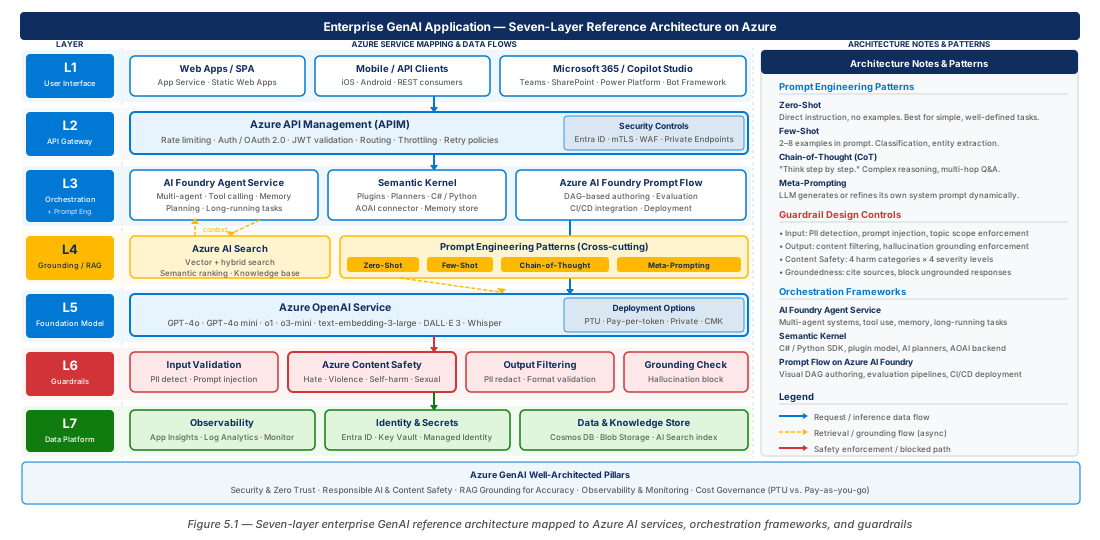
When a user submits a natural-language query to an enterprise AI assistant, at least seven distinct architectural concerns must be addressed before a trustworthy response reaches them. Conflating these concerns into a single Azure OpenAI call is the architectural equivalent of writing a monolith: it works in a demo and collapses under production load, regulatory scrutiny, or a prompt injection attack.
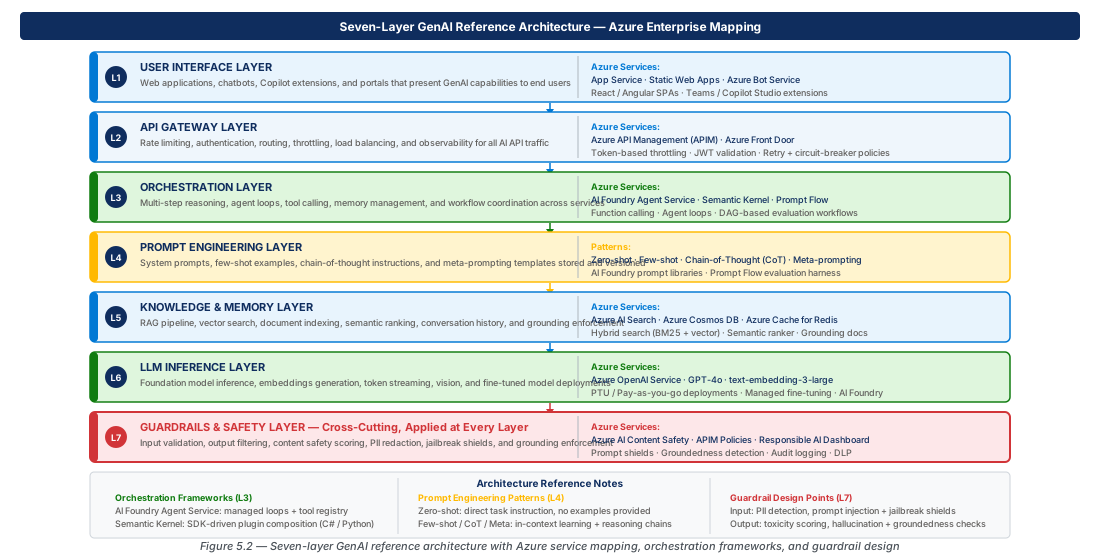
The seven layers are: (1) User Interface, (2) API and Web Application Gateway, (3) AI Orchestration, (4) Prompt Engine, (5) Retrieval Layer, (6) Tools and External APIs, and (7) LLM and Response Guardrails. Understanding the boundary between each layer is the core design skill for GenAI architects — a change to the retrieval strategy should not require re-testing the guardrail logic.
Layer 1 — User Interface
The user interface layer encompasses web front ends, Teams bots, mobile apps, and programmatic API clients. For enterprise deployments, this layer must support corporate identity (Microsoft Entra ID), accessibility standards, and multi-modal inputs. Streaming responses require WebSocket or Server-Sent Events support; citation rendering must be designed in from the start.
The UI layer is also the first defense against prompt injection from document uploads or URL submissions. Input length limits, file type allow-lists, and virus scanning belong here before user content travels any deeper into the system.
Layer 2 — API and Web Application Gateway
The gateway layer enforces authentication, authorization, rate limiting, usage metering, request routing, and API versioning. In Azure, this layer is owned by Azure API Management (APIM) in front of an Azure App Service or Azure Container Apps back end. APIM's policy engine can inject system-context headers, route to different model deployments based on caller identity, enforce per-subscription token quotas, and capture telemetry.
A common antipattern is placing GenAI orchestration logic inside APIM policies. APIM is excellent for traffic management but is not a compute layer — complex multi-step orchestration belongs in layer three.
Layer 3 — AI Orchestration
The orchestration layer receives a validated, authenticated request from the gateway, determines which workflow to execute, assembles the context and prompt, calls the retrieval layer and tools as needed, invokes the LLM, runs output through guardrails, and returns a structured response. In Azure, this layer is implemented using Azure AI Foundry Agent Service, Semantic Kernel, or Azure AI Foundry Prompt Flow.
The orchestration layer is also responsible for conversation state management. Strategies for managing context window limits include sliding window truncation, summarization of older turns, and external memory stores (Cosmos DB, Redis). The choice of memory strategy must be made explicit in the design — it cannot be deferred.
Mapping the Reference Architecture to Azure Services
Azure API Management as the GenAI Gateway
APIM's built-in OpenAI load balancing, token-rate policies, and semantic kernel integration make it the best-fit gateway for language model traffic. The azure-openai-token-limit policy enforces per-subscription prompt and completion token quotas; azure-openai-usage-tracking emits per-call token consumption to Application Insights.
For production, configure APIM with a backend pool containing multiple Azure OpenAI deployments across regions using round-robin or priority-based routing. This eliminates single-region TPM limits as a scaling ceiling and enables active-active failover.
Warning
APIM's retry policy must be tuned carefully for Azure OpenAI backends. The default retry on 5xx can cause the same large prompt to be submitted multiple times, resulting in duplicate charges. Set retry only on connection errors, not on HTTP 500 or 503, and implement idempotency at the orchestration layer.
# CE-09: Deploy APIM with Azure OpenAI backend pool
RG="rg-enterprise-genai-application-anatomy-prod-001"
LOCATION="eastus2"
APIM_NAME="enterprise-genai-prod-eastus2-001-apim"
AOAI_NAME="enterprise-genai-prod-eastus2-001-aoai"

az cognitiveservices account create --name "$AOAI_NAME" --resource-group "$RG" \
  --location "$LOCATION" --kind OpenAI --sku S0 --yes

az apim create --name "$APIM_NAME" --resource-group "$RG" \
  --location "$LOCATION" --publisher-name "Enterprise GenAI Platform" \
  --publisher-email "platform-admin@enterprise.com" --sku-name StandardV2
# ... see full lab CE-09 below for complete deployment script
Azure AI Foundry as the Orchestration Hub
An AI Foundry Hub is the top-level organizational resource that maps to an enterprise business unit or platform team. Within a Hub, multiple Projects are created — one per application or use case — sharing the Hub's network, compute, and connection resources while maintaining project-level RBAC, data isolation, and experiment tracking.
Note
AI Foundry Hub creates dependent Azure resources automatically — Storage Account, Key Vault, Container Registry, and Application Insights — in the same resource group. Naming and tagging policies applied to the Hub do not propagate to these child resources. Apply tags explicitly using an Azure Policy at the resource group scope.
Azure AI Search as the Retrieval Layer
Azure AI Search implements Retrieval-Augmented Generation (RAG) — retrieving relevant knowledge from a curated corpus and injecting it into the prompt as grounding context. It provides three composable retrieval modes: keyword search (BM25), vector search (cosine similarity over embeddings), and hybrid search (RRF-fused). The semantic ranker add-on applies a cross-encoder model to re-rank top-N hybrid results.
Tip
Always include content_vector, chunk_id, source_url, and last_modified fields in index schemas. Use 512-token chunks with 10% overlap for technical documentation; 256-token chunks for FAQ-style content where precision matters more than coverage.
Azure AI Content Safety as the Guardrail Layer
Azure AI Content Safety provides multi-layered moderation at both the input (prompt) and output (completion) stages. Its APIs detect harmful categories at four severity thresholds (0–7), detect prompt injection via the Prompt Shield API, and verify output attribution via the Groundedness Detection API. Integration via AI Foundry Hub's Content Filters configuration attaches named filter profiles directly to model deployments.
Warning
The default Content Safety filter profile blocks at severity threshold 2 across all categories. For security analysis, medical documentation, or legal research workloads this default is too restrictive. Always configure a custom filter profile tuned to the workload's risk profile and route changes through change control.
| Azure Service | Layer | Primary Role | Key SKU/Tier |
|---|---|---|---|
| Azure Front Door + WAF | L2 (Gateway) | Edge routing, DDoS, WAF | Standard / Premium |
| Azure API Management | L2 (Gateway) | Auth, rate limiting, token quotas | Developer / Standard V2 / Premium |
| Azure App Service / Container Apps | L2–L3 | Application hosting | B3 / P2V3 / Consumption |
| Azure AI Foundry | L3 (Orchestration) | Agent Service, Prompt Flow, evaluation | Per-consumption |
| Azure OpenAI Service | L7 (LLM) | Inference: GPT-4o, GPT-4o-mini, o1 | S0 (PTU for reserved capacity) |
| Azure AI Search | L5 (Retrieval) | Hybrid RAG, semantic ranking | Basic / Standard / Storage Optimized |
| Azure Cosmos DB | L5 (State/Memory) | Conversation history, session state | Serverless / Provisioned |
| Azure AI Content Safety | L7 (Guardrails) | Input/output moderation, prompt injection | S0 |
| Azure Key Vault | Cross-cutting | Secret and key management | Standard / Premium (HSM) |
| Azure Monitor + App Insights | Cross-cutting | Observability, cost telemetry | Pay-per-use |
Prompt Engineering for Architects
Zero-Shot and Few-Shot Patterns
Prompt engineering is not a developer concern that architects can delegate — the structure of prompts directly determines system behavior, cost, latency, and reliability. Zero-shot prompting provides the model with a task description and input without examples. It is appropriate for well-defined tasks with simple output formats and has the lowest cost and latency profile (system prompts typically 200–500 tokens).
Few-shot prompting augments the prompt with two to eight example input-output pairs. Use it when output must follow a precise schema, domain vocabulary requires demonstration, or zero-shot testing reveals systematic formatting errors. For high-volume workloads, evaluate whether fine-tuning would be more economical than repeating examples in every request.
Tip
When designing few-shot examples, choose examples that cover edge cases, not just the happy path. For financial data prompts, include an example where the input is ambiguous and show the model how to respond — ask a clarifying question or return a structured uncertainty signal — rather than guessing.
Chain-of-Thought and Meta-Prompting
Chain-of-thought (CoT) prompting instructs the model to reason step by step before producing its final answer. CoT is effective for multi-step logic: financial calculations, code debugging, compliance policy interpretation. The key design decision is standard CoT (reasoning visible to the user — aids trust) versus scratchpad CoT (reasoning discarded before a clean final answer is returned — appropriate for production UIs).
Meta-prompting uses a language model to generate, evaluate, or improve prompts for other language models. A tiered meta-prompting pattern uses a fast, low-cost model (GPT-4o-mini) to classify intent and select a prompt template, then passes the assembled prompt to the full model (GPT-4o or o1). This approach can reduce per-request cost by 40–60% on mixed-intent workloads.
# CE-10: Deploy three-tier model deployments for tiered prompting
AOAI_NAME="enterprise-genai-prod-eastus2-001-aoai"
RG="rg-enterprise-genai-application-anatomy-prod-001"

# Tier 1: intent classification (high-volume, low-cost)
az cognitiveservices account deployment create --name "$AOAI_NAME" --resource-group "$RG" \
  --deployment-name gpt-4o-mini-classifier --model-name gpt-4o-mini \
  --model-version "2024-07-18" --model-format OpenAI --sku-name GlobalStandard --sku-capacity 200

# Tier 2: standard quality; Tier 3: o1 for reasoning (see full lab CE-10)
System Prompt Architecture and Prompt Libraries
The system prompt is the primary mechanism for encoding organizational knowledge, constraints, persona, and output contracts into a GenAI application. System prompts must be treated as first-class software artifacts: stored in source control, versioned, tested against a regression suite, reviewed in pull requests, and deployed through a release pipeline.
A production system prompt has four sections: (1) Persona and Role, (2) Behavioral Constraints, (3) Knowledge Context, and (4) Output Format Contract. Separating these concerns makes it easier to update one section without inadvertently affecting behavior governed by another.
Warning
System prompt leakage is a real production risk. Mitigations include instructing the model not to reveal prompt contents, using Azure AI Content Safety Prompt Shield to detect extraction attacks, and structuring proprietary logic as RAG-retrieved context rather than hardcoded system prompt text. Classify system prompt contents at the same sensitivity level as source code.
Orchestration Frameworks on Azure
Azure AI Foundry Agent Service
Azure AI Foundry Agent Service is the managed, declarative framework for building stateful AI agents on Azure. An Agent maintains conversation state, has access to tools (code interpreter, file search, function calling), and can execute multi-step tasks autonomously. Each agent run is tracked with a run ID, enabling observability, replay, and debugging. The service manages thread state in Azure-managed storage, eliminating the need for teams to build conversation persistence.
Note
Agent Service enforces regional availability for thread storage. As of mid-2026, persistent storage is available in East US 2, West US 3, West Europe, and Australia East. For multi-region deployments, route agent creation to the correct region based on user affinity and use Cosmos DB global distribution for cross-region state synchronization.
Semantic Kernel: SDK-Based Orchestration
Semantic Kernel (SK) is Microsoft's open-source SDK for AI orchestration in .NET, Python, and Java. It provides abstractions for Plugins (collections of callable functions), Planners (algorithms that decompose user goals into plugin call sequences), and Memory (vector-backed semantic recall). SK occupies the space between raw OpenAI API calls and the fully managed Agent Service, giving teams precise control while providing production-grade abstractions.
Sequential orchestration — where application code explicitly calls plugins in a deterministic sequence — is the right pattern for enterprise workflows where the step sequence must be auditable. The planner approach suits exploratory tasks where the optimal tool sequence is not known in advance. SK integrates with AI Foundry through the Azure AI Inference connector, decoupling orchestration from the model provider.
Prompt Flow: Visual Workflow Orchestration
Azure AI Foundry Prompt Flow is a visual, graph-based workflow authoring environment. A Prompt Flow flow is a directed acyclic graph where each node is a processing step: a Jinja2 prompt template, a Python function, an LLM call, or an AI Search retrieval. Flows are version-controlled as YAML files and deployed as managed online endpoints in AI Foundry.
Prompt Flow's primary enterprise value is evaluation and CI/CD integration. Evaluation flows compute quality metrics (groundedness, relevance, coherence, fluency) using LLM-as-judge scoring and integrate into Azure DevOps or GitHub Actions pipelines as automated quality gates before a new prompt version is promoted to production.
# CE-10: Deploy a Prompt Flow managed online endpoint
PROJECT_NAME="enterprise-genai-prod-eastus2-001-aiproj"
ENDPOINT_NAME="enterprise-genai-prod-eastus2-001-pfendpt"

az ml online-endpoint create --name "$ENDPOINT_NAME" \
  --resource-group "$RG" --workspace-name "$PROJECT_NAME" --auth-mode key

az ml online-deployment create --name rag-chat-v1 --endpoint "$ENDPOINT_NAME" \
  --resource-group "$RG" --workspace-name "$PROJECT_NAME" \
  --file rag-chat-flow/deployment.yaml --all-traffic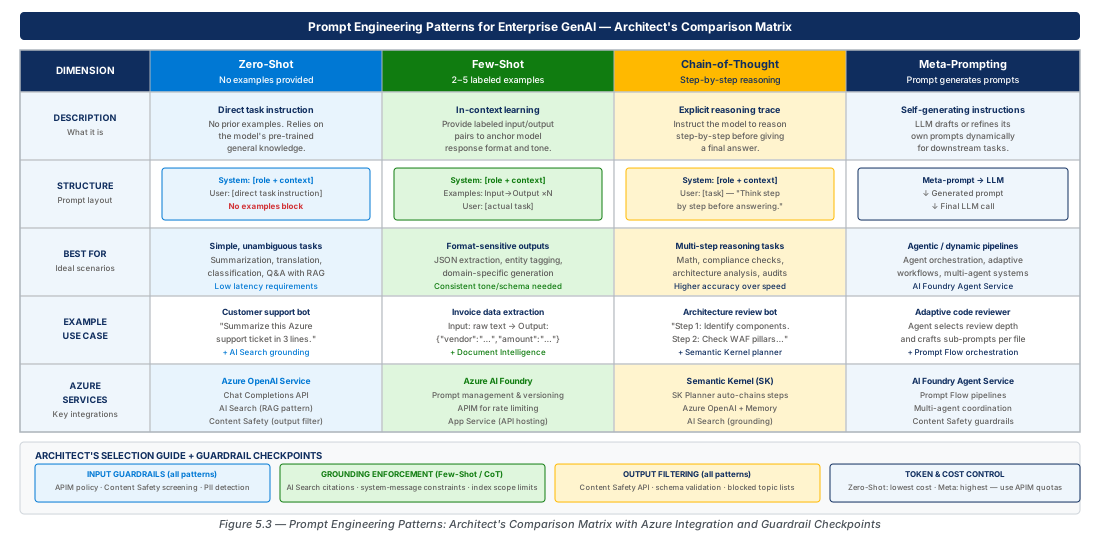
Guardrail Design: From Input to Output
Input Validation and Prompt Injection Defense
Guardrail design begins before the LLM sees a single token. Input validation at the application layer catches malformed requests, oversized inputs, and disallowed file types. Azure AI Content Safety's Prompt Shield API detects both direct prompt injection (user-crafted attacks) and indirect injection (malicious instructions embedded in RAG-retrieved documents). The orchestration layer should check Prompt Shield results before passing the assembled prompt to the LLM and return a structured refusal — not an error — if an attack is detected.
Warning
Many teams implement prompt injection detection only on direct user messages and overlook document-grounded injection. An attacker who can influence the content of documents indexed into Azure AI Search — for example, via a support ticket — can inject malicious instructions through the retrieval layer. Enable Prompt Shield's indirect injection detection mode for all content sources.
Output Filtering and Content Safety Integration
For Azure OpenAI deployments, output filtering is most efficiently implemented through the Content Filter configuration on the model deployment itself — this allows native filtering without a round-trip to a separate API. The filter profile exposes per-category severity thresholds for both input and output and is attached to the deployment name, so different applications on the same Azure OpenAI resource can have different filter profiles.
For highly regulated industries, supplement native filters with custom orchestration-layer validation: regex-based PII detection and redaction, schema validation for structured output, and a groundedness check that verifies factual claims are attributable to retrieved context.
Grounding Enforcement and Hallucination Mitigation
Grounding enforcement constrains the LLM to generate responses attributable to the retrieved context. Effective grounding requires coordination across three layers: retrieval (high-quality chunks), prompt engine (explicit cite-and-decline instructions), and output guardrail (post-generation attribution verification). The prompt instruction must be unconditional: "Answer only using the context provided. If the context does not contain sufficient information, respond with: 'I do not have sufficient information in my knowledge base to answer this question.'"
Azure AI Content Safety's Groundedness Detection API takes the model's response, the retrieved context chunks, and the user query, and returns a groundedness score with a list of ungrounded claims. It adds approximately 300–800ms latency; for latency-sensitive applications, run it asynchronously and surface a quality confidence indicator in the UI rather than blocking response delivery.
Lab
CE-09: Deploy the Enterprise GenAI Foundation Stack
Provisions the core infrastructure for a RAG-based enterprise AI assistant: resource groups, Azure OpenAI with GPT-4o and text-embedding-3-large deployments, Azure AI Search with semantic ranking, AI Foundry Hub and Project, and the APIM gateway. Uses CAF naming conventions in the production resource group.
# CE-09: Deploy enterprise GenAI foundation stack (set -euo pipefail)
RG="rg-enterprise-genai-application-anatomy-prod-001"; LOCATION="eastus2"
PREFIX="enterprise-genai-prod-eastus2-001"

az group create --name "$RG" --location "$LOCATION" \
  --tags Environment=Production Workload=GenAIApplicationAnatomy CostCenter=AI-Platform

az cognitiveservices account create --name "${PREFIX}-aoai" --resource-group "$RG" \
  --location "$LOCATION" --kind OpenAI --sku S0 --yes

az search service create --name "${PREFIX}-aisearch" --resource-group "$RG" \
  --location "$LOCATION" --sku standard --replica-count 2

# ... AI Foundry Hub, Project, and APIM creation — see full script in chapter repoCE-10: Configure RAG Pipeline with Content Safety Guardrails
Creates an AI Search vector index (3072-dim HNSW, semantic ranking), deploys the Azure AI Content Safety resource, and assigns least-privilege RBAC roles (Cognitive Services OpenAI User, Search Index Data Contributor, Cognitive Services User) to the AI Foundry Project managed identity. Enables Prompt Shield and Groundedness Detection on the guardrail layer.
# CE-10: Configure Content Safety and vector index
CS_NAME="${PREFIX}-contentsafety"

az cognitiveservices account create --name "$CS_NAME" --resource-group "$RG" \
  --location "$LOCATION" --kind ContentSafety --sku S0 --yes

PROJECT_PRINCIPAL_ID=$(az ml workspace show --name "${PREFIX}-aiproj" \
  --resource-group "$RG" --query identity.principalId -o tsv)

az role assignment create --assignee "$PROJECT_PRINCIPAL_ID" \
  --role "Cognitive Services User" --scope "$CS_RESOURCE_ID"
# ... vector index schema (HNSW, 3072-dim) — see full script in chapter repo
Summary
| Concept | Key Point |
|---|---|
| Seven-Layer Reference Architecture | Every enterprise GenAI application maps to seven layers: UI, Gateway, Orchestration, Prompt Engine, Retrieval, Tools, LLM + Guardrails; conflating layers creates brittle systems |
| Azure Service Mapping | APIM owns the gateway; AI Foundry owns orchestration and evaluation; Azure OpenAI owns inference; AI Search owns retrieval; Content Safety owns guardrails |
| Prompt Engineering Patterns | Zero-shot for simple tasks; few-shot for schema-constrained output; chain-of-thought for multi-step reasoning; meta-prompting for dynamic template selection and cost optimization |
| Orchestration Frameworks | Agent Service for managed stateful agents; Semantic Kernel for programmatic SDK-based orchestration; Prompt Flow for visual workflow authoring with CI/CD-integrated quality evaluation |
| Guardrail Design | Guardrails operate at input (Prompt Shield), output (Content Filter, PII redaction), and grounding (Groundedness Detection API) — all three stages are required for production trust |
| System Prompt as Software | System prompts must be version-controlled, tested with regression suites, reviewed in pull requests, and deployed through release pipelines |
Chapter: 5 of 12 | Status: v0.1 Draft |