Azure AI Solutions Architecture: Designing and Operating Enterprise AI Systems
AI Data Architecture and Security
Enterprise AI workloads demand a data architecture that unifies structured records, unstructured documents, vector embeddings, and knowledge graphs under a single governance framework, while withstanding AI-specific adversarial threats such as prompt injection, data poisoning, and jailbreaking. Architects who internalize both the data platform and the security posture will deliver AI systems that are capable, auditable, compliant, and resilient.
1. Foundations: The Enterprise AI Data Platform
Multi-Modal Data in AI Workloads
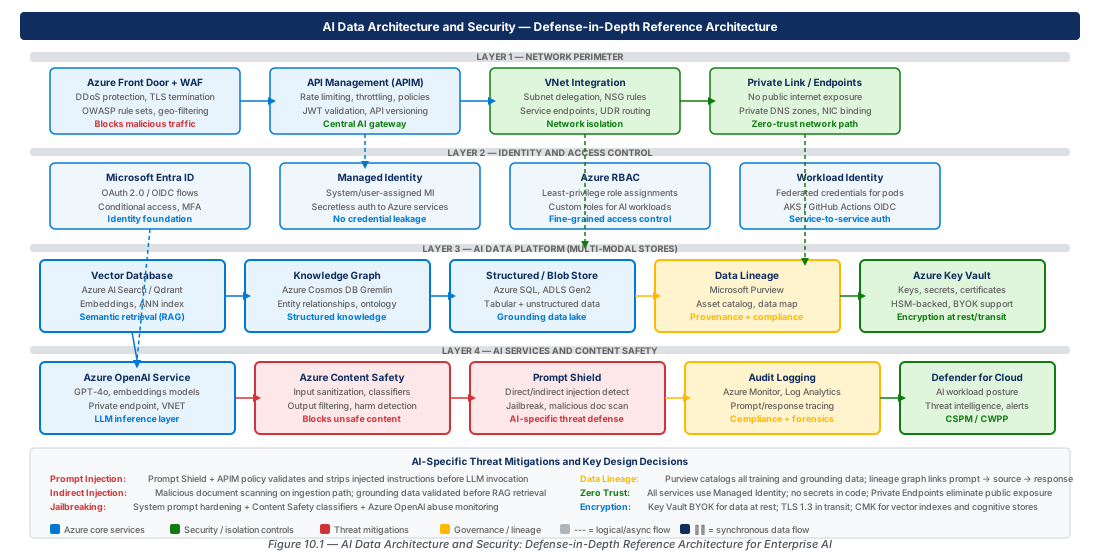
Modern enterprise AI systems must retrieve SQL rows, parse PDFs, traverse knowledge graphs, and compare embeddings within a single inference request. The key insight is that multi-modal data requires multi-modal retrieval but unified governance. Each modality has an optimal tier: Azure SQL or Cosmos DB for structured records; ADLS Gen2 for raw files; Azure AI Search for hybrid retrieval; pgvector or a managed vector store for dense similarity; Cosmos DB Gremlin for graph traversal — all tied together by Microsoft Purview and Entra ID.
Embeddings are derived artifacts, not primary storage. When a model is upgraded or chunking strategy changes, the reindexing pipeline reads from the unchanged ADLS Gen2 source layer and regenerates embeddings without touching authoritative records. The vector database is an acceleration index only.
Note
Azure AI Search now supports integrated vectorization, calling an Azure OpenAI embedding model automatically at index and query time. You still need ADLS Gen2 or Blob Storage as the authoritative source layer.
Data Lake Architecture for AI Pipelines
ADLS Gen2 provides hierarchical namespace, POSIX-style ACLs, tiered storage, and native integration with Synapse Analytics, Databricks, and Data Factory. For AI workloads, organize the lake into four layers: Bronze (raw as-is), Silver (cleaned, OCR, PII-flagged), Gold (business-ready), and Embeddings (chunked text, vectors, metadata linking each chunk to its source document version and model identifier).
# Create ADLS Gen2 account with medallion layers
az storage account create \
  --name "staidataprodeastus2001" --resource-group "$RG" \
  --hierarchical-namespace true --min-tls-version "TLS1_2" \
  --allow-blob-public-access false --default-action "Deny"

for LAYER in bronze silver gold embeddings; do
  az storage fs create --name "$LAYER" --account-name "staidataprodeastus2001" --auth-mode login
doneWarning
Always set --allow-blob-public-access false and --default-action Deny. Grant access exclusively via Private Endpoints and Entra ID role assignments to prevent PII or embedding artifact leakage.
Vector Databases and Embedding Management
Azure AI Search combines BM25, SPLADE sparse vectors, and HNSW dense vectors in one index. Hybrid retrieval with Reciprocal Rank Fusion (RRF) outperforms pure vector retrieval on heterogeneous enterprise corpora. For latency below 10 ms at high throughput, use pgvector on Azure Database for PostgreSQL; for horizontal scale beyond a single instance, use Qdrant or Weaviate on Azure Kubernetes Service (AKS).
Every embedding must carry metadata: source document URI, version hash, chunking strategy ID, model ID, and generation timestamp. Without this discipline, a model upgrade forces a full reindex with no incremental path.
Knowledge Graphs and Data Lineage
Knowledge graphs enable multi-hop relationship queries in milliseconds. In AI workloads they serve two roles: structured retrieval enrichment for RAG (traversing related entities before prompt construction) and data lineage storage (recording provenance from SourceDocument through ChunkArtifact to InferenceResponse). Microsoft Purview captures automated lineage from Synapse, ADF, and AI services; custom lineage is injected via the Purview REST API.
2. Securing the Enterprise AI Identity Plane
Managed Identity and Workload Identity Patterns
Every Azure service in the AI data platform must use Managed Identity — no stored credentials, no connection strings. Use System-Assigned Managed Identity (SAMI) for resources with a unique lifecycle (a single Container Apps job, a Data Factory instance). Use User-Assigned Managed Identity (UAMI) when multiple resources share identical permissions, or when you need to pre-stage role assignments before the workload deploys.
Workload Identity Federation (WIF) extends this pattern to external workloads — GitHub Actions CI/CD, AKS clusters running Arc — allowing them to exchange a short-lived OIDC token for an Azure access token with no stored secret.
# Create UAMI and assign least-privilege roles
az identity create --name "id-ai-ingestion-prod-eastus2-001" --resource-group "$RG"
UAMI_PID=$(az identity show --name "id-ai-ingestion-prod-eastus2-001" \
  --resource-group "$RG" --query principalId -o tsv)
az role assignment create --assignee "$UAMI_PID" \
  --role "Cognitive Services OpenAI User" --scope "$OPENAI_ID"
az role assignment create --assignee "$UAMI_PID" \
  --role "Storage Blob Data Contributor" --scope "$STORAGE_ID"
Entra ID RBAC for AI Services
All access control must flow through Entra ID role assignments — never resource-level API keys. Applications should receive Cognitive Services OpenAI User scoped to the specific OpenAI resource, not the subscription. Indexing pipelines receive Search Index Data Contributor; query paths receive Search Index Data Reader.
| Service | Role | Use Case | Scope |
|---|---|---|---|
| Azure OpenAI | Cognitive Services OpenAI User | Inference / RAG queries | Per-resource |
| Azure OpenAI | Cognitive Services OpenAI Contributor | MLOps / deployment mgmt | Per-resource |
| Azure AI Search | Search Index Data Reader | Application query path | Per-index |
| Azure AI Search | Search Index Data Contributor | Indexing pipelines | Per-resource |
| ADLS Gen2 | Storage Blob Data Reader | Indexer / read-only | Per-container ACL |
| ADLS Gen2 | Storage Blob Data Contributor | Ingestion pipelines | Per-container ACL |
| Azure Key Vault | Key Vault Secrets User | App reading secrets | Per-secret or per-vault |
| Microsoft Purview | Data Reader | Governance / lineage queries | Per-collection |
Tip
Use Entra ID Privileged Identity Management (PIM) for any write or management role. PIM enforces just-in-time approval, limits the activation window to hours, and logs every activation in the Entra audit log.
Private Endpoints and Network Isolation Fundamentals
Azure Private Link creates a Private Endpoint — a NIC with a private IP — mapped to a specific PaaS resource. DNS resolution for the public hostname is overridden by a Private DNS Zone, redirecting to the private IP. Traffic flows entirely within the Microsoft backbone. Private Endpoints are supported for Azure OpenAI, AI Search, ADLS Gen2, Key Vault, Container Registry, Machine Learning, and Cosmos DB.
3. Network Isolation Architecture for AI Services
WAF, APIM, and the AI API Gateway Pattern
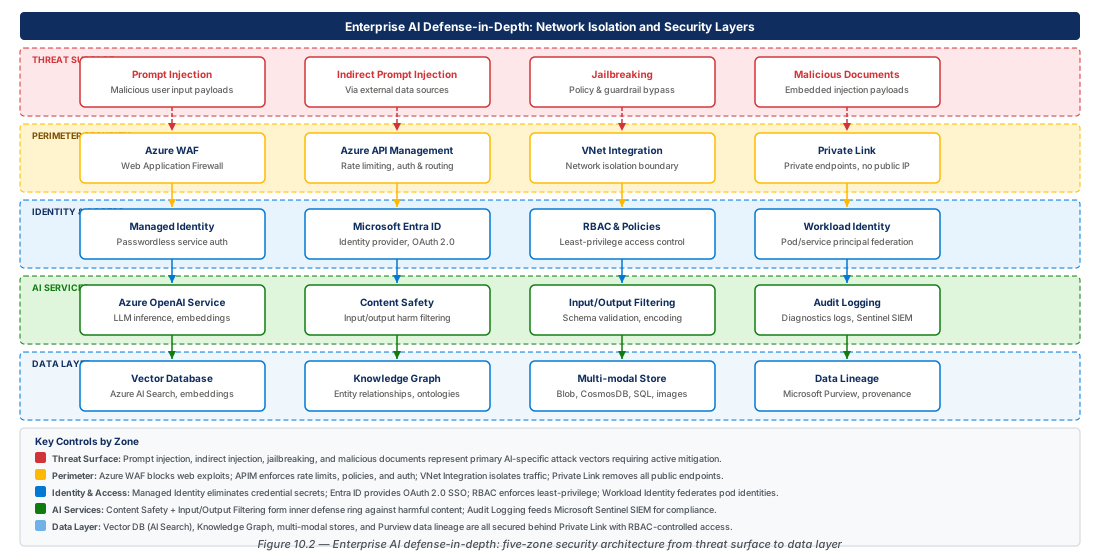
AI services must never be exposed directly to clients. Interpose Azure Application Gateway (WAF) and Azure API Management (APIM) as an AI API gateway layer. WAF in Prevention mode detects unusual payload patterns — extremely long bodies, Unicode homoglyphs, base64 in unexpected fields — before they reach APIM. APIM validates Entra ID bearer tokens, applies per-client rate limiting, routes across OpenAI deployments for PTU overflow, and logs full request/response payloads to Azure Event Hub.
# Create APIM in Internal VNet mode for AI gateway
az apim create \
  --name "apim-ai-data-prod-eastus2-001" --resource-group "$RG" \
  --sku-name "Premium" --sku-capacity 2 \
  --virtual-network "Internal" --enable-managed-identity true \
  --publisher-email "platform-ai@contoso.com" \
--publisher-name "Contoso AI Platform"Warning
Never deploy APIM in External mode for AI workloads — it exposes the gateway to the internet and makes WAF the sole protection layer. Always use Internal mode with Application Gateway as the public ingress point.
Private Link and VNet Integration Patterns
VNet Integration routes outbound workload traffic through a designated subnet; Private Endpoints ensure PaaS services receive connections at private IPs. Together, they guarantee that traffic between AI workloads and AI services never crosses the public internet. The reference topology uses a hub VNet (Azure Firewall, Bastion, APIM) and spoke VNets (Container Apps, AKS, ML compute, Private Endpoints).
| Service | Private DNS Zone | Subresource |
|---|---|---|
| Azure OpenAI | privatelink.openai.azure.com | account |
| Azure AI Search | privatelink.search.windows.net | searchService |
| ADLS Gen2 (blob) | privatelink.blob.core.windows.net | blob |
| ADLS Gen2 (dfs) | privatelink.dfs.core.windows.net | dfs |
| Azure Key Vault | privatelink.vaultcore.azure.net | vault |
| Azure Cosmos DB | privatelink.documents.azure.com | Sql / Gremlin |
| Azure Machine Learning | privatelink.api.azureml.ms | amlworkspace |
| Azure Event Hub | privatelink.servicebus.windows.net | namespace |
Note
Azure Machine Learning workspaces require four separate Private Endpoints (workspace, Storage, Key Vault, Container Registry). Automate all four with a single Bicep module or Terraform resource to avoid DNS misconfiguration.
4. AI-Specific Threat Vectors
Prompt Injection and Indirect Prompt Injection
Prompt injection occurs when user input overrides system prompt instructions. Indirect prompt injection is more dangerous: malicious instructions embedded in retrieved documents or tool results are executed as legitimate directives when the AI processes that context. The architectural defense begins at ingest: every document passes through Azure AI Content Safety /analyze before reaching the gold or embeddings layer; flagged documents are quarantined in a separate ADLS Gen2 container and routed to human review.
At inference time, the orchestration layer calls the Content Safety Prompt Shield endpoint to evaluate the composed prompt (system message + retrieved context + user query). If the shield score exceeds the configured threshold, the flagged chunk is redacted and the event logged to Azure Monitor. Responses are still generated from remaining context to avoid denial-of-service impact.
Warning
Tool call results are the highest-risk indirect injection vector. Every tool result must be wrapped in a structural untrusted-content marker (e.g., <tool_result source="search" trust="untrusted">) and evaluated by Prompt Shield before being used in context.
Jailbreaking and Model Abuse Patterns
Jailbreaking manipulates a model into producing content its safety training was designed to prevent. Configure Azure OpenAI content filter policies to medium severity for all categories (hate, violence, self-harm, sexual) with explicit jailbreak detection enabled — these filters apply at the model endpoint and cannot be bypassed by application code.
Monitor for jailbreaking signals via Log Analytics KQL: abnormally long prompts (>8 000 tokens), known jailbreak trigger phrases, high refusal rates from a specific principal, and unusual tool invocation patterns. Feed these signals into an Azure Sentinel workbook for automated incident response.
Data Poisoning and Malicious Documents
Data poisoning corrupts the RAG knowledge base so that users receive attacker-controlled false information as authoritative corporate knowledge. The three-layer defense is: (1) restrict bronze layer write access to authorized ingestion service principals with approval workflows; (2) compute SHA-256 hashes at ingest and reprocess any document whose hash changes after initial ingestion; (3) run an Azure Machine Learning embedding similarity monitor to flag semantic drift in index topic clusters before content goes live.
Process all untrusted documents (PDFs, Office files) in isolated Azure Container Instances with no network egress, read-only mounts, and termination after single-document processing — eliminating persistence from any successful exploit.
5. Defense-in-Depth for Enterprise AI
Content Safety Layers and Input Sanitization
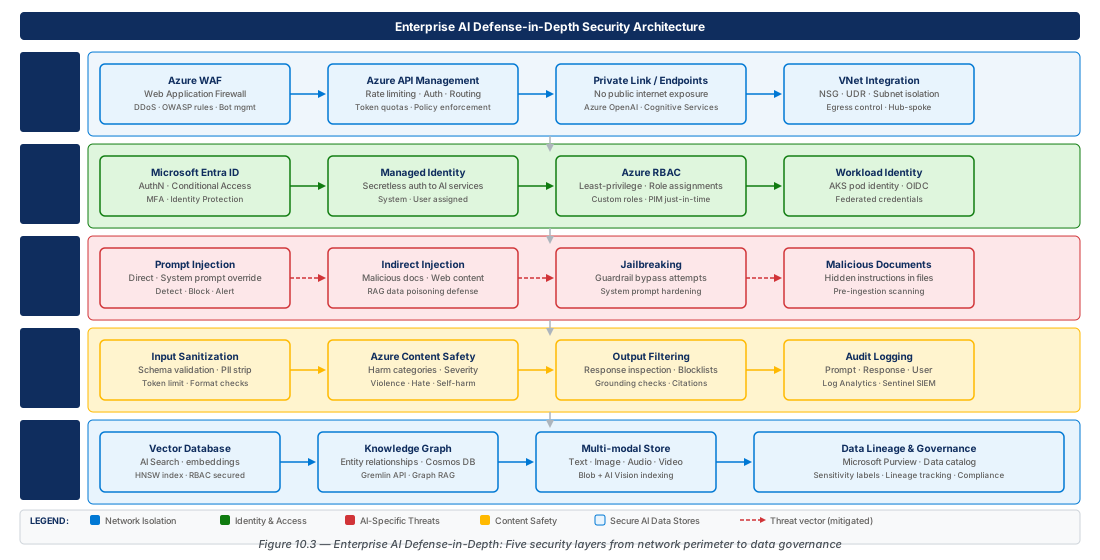
Input sanitization normalizes user input before it reaches the model: strip Unicode control characters, apply NFKC normalization for homoglyph substitutions, enforce maximum token limits before APIM, and reject repeated-token inputs. Call Azure AI Content Safety synchronously at three points: raw user input, composed prompt, and model output response.
# Create Content Safety with private endpoint
az cognitiveservices account create \
  --name "$CS_NAME" --resource-group "$RG" \
  --kind "ContentSafety" --sku "S0" --assign-identity
az cognitiveservices account update --name "$CS_NAME" --resource-group "$RG" \
  --set properties.publicNetworkAccess=Disabled
az network private-endpoint create --name "pe-$CS_NAME" --resource-group "$RG" \
  --subnet "$SUBNET_ID" --private-connection-resource-id "$CS_ID" --group-id account
Output Filtering and Audit Logging
Groundedness detection evaluates whether the model's response is supported by retrieved context. Azure AI Content Safety /groundedness:detect returns a Boolean verdict and ungrounded claims. For compliance-critical domains (financial, medical, legal), block any response with an ungrounded claim count above zero and return a standard fallback message.
Audit logs must capture: hashed user ID, session ID, composed prompt, model response, content safety scores, groundedness verdict, and latency breakdown. These flow from APIM's Event Hub output to a Log Analytics workspace in a separate resource group with deny-assignment on Log Analytics Contributor for workload principals — workloads can write but cannot delete log entries.
# Create Log Analytics workspace and enable OpenAI diagnostics
az monitor log-analytics workspace create \
  --workspace-name "$LAW_NAME" --resource-group "$RG" \
  --sku "PerGB2018" --retention-time 90
az monitor diagnostic-settings create \
  --name "diag-openai-to-law" --resource "$OPENAI_ID" \
  --workspace "$LAW_ID" \
--logs '[{"category":"Audit","enabled":true},{"category":"RequestResponse","enabled":true}]'Tip
Build an Azure Monitor Workbook over AI audit logs with panels for: daily request volume by principal, content safety flag rate by category, refusal rate trend, groundedness failure rate, and top 10 longest prompts by token count.
6. Lab
CE-19: Deploy a Secured AI Data Platform with Private Endpoints
Provision ADLS Gen2, Azure AI Search, and Azure OpenAI with all public access disabled and Managed Identity authentication. Prerequisites: Azure CLI 2.60+, subscription Owner role, VNet already provisioned.
# CE-19: Secured AI data platform with Private Endpoints
RG="rg-ai-data-architecture-security-dev-001"; LOCATION="eastus2"
az group create --name "$RG" --location "$LOCATION"

# ADLS Gen2 with medallion layers
az storage account create --name "staidatadeveastus2001" --resource-group "$RG" \
  --hierarchical-namespace true --allow-blob-public-access false --default-action "Deny"
for L in bronze silver gold embeddings quarantine; do
  az storage fs create --name "$L" --account-name "staidatadeveastus2001" --auth-mode login; done

# Azure OpenAI (public access disabled, text-embedding-3-large deployed)
az cognitiveservices account create --name "oai-ai-data-dev-eastus2-001" \
  --resource-group "$RG" --kind "OpenAI" --sku "S0" --assign-identity
# ... private endpoints for blob, dfs, openai, searchService subresourcesCE-20: Configure Prompt Injection Defense and Audit Logging Pipeline
Deploy Azure AI Content Safety with private access, a Log Analytics workspace with 90-day retention, and a scheduled KQL alert that fires when more than 10 prompt injection attempts are detected in a 15-minute window. Prerequisites: CE-19 completed.
# CE-20: Content Safety + audit logging + KQL alert
az cognitiveservices account create --name "cs-ai-data-dev-eastus2-001" \
  --resource-group "$RG" --kind "ContentSafety" --sku "S0" --assign-identity
az monitor log-analytics workspace create --workspace-name "$LAW_NAME" \
  --resource-group "$RG" --sku "PerGB2018" --retention-time 90
az monitor scheduled-query create \
  --name "alert-prompt-injection-spike-dev" --resource-group "$RG" \
  --scopes "$LAW_ID" --severity 2 \
  --condition-query "AzureDiagnostics | where operationName_s == 'ShieldPrompt' | where responseBody_s contains '\"attackDetected\":true' | summarize count() by bin(TimeGenerated,15m) | where count_ > 10" \
  --evaluation-frequency "PT15M" --window-size "PT15M"
7. Summary
| Concept | Key Point |
|---|---|
| Multi-Modal Data Architecture | ADLS Gen2 medallion layers (Bronze/Silver/Gold/Embeddings) are the authoritative source; vector stores and search indexes are derived acceleration layers. |
| Vector Database Selection | Azure AI Search hybrid (BM25 + HNSW + RRF) is optimal for most enterprise RAG; pgvector and AKS-hosted stores suit specialized latency or scale requirements. |
| Managed Identity and RBAC | SAMI for unique resources, UAMI for shared identity patterns, WIF for external CI/CD; all role assignments scoped to minimum necessary privilege. |
| Network Isolation | WAF + APIM Internal mode as the AI API gateway; Private Endpoints for all PaaS services; Private DNS Zones linked to every spoke VNet. |
| Prompt Injection Defense | Content Safety Prompt Shield applied at raw input, composed prompt, and retrieved-context stages; tool results are the highest-risk indirect injection vector. |
| Data Poisoning Mitigation | SHA-256 integrity hashing at ingest, restricted bronze-layer write access, semantic drift monitoring, isolated container processing for untrusted documents. |
| Audit and Compliance | Full prompt/response logging via APIM Event Hub to Log Analytics; groundedness detection; KQL alert rules for injection spikes; 90-day hot retention. |
Chapter: 10 of 12 | Status: v0.1 Draft |