Azure AI Solutions Architecture: Designing and Operating Enterprise AI Systems
AI Agents and Agentic Architecture
The emergence of AI agents represents a fundamental architectural inflection point — not merely an incremental improvement over conversational AI, but a structural shift in how software systems perceive, plan, and act in the world. Where earlier AI applications consumed a prompt and produced a response, agents operate in iterative feedback loops, selecting tools, revising plans, maintaining state across turns, and coordinating with other agents. This chapter establishes the vocabulary, patterns, and Azure-native infrastructure required to design agentic systems that are reliable, auditable, and safe to operate at scale.
The Architectural Evolution of AI Systems
Understanding where agents sit in the broader AI application landscape is essential before designing one. Each generation of AI system solves a different architectural problem, and each introduces constraints and capabilities that the next generation inherits or transcends.
From Chatbot to LLM Application
The earliest production AI systems were chatbots: stateless request-response pipelines backed by rule-based intent classifiers. When Azure OpenAI Service became generally available, teams replaced these handlers with LLM completions, producing the LLM application pattern — a prompt engineering layer between an API gateway and an Azure OpenAI deployment, still stateless and single-turn. The transition was primarily a capability shift within an otherwise unchanged architecture, which is why LLM applications proliferated so rapidly.
The RAG Application: Grounding Knowledge in External Data
The RAG pattern addresses the LLM's frozen training knowledge by inserting a retrieval step before the model call. On Azure, RAG architectures converge on Azure AI Search using hybrid search (dense vector + BM25) with Reciprocal Rank Fusion. The vector index is the first stateful external component, but the application loop remains single-turn — RAG enhances what the model knows without giving the model any ability to do.
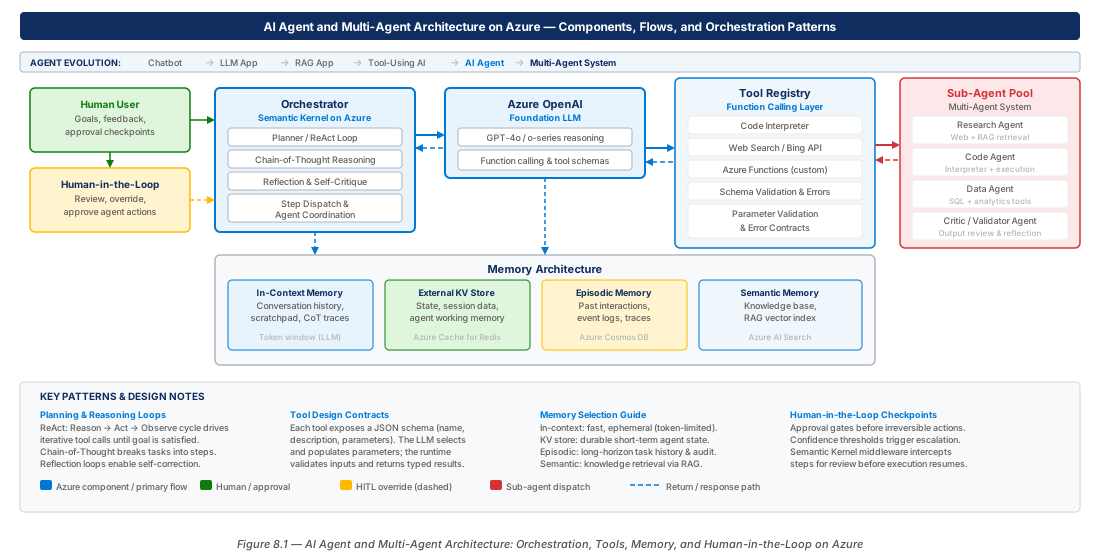
Tool-Using AI: Giving the Model Hands
A tool-using AI extends the LLM with a function-calling interface: the model emits structured tool-call requests, the application executes them, and returns observations. The loop is now multi-turn — prompt → tool call → result → response — but bounded by a fixed iteration limit. This pattern is right for deterministic, short workflows such as looking up account balances or querying databases.
AI Agent: Autonomous Planning and Goal-Directed Behavior
An AI agent extends the tool-using system with a reasoning loop — the iterative cycle of Observe, Think, Act — that continues across multiple turns without human intervention between each step. The agent pursues an objective rather than answering a question. This autonomy introduces first-class design questions: how to bound the action space, maintain plan coherence, and determine when to require a human decision before a consequential action.
Multi-Agent Systems: Orchestration and Specialization
Multi-agent systems distribute cognitive load across cooperating agents, each responsible for a defined subdomain. The principal motivation is scalability of capability: a single agent with a 128K-token context and thirty tools struggles as task complexity grows. On Azure, multi-agent orchestration is supported by Semantic Kernel's agent framework and Azure AI Foundry's agent service, implemented as either a static OrchestrationKernel or a dynamic durable workflow in Azure Durable Functions.
Tool Design and Function Calling
The tools available to an agent define its action space as concretely as the model's training defines its knowledge space. Poorly designed tools are the most common source of unreliable agent behavior in production — tool design is a first-class architectural discipline.
Schema Authoring and Parameter Design
Every tool exposed to Azure OpenAI must be described by a JSON Schema object. The model uses these schemas — not the implementation — to decide when and how to call each tool. Effective schemas have unambiguous imperative names (search_product_catalog, not process_data), precise parameter description fields, and all required parameters in the required array. Prefer flat parameter lists with enum constraints over complex nested objects.
Important
The model never executes tools directly — it emits a structured JSON object that your application layer executes. Always validate every inbound tool call against the schema before executing the underlying function. An unvalidated tool call that reaches a production system is a security and reliability hazard.
CE-15: Deploy Azure AI Foundry Agent Environment
Create the resource group, AI Services account, and GPT-4o deployment that back all agent labs. Then provision Application Insights and Key Vault for telemetry and secret management.
# Step 1: Create resource group
az group create \
  --name rg-ai-agents-agentic-architecture-prod-001 \
  --location eastus2 \
  --tags environment=prod workload=ai-agents chapter=ch08

# Step 2: Create Azure AI Services
az cognitiveservices account create \
  --name ai-agents-prod-eastus2-001 \
  --resource-group rg-ai-agents-agentic-architecture-prod-001 \
  --kind AIServices --sku S0 --location eastus2 --yes

# Step 3: Deploy GPT-4o for agent reasoning
az cognitiveservices account deployment create \
  --name ai-agents-prod-eastus2-001 \
  --resource-group rg-ai-agents-agentic-architecture-prod-001 \
  --deployment-name gpt-4o-agent-001 \
  --model-name gpt-4o --model-version 2024-11-20 \
  --sku-capacity 100 --sku-name GlobalStandard
Parameter Validation and Error Handling Contracts
Every tool implementation should define three response states: success, recoverable failure (agent can retry with modified parameters), and terminal failure (agent should escalate). These states must be communicated through the tool's return value — structured objects with status, message, and data fields — not through exceptions. Vague error messages cause the agent to retry identically or hallucinate a cause; specific messages enable direct corrective action.
Tip
Implement retry logic at the tool dispatch layer (for transient HTTP 429/503 errors), not inside individual tools. The agent's reasoning loop already handles logical retries. Store the complete tool call log — request, response, duration, correlation ID — in Azure Monitor as a structured event for every agent invocation.
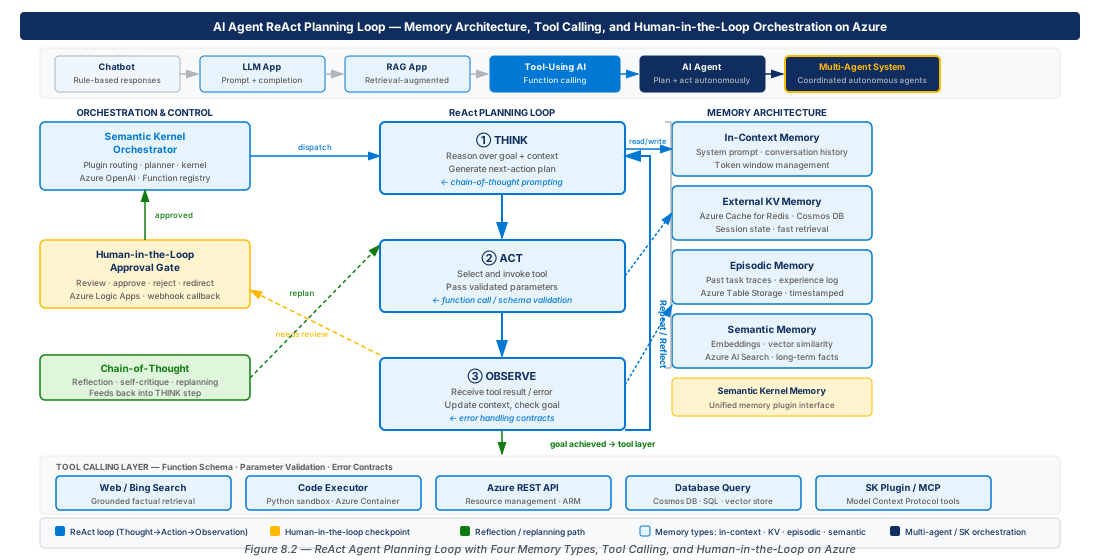
Composing Tool Sets for Agent Personas
Group tools by domain with consistent naming prefixes: catalog_search, catalog_get_product, catalog_list_categories. Include a clarify tool that surfaces ambiguous goals to the user, and a terminate_with_reason tool that allows the agent to exit gracefully when the goal is unachievable — preventing infinite retry loops. A production agent typically requires five to twenty tools.
Planning and Reasoning Loops
The reasoning loop is the engine of an AI agent — the iterative cognitive process by which the agent translates a goal into a sequence of actions. Different loop architectures make different tradeoffs between flexibility, auditability, and computational cost.
The ReAct Pattern: Interleaving Reasoning and Action
ReAct (Reasoning + Acting) structures the agent's scratchpad as interleaved Thought, Action, and Observation steps. The Thought step externalizes reasoning before each tool call, producing more coherent plans and easier debugging. On Azure OpenAI, ReAct is implemented by including a structured system prompt and maintaining the full Thought/Action/Observation history in the conversation messages array — the scratchpad is a first-class debugging artifact, not a hidden internal state.
Note
ReAct consumes 5–8x more tokens than direct tool-calling for the same ten-step task due to Thought generation. Manage cost with model selection, Azure OpenAI Prompt Caching, and Thought compression (summarizing the scratchpad at intervals).
Chain-of-Thought Planning and Task Decomposition
CoT planning separates the planning phase from execution: the agent first generates a complete numbered plan with dependencies and expected intermediate results, then executes step by step with a human or automated validator reviewing the plan before any action is taken. This is the appropriate architecture for agents operating on production systems, managing financial resources, or taking irreversible actions. The plan artifact is both the human approval integration point and the primary diagnostic when execution diverges from intent.
CE-16: Deploy Agent Memory Infrastructure
Provision Azure Cosmos DB for episodic and key-value memory, Azure AI Search for semantic memory, Azure Cache for Redis for session state, and Azure Container Apps for the Semantic Kernel agent runtime.
# Cosmos DB for episodic/key-value memory (prod)
az cosmosdb create \
  --name cosmos-agents-prod-eastus2-001 \
  --resource-group rg-ai-agents-agentic-architecture-prod-001 \
  --kind GlobalDocumentDB \
  --default-consistency-level BoundedStaleness \
  --locations regionName=eastus2 failoverPriority=0 isZoneRedundant=true

# Azure AI Search for semantic memory
az search service create \
  --name srch-agents-prod-eastus2-001 \
  --resource-group rg-ai-agents-agentic-architecture-prod-001 \
  --sku Standard --partition-count 2 --replica-count 3

# Redis for session key-value memory
az redis create \
  --name redis-agents-prod-eastus2-001 \
  --resource-group rg-ai-agents-agentic-architecture-prod-001 \
  --location eastus2 --sku Premium --vm-size P1
Reflection and Self-Correction
Reflection introduces a secondary model call that critiques the agent's output against the original goal before surfacing it to the user. It is most valuable for generated code, documents, and plans, adding 30–50% token overhead while substantially reducing hallucination rates. On Azure, reflection is implemented as a separate Semantic Kernel agent with a CritiquePlugin or as a conditional evaluation step: if the primary output scores below a threshold on a scoring rubric, the agent re-generates before proceeding.
Memory Architecture for Azure AI Agents
Memory is the mechanism by which an agent's behavior is informed by context beyond its current context window. The four memory tiers serve different purposes and require different Azure infrastructure — a production agent's memory architecture is a deliberate composition, not a single store.
In-Context Memory and Context Window Management
In-context memory is the content of the model's context window — fastest and most reliable, but bounded by the model's maximum context length and priced per token. Three strategies manage context pressure: sliding window truncation (simplest, loses early context), summarization compression (preserves semantics, adds latency), and retrieval-augmented context (most flexible, uses Azure AI Search with a session-scoped vector index to retrieve only the most relevant prior turns).
Warning
Never truncate the system prompt to save context space. It encodes the agent's behavioral constraints and safety instructions. Agents operating with a truncated system prompt are prone to violating behavioral boundaries, leading to unintended data access, policy violations, or runaway tool call loops.
External Key-Value and Episodic Memory on Azure
Key-value memory provides a fast, durable store for named session facts (user ID, subscription tier, preferences). Use Azure Cache for Redis for sub-millisecond session-scoped access, and Azure Cosmos DB for durable cross-session facts. Episodic memory stores the agent's past actions as a time-series collection in Cosmos DB — capturing agent ID, session ID, timestamp, action type, outcome, and metadata — enabling the agent to avoid repeating failed calls and remember user preferences across sessions.
Semantic Memory: Vectorized Knowledge on Azure AI Search
Semantic memory is the agent's content-addressable knowledge store, built on Azure AI Search with vector indexing using text-embedding-3-large (3072 dimensions, reducible with matryoshka representation learning). When the agent needs domain knowledge, it embeds the query, executes a hybrid search, and retrieves top-k documents for context injection. Partition your index by agent persona to reduce retrieval noise and simplify cache invalidation.
| Memory Need | Tier | Azure Service | Latency | Durability |
|---|---|---|---|---|
| Current session facts | Key-Value (session) | Azure Cache for Redis | < 1 ms | Session-scoped |
| Persistent user facts | Key-Value (durable) | Azure Cosmos DB | 5–10 ms | Cross-session |
| Recent agent actions | Episodic | Azure Cosmos DB (time-series) | 5–10 ms | Cross-session |
| Domain knowledge | Semantic | Azure AI Search (vector) | 50–200 ms | Long-lived |
| Active conversation | In-Context | Model context window | < 1 ms | Single-turn |
| Compressed summaries | In-Context (compressed) | Azure Blob + OpenAI | 200–500 ms | Cross-session |
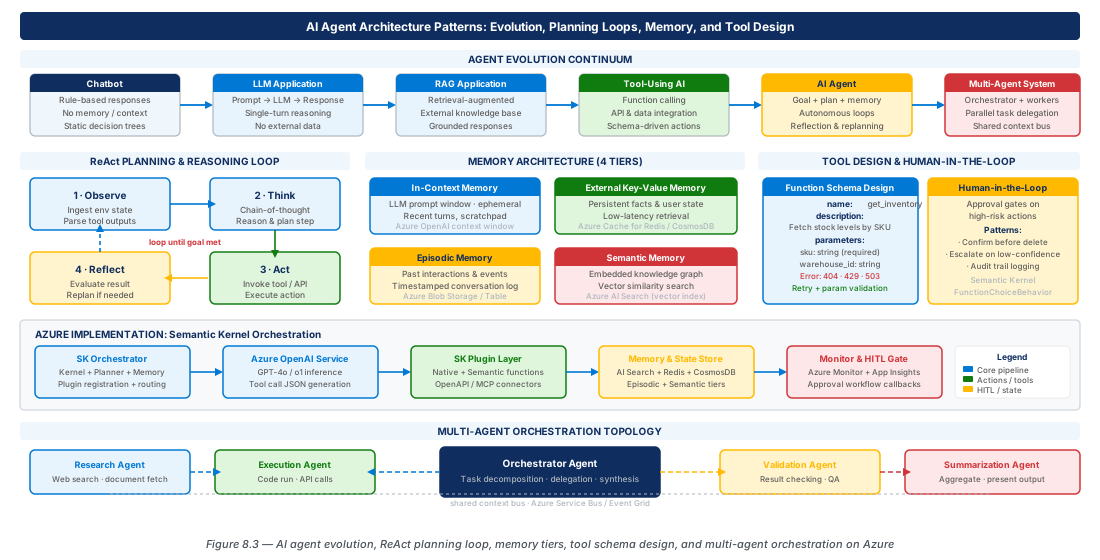
Human-in-the-Loop Patterns and Semantic Kernel Orchestration
Fully autonomous agents are appropriate for a narrow class of low-risk, high-volume tasks. For the broad middle ground — consequential actions, ambiguous goals, outputs consumed by other people — human-in-the-loop (HITL) patterns provide the safety and accountability that production systems require.
Designing Human Intervention Points
Three categories of intervention point are standard: pre-execution approval before irreversible actions (delete, send, financial commit, production config changes); plan review before any CoT plan step is executed; and exception escalation when the agent encounters an unresolvable situation. HITL is implemented as interrupt/resume via Azure Durable Functions' WaitForExternalEvent API — the agent serializes state to a Storage Queue, notifies the approver via Logic Apps (email, Teams card, or ServiceNow ticket), and suspends until the decision arrives.
Agent Orchestration with Semantic Kernel
A Semantic Kernel agent is constructed from a Kernel instance, an AgentThread, and KernelPlugin tool sets. Setting FunctionChoiceBehavior.Auto enables ReAct-style autonomous tool selection. The AgentGroupChat class supports multi-agent orchestration with a TerminationStrategy and a SelectionStrategy (round-robin, model-selected, or custom rule-based) governing which agent speaks next.
# Deploy Container Apps environment for SK agent runtime
az containerapp env create \
  --name cae-agents-prod-eastus2-001 \
  --resource-group rg-ai-agents-agentic-architecture-prod-001 \
  --location eastus2 --enable-workload-profiles

# Deploy Semantic Kernel agent container
az containerapp create \
  --name ca-sk-agent-prod-001 \
  --environment cae-agents-prod-eastus2-001 \
  --image mcr.microsoft.com/azureai/sk-agent-runtime:1.0 \
  --min-replicas 2 --max-replicas 20 \
--cpu 2.0 --memory 4.0Gi --system-assignedNote
Semantic Kernel's agent framework uses Azure OpenAI Assistants API threading semantics — agent thread state is managed server-side. For agents requiring full state control or running in Azure Government environments, implement the loop directly via Chat Completions API and manage thread state in Azure Cosmos DB.
Safety Guardrails and Agent Behavioral Boundaries
The system prompt is the primary behavioral boundary encoder — use explicit negative constraints: "never access data outside the tenant ID in the session token," "never submit orders exceeding $10,000 without human approval." Supplement with programmatic enforcement at the tool dispatch layer using Azure API Management (APIM) policies (rate limits, JWT validation, quota enforcement) and Azure Policy for resource scope validation. System prompt guardrails are necessary but insufficient; APIM policy enforcement prevents prompt injection from bypassing them.
Warning
Agents with write access to production data must be tested under adversarial prompt injection before deployment. Prompt injection — malicious content in a tool's output overriding the system prompt — is the most significant security risk unique to agentic systems. Use Azure Content Safety's Prompt Shield for server-side injection detection in user messages and grounding documents.
Summary
| Concept | Key Point |
|---|---|
| Agent evolution | Chatbot → LLM app → RAG app → tool-using AI → AI agent → multi-agent system marks a shift from answering questions to pursuing goals through iterative action. |
| Tool schema design | Function names and parameter descriptions are model inputs; precise, unambiguous schemas are the highest-leverage variable in agent reliability. |
| ReAct vs. CoT planning | ReAct interleaves reasoning and action for exploratory tasks; CoT planning separates planning from execution for consequential workflows requiring pre-execution review. |
| Memory tiers | Four tiers — in-context, key-value (Redis/Cosmos DB), episodic (Cosmos DB), and semantic (AI Search) — serve different access patterns; no single store serves all needs. |
| Human-in-the-loop | HITL is implemented as interrupt/resume via Durable Functions WaitForExternalEvent; agent state is serialized at the intervention point and resumed after the human decision arrives. |
| Safety guardrails | System prompt constraints plus programmatic APIM policy enforcement at the tool dispatch layer are both required to prevent prompt injection and scope violations in production. |
Chapter: 8 of 12 | Status: v0.1 Draft |