Azure AI Solutions Architecture: Designing and Operating Enterprise AI Systems
RAG Architecture
Retrieval-Augmented Generation (RAG) solves the two most critical limitations of LLMs in production: knowledge staleness and factual grounding. Rather than relying on parametric memory, RAG externalizes knowledge into a searchable index, retrieves the most relevant context at inference time, and conditions the model's response on that retrieved evidence. For architects building on Azure, this pattern spans Azure Document Intelligence, Azure Blob Storage, Azure AI Search, and Azure OpenAI — and the design decisions at each stage compound into measurable accuracy, latency, and cost outcomes.
RAG Foundations and Core Architecture
The Anatomy of a RAG Pipeline
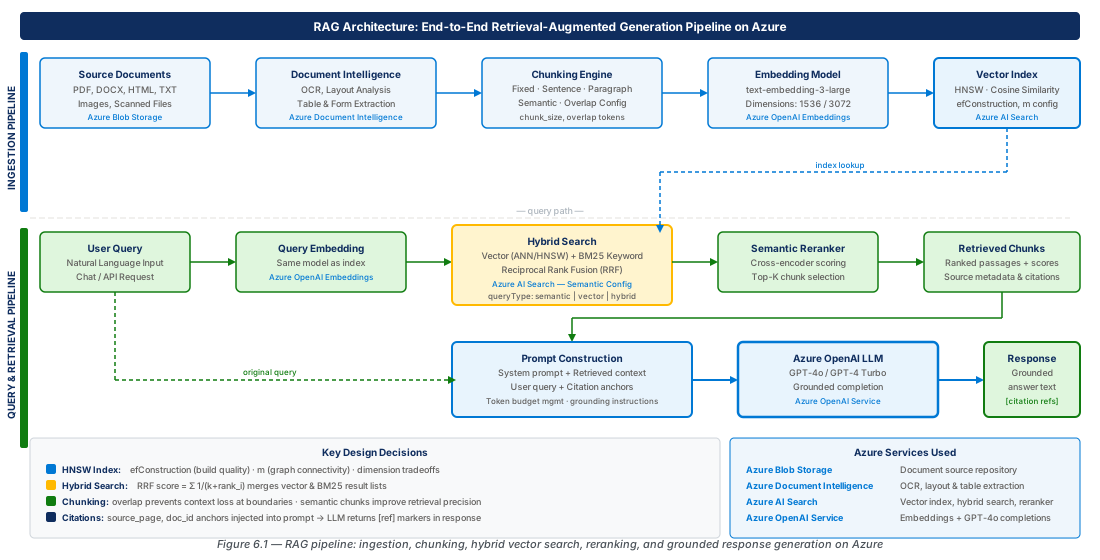
A RAG pipeline is an orchestrated sequence of stages divided cleanly into two phases: an offline indexing phase that runs when documents are ingested or updated, and an online retrieval and generation phase that runs at query time. The quality of every downstream retrieval depends entirely on the offline phase — poorly parsed documents, misaligned chunk sizes, and wrong-domain embeddings all manifest as hallucination or irrelevance in the final response.
During the online phase, a user query is embedded, submitted to the search index as a vector (and optionally keyword) query, the top-K results are reranked, the selected chunks are formatted into a prompt, and the language model generates a grounded response with citations. Latency is dominated by the embedding call, the search query, and the completion call — each adding 50–300 ms — so architects must budget P95 targets across all three.
Azure Service Topology for RAG
The canonical Azure RAG topology maps each pipeline stage to a managed service: Blob Storage (document store and event source), Azure Document Intelligence (parsing and layout extraction), Azure AI Search (vector + hybrid index), Azure OpenAI Service (embedding and completion models), and Azure AI Foundry (orchestration, evaluation, and model lifecycle). Each service is independently scalable and independently versioned, so an embedding model upgrade can be validated against a shadow index before promoting to production.
In production, all service-to-service communication travels over Private Endpoints within a Virtual Network. Managed Identities replace connection strings; Azure Key Vault holds any secrets that cannot use managed identity. Design for private networking from day one — retrofitting it onto a RAG pipeline built with public endpoints requires redeploying every service.
Document Ingestion and Parsing
Azure Blob Storage as the Ingestion Source
Azure Blob Storage is the universal document store for RAG ingestion pipelines on Azure. A Blob Storage Event Grid subscription publishes a Microsoft.Storage.BlobCreated event the moment a new document lands; an Azure Function subscribes to this event and initiates the parsing and indexing workflow — no polling, no batch job required. A hierarchical container structure (/{tenant-id}/{document-type}/{year}/{month}/{id}.pdf) enables per-tenant RBAC, lifecycle policies, and path-prefixed chunking configurations.
Document metadata — source URL, date, author, security classification — should be stored as Blob metadata tags so the indexing pipeline can propagate them as filterable fields in the search index without re-parsing the document. Storage account throughput limits (20,000 req/s by default) must be managed with multiple accounts and exponential backoff during bulk loads.
Important
Blob Storage soft delete and versioning must be enabled on production containers. Without soft delete, a brief window exists during which the search index contains chunks pointing to a blob version that no longer exists, causing stale content or broken citations.
Azure Document Intelligence for Content Extraction
Azure Document Intelligence provides the most production-ready document parsing capability on Azure for PDFs, scanned images, Office documents, and structured forms. The prebuilt-layout model is the recommended starting point for general ingestion: it handles multi-column layouts, tables, and figures without training data and returns a structured JSON response with bounding boxes, reading order, font properties, and semantic roles (heading, paragraph, table cell, list item).
The API response includes an analyzeResult.paragraphs array with cross-page semantic units — the correct input for most RAG chunking strategies, as Document Intelligence has already identified sentence boundaries and preserved reading order across columns.
Note
Set outputContentFormat=markdown on the prebuilt-layout model. Markdown output preserves heading hierarchy, table structure, and list formatting in a form downstream chunkers can parse deterministically. Raw text output loses all structural information.
CE-11: Provision Azure Document Intelligence and Ingestion Storage
Create the Document Intelligence resource and configure storage with soft delete and versioning enabled for the ingestion pipeline.
RG="rg-rag-architecture-azure-dev-001"
LOC="eastus2"
DOC_INTEL="docint-rag-architecture-dev-eastus2-001"
STORAGE="stragarchdeveastus2001"

az group create --name $RG --location $LOC
az cognitiveservices account create --name $DOC_INTEL --resource-group $RG \
  --kind FormRecognizer --sku S0 --location $LOC --yes
az storage account create --name $STORAGE --resource-group $RG \
  --sku Standard_LRS --allow-blob-public-access false --min-tls-version TLS1_2
az storage account blob-service-properties update --account-name $STORAGE \
  --resource-group $RG --enable-versioning true \
  --enable-delete-retention true --delete-retention-days 30
# ... assign Cognitive Services User role to managed identity ...
Chunking Strategies
Fixed-Size and Sentence-Based Chunking
The chunk is the fundamental unit of retrieval — every search result, every citation, and every limit on RAG quality is bounded by chunk quality. Fixed-size chunking divides text into segments of exactly N tokens with optional overlap. It is the simplest strategy and appropriate for well-structured documents (markdown, JSON, YAML), but semantically blind for prose: it splits sentences mid-flow and separates table headers from rows.
Sentence-based chunking accumulates sentences until a target token budget is reached, preserving grammatical completeness but still ignoring document semantic structure. It is better than fixed-size for general prose but cannot keep a multi-sentence argument together as a unit.
Tip
Always prefix each chunk's text content with the document title, section heading, and page number. Many embedding models weight early tokens more heavily; this "chunk header" pattern adds 20–30 tokens per chunk but measurably improves retrieval precision.
Paragraph, Semantic, and Overlap Configuration
Paragraph-based chunking treats each paragraph returned by Document Intelligence as a natural chunk boundary, producing semantically coherent and grammatically complete units. The main challenge is variance: paragraphs range from 30 to 500+ tokens, so a maximum-size guard (split paragraphs exceeding 512 tokens) is required. For most enterprise RAG systems, paragraph-based chunking with a 100-token overlap is the recommended default.
Semantic chunking uses embedding similarity to detect topic shifts, inserting boundaries wherever cosine similarity drops below a threshold. It produces topically coherent chunks regardless of visual formatting but requires an embedding call per sentence during indexing — adding latency and cost. An overlap of 100–200 tokens (on 500-token chunks) is the recommended starting point; overlap beyond 30% produces diminishing returns.
Warning
Chunking strategy must remain consistent between index time and query time. If chunks are generated with a 512-token maximum at index time but query expansion generates 800-token hypothetical answers at query time, similarity scores will be systematically miscalibrated. Document the chunking configuration as a versioned artifact alongside the index schema.
| Chunking Strategy | Semantic Coherence | Ingestion Cost | Best For |
|---|---|---|---|
| Fixed-size (no overlap) | Low | Low | Structured data (JSON, YAML, code) |
| Fixed-size (with overlap) | Low–Medium | Low | Simple prose, quick prototyping |
| Sentence-based | Medium | Low | General prose documents |
| Paragraph-based | High | Low | Well-formatted PDFs, Word documents |
| Semantic (embedding-based) | Very High | High | Long-form narrative, HTML, mixed content |
| Document Intelligence layout | Very High | Medium | Complex PDFs with tables and figures |

Embedding Models and Vector Indexing in Azure AI Search
Choosing an Embedding Model
The embedding model is the single most impactful decision for retrieval quality. Azure OpenAI Service provides text-embedding-3-small (1536 dimensions) and text-embedding-3-large (up to 3072 dimensions, reducible to 256 via Matryoshka Representation Learning). text-embedding-3-small offers the best price-performance for most enterprise RAG workloads; text-embedding-3-large reduced to 256 dimensions often outperforms it on multilingual and technical content while using 6x less storage.
Both models support 8191 input tokens, but quality degrades on inputs longer than ~512 tokens. Aligning chunk size to the model's effective quality range (256–512 tokens) maximizes retrieval precision. Embedding model versions are locked at index creation time in Azure AI Search — upgrading requires rebuilding the entire index, so plan for blue-green index deployments.
HNSW Configuration and Dimension Tradeoffs
Azure AI Search implements ANN search using HNSW. The m parameter (default: 4, range: 4–10) controls bidirectional links per node: use m=4 for corpora under 10M vectors; use m=8 or m=10 for larger corpora or recall requirements above 95%. efConstruction (default: 400) controls graph quality at build time; efSearch (default: 500) controls recall at query time. Always specify "metric": "cosine" — Azure OpenAI embeddings are L2-normalized, making cosine and dot product equivalent, but Euclidean distance is sensitive to vector magnitude and is the wrong choice.
CE-12: Provision Azure AI Search with HNSW Vector Index
Create the production AI Search service, deploy embedding and completion models on Azure OpenAI, and define the vector index schema with HNSW configuration.
RG="rg-rag-architecture-azure-prod-001"
SEARCH="rag-architecture-prod-eastus2-001"
OAI="oai-rag-architecture-prod-eastus2-001"

az search service create --name $SEARCH --resource-group $RG \
  --sku S2 --partition-count 2 --replica-count 3
az cognitiveservices account deployment create --name $OAI \
  --resource-group $RG --deployment-name text-embedding-3-small \
  --model-name "text-embedding-3-small" --model-format OpenAI \
  --sku-capacity 120 --sku-name Standard
# Create index via REST: fields include content_vector (1536-dim HNSW cosine)
# hnswParameters: m=4, efConstruction=400, efSearch=500, metric=cosine| Azure AI Search SKU | Vectors per Index | Vector Storage | Recommended For |
|---|---|---|---|
| Basic | 1M | 0.5 GB/partition | Development, POC |
| Standard S1 | 5M | 2 GB/partition | Small production |
| Standard S2 | 20M | 8 GB/partition | Medium production |
| Standard S3 | 200M | 24 GB/partition | Large enterprise |
| Storage Optimized L1 | 10M | 2 TB/partition | Archive, compliance |
| Storage Optimized L2 | 10M | 4 TB/partition | Large archive |
Hybrid Search and Reciprocal Rank Fusion
Combining Vector and BM25 Keyword Search
Hybrid search combines vector (semantic) and BM25 keyword search in a single query and merges results using Reciprocal Rank Fusion. Vector search fails on precise terminology queries (exact error codes, regulatory identifiers) where keyword matching is trivially correct; keyword search fails on conceptual queries (paraphrases, synonyms) where vector similarity is correct. In production RAG, the query distribution always includes both types — making hybrid search the correct default architecture.
Azure AI Search implements hybrid search natively: when both search and vectors parameters are provided, the service executes both queries in parallel, merges them with RRF, and returns a unified @search.score — no client-side merging required.
Important
Hybrid search requires both the keyword-searchable text field and the vector field to be populated with the same text content for each document. If the content field contains only short chunk headers while the vector field contains the full chunk embedding, the keyword and vector signals will be misaligned and RRF will not improve over vector-only search.
Reciprocal Rank Fusion Configuration
RRF assigns each document a score of 1 / (k + rank_i) in each result list (Azure AI Search uses k=60 by default) and sums scores across lists. This rank-based fusion does not require score normalization — BM25 scores are unbounded while cosine similarity is bounded to [-1,1], making RRF the correct choice over weighted score blending. Documents appearing near the top of multiple lists receive the highest scores, rewarding documents that are simultaneously relevant by meaning and by keyword.
CE-13: Execute a Hybrid Search Query with RRF and Semantic Reranking
Generate a query embedding, then execute a hybrid search with semantic reranking against the production index. Review @search.rerankerScore values to confirm the reranker is providing a stronger relevance signal than the raw RRF score.
# Step 1: Generate query embedding
curl -s -X POST "${OPENAI_ENDPOINT}/openai/deployments/text-embedding-3-small/embeddings?api-version=2024-02-01" \
  -H "Content-Type: application/json" -H "api-key: ${KEY}" \
  -d "{\"input\": \"${QUERY_TEXT}\"}" | python3 -c "import json,sys; print(json.load(sys.stdin)['data'][0]['embedding'][:5])"
# Step 2: Hybrid search with semantic reranker
# queryType=semantic, vectorQueries k=50, top=5, filter by tenant_id
# Review @search.rerankerScore (0-4): filter out results below 1.5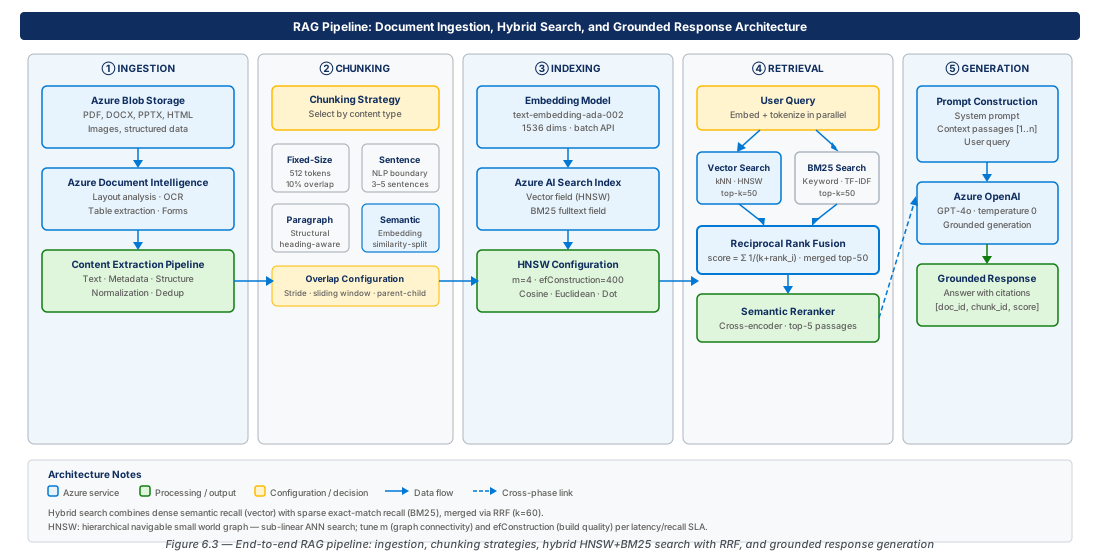
Reranking, Prompt Construction, and Grounded Response Generation
Semantic Reranking in Azure AI Search
Semantic reranking applies a cross-encoder model — which jointly encodes query and document together — to rescore the top-K RRF candidates using a richer relevance signal. Azure AI Search implements this as queryType: semantic using Microsoft's internally trained cross-encoder. The reranker operates on the top 50 candidates (configurable) and returns a @search.rerankerScore on a scale of 0–4. This score is the authoritative relevance signal for downstream use; results with a score below 1.5 should generally be excluded from the prompt context.
Note
Semantic reranking is available only on Standard S1 and higher SKUs and is priced per 1,000 queries. For high-volume workloads, evaluate whether the 10–20% improvement in answer accuracy justifies the cost versus an external reranker (Cohere Rerank, BGE-Reranker-v2) deployed via Azure AI Foundry's model catalog.
Prompt Construction and Citation Patterns
The recommended prompt structure has four components: a system message defining the model's role and grounding constraint, a formatted list of retrieved chunks with explicit source identifiers ([Source 1], [Source 2]), the user's question, and a citation instruction. The system message must explicitly instruct the model to answer only from the provided context and to respond "I don't have information about that in the provided documents" when the answer is absent — without this, frontier models supplement retrieved context with parametric knowledge.
CE-14: Build and Execute a Grounded RAG Prompt with Citation Tracking
Assemble retrieved chunks into a structured prompt with [Source N] identifiers, invoke GPT-4o at temperature 0.0, and parse the citation references from the completion output.
curl -s -X POST "${OAI_ENDPOINT}/openai/deployments/gpt-4o/chat/completions?api-version=2024-02-01" \
  -H "Content-Type: application/json" -H "api-key: ${KEY}" \
  -d '{
    "messages": [
      {"role":"system","content":"Answer ONLY from provided sources. Cite as [Source N]. If not found, say so."},
      {"role":"user","content":"[Source 1] Title: ...\nContent: ...\n\nQuestion: ..."}
    ],
    "temperature": 0.0,
    "max_tokens": 800
  }' | python3 -c "import json,sys; r=json.load(sys.stdin); print(r['choices'][0]['message']['content'])"
Grounded Response Generation and Citation Validation
Temperature must be set to 0.0 for factual retrieval tasks — higher temperatures increase the probability of the model paraphrasing retrieved content inaccurately. Post-generation, validate that every [Source N] citation corresponds to an actual chunk in the retrieved set. Citation hallucination — the model inventing source identifiers or attributing content to the wrong source — is rare at temperature 0.0 but non-zero, and increases when retrieved context exceeds 4000 tokens or when multiple sources cover similar topics with different conclusions.
Warning
Temperature 0.0 does not guarantee deterministic output. Azure OpenAI uses server-side batching and may return marginally different responses due to floating-point non-determinism. For audit and compliance scenarios, store the full prompt-response pair with a content hash in Azure Cosmos DB and serve the cached response for repeated identical queries.
Production RAG grounding quality is tracked with four primary metrics: Groundedness (every claim traceable to retrieved context), Citation accuracy (cited sources contain the attributed content), Answer relevance (response addresses the question), and Retrieval precision (top-K chunks are genuinely relevant). All four can be evaluated automatically using Azure AI Foundry's evaluation SDK; a regression of more than 5 percentage points over a 24-hour rolling window should trigger a pipeline review.
Lab
CE-11 Full: Deploy the Complete Document Ingestion Pipeline
Deploy storage, Document Intelligence, Function App, and Event Grid subscription for event-driven ingestion. The Function App uses a system-assigned managed identity for all service access — no connection strings.
FUNC="func-rag-ingest-dev-eastus2-001"
az functionapp create --name $FUNC --resource-group $RG \
  --storage-account $STORAGE --runtime python --runtime-version "3.11" \
  --functions-version 4 --os-type Linux --assign-identity [system]
az functionapp config appsettings set --name $FUNC --resource-group $RG \
  --settings CHUNK_SIZE_TOKENS=512 CHUNK_OVERLAP_TOKENS=100 \
           CHUNKING_STRATEGY=paragraph OUTPUT_FORMAT=markdown
# Assign Cognitive Services User + Storage Blob Data Reader/Contributor to managed identityCE-12 Full: Validate the End-to-End RAG Query Pipeline
Upload a test document, wait for the ingestion pipeline to index it, then execute three test queries with hybrid search and semantic reranking to validate retrieval quality.
az storage blob upload --account-name $STORAGE \
  --container-name documents-raw --name "test/azure-ai-search-guide.txt" \
  --file /tmp/test-doc.txt --auth-mode login
# Event Grid triggers ingestion automatically; allow ~30s for processing
DOC_COUNT=$(curl -s "${SEARCH_ENDPOINT}/indexes/${INDEX}/docs/\$count?api-version=2024-07-01" \
  -H "api-key: ${SEARCH_KEY}")
echo "Index count after ingestion: ${DOC_COUNT}"
# Execute test queries; confirm @search.rerankerScore > 1.5 for top results
Summary
| Concept | Key Point |
|---|---|
| Document parsing | Use Azure Document Intelligence prebuilt-layout with outputContentFormat=markdown to preserve heading hierarchy and table structure for downstream chunking. |
| Chunking strategy | Paragraph-based chunking with 512-token maximum and 100-token overlap is the recommended default; semantic chunking improves quality for unstructured prose at higher ingestion cost. |
| Embedding model | text-embedding-3-small (1536-dim) offers best price-performance; text-embedding-3-large reduced to 256-dim outperforms it on multilingual and technical content. |
| HNSW configuration | Use m=4, efConstruction=400, efSearch=500 for indexes under 10M vectors; increase m and efSearch for larger corpora; always use metric=cosine. |
| Hybrid search | Combine vector and BM25 in a single Azure AI Search query; RRF merges results automatically without client-side score normalization. |
| Semantic reranking | Enable queryType=semantic on Standard S1+; use @search.rerankerScore (0–4) as the definitive relevance signal; filter results below 1.5 before prompt construction. |
| Grounded generation | Set temperature=0.0; include explicit grounding constraints in the system message; prefix each chunk with [Source N]; validate citation accuracy as a post-generation quality gate. |
Chapter: 6 of 12 | Status: v0.1 Draft |